Pilih bahasa

Motion to Dismiss Form – Fillable PDF Ready to Use

  1. Bahasa Bahasa inggris
  2. Negara Amerika Serikat
  3. Aktivitas Legal Forms
  4. Departemen Judiciary
Motion to Dismiss Form – Fillable PDF Ready to Use

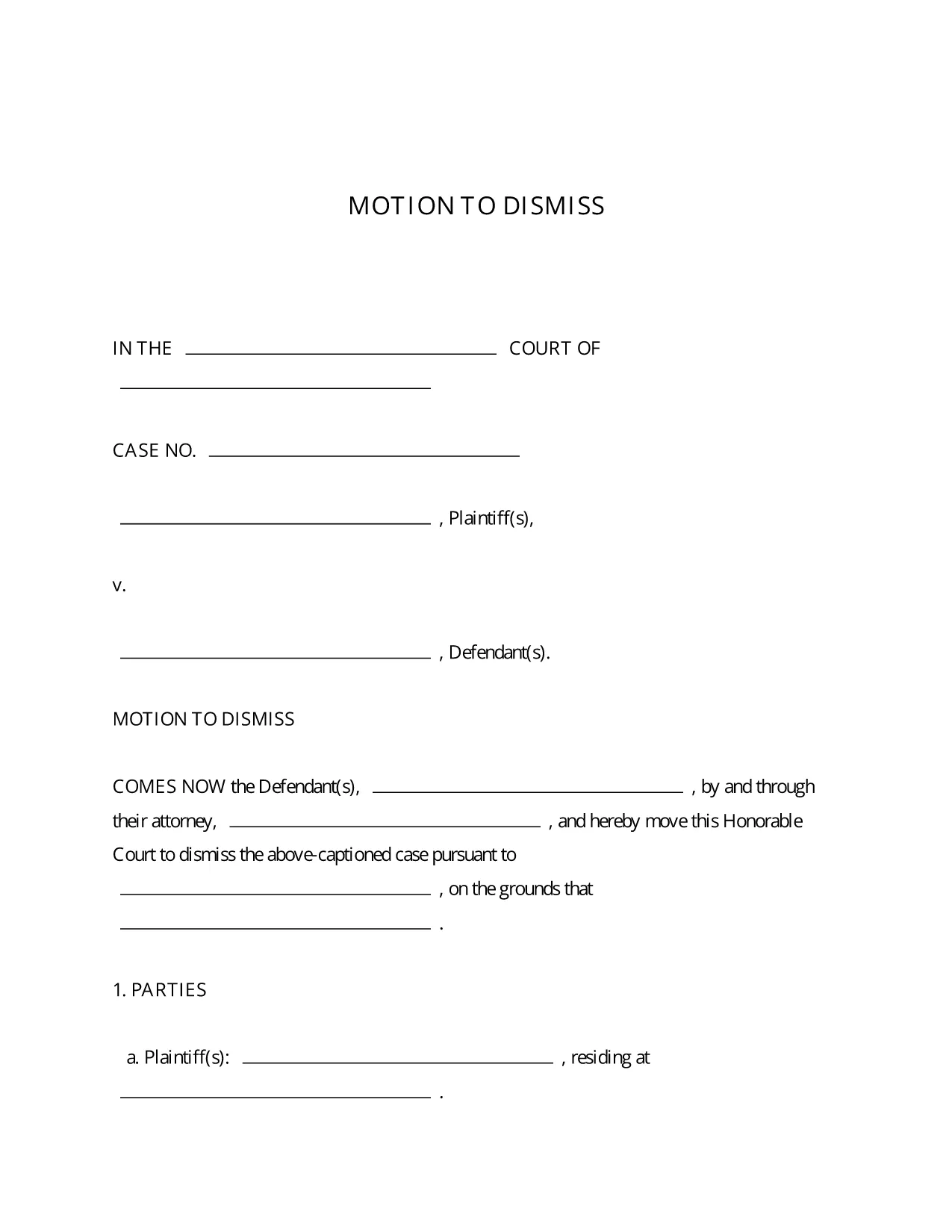
A Motion to Dismiss is a formal request to the court to throw out a case before trial. Whether you’re citing lack of jurisdiction, failure to state a claim, or an expired statute of limitations, the right template saves you time and ensures every required element is included.

What Is a Motion to Dismiss?

The motion asks the judge to dismiss the plaintiff’s complaint for legal reasons. It is typically filed early in the litigation process and must follow the procedural rules of the jurisdiction where the case is pending.

Key Sections of the Motion to Dismiss Form

  • Caption: Court name, case number, and parties.
  • Introduction: Brief statement of the request.
  • Grounds for Dismissal: Detailed legal reasons with citations.
  • Conclusion & Relief Sought: What you want the court to order.
  • Signature Block: Attorney’s signature, bar number, and contact info.

How to Fill Out the Fillable PDF in Seconds

Instead of downloading the PDF and opening a separate editor, simply click the “Fill out this form” button on this page. The Formize PDF Filler app loads instantly, letting you type directly into each field, add your signature, and save the completed document with one click.

Common Mistakes to Avoid

  • Leaving required fields blank – the court will reject an incomplete motion.
  • Using the wrong jurisdictional language – double‑check the local rules.
  • Failing to attach supporting case law or statutes.
  • Missing the signature block or bar number.

Download, Complete, and Submit Your Motion

Once you’ve filled out the form, download the finished PDF, print it (if required), and file it with the clerk of the court. Many courts now accept electronic filing, so you can upload the PDF directly from your computer.

This fillable Motion to Dismiss PDF is free, fully editable, and compliant with standard court formatting requirements.

FAQ
  • Is the Motion to Dismiss form free to use?

    Yes, the fillable PDF provided here is completely free and can be used for any civil case in U.S. courts.

  • Do I need Adobe Acrobat to edit the form?

    No. The Formize PDF Filler works in any modern browser, so you can edit the form without installing additional software.

  • Can I file the completed motion electronically?

    Most U.S. courts accept electronic filing (e‑filing). After downloading the completed PDF, follow your court’s e‑filing portal instructions.

  • What if my jurisdiction has different formatting rules?

    The template follows the most common federal and state formatting guidelines. Review your local court rules and adjust font size or margin settings if needed.

  • How long does it take to complete the form?

    With the fillable PDF and Formize Filler, most users finish in 5‑10 minutes, depending on the complexity of the legal arguments.

  • Can I save my progress and return later?

    Yes. Use the “Save” button in Formize PDF Filler to store a draft in your account, then reopen it whenever you’re ready.

  • Do I need a lawyer to use this form?

    While the form is designed for self‑representation, it’s advisable to have an attorney review your motion to ensure legal accuracy.

BAGAIMANA CARANYA

Cara mengisi motion to dismiss form gratis secara online dalam 5 langkah mudah:

  1. 1
    Click the Fill‑out Button
    Press the “Fill out this form” button on the page to launch Formize PDF Filler.
  2. 2
    Wait for the Filler to Load
    The app loads in seconds; you’ll see editable fields appear directly in your browser.
  3. 3
    Enter Your Information
    Type the case details, grounds for dismissal, and any supporting citations into the highlighted fields.
  4. 4
    Add Your Signature
    Use the built‑in e‑signature tool to sign the document securely.
  5. 5
    Save or Download
    Click “Save” to store the completed PDF in your Formize account, or “Download” to get a copy for filing.
Bentuk aplikasi Pengisi PDF
TENTANG

kerangka motion to dismiss form

Dengan serangkaian fitur tradisional untuk melihat dan mengisi dokumen PDF, dipadukan dengan manfaat aplikasi web dan tata letak responsif, Anda dapat menyelesaikan motion to dismiss form dalam hitungan menit.

FITUR

Pengisi PDF

Cara termudah untuk mengisi formulir PDF secara online

  • Isi motion to dismiss form dengan cepat
    Mencari cara mengisi motion to dismiss form dengan cepat secara online? Dengan pengisi formulir PDF online gratis kami, Anda akan tahu cara mengedit dan mengisi dokumen pdf ini dalam waktu kurang dari satu menit.
  • Editor PDF online yang mudah digunakan
    Muak dengan mencetak file PDF sehingga Anda dapat mengeditnya, sebelum memindai ulang dan mengirimnya kembali? Edit dokumen PDF secara online gratis. Gunakan editor pdf online kami untuk menghemat waktu dan kertas.
  • Alat hebat, semua platform
    Ingin tahu cara mengisi motion to dismiss form di Mac, atau mungkin cara menggunakan pengisi PDF gratis? Alat PDF online kami berfungsi di semua platform.
  • Penyimpanan file yang aman
    File "motion to dismiss form" yang telah selesai disimpan dalam database aman yang dikelola oleh hosting Amazon Cloud. Anda dapat menghapus file Anda dari sistem kami kapan saja. Bagaimanapun, file-file ini secara otomatis dihapus setelah 24 jam.
  • Ngobrol dengan motion to dismiss form
    Ngobrol dengan "motion to dismiss form" di Chatize yang merupakan asisten pembaca PDF gratis. Ajukan pertanyaan dan dapatkan jawaban dari "motion to dismiss form". Cukup klik tombol Chat Dengan Dokumen di atas.

Hapus sesi pengisian

Hapus sesi pengisian yang dipilih? Dalam hal ini, kemajuan Anda dalam menyelesaikan formulir akan hilang.

Hapus sesi pengeditan

Hapus sesi pengeditan yang dipilih? Dalam hal ini, kemajuan Anda dalam membuat dan mengedit formulir akan hilang.