Pilih bahasa

Application Form Kaise Likhen – Complete Guide & Fillable PDF

  1. Bahasa Bahasa inggris
  2. Negara Amerika Serikat
  3. Aktivitas Employment
  4. Departemen Labor Department
Application Form Kaise Likhen – Complete Guide & Fillable PDF

Writing an application form ("application form kaise likhen") can feel overwhelming, especially when you need a professional layout and the ability to edit it later. Using a fillable PDF eliminates the guesswork – you get a ready‑made template, clear fields, and the option to save or print instantly.

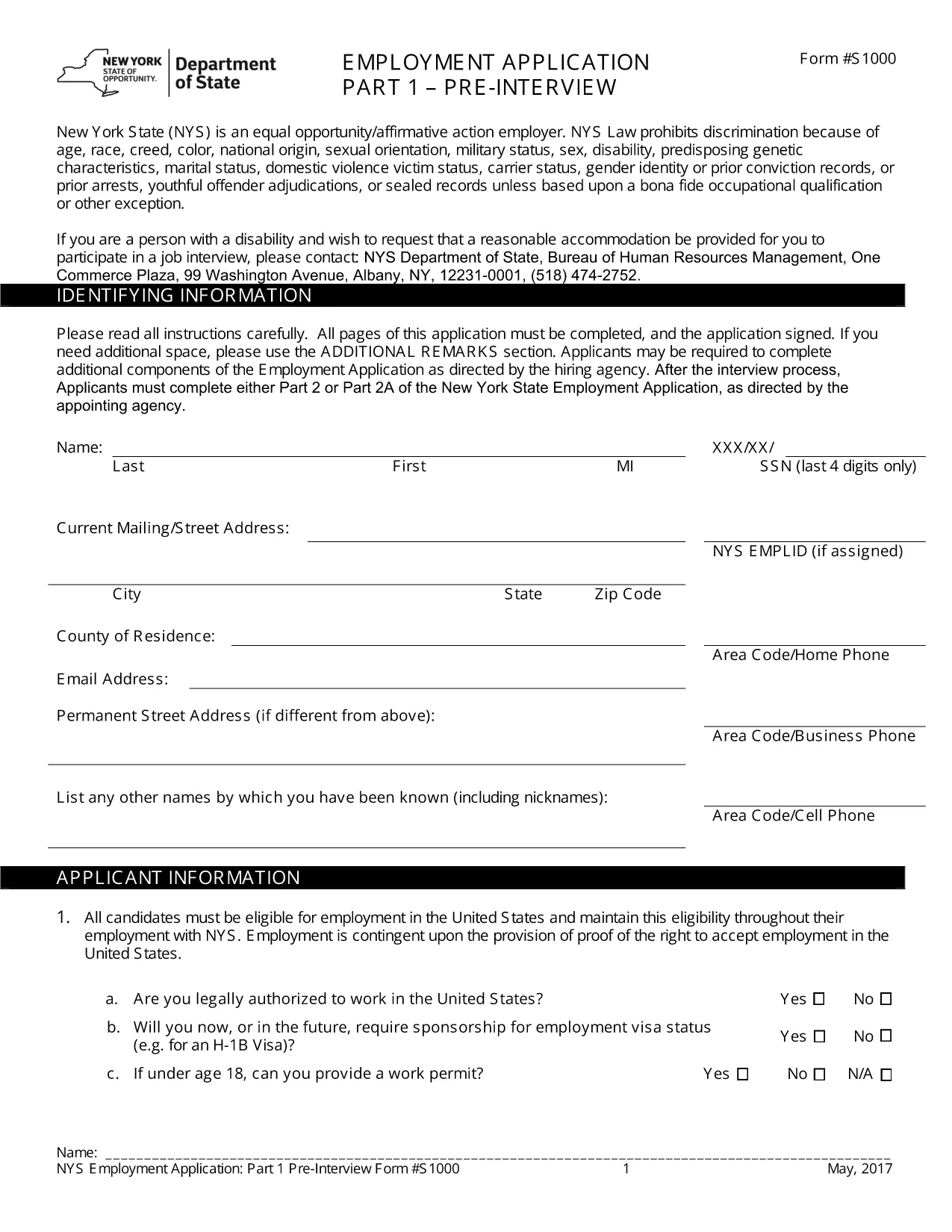
The PDF we provide is a standard Employment Application Form used across many U.S. companies. Although the form is in English, the same structure works for any type of application you need to create – job, scholarship, or government request. Follow the instructions below to complete it online, without downloading a separate editor.

Why a Fillable PDF Makes Writing Application Forms Easy

Pre‑designed layout: All required sections (personal details, work history, references) are already organized.

Editable fields: Click any box, type your answer, and move on. No printing, scanning, or re‑typing.

e‑Signature support: Add a legally binding signature directly in the browser.

Step‑by‑Step: Fill Out the Application Form Online

Use the Formize PDF Filler that appears when you click the button below. No extra software is needed.

Common Mistakes & Tips for a Perfect Application

1. Skipping required fields – The form highlights empty mandatory sections in red.

2. Typos in names or dates – Double‑check spelling before saving.

3. Incorrect contact information – Verify phone numbers and email addresses; employers often use these to contact you.

By following these tips, your application will look polished and professional, increasing your chances of success.

FAQ
  • Do I need to download any software to fill the form?

    No. The Formize PDF Filler runs completely in your web browser, so you can fill the form on any device.

  • Can I save the form and finish it later?

    Yes. Use the "Save" button to download a copy of the partially completed PDF and reopen it later in Formize.

  • Is the form suitable for Hindi applications?

    The template is in English, but you can type Hindi text using any standard keyboard or input method.

  • What if I make a mistake after submitting?

    Contact the organization that received your form. Most accept a corrected PDF if you explain the error.

  • Is my personal data safe while using Formize?

    Formize uses SSL encryption and does not store your data after the session ends, ensuring privacy and security.

BAGAIMANA CARANYA

Cara mengisi application form kaise likhen gratis secara online dalam 4 langkah mudah:

  1. 1
    Open the Fillable Form
    Click the "Fill out this form" button on the page. The Formize PDF Filler will load in a new tab.
  2. 2
    Enter Your Information
    Tap each field, type your details (name, address, work history, etc.), and use the Tab key to move to the next section.
  3. 3
    Add Your e‑Signature
    When you reach the signature box, select "Add Signature" and draw or type your name.
  4. 4
    Review & Save
    Click "Review" to ensure all required fields are completed, then choose "Save" to download a copy or "Submit" to share.
Bentuk aplikasi Pengisi PDF
TENTANG

kerangka application form kaise likhen

Dengan serangkaian fitur tradisional untuk melihat dan mengisi dokumen PDF, dipadukan dengan manfaat aplikasi web dan tata letak responsif, Anda dapat menyelesaikan application form kaise likhen dalam hitungan menit.

FITUR

Pengisi PDF

Cara termudah untuk mengisi formulir PDF secara online

  • Isi application form kaise likhen dengan cepat
    Mencari cara mengisi application form kaise likhen dengan cepat secara online? Dengan pengisi formulir PDF online gratis kami, Anda akan tahu cara mengedit dan mengisi dokumen pdf ini dalam waktu kurang dari satu menit.
  • Editor PDF online yang mudah digunakan
    Muak dengan mencetak file PDF sehingga Anda dapat mengeditnya, sebelum memindai ulang dan mengirimnya kembali? Edit dokumen PDF secara online gratis. Gunakan editor pdf online kami untuk menghemat waktu dan kertas.
  • Alat hebat, semua platform
    Ingin tahu cara mengisi application form kaise likhen di Mac, atau mungkin cara menggunakan pengisi PDF gratis? Alat PDF online kami berfungsi di semua platform.
  • Penyimpanan file yang aman
    File "application form kaise likhen" yang telah selesai disimpan dalam database aman yang dikelola oleh hosting Amazon Cloud. Anda dapat menghapus file Anda dari sistem kami kapan saja. Bagaimanapun, file-file ini secara otomatis dihapus setelah 24 jam.
  • Ngobrol dengan application form kaise likhen
    Ngobrol dengan "application form kaise likhen" di Chatize yang merupakan asisten pembaca PDF gratis. Ajukan pertanyaan dan dapatkan jawaban dari "application form kaise likhen". Cukup klik tombol Chat Dengan Dokumen di atas.

Hapus sesi pengisian

Hapus sesi pengisian yang dipilih? Dalam hal ini, kemajuan Anda dalam menyelesaikan formulir akan hilang.

Hapus sesi pengeditan

Hapus sesi pengeditan yang dipilih? Dalam hal ini, kemajuan Anda dalam membuat dan mengedit formulir akan hilang.