Pilih bahasa

Accident Affidavit Fillable PDF – Download & Complete Online

  1. Negara Amerika Serikat
  2. Bahasa Bahasa inggris
  3. Departemen Legal
  4. Aktivitas Legal Documents
Accident Affidavit Fillable PDF – Download & Complete Online

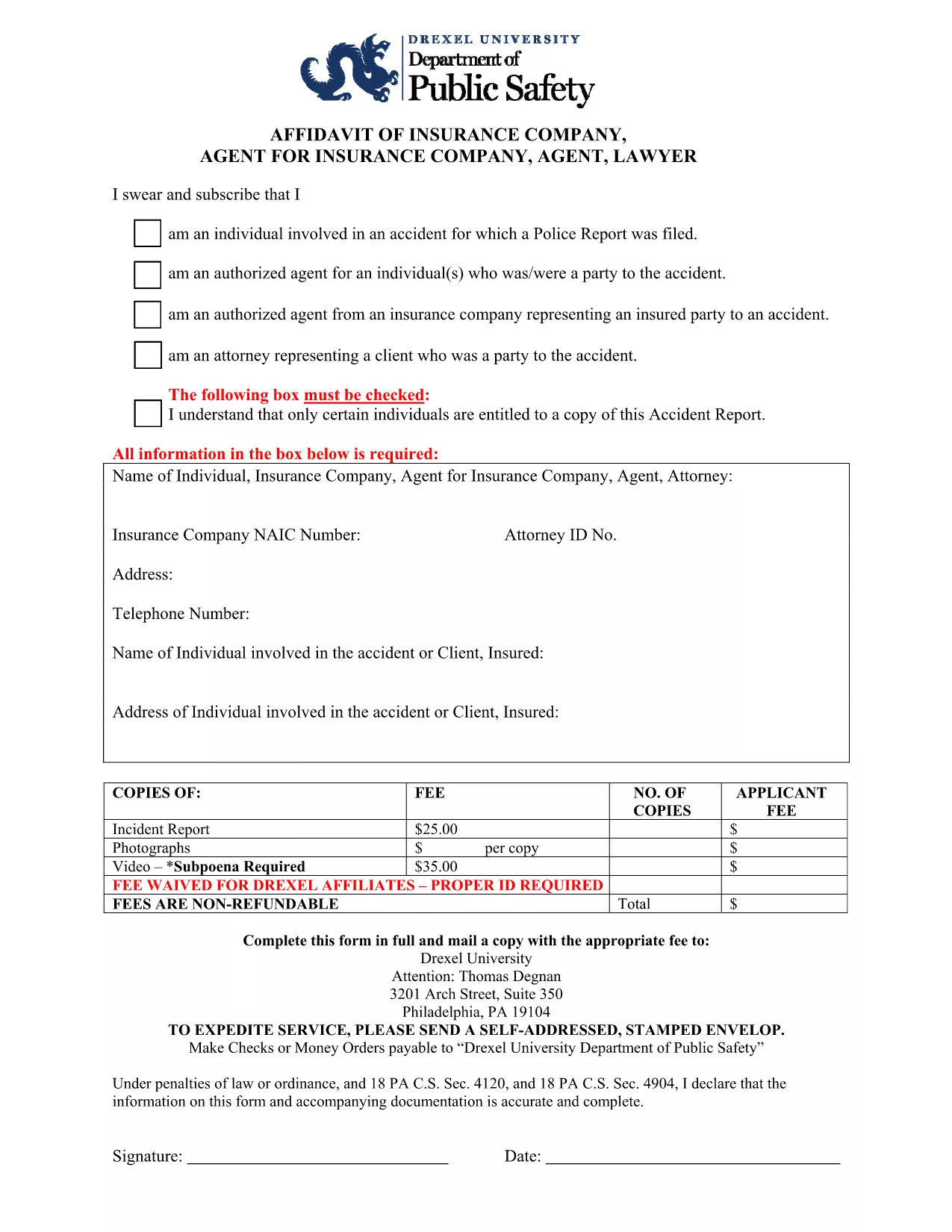
An accident affidavit is a sworn written statement that details the facts surrounding a vehicle or personal injury incident. Courts, insurance companies, and legal representatives rely on this document to establish liability, verify damages, and support claim settlements.

Our fillable Accident Affidavit PDF eliminates the hassle of printing, scanning, or hand‑writing. Powered by Formize’s PDF Filler app, you can fill, sign, and download the completed form directly from your browser – all while keeping your data secure.

What Is an Accident Affidavit?

The affidavit captures essential information such as the date, time, location of the accident, parties involved, vehicle details, witness statements, and a narrative of how the incident occurred. Because it is a legal document, the information must be accurate and signed under oath.

Why Choose Our Fillable PDF Form?

  • Instant download – Get the PDF with one click.
  • Online filling – No PDF editor needed; the Formize filler loads automatically.
  • Auto‑save – Your progress is saved in the browser, preventing data loss.
  • e‑Signature ready – Sign with a mouse, touch screen, or stylus.
  • Compliance‑ready – Meets most state requirements for sworn statements.

How to Complete the Accident Affidavit in Seconds

Follow the simple steps below. The process takes less than five minutes for most users.

Common Mistakes to Avoid

Even a small error can delay your claim. Make sure to:

  • Enter the exact date and time of the accident.
  • Provide full legal names and contact information for all parties.
  • Describe the incident objectively—avoid opinion or speculation.
  • Include every witness, even if they only saw a portion of the event.
  • Sign and date the form before saving or exporting.

Where to Submit Your Completed Affidavit

After saving the filled PDF, you can:

  • Upload it to your insurance claim portal.
  • Send it to your attorney for legal review.
  • File it with the appropriate court or law enforcement agency.

Always keep a copy for your records.

FAQ
  • What is the difference between an accident report and an accident affidavit?

    An accident report records factual details for internal or regulatory use, while an affidavit is a sworn statement that can be used as legal evidence in court or insurance claims.

  • Do I need a notary for the accident affidavit?

    Many jurisdictions accept a signed affidavit without notarization, but some courts or insurers may require a notary. Check the specific requirements of the agency requesting the form.

  • Can I edit the PDF after I’ve saved it?

    Yes. Open the saved PDF in any PDF viewer that supports form fields, or re‑open it with the Formize filler to make adjustments before final submission.

  • Is my information safe when I use Formize’s filler?

    Formize uses SSL encryption and processes all data locally in your browser, so your personal details never leave your device unless you choose to upload or share the file.

  • What if I make a mistake while filling the form?

    You can simply delete the incorrect entry and type the correct information. If you have already saved the PDF, open it again with the filler to correct any errors.

  • How long does it take to complete the affidavit?

    For most users, entering the required details and signing takes under five minutes.

  • Do I need to include photos of the accident?

    Photos are not part of the affidavit itself, but attaching them to your claim or court filing can strengthen your case.

BAGAIMANA CARANYA

Cara mengisi accident affidavit gratis secara online dalam 5 langkah mudah:

  1. 1
    Click the Fillable Form Button
    On this page, click the “Fill out this form” button. The Formize PDF Filler app will open instantly in a new tab.
  2. 2
    Enter Your Information
    Type directly into each highlighted field—date, location, parties, vehicle details, and the incident description.
  3. 3
    Add Your Signature
    Use your mouse, finger, or stylus to sign the affidavit in the designated signature box.
  4. 4
    Review and Save
    Double‑check all entries for accuracy, then click “Save” to download the completed PDF to your device.
  5. 5
    Submit to the Required Party
    Email, upload, or print the saved PDF and deliver it to your insurance company, attorney, or court as instructed.
Bentuk aplikasi Pengisi PDF
TENTANG

kerangka accident affidavit

Dengan serangkaian fitur tradisional untuk melihat dan mengisi dokumen PDF, dipadukan dengan manfaat aplikasi web dan tata letak responsif, Anda dapat menyelesaikan accident affidavit dalam hitungan menit.

FITUR

Pengisi PDF

Cara termudah untuk mengisi formulir PDF secara online

  • Isi accident affidavit dengan cepat
    Mencari cara mengisi accident affidavit dengan cepat secara online? Dengan pengisi formulir PDF online gratis kami, Anda akan tahu cara mengedit dan mengisi dokumen pdf ini dalam waktu kurang dari satu menit.
  • Editor PDF online yang mudah digunakan
    Muak dengan mencetak file PDF sehingga Anda dapat mengeditnya, sebelum memindai ulang dan mengirimnya kembali? Edit dokumen PDF secara online gratis. Gunakan editor pdf online kami untuk menghemat waktu dan kertas.
  • Alat hebat, semua platform
    Ingin tahu cara mengisi accident affidavit di Mac, atau mungkin cara menggunakan pengisi PDF gratis? Alat PDF online kami berfungsi di semua platform.
  • Penyimpanan file yang aman
    File "accident affidavit" yang telah selesai disimpan dalam database aman yang dikelola oleh hosting Amazon Cloud. Anda dapat menghapus file Anda dari sistem kami kapan saja. Bagaimanapun, file-file ini secara otomatis dihapus setelah 24 jam.
  • Ngobrol dengan accident affidavit
    Ngobrol dengan "accident affidavit" di Chatize yang merupakan asisten pembaca PDF gratis. Ajukan pertanyaan dan dapatkan jawaban dari "accident affidavit". Cukup klik tombol Chat Dengan Dokumen di atas.

Hapus sesi pengisian

Hapus sesi pengisian yang dipilih? Dalam hal ini, kemajuan Anda dalam menyelesaikan formulir akan hilang.

Hapus sesi pengeditan

Hapus sesi pengeditan yang dipilih? Dalam hal ini, kemajuan Anda dalam membuat dan mengedit formulir akan hilang.