
Pilih bahasa

OPM Form 1351A – Work Years and Personnel Costs Report (Fillable PDF)

  1. Bahasa Bahasa inggris
  2. Negara Amerika Serikat
  3. Departemen Kantor Manajemen Personalia
  4. Sektor Formulir OPM
OPM Form 1351A – Work Years and Personnel Costs Report (Fillable PDF)

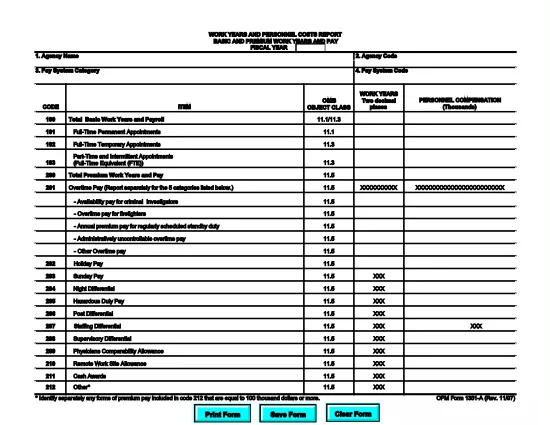
The OPM Form 1351A (Work Years and Personnel Costs Report – Basic and Premium Work Years and Pay) is a mandatory annual report for federal agencies. It captures the number of work years, basic salary, and premium pay for all employees in a fiscal year. Accurate completion supports workforce analysis, budgeting, and compliance with Office of Personnel Management (OPM) guidelines.

What Is OPM Form 1351A?

This form collects detailed payroll data for each employee, including:

  • Basic work years
  • Premium work years (e.g., overtime, hazard pay)
  • Total basic pay and premium pay
  • Fiscal year covered

Agencies submit the data to OPM for the annual Federal Workforce Report.

How to Complete the Form Using Formize PDF Filler

Our online Formize PDF Filler turns the static PDF into an interactive form. No extra software is required—just a web browser.

  1. Click the **"Fill out this form"** button below.
  2. Wait a few seconds while the Formize PDF Filler app loads the fillable version of OPM Form 1351A.
  3. Enter the required data in each field. Navigation tabs let you jump between sections quickly.
  4. Use the **Validate** button to check for missing or incorrectly formatted entries.
  5. When finished, click **Save & Download** to get a completed PDF you can upload to OPM’s portal.

Common Mistakes to Avoid When Filing 1351A

  • Incorrect fiscal year: Verify the FY matches the reporting period.
  • Missing premium pay codes: Ensure all premium pay types (e.g., overtime, night differential) are included.
  • Rounding errors: Use the exact figures from your payroll system; do not round up or down.
  • Duplicate entries: Each employee should appear only once per fiscal year.

Download the Fillable PDF Instantly

Click the button below to open the fillable version of OPM Form 1351A. The file is hosted by the official OPM website, guaranteeing the latest version.

Helpful Resources & FAQs

Below you’ll find answers to the most common questions about OPM Form 1351A and using our PDF filler.

FAQ
  • What is the purpose of OPM Form 1351A?

    Form 1351A collects annual data on basic and premium work years and pay for all federal employees, helping OPM analyze workforce costs and trends.

  • Do I need a special PDF editor to fill out Form 1351A?

    No. Our Formize PDF Filler turns the PDF into an interactive web form, so you can complete it directly in your browser.

  • Can I save my progress and return later?

    Yes. Use the "Save" button at any time to download a partially completed PDF, then reload it later in the Formize filler to continue.

  • What fiscal year should I report?

    Report the fiscal year that matches the data you are submitting (e.g., FY 2024 for the period October 1 2023 – September 30 2024).

  • Where do I submit the completed Form 1351A?

    After downloading the completed PDF, upload it to the OPM reporting portal or follow your agency’s internal submission process.

  • Is the PDF version on Formize the official OPM form?

    Yes. The file is linked directly from the official OPM website, ensuring you have the most current version.

  • What if I make a mistake after downloading?

    Open the saved PDF again with Formize, correct the errors, re‑validate, and download the updated version.

BAGAIMANA CARANYA

Cara mengisi OPM Form 1351A gratis secara online dalam 4 langkah mudah:

  1. 1
    Open the Fillable Form
    Click the "Fill out this form" button on the page. The Formize PDF Filler will load the OPM Form 1351A automatically.
  2. 2
    Enter Your Data
    Complete each section—basic work years, premium work years, pay amounts, and fiscal year—using the on‑screen fields.
  3. 3
    Validate & Review
    Use the built‑in validation tool to catch missing or mismatched entries, then review the entire form for accuracy.
  4. 4
    Save and Download
    When all data is correct, click "Save & Download" to obtain a completed PDF ready for submission to OPM.
Bentuk aplikasi Pengisi PDF
TENTANG

Formulir Kantor Manajemen Personalia (OPM).

OPM Form 1351A adalah salah satu formulir resmi yang digunakan oleh Kantor Manajemen Personalia Amerika Serikat, yang merupakan lembaga independen pemerintah federal yang bertanggung jawab mengelola tenaga kerja pegawai negeri dan tunjangan pegawai federal. OPM menetapkan kebijakan dan peraturan terkait dengan ketenagakerjaan federal, mengelola berbagai program kepegawaian, dan memberikan layanan kepada pegawai federal, pensiunan, dan pelamar kerja.

Berikut adalah beberapa contoh formulir Kantor Manajemen Personalia:

Formulir Standar 86 (SF-86) : Formulir ini digunakan untuk proses investigasi latar belakang bagi individu yang mengajukan izin keamanan. Ini mengumpulkan informasi pribadi, pekerjaan, pendidikan, dan keuangan yang komprehensif, serta rincian tentang kontak dan aktivitas luar negeri.

Formulir Standar 2809 (SF-2809) : Formulir ini digunakan untuk mendaftar ke Program Tunjangan Kesehatan Pegawai Federal (FEHB), yang memberikan perlindungan asuransi kesehatan kepada pegawai federal, pensiunan, dan anggota keluarga mereka yang memenuhi syarat.

Formulir Standar 2817 (SF-2817): Formulir ini digunakan untuk mengajukan permohonan kelanjutan pertanggungan berdasarkan Program Asuransi Gigi dan Penglihatan Pegawai Federal (FEDVIP) setelah pensiun atau berpisah dari layanan federal.

Formulir Standar 3107 (SF-3107) : Formulir ini digunakan untuk mengajukan tunjangan pensiun berdasarkan Sistem Pensiun Pegawai Negeri Sipil (CSRS).

Formulir Standar 2801 (SF-2801) : Formulir ini digunakan untuk mengajukan tunjangan pensiun berdasarkan Sistem Pensiun Pegawai Federal (FERS).

Formulir Standar 15 (SF-15) : Formulir ini digunakan untuk mengajukan preferensi veteran dalam pekerjaan federal. Dokumen ini diajukan oleh para veteran atau anggota keluarga mereka yang memenuhi syarat yang mencari peluang kerja di pemerintah federal.

Contoh-contoh ini mewakili beberapa bentuk OPM yang umum digunakan dalam konteks ketenagakerjaan federal dan tunjangan karyawan. Namun, OPM memiliki berbagai bentuk lain yang berkaitan dengan berbagai program personel, pensiun, asuransi, dan aspek ketenagakerjaan federal lainnya. Formulir spesifik yang diperlukan dapat bervariasi tergantung pada sifat transaksi, program, atau manfaat yang dicari. Disarankan untuk berkonsultasi dengan situs resmi Kantor Manajemen Personalia A.S. (www.opm.gov) atau mencari panduan dari OPM atau personel sumber daya manusia terkait untuk mendapatkan informasi yang akurat dan up-to-date. informasi terkini mengenai formulir OPM spesifik yang relevan dengan pekerjaan federal Anda atau kebutuhan terkait tunjangan.

FITUR

Pengisi PDF

Cara termudah untuk mengisi formulir PDF secara online

  • Isi OPM Form 1351A dengan cepat
    Mencari cara mengisi OPM Form 1351A dengan cepat secara online? Dengan pengisi formulir PDF online gratis kami, Anda akan tahu cara mengedit dan mengisi dokumen pdf ini dalam waktu kurang dari satu menit.
  • Editor PDF online yang mudah digunakan
    Muak dengan mencetak file PDF sehingga Anda dapat mengeditnya, sebelum memindai ulang dan mengirimnya kembali? Edit dokumen PDF secara online gratis. Gunakan editor pdf online kami untuk menghemat waktu dan kertas.
  • Alat hebat, semua platform
    Ingin tahu cara mengisi OPM Form 1351A di Mac, atau mungkin cara menggunakan pengisi PDF gratis? Alat PDF online kami berfungsi di semua platform.
  • Penyimpanan file yang aman
    File "OPM Form 1351A" yang telah selesai disimpan dalam database aman yang dikelola oleh hosting Amazon Cloud. Anda dapat menghapus file Anda dari sistem kami kapan saja. Bagaimanapun, file-file ini secara otomatis dihapus setelah 24 jam.
  • Ngobrol dengan OPM Form 1351A
    Ngobrol dengan "OPM Form 1351A" di Chatize yang merupakan asisten pembaca PDF gratis. Ajukan pertanyaan dan dapatkan jawaban dari "OPM Form 1351A". Cukup klik tombol Chat Dengan Dokumen di atas.

Hapus sesi pengisian

Hapus sesi pengisian yang dipilih? Dalam hal ini, kemajuan Anda dalam menyelesaikan formulir akan hilang.

Hapus sesi pengeditan

Hapus sesi pengeditan yang dipilih? Dalam hal ini, kemajuan Anda dalam membuat dan mengedit formulir akan hilang.