
Pilih bahasa

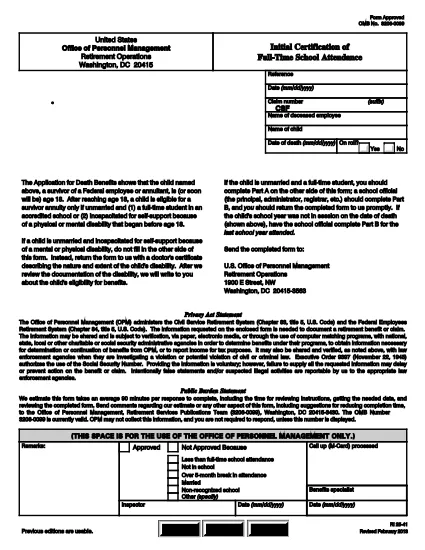
RI 25‑41 Fillable PDF – Initial Certification of Full‑Time School Attendance

  1. Negara Amerika Serikat
  2. Bahasa Bahasa inggris
  3. Departemen Kantor Manajemen Personalia
  4. Sektor Formulir Pensiun & Asuransi
RI 25‑41 Fillable PDF – Initial Certification of Full‑Time School Attendance

The RI 25‑41 is the federal “Initial Certification of Full‑Time School Attendance” used by the Office of Personnel Management (OPM) to verify a student’s eligibility for federal education benefits. This form is required for each school year and must be completed by both the payee (the student’s parent or guardian) and an official of the educational institution.

What Is the RI 25‑41 Form?

RI 25‑41 collects detailed information about the student’s enrollment, the school’s accreditation, and the anticipated dates of attendance. Part A is filled out by the payee, while Part B is completed by a school official. The form must be signed and returned to OPM before benefits are paid.

How to Fill Out RI 25‑41 Online with Formize

Instead of printing, scanning, or editing the PDF in a separate program, you can fill the form directly on our site. Follow the simple steps below:

  1. Click the “Fill out this form” button on the page.
  2. Wait a few seconds while the Formize PDF Filler app loads the fillable RI 25‑41 document.
  3. Enter your information in each field. Use the TAB key to jump between fields.
  4. When all required fields are completed, click Save & Download to get a copy of the completed PDF.
  5. Print the signed copy (if a signature is required) and submit it to OPM as instructed.

Key Sections & Common Mistakes to Avoid

  • Part A – Payee Information: Double‑check the Social Security Number and date of birth; a typo will delay processing.
  • Part B – School Official: Ensure the official’s title and phone number are current; OPM may contact them for verification.
  • Attendance Dates: Use the exact start and end dates of the academic term. Do not leave blanks.
  • Signatures: Electronic signatures are accepted only if the PDF is printed, signed, and scanned back. The online filler does not replace a handwritten signature where required.
  • Attachments: If the school requires additional documentation (e.g., enrollment verification), attach those files before downloading the final PDF.

Where to Submit the Completed Form

After saving the completed RI 25‑41, mail or fax the signed PDF to the address listed on the OPM website. For most federal employees, the preferred method is to upload the PDF to the OPM portal under “Retirement & Insurance Forms.”

Need a printable version? Use the direct download link below.

FAQ
  • Can I submit the RI 25‑41 electronically?

    Yes. After completing the form in the Formize filler, you can download the PDF and upload it to the OPM portal. If a signature is required, print, sign, and scan the document before uploading.

  • Who can fill out Part B of the form?

    Part B must be completed by an authorized official of the educational institution, such as the registrar or dean.

  • What happens if I make a mistake on the form?

    Incorrect or missing information can delay benefit payments. Review all entries carefully and correct any errors before submitting.

  • Do I need to attach proof of enrollment?

    OPM may request additional enrollment verification. Attach any required documents before downloading the final PDF.

  • Is the RI 25‑41 form still valid for 2024‑2025 school years?

    Yes. The RI 25‑41 form is the current version for all upcoming school years unless OPM announces a revision.

  • How long does it take for OPM to process the form?

    Processing typically takes 10‑14 business days after receipt of a complete and signed form.

BAGAIMANA CARANYA

Cara mengisi RI 25-41 gratis secara online dalam 4 langkah mudah:

  1. 1
    Open the Fillable Form
    Click the “Fill out this form” button on this page. The Formize PDF Filler will open the RI 25‑41 document automatically.
  2. 2
    Enter Your Information
    Type directly into each field. Use TAB to move to the next field. All required fields are marked with an asterisk.
  3. 3
    Save and Download
    When you’re finished, click “Save & Download” to get a copy of the completed PDF. Print and sign if a handwritten signature is required.
  4. 4
    Submit to OPM
    Mail, fax, or upload the signed PDF to the OPM portal as instructed in the form’s instructions.
Bentuk aplikasi Pengisi PDF
TENTANG

Formulir Kantor Manajemen Personalia (OPM).

RI 25-41 adalah salah satu formulir resmi yang digunakan oleh Kantor Manajemen Personalia Amerika Serikat, yang merupakan lembaga independen pemerintah federal yang bertanggung jawab mengelola tenaga kerja pegawai negeri dan tunjangan pegawai federal. OPM menetapkan kebijakan dan peraturan terkait dengan ketenagakerjaan federal, mengelola berbagai program kepegawaian, dan memberikan layanan kepada pegawai federal, pensiunan, dan pelamar kerja.

Berikut adalah beberapa contoh formulir Kantor Manajemen Personalia:

Formulir Standar 86 (SF-86) : Formulir ini digunakan untuk proses investigasi latar belakang bagi individu yang mengajukan izin keamanan. Ini mengumpulkan informasi pribadi, pekerjaan, pendidikan, dan keuangan yang komprehensif, serta rincian tentang kontak dan aktivitas luar negeri.

Formulir Standar 2809 (SF-2809) : Formulir ini digunakan untuk mendaftar ke Program Tunjangan Kesehatan Pegawai Federal (FEHB), yang memberikan perlindungan asuransi kesehatan kepada pegawai federal, pensiunan, dan anggota keluarga mereka yang memenuhi syarat.

Formulir Standar 2817 (SF-2817): Formulir ini digunakan untuk mengajukan permohonan kelanjutan pertanggungan berdasarkan Program Asuransi Gigi dan Penglihatan Pegawai Federal (FEDVIP) setelah pensiun atau berpisah dari layanan federal.

Formulir Standar 3107 (SF-3107) : Formulir ini digunakan untuk mengajukan tunjangan pensiun berdasarkan Sistem Pensiun Pegawai Negeri Sipil (CSRS).

Formulir Standar 2801 (SF-2801) : Formulir ini digunakan untuk mengajukan tunjangan pensiun berdasarkan Sistem Pensiun Pegawai Federal (FERS).

Formulir Standar 15 (SF-15) : Formulir ini digunakan untuk mengajukan preferensi veteran dalam pekerjaan federal. Dokumen ini diajukan oleh para veteran atau anggota keluarga mereka yang memenuhi syarat yang mencari peluang kerja di pemerintah federal.

Contoh-contoh ini mewakili beberapa bentuk OPM yang umum digunakan dalam konteks ketenagakerjaan federal dan tunjangan karyawan. Namun, OPM memiliki berbagai bentuk lain yang berkaitan dengan berbagai program personel, pensiun, asuransi, dan aspek ketenagakerjaan federal lainnya. Formulir spesifik yang diperlukan dapat bervariasi tergantung pada sifat transaksi, program, atau manfaat yang dicari. Disarankan untuk berkonsultasi dengan situs resmi Kantor Manajemen Personalia A.S. (www.opm.gov) atau mencari panduan dari OPM atau personel sumber daya manusia terkait untuk mendapatkan informasi yang akurat dan up-to-date. informasi terkini mengenai formulir OPM spesifik yang relevan dengan pekerjaan federal Anda atau kebutuhan terkait tunjangan.

FITUR

Pengisi PDF

Cara termudah untuk mengisi formulir PDF secara online

  • Isi RI 25-41 dengan cepat
    Mencari cara mengisi RI 25-41 dengan cepat secara online? Dengan pengisi formulir PDF online gratis kami, Anda akan tahu cara mengedit dan mengisi dokumen pdf ini dalam waktu kurang dari satu menit.
  • Editor PDF online yang mudah digunakan
    Muak dengan mencetak file PDF sehingga Anda dapat mengeditnya, sebelum memindai ulang dan mengirimnya kembali? Edit dokumen PDF secara online gratis. Gunakan editor pdf online kami untuk menghemat waktu dan kertas.
  • Alat hebat, semua platform
    Ingin tahu cara mengisi RI 25-41 di Mac, atau mungkin cara menggunakan pengisi PDF gratis? Alat PDF online kami berfungsi di semua platform.
  • Penyimpanan file yang aman
    File "RI 25-41" yang telah selesai disimpan dalam database aman yang dikelola oleh hosting Amazon Cloud. Anda dapat menghapus file Anda dari sistem kami kapan saja. Bagaimanapun, file-file ini secara otomatis dihapus setelah 24 jam.
  • Ngobrol dengan RI 25-41
    Ngobrol dengan "RI 25-41" di Chatize yang merupakan asisten pembaca PDF gratis. Ajukan pertanyaan dan dapatkan jawaban dari "RI 25-41". Cukup klik tombol Chat Dengan Dokumen di atas.

Hapus sesi pengisian

Hapus sesi pengisian yang dipilih? Dalam hal ini, kemajuan Anda dalam menyelesaikan formulir akan hilang.

Hapus sesi pengeditan

Hapus sesi pengeditan yang dipilih? Dalam hal ini, kemajuan Anda dalam membuat dan mengedit formulir akan hilang.