
Pilih bahasa

SF3104B – Documentation & Elections for FERS Death Benefits (Fillable PDF)

  1. Bahasa Bahasa inggris
  2. Negara Amerika Serikat
  3. Departemen Kantor Manajemen Personalia
  4. Sektor Formulir Standar
SF3104B – Documentation & Elections for FERS Death Benefits (Fillable PDF)

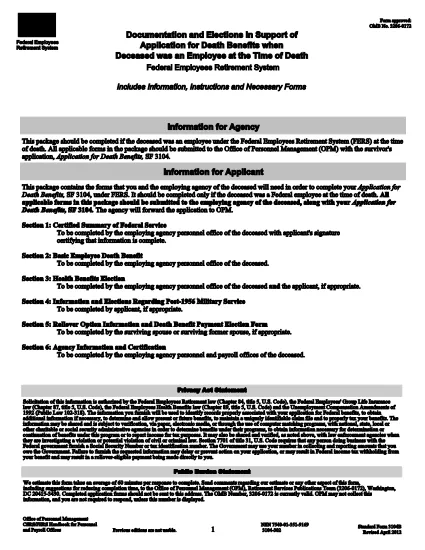
The SF3104B is the official Government form used to document elections and provide information when a Federal employee covered by the Federal Employees Retirement System (FERS) passes away. Survivors use this form to choose health‑benefit options, elect payment methods, and request any applicable deposits.

What Is the SF3104B Form?

SF3104B, Documentation and Elections in Support of Application for Death Benefits, is part of the survivor‑benefit package that must be submitted with the main SF3104 application. The form is available as a fillable PDF, allowing you to type directly into each field without printing first.

Who Must Complete SF3104B?

  • Surviving spouse, child, or other eligible beneficiary of a deceased FERS employee.
  • Anyone acting as a legal representative for the survivor.
  • Any party needing to make elections regarding health coverage, deposit of service credit, or payment method for death benefits.

How to Fill Out the Form Using Formize

Instead of downloading the PDF and opening it in a separate editor, simply click the "Fill out this form" button on this page. The Formize PDF Filler app will load in your browser, letting you complete the form instantly.

Common Mistakes to Avoid

  • Leaving required fields blank: Every field marked with an asterisk (*) must be completed.
  • Incorrect dates: Use the MM/DD/YYYY format and double‑check the date of death.
  • Mismatched signatures: The survivor’s signature must match the name entered on the form.
  • Submitting an outdated version: Use the current PDF (revision date 04/2012) linked below.

Where to Submit the Completed Form

After you’ve saved the completed SF3104B, attach it to the survivor’s application package and mail it to the Office of Personnel Management (OPM) at the address provided in the instructions, or submit electronically if your agency permits electronic filing.

Download the official fillable PDF (SF3104B)

FAQ
  • Who is eligible to file SF3104B?

    The surviving spouse, children, or any other qualified beneficiary of a deceased FERS employee may complete the form.

  • Do I need to print the form to sign it?

    No. Formize allows you to add an electronic signature directly in the browser, which is accepted by OPM.

  • Can I submit the form electronically?

    If your agency’s HR system accepts electronic documents, you can upload the completed PDF. Otherwise, mail the printed copy to OPM.

  • What is the deadline for submitting SF3104B?

    Submit the form as soon as possible after the death of the employee. Delays may affect benefit elections and payments.

  • What if I make a mistake after submitting?

    Contact OPM’s Survivor Benefits office immediately. They can guide you on filing an amendment or a corrected form.

  • Is there a cost to use the Formize PDF Filler?

    No. Formize’s online filler is free for all users accessing government forms on Formize.com.

  • Do I need any additional documents with SF3104B?

    Yes. The form is submitted together with SF3104 (Application for Death Benefits) and any required supporting documentation, such as a death certificate.

BAGAIMANA CARANYA

Cara mengisi SF3104B gratis secara online dalam 5 langkah mudah:

  1. 1
    Locate the Fillable Form Button
    Scroll down to the bright "Fill out this form" button on this page.
  2. 2
    Launch Formize PDF Filler
    Click the button. The Formize PDF Filler app loads directly in your browser—no download needed.
  3. 3
    Complete Each Section
    Enter the required information, make your benefit elections, and sign electronically where indicated.
  4. 4
    Review and Save
    Use the built‑in preview to double‑check all entries, then click "Save" to download the completed PDF.
  5. 5
    Submit to OPM
    Attach the saved PDF to your survivor benefits package and send it to the Office of Personnel Management as instructed.
Bentuk aplikasi Pengisi PDF
TENTANG

Formulir Kantor Manajemen Personalia (OPM).

SF3104B adalah salah satu formulir resmi yang digunakan oleh Kantor Manajemen Personalia Amerika Serikat, yang merupakan lembaga independen pemerintah federal yang bertanggung jawab mengelola tenaga kerja pegawai negeri dan tunjangan pegawai federal. OPM menetapkan kebijakan dan peraturan terkait dengan ketenagakerjaan federal, mengelola berbagai program kepegawaian, dan memberikan layanan kepada pegawai federal, pensiunan, dan pelamar kerja.

Berikut adalah beberapa contoh formulir Kantor Manajemen Personalia:

Formulir Standar 86 (SF-86) : Formulir ini digunakan untuk proses investigasi latar belakang bagi individu yang mengajukan izin keamanan. Ini mengumpulkan informasi pribadi, pekerjaan, pendidikan, dan keuangan yang komprehensif, serta rincian tentang kontak dan aktivitas luar negeri.

Formulir Standar 2809 (SF-2809) : Formulir ini digunakan untuk mendaftar ke Program Tunjangan Kesehatan Pegawai Federal (FEHB), yang memberikan perlindungan asuransi kesehatan kepada pegawai federal, pensiunan, dan anggota keluarga mereka yang memenuhi syarat.

Formulir Standar 2817 (SF-2817): Formulir ini digunakan untuk mengajukan permohonan kelanjutan pertanggungan berdasarkan Program Asuransi Gigi dan Penglihatan Pegawai Federal (FEDVIP) setelah pensiun atau berpisah dari layanan federal.

Formulir Standar 3107 (SF-3107) : Formulir ini digunakan untuk mengajukan tunjangan pensiun berdasarkan Sistem Pensiun Pegawai Negeri Sipil (CSRS).

Formulir Standar 2801 (SF-2801) : Formulir ini digunakan untuk mengajukan tunjangan pensiun berdasarkan Sistem Pensiun Pegawai Federal (FERS).

Formulir Standar 15 (SF-15) : Formulir ini digunakan untuk mengajukan preferensi veteran dalam pekerjaan federal. Dokumen ini diajukan oleh para veteran atau anggota keluarga mereka yang memenuhi syarat yang mencari peluang kerja di pemerintah federal.

Contoh-contoh ini mewakili beberapa bentuk OPM yang umum digunakan dalam konteks ketenagakerjaan federal dan tunjangan karyawan. Namun, OPM memiliki berbagai bentuk lain yang berkaitan dengan berbagai program personel, pensiun, asuransi, dan aspek ketenagakerjaan federal lainnya. Formulir spesifik yang diperlukan dapat bervariasi tergantung pada sifat transaksi, program, atau manfaat yang dicari. Disarankan untuk berkonsultasi dengan situs resmi Kantor Manajemen Personalia A.S. (www.opm.gov) atau mencari panduan dari OPM atau personel sumber daya manusia terkait untuk mendapatkan informasi yang akurat dan up-to-date. informasi terkini mengenai formulir OPM spesifik yang relevan dengan pekerjaan federal Anda atau kebutuhan terkait tunjangan.

FITUR

Pengisi PDF

Cara termudah untuk mengisi formulir PDF secara online

  • Isi SF3104B dengan cepat
    Mencari cara mengisi SF3104B dengan cepat secara online? Dengan pengisi formulir PDF online gratis kami, Anda akan tahu cara mengedit dan mengisi dokumen pdf ini dalam waktu kurang dari satu menit.
  • Editor PDF online yang mudah digunakan
    Muak dengan mencetak file PDF sehingga Anda dapat mengeditnya, sebelum memindai ulang dan mengirimnya kembali? Edit dokumen PDF secara online gratis. Gunakan editor pdf online kami untuk menghemat waktu dan kertas.
  • Alat hebat, semua platform
    Ingin tahu cara mengisi SF3104B di Mac, atau mungkin cara menggunakan pengisi PDF gratis? Alat PDF online kami berfungsi di semua platform.
  • Penyimpanan file yang aman
    File "SF3104B" yang telah selesai disimpan dalam database aman yang dikelola oleh hosting Amazon Cloud. Anda dapat menghapus file Anda dari sistem kami kapan saja. Bagaimanapun, file-file ini secara otomatis dihapus setelah 24 jam.
  • Ngobrol dengan SF3104B
    Ngobrol dengan "SF3104B" di Chatize yang merupakan asisten pembaca PDF gratis. Ajukan pertanyaan dan dapatkan jawaban dari "SF3104B". Cukup klik tombol Chat Dengan Dokumen di atas.

Hapus sesi pengisian

Hapus sesi pengisian yang dipilih? Dalam hal ini, kemajuan Anda dalam menyelesaikan formulir akan hilang.

Hapus sesi pengeditan

Hapus sesi pengeditan yang dipilih? Dalam hal ini, kemajuan Anda dalam membuat dan mengedit formulir akan hilang.