
Pilih bahasa

SF 3107PR Payroll Provider Checklist – Fillable PDF

  1. Bahasa Bahasa inggris
  2. Negara Amerika Serikat
  3. Departemen Kantor Manajemen Personalia
  4. Sektor Formulir Standar
SF 3107PR Payroll Provider Checklist – Fillable PDF

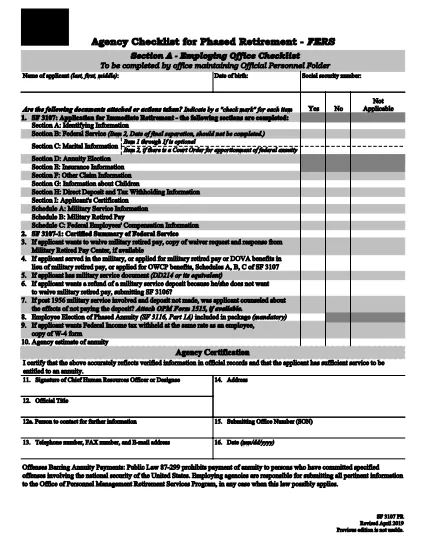
The SF 3107PR is the official Payroll Provider Checklist for Phased Retirement – FERS used by federal agencies to verify that all payroll actions are correctly processed when an employee retires early under the Federal Employees Retirement System (FERS). This form must be completed by the payroll office and signed by the employee’s agency before the retirement becomes effective.

What Is the SF 3107PR Form?

SF 3107PR (Form 3107PR) is published by the Office of Personnel Management (OPM). It contains sections for:

  • Employee identification and retirement date
  • Payroll provider verification
  • Check of final salary, leave balances, and deductions
  • Signatures from the employee, payroll officer, and agency head

How to Complete the SF 3107PR Online

Instead of printing, filling, and scanning the PDF, you can complete the form directly in your browser using Formize’s built‑in PDF filler. Follow the simple steps below.

Common Mistakes to Avoid

Even with a fillable PDF, errors can slip through. Keep these tips in mind:

  • Wrong retirement date: Verify the date matches the employee’s approved phased‑retirement request.
  • Missing signatures: All required signatures must be captured before submission.
  • Incorrect payroll codes: Double‑check the payroll provider and cost‑center numbers.
  • Unfilled optional fields: If a field is marked “N/A,” type “N/A” rather than leaving it blank.

Where to Submit the Completed Checklist

After the form is filled and signed, the payroll office should forward the PDF to the OPM Retirement Services Program and retain a copy in the employee’s official personnel file.

Need the original PDF? Click the button below to open the fillable version instantly.

FAQ
  • What is the purpose of SF 3107PR?

    SF 3107PR is used by federal agencies to confirm that payroll actions are correctly set up for an employee who is retiring early under the phased‑retirement option of FERS.

  • Can I fill out SF 3107PR on a mobile device?

    Yes. The Formize PDF filler works on most modern smartphones and tablets, allowing you to complete the form anywhere with an internet connection.

  • Do I need a PDF reader to use the fillable form?

    No. The form is fully interactive within the browser; you only need a web browser that supports JavaScript.

  • How many signatures are required on SF 3107PR?

    Three signatures are required: the employee, the payroll officer, and an authorized agency official.

  • What should I do if I make a mistake after saving?

    Open the saved PDF again in the Formize filler, correct the error, and re‑save. The form retains all previously entered data.

  • Is the fillable PDF version the same as the paper version?

    Yes. The electronic version contains the exact same fields and wording as the printable PDF published by OPM.

  • Where do I submit the completed SF 3107PR?

    Submit the final PDF to your agency’s payroll office and forward a copy to the OPM Retirement Services Program as instructed in agency policy.

BAGAIMANA CARANYA

Cara mengisi SF 3107PR gratis secara online dalam 5 langkah mudah:

  1. 1
    Click the Fill‑out Button
    On this page, click the "Fill out this form" button. The Formize PDF Filler app will open in a new tab.
  2. 2
    Wait for the Filler to Load
    The fillable version of SF 3107PR loads automatically. No download or extra software is required.
  3. 3
    Enter All Required Information
    Complete each field, using drop‑downs and check‑boxes where provided. Type "N/A" for any non‑applicable items.
  4. 4
    Add Signatures
    Use the built‑in signature tool to capture electronic signatures from the employee and payroll officer.
  5. 5
    Save or Email the Completed Form
    When finished, click "Save" to download a copy or "Email" to send the PDF directly to your agency’s retirement office.
Bentuk aplikasi Pengisi PDF
TENTANG

Formulir Kantor Manajemen Personalia (OPM).

SF 3107PR adalah salah satu formulir resmi yang digunakan oleh Kantor Manajemen Personalia Amerika Serikat, yang merupakan lembaga independen pemerintah federal yang bertanggung jawab mengelola tenaga kerja pegawai negeri dan tunjangan pegawai federal. OPM menetapkan kebijakan dan peraturan terkait dengan ketenagakerjaan federal, mengelola berbagai program kepegawaian, dan memberikan layanan kepada pegawai federal, pensiunan, dan pelamar kerja.

Berikut adalah beberapa contoh formulir Kantor Manajemen Personalia:

Formulir Standar 86 (SF-86) : Formulir ini digunakan untuk proses investigasi latar belakang bagi individu yang mengajukan izin keamanan. Ini mengumpulkan informasi pribadi, pekerjaan, pendidikan, dan keuangan yang komprehensif, serta rincian tentang kontak dan aktivitas luar negeri.

Formulir Standar 2809 (SF-2809) : Formulir ini digunakan untuk mendaftar ke Program Tunjangan Kesehatan Pegawai Federal (FEHB), yang memberikan perlindungan asuransi kesehatan kepada pegawai federal, pensiunan, dan anggota keluarga mereka yang memenuhi syarat.

Formulir Standar 2817 (SF-2817): Formulir ini digunakan untuk mengajukan permohonan kelanjutan pertanggungan berdasarkan Program Asuransi Gigi dan Penglihatan Pegawai Federal (FEDVIP) setelah pensiun atau berpisah dari layanan federal.

Formulir Standar 3107 (SF-3107) : Formulir ini digunakan untuk mengajukan tunjangan pensiun berdasarkan Sistem Pensiun Pegawai Negeri Sipil (CSRS).

Formulir Standar 2801 (SF-2801) : Formulir ini digunakan untuk mengajukan tunjangan pensiun berdasarkan Sistem Pensiun Pegawai Federal (FERS).

Formulir Standar 15 (SF-15) : Formulir ini digunakan untuk mengajukan preferensi veteran dalam pekerjaan federal. Dokumen ini diajukan oleh para veteran atau anggota keluarga mereka yang memenuhi syarat yang mencari peluang kerja di pemerintah federal.

Contoh-contoh ini mewakili beberapa bentuk OPM yang umum digunakan dalam konteks ketenagakerjaan federal dan tunjangan karyawan. Namun, OPM memiliki berbagai bentuk lain yang berkaitan dengan berbagai program personel, pensiun, asuransi, dan aspek ketenagakerjaan federal lainnya. Formulir spesifik yang diperlukan dapat bervariasi tergantung pada sifat transaksi, program, atau manfaat yang dicari. Disarankan untuk berkonsultasi dengan situs resmi Kantor Manajemen Personalia A.S. (www.opm.gov) atau mencari panduan dari OPM atau personel sumber daya manusia terkait untuk mendapatkan informasi yang akurat dan up-to-date. informasi terkini mengenai formulir OPM spesifik yang relevan dengan pekerjaan federal Anda atau kebutuhan terkait tunjangan.

FITUR

Pengisi PDF

Cara termudah untuk mengisi formulir PDF secara online

  • Isi SF 3107PR dengan cepat
    Mencari cara mengisi SF 3107PR dengan cepat secara online? Dengan pengisi formulir PDF online gratis kami, Anda akan tahu cara mengedit dan mengisi dokumen pdf ini dalam waktu kurang dari satu menit.
  • Editor PDF online yang mudah digunakan
    Muak dengan mencetak file PDF sehingga Anda dapat mengeditnya, sebelum memindai ulang dan mengirimnya kembali? Edit dokumen PDF secara online gratis. Gunakan editor pdf online kami untuk menghemat waktu dan kertas.
  • Alat hebat, semua platform
    Ingin tahu cara mengisi SF 3107PR di Mac, atau mungkin cara menggunakan pengisi PDF gratis? Alat PDF online kami berfungsi di semua platform.
  • Penyimpanan file yang aman
    File "SF 3107PR" yang telah selesai disimpan dalam database aman yang dikelola oleh hosting Amazon Cloud. Anda dapat menghapus file Anda dari sistem kami kapan saja. Bagaimanapun, file-file ini secara otomatis dihapus setelah 24 jam.
  • Ngobrol dengan SF 3107PR
    Ngobrol dengan "SF 3107PR" di Chatize yang merupakan asisten pembaca PDF gratis. Ajukan pertanyaan dan dapatkan jawaban dari "SF 3107PR". Cukup klik tombol Chat Dengan Dokumen di atas.

Hapus sesi pengisian

Hapus sesi pengisian yang dipilih? Dalam hal ini, kemajuan Anda dalam menyelesaikan formulir akan hilang.

Hapus sesi pengeditan

Hapus sesi pengeditan yang dipilih? Dalam hal ini, kemajuan Anda dalam membuat dan mengedit formulir akan hilang.