
Pilih bahasa

SF 3110 – Former Spouse’s Consent to FERS Election (Fillable PDF)

  1. Bahasa Bahasa inggris
  2. Negara Amerika Serikat
  3. Departemen Kantor Manajemen Personalia
  4. Sektor Formulir Standar
SF 3110 – Former Spouse’s Consent to FERS Election (Fillable PDF)

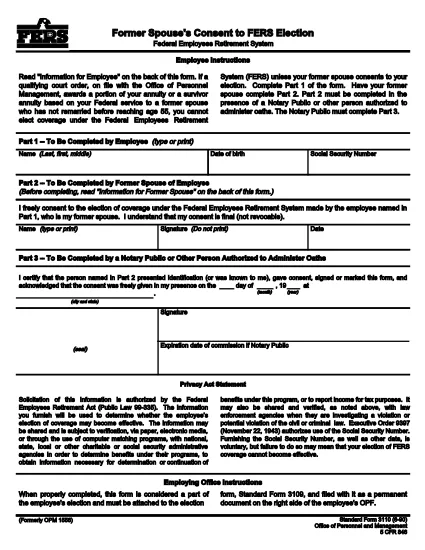
The SF 3110 is the official United States government form titled “Former Spouse’s Consent to Federal Employees Retirement System (FERS) Election.” It is used when a former spouse must give written consent for a federal employee to elect FERS coverage for themselves or their former spouse.

This form is required under 5 CFR 846 and is commonly requested during divorce or separation proceedings involving federal employees. The form must be completed, signed, and submitted to the appropriate agency (usually the Office of Personnel Management or the employing agency).

What is the SF 3110 Form?

SF 3110 captures the former spouse’s free consent, includes basic identifying information for both parties, and provides a space for the signature and date. The form is short—typically two pages—and can be completed electronically using a fillable PDF.

When and Why You Need SF 3110

Use this form whenever:

  • A federal employee wishes to change or retain FERS coverage after a divorce.
  • The employee’s former spouse must formally consent to the election.
  • An agency requests proof of consent for benefits processing.

Submitting a correctly completed SF 3110 helps avoid delays in retirement benefit calculations.

How to Complete the Form Online

Instead of downloading and editing the PDF manually, click the “Fill out this form” button on our page. The Formize PDF Filler will load instantly, allowing you to type, sign, and save the document directly in your browser.

Common Mistakes to Avoid

  • Leaving any required field blank (especially the employee’s name and Social Security Number).
  • Using a printed copy for an electronic signature—digital signatures are accepted and faster.
  • Submitting an outdated version; always use the latest PDF (revision 06/1990).

Where to Submit the Completed Form

After saving the filled PDF, email or mail it to the agency listed on the form (usually the employee’s HR office or OPM). Keep a copy for your records.

Need the fillable PDF now? Click below to start the online filler.

FAQ
  • What is the purpose of SF 3110?

    SF 3110 provides a written consent from a former spouse allowing a federal employee to elect or retain FERS coverage after a divorce.

  • Can I fill out SF 3110 on a mobile device?

    Yes. The Formize fillable PDF works on most smartphones and tablets with a modern browser.

  • Do I need a printer to submit the form?

    No. A digitally signed PDF is acceptable for most agencies, but check the specific agency’s submission guidelines.

  • How often is the SF 3110 updated?

    The current revision date is June 1990. Use the latest PDF provided by OPM to ensure compliance.

  • What if I make a mistake after saving?

    Open the saved PDF again in the Formize filler, correct the error, and re‑save. The fillable version allows unlimited edits before final submission.

  • Is there a fee to use the Formize PDF filler?

    No. Formize provides free online filling for government PDFs like SF 3110.

BAGAIMANA CARANYA

Cara mengisi SF 3110 gratis secara online dalam 5 langkah mudah:

  1. 1
    Open the Fillable Form
    Click the “Fill out this form” button on the page. The Formize PDF Filler will launch in a new tab.
  2. 2
    Enter All Required Information
    Type the employee’s name, SSN, and your consent statement directly into the fields. Use the tab key to move between sections.
  3. 3
    Add Your Digital Signature
    Select the signature field, draw or type your signature, and confirm.
  4. 4
    Save and Download
    When you’re finished, click “Save” to download a copy of the completed PDF to your computer.
  5. 5
    Submit to the Appropriate Agency
    Email or mail the saved PDF to the HR office or OPM as instructed on the form.
Bentuk aplikasi Pengisi PDF
TENTANG

Formulir Kantor Manajemen Personalia (OPM).

SF 3110 adalah salah satu formulir resmi yang digunakan oleh Kantor Manajemen Personalia Amerika Serikat, yang merupakan lembaga independen pemerintah federal yang bertanggung jawab mengelola tenaga kerja pegawai negeri dan tunjangan pegawai federal. OPM menetapkan kebijakan dan peraturan terkait dengan ketenagakerjaan federal, mengelola berbagai program kepegawaian, dan memberikan layanan kepada pegawai federal, pensiunan, dan pelamar kerja.

Berikut adalah beberapa contoh formulir Kantor Manajemen Personalia:

Formulir Standar 86 (SF-86) : Formulir ini digunakan untuk proses investigasi latar belakang bagi individu yang mengajukan izin keamanan. Ini mengumpulkan informasi pribadi, pekerjaan, pendidikan, dan keuangan yang komprehensif, serta rincian tentang kontak dan aktivitas luar negeri.

Formulir Standar 2809 (SF-2809) : Formulir ini digunakan untuk mendaftar ke Program Tunjangan Kesehatan Pegawai Federal (FEHB), yang memberikan perlindungan asuransi kesehatan kepada pegawai federal, pensiunan, dan anggota keluarga mereka yang memenuhi syarat.

Formulir Standar 2817 (SF-2817): Formulir ini digunakan untuk mengajukan permohonan kelanjutan pertanggungan berdasarkan Program Asuransi Gigi dan Penglihatan Pegawai Federal (FEDVIP) setelah pensiun atau berpisah dari layanan federal.

Formulir Standar 3107 (SF-3107) : Formulir ini digunakan untuk mengajukan tunjangan pensiun berdasarkan Sistem Pensiun Pegawai Negeri Sipil (CSRS).

Formulir Standar 2801 (SF-2801) : Formulir ini digunakan untuk mengajukan tunjangan pensiun berdasarkan Sistem Pensiun Pegawai Federal (FERS).

Formulir Standar 15 (SF-15) : Formulir ini digunakan untuk mengajukan preferensi veteran dalam pekerjaan federal. Dokumen ini diajukan oleh para veteran atau anggota keluarga mereka yang memenuhi syarat yang mencari peluang kerja di pemerintah federal.

Contoh-contoh ini mewakili beberapa bentuk OPM yang umum digunakan dalam konteks ketenagakerjaan federal dan tunjangan karyawan. Namun, OPM memiliki berbagai bentuk lain yang berkaitan dengan berbagai program personel, pensiun, asuransi, dan aspek ketenagakerjaan federal lainnya. Formulir spesifik yang diperlukan dapat bervariasi tergantung pada sifat transaksi, program, atau manfaat yang dicari. Disarankan untuk berkonsultasi dengan situs resmi Kantor Manajemen Personalia A.S. (www.opm.gov) atau mencari panduan dari OPM atau personel sumber daya manusia terkait untuk mendapatkan informasi yang akurat dan up-to-date. informasi terkini mengenai formulir OPM spesifik yang relevan dengan pekerjaan federal Anda atau kebutuhan terkait tunjangan.

FITUR

Pengisi PDF

Cara termudah untuk mengisi formulir PDF secara online

  • Isi SF 3110 dengan cepat
    Mencari cara mengisi SF 3110 dengan cepat secara online? Dengan pengisi formulir PDF online gratis kami, Anda akan tahu cara mengedit dan mengisi dokumen pdf ini dalam waktu kurang dari satu menit.
  • Editor PDF online yang mudah digunakan
    Muak dengan mencetak file PDF sehingga Anda dapat mengeditnya, sebelum memindai ulang dan mengirimnya kembali? Edit dokumen PDF secara online gratis. Gunakan editor pdf online kami untuk menghemat waktu dan kertas.
  • Alat hebat, semua platform
    Ingin tahu cara mengisi SF 3110 di Mac, atau mungkin cara menggunakan pengisi PDF gratis? Alat PDF online kami berfungsi di semua platform.
  • Penyimpanan file yang aman
    File "SF 3110" yang telah selesai disimpan dalam database aman yang dikelola oleh hosting Amazon Cloud. Anda dapat menghapus file Anda dari sistem kami kapan saja. Bagaimanapun, file-file ini secara otomatis dihapus setelah 24 jam.
  • Ngobrol dengan SF 3110
    Ngobrol dengan "SF 3110" di Chatize yang merupakan asisten pembaca PDF gratis. Ajukan pertanyaan dan dapatkan jawaban dari "SF 3110". Cukup klik tombol Chat Dengan Dokumen di atas.

Hapus sesi pengisian

Hapus sesi pengisian yang dipilih? Dalam hal ini, kemajuan Anda dalam menyelesaikan formulir akan hilang.

Hapus sesi pengeditan

Hapus sesi pengeditan yang dipilih? Dalam hal ini, kemajuan Anda dalam membuat dan mengedit formulir akan hilang.