
Pilih bahasa

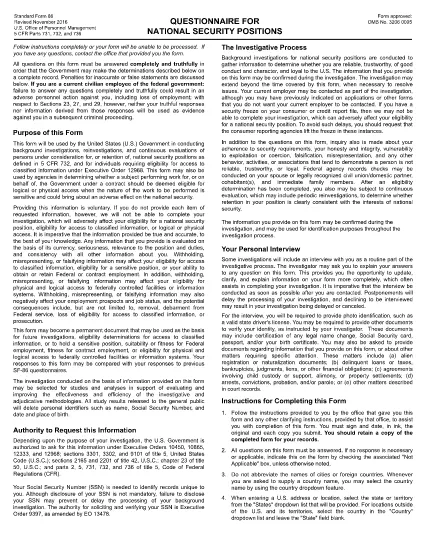
SF-86 Questionnaire – Fillable PDF for Security Clearance

  1. Bahasa Bahasa inggris
  2. Negara Amerika Serikat
  3. Departemen Kantor Manajemen Personalia
  4. Sektor Formulir Standar
SF-86 Questionnaire – Fillable PDF for Security Clearance

The SF-86 (Standard Form 86) is the U.S. government’s official questionnaire used for background investigations, reinvestigations, and continuous evaluations of individuals seeking access to classified information or national‑security positions. Completing it accurately is essential for obtaining a security clearance.

This page provides a fillable PDF version of the SF-86 that you can complete directly in your browser using the Formize PDF Filler app. No additional software or printing is required.

What Is the SF-86 Form?

The SF-86 collects detailed personal information, including:

  • Education and employment history (last 10 years)
  • Foreign contacts, travel, and residences
  • Criminal record, financial disclosures, and drug use
  • Military service and security‑related activities

Agencies use this data to assess eligibility for a security clearance.

Key Sections of the SF-86

Understanding the major sections helps you gather the right documents before you start:

  1. Personal Information – name, date of birth, Social Security number.
  2. Residence History – every address for the past 10 years.
  3. Employment & Education – employers, schools, dates, and supervisors.
  4. Foreign Contacts & Travel – individuals, countries, and trips abroad.
  5. Legal & Financial Matters – arrests, convictions, bankruptcies, debts.

How to Complete the SF-86 Online

Follow these simple steps to fill out the form quickly and securely:

  • Click the "Fill out this form" button below.
  • Wait a few seconds while the Formize PDF Filler loads.
  • Enter your information field‑by‑field; the app auto‑saves as you go.
  • When finished, click "Save & Download" to get a completed PDF copy.
  • Submit the saved PDF to your agency or upload it through e‑QIP as instructed.

Common Mistakes & Tips

Tip 1: Answer every question truthfully. Incomplete or false information can delay or deny your clearance.

Tip 2: Use exact dates (MM/DD/YYYY) and full legal names for contacts.

Tip 3: Keep supporting documents (travel itineraries, employment letters) handy for reference.

Tip 4: Review the form twice before saving. The Formize filler highlights required fields you might have missed.

Ready to start? Click below to launch the fillable SF-86 PDF.

FAQ
  • What is the SF-86 used for?

    The SF-86 is the standard questionnaire for background investigations and security clearances for U.S. government, military, and contractor positions.

  • Can I fill out the SF-86 on a mobile device?

    Yes. The Formize PDF Filler works on most modern smartphones and tablets, but a desktop browser provides the best experience.

  • Is the fillable PDF version official?

    Yes. The PDF linked below is the official OPM form, now available as a fillable document through Formize.

  • Do I need an e‑QIP account to use this form?

    No. You can complete the PDF offline with Formize and then upload the finished file to e‑QIP if your agency requires it.

  • How long does it take to complete the SF-86?

    Preparation time varies, but most applicants finish the form in 2–4 hours. Gather employment, travel, and foreign‑contact records beforehand.

  • What happens if I make a mistake?

    Incorrect or omitted information can delay your clearance. Use the Formize auto‑save and review features, then double‑check before submitting.

  • Is my data secure while using Formize?

    Formize uses SSL encryption and does not store your personal data on its servers after you download the completed PDF.

BAGAIMANA CARANYA

Cara mengisi SF-86 gratis secara online dalam 5 langkah mudah:

  1. 1
    Click the Fill Out Button
    Press the "Fill out this form" button on this page to open the SF-86 in the Formize PDF Filler.
  2. 2
    Wait for the Filler to Load
    The Formize app loads in a few seconds; a loading bar will appear at the top of the screen.
  3. 3
    Enter Your Information
    Complete each section of the questionnaire. The filler auto‑saves as you type and highlights any required fields you missed.
  4. 4
    Save and Download
    When all fields are filled, click "Save & Download" to get a completed PDF copy on your device.
  5. 5
    Submit to Your Agency
    Follow your agency’s instructions—usually uploading the PDF to e‑QIP or providing a printed copy to your security officer.
Bentuk aplikasi Pengisi PDF
TENTANG

Formulir Kantor Manajemen Personalia (OPM).

SF-86 adalah salah satu formulir resmi yang digunakan oleh Kantor Manajemen Personalia Amerika Serikat, yang merupakan lembaga independen pemerintah federal yang bertanggung jawab mengelola tenaga kerja pegawai negeri dan tunjangan pegawai federal. OPM menetapkan kebijakan dan peraturan terkait dengan ketenagakerjaan federal, mengelola berbagai program kepegawaian, dan memberikan layanan kepada pegawai federal, pensiunan, dan pelamar kerja.

Berikut adalah beberapa contoh formulir Kantor Manajemen Personalia:

Formulir Standar 86 (SF-86) : Formulir ini digunakan untuk proses investigasi latar belakang bagi individu yang mengajukan izin keamanan. Ini mengumpulkan informasi pribadi, pekerjaan, pendidikan, dan keuangan yang komprehensif, serta rincian tentang kontak dan aktivitas luar negeri.

Formulir Standar 2809 (SF-2809) : Formulir ini digunakan untuk mendaftar ke Program Tunjangan Kesehatan Pegawai Federal (FEHB), yang memberikan perlindungan asuransi kesehatan kepada pegawai federal, pensiunan, dan anggota keluarga mereka yang memenuhi syarat.

Formulir Standar 2817 (SF-2817): Formulir ini digunakan untuk mengajukan permohonan kelanjutan pertanggungan berdasarkan Program Asuransi Gigi dan Penglihatan Pegawai Federal (FEDVIP) setelah pensiun atau berpisah dari layanan federal.

Formulir Standar 3107 (SF-3107) : Formulir ini digunakan untuk mengajukan tunjangan pensiun berdasarkan Sistem Pensiun Pegawai Negeri Sipil (CSRS).

Formulir Standar 2801 (SF-2801) : Formulir ini digunakan untuk mengajukan tunjangan pensiun berdasarkan Sistem Pensiun Pegawai Federal (FERS).

Formulir Standar 15 (SF-15) : Formulir ini digunakan untuk mengajukan preferensi veteran dalam pekerjaan federal. Dokumen ini diajukan oleh para veteran atau anggota keluarga mereka yang memenuhi syarat yang mencari peluang kerja di pemerintah federal.

Contoh-contoh ini mewakili beberapa bentuk OPM yang umum digunakan dalam konteks ketenagakerjaan federal dan tunjangan karyawan. Namun, OPM memiliki berbagai bentuk lain yang berkaitan dengan berbagai program personel, pensiun, asuransi, dan aspek ketenagakerjaan federal lainnya. Formulir spesifik yang diperlukan dapat bervariasi tergantung pada sifat transaksi, program, atau manfaat yang dicari. Disarankan untuk berkonsultasi dengan situs resmi Kantor Manajemen Personalia A.S. (www.opm.gov) atau mencari panduan dari OPM atau personel sumber daya manusia terkait untuk mendapatkan informasi yang akurat dan up-to-date. informasi terkini mengenai formulir OPM spesifik yang relevan dengan pekerjaan federal Anda atau kebutuhan terkait tunjangan.

FITUR

Pengisi PDF

Cara termudah untuk mengisi formulir PDF secara online

  • Isi SF-86 dengan cepat
    Mencari cara mengisi SF-86 dengan cepat secara online? Dengan pengisi formulir PDF online gratis kami, Anda akan tahu cara mengedit dan mengisi dokumen pdf ini dalam waktu kurang dari satu menit.
  • Editor PDF online yang mudah digunakan
    Muak dengan mencetak file PDF sehingga Anda dapat mengeditnya, sebelum memindai ulang dan mengirimnya kembali? Edit dokumen PDF secara online gratis. Gunakan editor pdf online kami untuk menghemat waktu dan kertas.
  • Alat hebat, semua platform
    Ingin tahu cara mengisi SF-86 di Mac, atau mungkin cara menggunakan pengisi PDF gratis? Alat PDF online kami berfungsi di semua platform.
  • Penyimpanan file yang aman
    File "SF-86" yang telah selesai disimpan dalam database aman yang dikelola oleh hosting Amazon Cloud. Anda dapat menghapus file Anda dari sistem kami kapan saja. Bagaimanapun, file-file ini secara otomatis dihapus setelah 24 jam.
  • Ngobrol dengan SF-86
    Ngobrol dengan "SF-86" di Chatize yang merupakan asisten pembaca PDF gratis. Ajukan pertanyaan dan dapatkan jawaban dari "SF-86". Cukup klik tombol Chat Dengan Dokumen di atas.

Hapus sesi pengisian

Hapus sesi pengisian yang dipilih? Dalam hal ini, kemajuan Anda dalam menyelesaikan formulir akan hilang.

Hapus sesi pengeditan

Hapus sesi pengeditan yang dipilih? Dalam hal ini, kemajuan Anda dalam membuat dan mengedit formulir akan hilang.