
Pilih bahasa

DS-64 Statement Regarding a Lost or Stolen U.S. Passport (Fillable PDF)

  1. Bahasa Bahasa inggris
  2. Negara Amerika Serikat
  3. Aktivitas Paspor
DS-64 Statement Regarding a Lost or Stolen U.S. Passport (Fillable PDF)

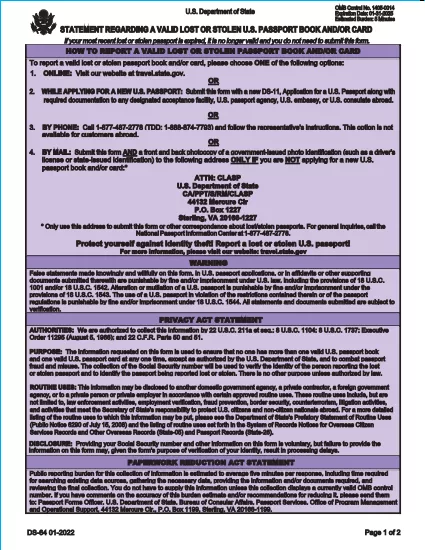
The DS-64 is the official U.S. Department of State form used to report a lost or stolen passport. Once submitted, the passport is immediately invalidated, preventing fraud and protecting your identity.

What Is the DS-64 Form?

DS-64, titled Statement Regarding a Lost or Stolen Passport, collects personal details, passport information, and a description of how the passport was lost or stolen. It is required whether you plan to request a replacement (DS‑11) or simply need the record of loss.

Why Use Formize’s Fillable PDF Filler?

  • Instant online filling: No need to download, print, and hand‑write.
  • Auto‑save: Your progress is saved in the browser, so you never lose data.
  • Error‑checking: Real‑time validation reduces mistakes.
  • Secure: All data stays on your device; Formize never stores personal information.

Step‑by‑Step Guide to Complete DS-64

Follow the simple steps below to fill, sign, and download the form.

Common Mistakes to Avoid

  • Leaving the passport number blank when you know it – the number is essential for cancellation.
  • Using colored ink or handwritten corrections – Formize requires black‑ink digital entry.
  • Forgetting to indicate whether you are submitting a replacement application (DS‑11).

Where to Submit Your Completed Form

After you download the completed DS‑64 PDF, you can:

  • Mail it to the address printed on the form if you are not applying for a new passport.
  • Include it with your DS‑11 application when requesting a replacement.
  • Submit it in person at a regional passport agency.

There is no fee to submit DS‑64 alone; fees apply only when you request a replacement passport.

FAQ
  • Can I submit DS‑64 online?

    No. The DS‑64 must be printed, signed, and submitted by mail or in person. Formize only provides a fillable PDF to simplify completion.

  • Is there a fee to file DS‑64?

    There is no fee to report a lost or stolen passport with DS‑64. Fees apply only when you request a replacement passport.

  • What if I don’t know my passport number?

    Enter ‘Unknown’ in the passport number field and provide as much other identifying information as possible.

  • Do I need a notary for DS‑64?

    No. The form only requires your signature; notarization is not required.

  • How long does it take for the passport to be invalidated?

    Once the State Department receives the DS‑64, the passport is typically canceled within a few business days.

  • Can a parent fill out DS‑64 for a minor?

    Yes. A parent or legal guardian may complete the form on behalf of a minor, signing in the appropriate section.

  • What should I do if my passport was expired when it was lost?

    You do not need to submit DS‑64 for an expired passport, but you may still do so to have a record of the loss.

  • Will I receive confirmation that my passport is canceled?

    The State Department does not send a formal confirmation, but the passport will be marked as invalid in their system.

BAGAIMANA CARANYA

Cara mengisi DS-64 gratis secara online dalam 5 langkah mudah:

  1. 1
    Open the Fillable Form
    Click the **Fill out this form** button on the page. The Formize PDF Filler app will load instantly in your browser.
  2. 2
    Enter Your Information
    Type your personal details, passport number, and loss description directly into the fields. All required fields are highlighted.
  3. 3
    Review & Sign
    Use the built‑in signature tool to sign the form digitally, then review each section for accuracy.
  4. 4
    Download or Print
    When you’re satisfied, click **Download PDF** to save a copy or **Print** to produce a hard copy for mailing.
  5. 5
    Submit the Form
    Mail or bring the completed DS‑64 to the address shown on the form, or attach it to your DS‑11 replacement application.
Bentuk aplikasi Pengisi PDF
TENTANG

Formulir Paspor

DS-64 adalah salah satu formulir Paspor yang merupakan dokumen yang digunakan untuk mengajukan pembuatan paspor, yaitu dokumen perjalanan yang menyatakan identitas dan kewarganegaraan pemegangnya dan memungkinkan mereka untuk bepergian ke luar negeri. Formulir paspor dapat bervariasi tergantung pada negara yang mengeluarkan paspor, tetapi umumnya berisi informasi pribadi tentang pemohon, seperti nama, tanggal lahir, dan tempat lahir, serta informasi tentang orang tua pemohon dan paspor atau dokumen perjalanan sebelumnya. .

Di Amerika Serikat, dua formulir paspor yang paling umum adalah DS-11 dan DS-82. Formulir DS-11 digunakan untuk pelamar pertama kali, anak di bawah umur, atau individu yang tidak memenuhi syarat untuk menggunakan formulir DS-82. Formulir DS-82 digunakan untuk perpanjangan paspor melalui surat bagi pelamar yang memenuhi syarat. Kedua formulir tersebut mengharuskan pemohon untuk memberikan informasi pribadi dan dokumen pendukung, seperti foto paspor dan bukti kewarganegaraan.

Negara-negara lain mungkin memiliki formulir dan persyaratan paspor yang berbeda, tetapi proses dasarnya biasanya melibatkan melengkapi aplikasi paspor, memberikan dokumentasi pendukung, dan menghadiri wawancara dengan petugas paspor di fasilitas atau kedutaan pemerintah. Penting untuk diperhatikan bahwa proses pengajuan paspor dapat memakan waktu beberapa minggu atau bahkan berbulan-bulan, jadi disarankan untuk mengajukan jauh-jauh hari sebelum perjalanan yang direncanakan.

FITUR

Pengisi PDF

Cara termudah untuk mengisi formulir PDF secara online

  • Isi DS-64 dengan cepat
    Mencari cara mengisi DS-64 dengan cepat secara online? Dengan pengisi formulir PDF online gratis kami, Anda akan tahu cara mengedit dan mengisi dokumen pdf ini dalam waktu kurang dari satu menit.
  • Editor PDF online yang mudah digunakan
    Muak dengan mencetak file PDF sehingga Anda dapat mengeditnya, sebelum memindai ulang dan mengirimnya kembali? Edit dokumen PDF secara online gratis. Gunakan editor pdf online kami untuk menghemat waktu dan kertas.
  • Alat hebat, semua platform
    Ingin tahu cara mengisi DS-64 di Mac, atau mungkin cara menggunakan pengisi PDF gratis? Alat PDF online kami berfungsi di semua platform.
  • Penyimpanan file yang aman
    File "DS-64" yang telah selesai disimpan dalam database aman yang dikelola oleh hosting Amazon Cloud. Anda dapat menghapus file Anda dari sistem kami kapan saja. Bagaimanapun, file-file ini secara otomatis dihapus setelah 24 jam.
  • Ngobrol dengan DS-64
    Ngobrol dengan "DS-64" di Chatize yang merupakan asisten pembaca PDF gratis. Ajukan pertanyaan dan dapatkan jawaban dari "DS-64". Cukup klik tombol Chat Dengan Dokumen di atas.

Hapus sesi pengisian

Hapus sesi pengisian yang dipilih? Dalam hal ini, kemajuan Anda dalam menyelesaikan formulir akan hilang.

Hapus sesi pengeditan

Hapus sesi pengeditan yang dipilih? Dalam hal ini, kemajuan Anda dalam membuat dan mengedit formulir akan hilang.