
Pilih bahasa

Rhode Island TR-9 Vehicle Title Application (Fillable PDF)

  1. Bahasa Bahasa inggris
  2. Negara Amerika Serikat
  3. Departemen Rhode Island DMV
  4. Aktivitas Pendaftaran kendaraan
Rhode Island TR-9 Vehicle Title Application (Fillable PDF)

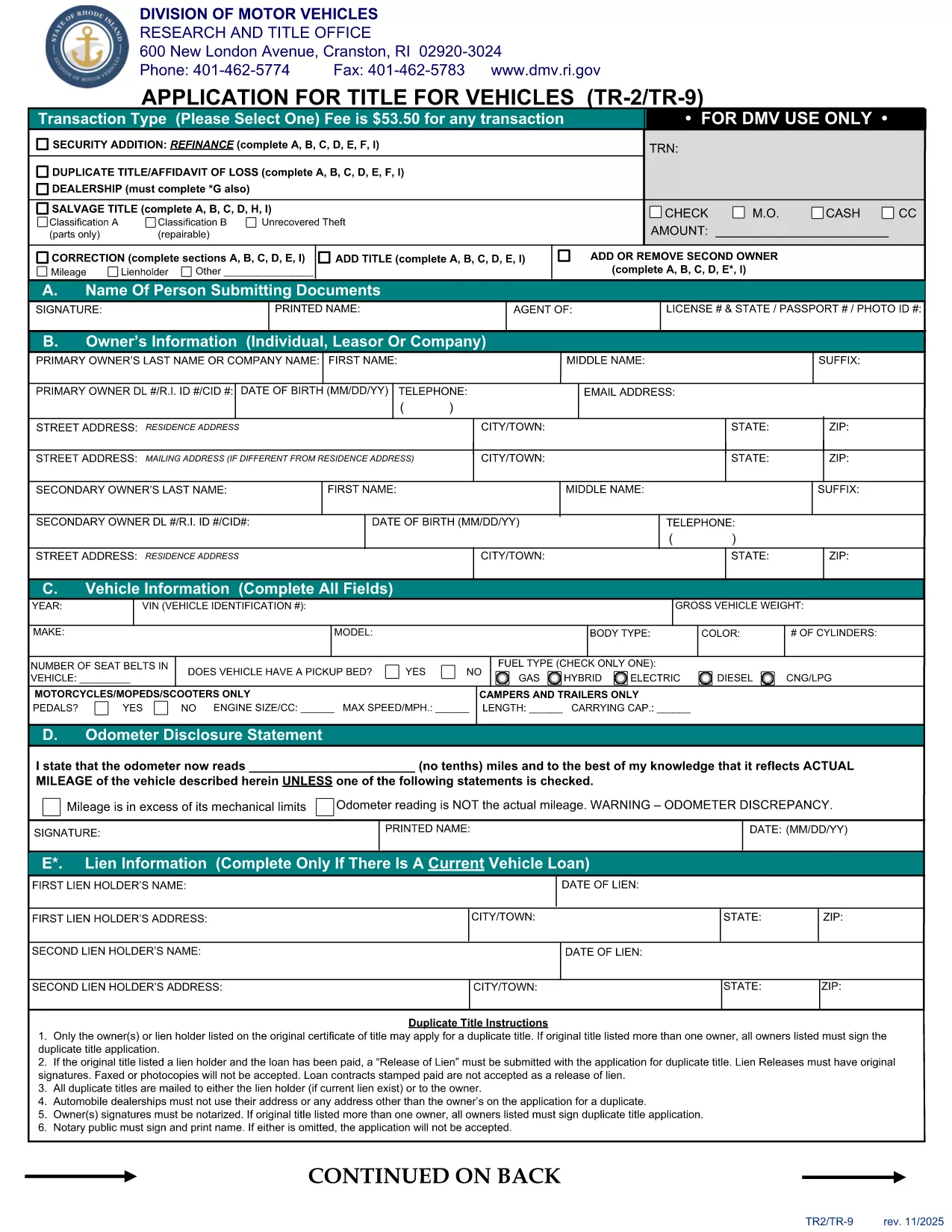
The TR-9 is the official Rhode Island DMV form used to apply for a new vehicle title or to transfer ownership. Historically it was a paper‑only document, but today you can complete it instantly as a fillable PDF.

Formize hosts a secure, browser‑based PDF filler that lets you enter all required information without installing any software. Once you finish, you can download, print, or submit the completed PDF directly to the RI DMV.

  • Fast & free: No printing or scanning required.
  • Secure: Your data stays in your browser until you choose to save.
  • Accurate: Built‑in validation helps you avoid common errors.

Below you’ll find step‑by‑step instructions, tips to prevent mistakes, and answers to the most common questions about the TR‑9 form.

FAQ
  • What is the purpose of the TR-9 form?

    The TR-9 is used to apply for a new title, transfer ownership, or correct information on an existing Rhode Island vehicle title.

  • Do I need to print the form after filling it online?

    The Rhode Island DMV still requires a printed, signed copy for most transactions, so print the completed PDF before mailing or delivering it.

  • Is there a fee associated with filing a TR-9?

    Yes, the standard title fee is $53.50 (as of the latest revision). Check the RI DMV fee schedule for any additional charges.

  • Can I save my progress and finish later?

    The Formize filler allows you to download a partially completed PDF at any time. Simply reopen the file later to continue.

  • Is the fillable PDF compatible with Adobe Reader?

    Yes, the PDF is fully compatible with Adobe Acrobat Reader, but using Formize’s online filler provides a smoother, no‑install experience.

  • What common mistakes should I avoid?

    Make sure VIN numbers match the vehicle, signatures are legible, and all required fields are completed. Missing or mismatched data can delay processing.

  • How long does the online filling process take?

    Most users finish the form in under 10 minutes, especially with Formize’s built‑in validation that catches errors instantly.

BAGAIMANA CARANYA

Cara mengisi TR-9 gratis secara online dalam 5 langkah mudah:

  1. 1
    Open the Fillable Form
    Click the "Fill out this form" button on the page. The Formize PDF Filler will launch directly in your browser.
  2. 2
    Wait for the Loader
    Give the app a few seconds to load all fields and validation rules.
  3. 3
    Enter Your Information
    Type in each required field (owner details, vehicle information, signatures, etc.). The filler highlights any missing or incorrectly formatted data.
  4. 4
    Review & Save
    Use the preview button to double‑check your entries, then click "Save PDF" to download the completed form.
  5. 5
    Submit to the DMV
    Print the saved PDF and mail it, or follow any electronic submission instructions provided by the Rhode Island DMV.
Bentuk aplikasi Pengisi PDF
TENTANG

Formulir Pendaftaran Kendaraan

Jika Anda memiliki atau menyewa kendaraan bermotor, trailer, atau perahu, Anda harus memenuhi kewajiban tertentu untuk menjaga agar kendaraan Anda terdaftar secara sah dan aman.

TR-9 adalah salah satu formulir STNK yang merupakan dokumen yang digunakan untuk mendaftarkan kendaraan bermotor dengan otoritas negara bagian atau provinsi terkait. Formulir ini biasanya diperlukan saat seseorang membeli kendaraan baru atau bekas atau saat mereka pindah ke negara bagian atau provinsi baru dengan kendaraan.

Persyaratan dan formulir pasti yang diperlukan untuk pendaftaran kendaraan dapat berbeda-beda di setiap lokasi, tetapi umumnya, prosesnya mencakup pemberian informasi tentang kendaraan, pemilik, dan hak gadai apa pun pada kendaraan tersebut.

Setelah formulir pendaftaran dan biaya diserahkan, otoritas negara bagian atau provinsi akan menerbitkan sertifikat pendaftaran atau plat nomor kepada pemilik kendaraan. Pendaftaran ini memungkinkan kendaraan untuk dioperasikan secara legal di jalan umum dan jalan raya.

FITUR

Pengisi PDF

Cara termudah untuk mengisi formulir PDF secara online

  • Isi TR-9 dengan cepat
    Mencari cara mengisi TR-9 dengan cepat secara online? Dengan pengisi formulir PDF online gratis kami, Anda akan tahu cara mengedit dan mengisi dokumen pdf ini dalam waktu kurang dari satu menit.
  • Editor PDF online yang mudah digunakan
    Muak dengan mencetak file PDF sehingga Anda dapat mengeditnya, sebelum memindai ulang dan mengirimnya kembali? Edit dokumen PDF secara online gratis. Gunakan editor pdf online kami untuk menghemat waktu dan kertas.
  • Alat hebat, semua platform
    Ingin tahu cara mengisi TR-9 di Mac, atau mungkin cara menggunakan pengisi PDF gratis? Alat PDF online kami berfungsi di semua platform.
  • Penyimpanan file yang aman
    File "TR-9" yang telah selesai disimpan dalam database aman yang dikelola oleh hosting Amazon Cloud. Anda dapat menghapus file Anda dari sistem kami kapan saja. Bagaimanapun, file-file ini secara otomatis dihapus setelah 24 jam.
  • Ngobrol dengan TR-9
    Ngobrol dengan "TR-9" di Chatize yang merupakan asisten pembaca PDF gratis. Ajukan pertanyaan dan dapatkan jawaban dari "TR-9". Cukup klik tombol Chat Dengan Dokumen di atas.

Hapus sesi pengisian

Hapus sesi pengisian yang dipilih? Dalam hal ini, kemajuan Anda dalam menyelesaikan formulir akan hilang.

Hapus sesi pengeditan

Hapus sesi pengeditan yang dipilih? Dalam hal ini, kemajuan Anda dalam membuat dan mengedit formulir akan hilang.