
Pilih bahasa

SSA-199 Vocational Rehabilitation Provider Claim – Fillable PDF

  1. Bahasa Bahasa inggris
  2. Negara Amerika Serikat
  3. Aktivitas Keamanan sosial
SSA-199 Vocational Rehabilitation Provider Claim – Fillable PDF

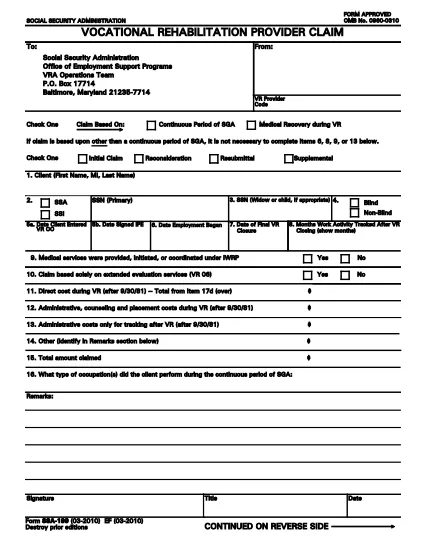
The SSA-199 is the official Vocational Rehabilitation (VR) Provider Claim used by the Social Security Administration (SSA). It allows VR providers to request reimbursement for services rendered to claimants who are receiving Social Security Disability benefits.

Formize.com hosts a fully fillable PDF version of the SSA-199, so you can complete the form directly in your browser—no printing, scanning, or faxing required.

What Is the SSA-199 Form?

The SSA-199 captures essential information about the client, the provider, and the services delivered. It includes sections for:

  • Client identification (name, SSN, date of birth)
  • Provider details (code, address, contact)
  • Type of claim (initial, reconsideration, resubmittal, supplemental)
  • Itemized list of direct costs and services
  • Signature and certification statements

How to Complete the SSA-199 Online

Follow these simple steps to fill out the form using Formize’s PDF Filler:

  1. Click the “Fill out this form” button on the page.
  2. Wait a moment while the Formize PDF Filler app loads the SSA-199.
  3. Enter the required information in each field. The filler automatically saves your progress.
  4. When all sections are complete, click “Save & Download” to get a signed PDF copy.
  5. Print or email the completed form to the SSA address listed on the form.

Common Mistakes to Avoid

  • Leaving fields blank: Incomplete forms are rejected.
  • Using the wrong claim type: Choose Initial, Reconsideration, Resubmittal, or Supplemental as appropriate.
  • Incorrect provider code: Verify your VR provider code before submitting.
  • Failing to itemize costs: Provide detailed descriptions and amounts for each service.

Where to Submit Your Completed Claim

Mail the signed PDF to:

Social Security Administration – Office of Employment Support Programs
VRA Operations Team
P.O. Box 17714
Baltimore, MD 21235-7714

Alternatively, you may fax the form if you have a fax number from your local SSA office.

Download the Fillable SSA-199 PDF

Ready to start? Click the button below to open the fillable SSA-199 form in Formize’s secure PDF Filler.

FAQ
  • What is the purpose of Form SSA-199?

    SSA-199 is used by Vocational Rehabilitation providers to request reimbursement for services provided to Social Security Disability claimants.

  • Can I fill out SSA-199 online without printing?

    Yes. Using Formize’s fillable PDF, you can complete the entire form in your browser and download the finished document.

  • Do I need a special PDF editor to use the fillable form?

    No special software is required. The Formize PDF Filler works in any modern web browser.

  • What claim types are available on SSA-199?

    Select one: Initial Claim, Reconsideration, Resubmittal, or Supplemental.

  • How do I avoid common rejection reasons?

    Make sure every required field is completed, use the correct provider code, choose the proper claim type, and itemize all costs clearly.

  • Is there a fee to download the SSA-199 fillable PDF?

    No. The PDF is provided free of charge through Formize.

  • Can I save my progress and return later?

    Yes. The Formize filler autosaves your entries, allowing you to close the browser and resume later.

  • Where should I send the completed SSA-199?

    Mail it to the Social Security Administration – Office of Employment Support Programs, VRA Operations Team, P.O. Box 17714, Baltimore, MD 21235-7714.

BAGAIMANA CARANYA

Cara mengisi SSA-199 gratis secara online dalam 5 langkah mudah:

  1. 1
    Open the Fillable Form
    Click the “Fill out this form” button on the page. The Formize PDF Filler will load the SSA-199 directly in your browser.
  2. 2
    Enter All Required Information
    Complete each field—client details, provider code, claim type, and itemized services. The filler saves your entries automatically.
  3. 3
    Review and Sign
    Double‑check all entries for accuracy, then add your electronic signature in the designated section.
  4. 4
    Save and Download
    Click “Save & Download” to obtain a completed PDF. You can print it or email it directly to the SSA.
  5. 5
    Submit to SSA
    Mail the signed PDF to the address shown on the form or follow any additional submission instructions from your local SSA office.
Bentuk aplikasi Pengisi PDF
TENTANG

Formulir Jaminan Sosial

SSA-199 adalah salah satu formulir Jaminan Sosial yang merupakan dokumen yang digunakan untuk mengajukan berbagai tunjangan dan layanan yang disediakan oleh Administrasi Jaminan Sosial (SSA) Amerika Serikat. SSA adalah agen federal yang mengelola program yang dirancang untuk memberikan bantuan keuangan kepada individu dan keluarga yang memenuhi syarat, termasuk tunjangan pensiun, tunjangan cacat, tunjangan selamat, dan pendapatan keamanan tambahan (SSI).

Beberapa bentuk Jaminan Sosial yang umum meliputi:

Aplikasi Tunjangan Pensiun Jaminan Sosial: Formulir ini digunakan untuk mengajukan tunjangan pensiun berdasarkan riwayat pekerjaan dan pendapatan seseorang.

Permohonan Tunjangan Kecacatan Jaminan Sosial: Formulir ini digunakan untuk mengajukan tunjangan kecacatan jika seseorang memiliki kondisi fisik atau mental yang menghalangi mereka untuk bekerja.

Aplikasi Manfaat Penyintas Jaminan Sosial: Formulir ini digunakan untuk mengajukan tunjangan penyintas jika pasangan atau orang tua seseorang telah meninggal dunia dan mereka memenuhi syarat untuk mendapatkan tunjangan penyintas.

Aplikasi Pendaftaran Medicare: Formulir ini digunakan untuk mendaftar di Medicare, program asuransi kesehatan federal untuk individu berusia di atas 65 tahun dan penyandang disabilitas atau kondisi medis tertentu.

Formulir Perubahan Alamat: Formulir ini digunakan untuk memperbarui alamat individu dengan SSA.

Formulir Permintaan Catatan Penghasilan: Formulir ini digunakan untuk meminta salinan catatan penghasilan individu, yang digunakan untuk menghitung tunjangan Jaminan Sosial.

Formulir ini dapat diisi secara online, melalui surat, atau secara langsung di kantor Jamsostek setempat. Penting untuk meninjau dan melengkapi semua formulir yang diperlukan dengan hati-hati untuk memastikan pemrosesan manfaat Jaminan Sosial tepat waktu dan akurat.

FITUR

Pengisi PDF

Cara termudah untuk mengisi formulir PDF secara online

  • Isi SSA-199 dengan cepat
    Mencari cara mengisi SSA-199 dengan cepat secara online? Dengan pengisi formulir PDF online gratis kami, Anda akan tahu cara mengedit dan mengisi dokumen pdf ini dalam waktu kurang dari satu menit.
  • Editor PDF online yang mudah digunakan
    Muak dengan mencetak file PDF sehingga Anda dapat mengeditnya, sebelum memindai ulang dan mengirimnya kembali? Edit dokumen PDF secara online gratis. Gunakan editor pdf online kami untuk menghemat waktu dan kertas.
  • Alat hebat, semua platform
    Ingin tahu cara mengisi SSA-199 di Mac, atau mungkin cara menggunakan pengisi PDF gratis? Alat PDF online kami berfungsi di semua platform.
  • Penyimpanan file yang aman
    File "SSA-199" yang telah selesai disimpan dalam database aman yang dikelola oleh hosting Amazon Cloud. Anda dapat menghapus file Anda dari sistem kami kapan saja. Bagaimanapun, file-file ini secara otomatis dihapus setelah 24 jam.
  • Ngobrol dengan SSA-199
    Ngobrol dengan "SSA-199" di Chatize yang merupakan asisten pembaca PDF gratis. Ajukan pertanyaan dan dapatkan jawaban dari "SSA-199". Cukup klik tombol Chat Dengan Dokumen di atas.

Hapus sesi pengisian

Hapus sesi pengisian yang dipilih? Dalam hal ini, kemajuan Anda dalam menyelesaikan formulir akan hilang.

Hapus sesi pengeditan

Hapus sesi pengeditan yang dipilih? Dalam hal ini, kemajuan Anda dalam membuat dan mengedit formulir akan hilang.