
Pilih bahasa

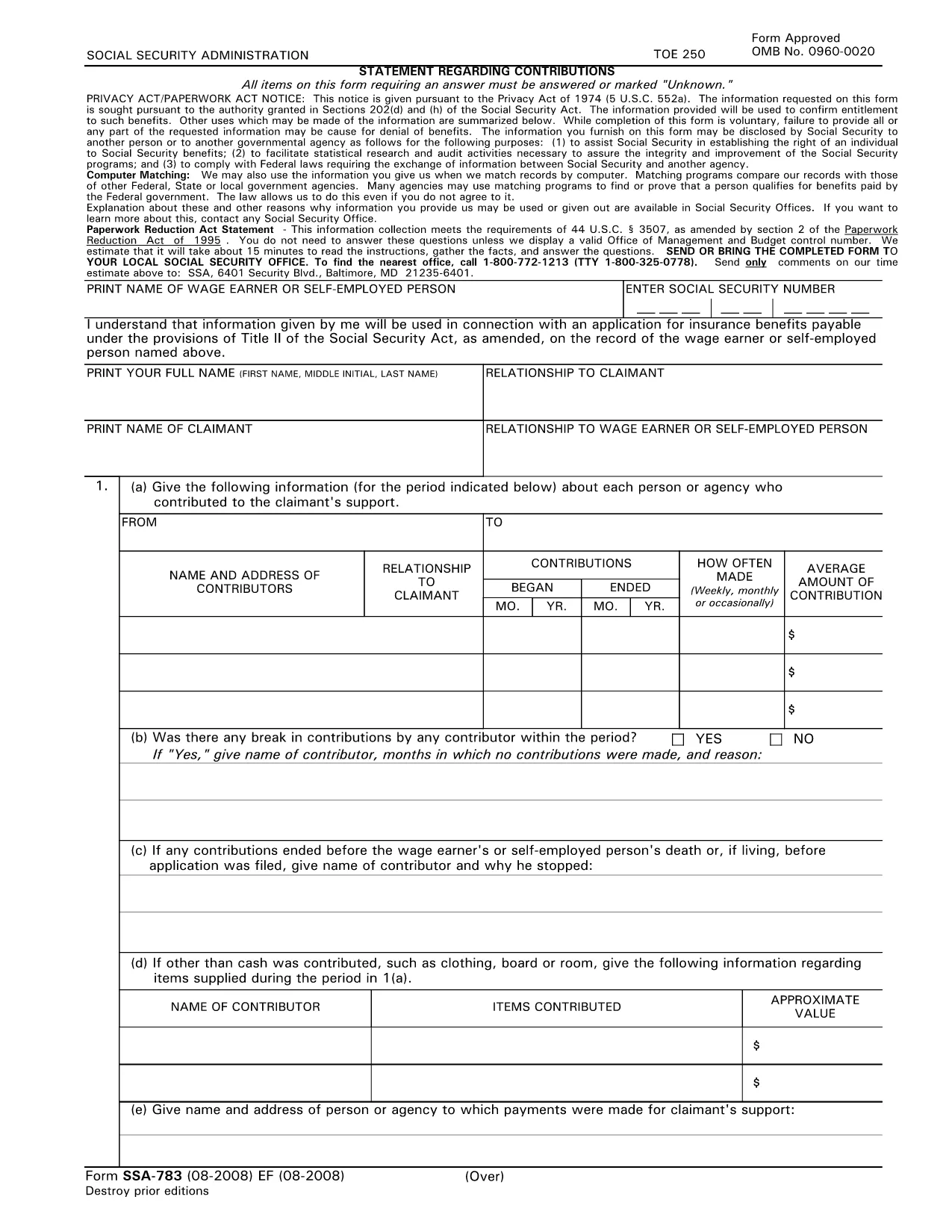
SSA‑783 Statement Regarding Contributions – Fillable PDF Form

  1. Bahasa Bahasa inggris
  2. Negara Amerika Serikat
  3. Aktivitas Keamanan sosial
Isi formulir ini
SSA‑783 Statement Regarding Contributions – Fillable PDF Form

The SSA‑783 Statement Regarding Contributions is the official Social Security Administration (SSA) form used to report contributions made to a claimant’s support. Whether you’re a wage earner, self‑employed person, or an agency, completing this form accurately is essential for establishing benefit eligibility.

What Is the SSA‑783 Form?

SSA‑783 collects detailed information about each contributor, the amount contributed, and the frequency of payments. The data helps the SSA verify entitlement to benefits under Title II of the Social Security Act.

How to Fill Out the SSA‑783 Form Online

With Formize you can complete the SSA‑783 without printing or using a separate PDF editor. Follow these simple steps:

  • Click the "Fill out this form" button on the page.
  • Wait a few seconds while the Formize PDF Filler app loads.
  • Enter your information directly into the fillable fields.
  • Review each section for accuracy, then click Submit to download the completed PDF.

Common Mistakes to Avoid

  • Leaving fields blank: Incomplete forms are rejected.
  • Incorrect dates or amounts: Double‑check contribution periods and dollar figures.
  • Illegible handwriting: Using a digital fillable PDF eliminates this issue.
  • Missing signatures: The form requires the signer’s name and signature at the end.

Where to Submit the Completed Form

After you download the finished SSA‑783 PDF, mail it to your local Social Security office or bring it in person. You can locate the nearest office by calling 1‑800‑772‑1213 (TTY 1‑800‑325‑0778).

Why Use Formize’s Fillable PDF

Formize provides a secure, browser‑based PDF filler that:

  • Eliminates the need for third‑party PDF editors.
  • Auto‑saves your progress so you can return later.
  • Ensures the final document meets SSA formatting requirements.

Ready to start? Click the button below and complete your SSA‑783 in minutes.

Fill out this form

FAQ
  • Who must file the SSA‑783 form?

    Anyone who has received contributions toward a claimant’s support—such as a wage earner, self‑employed individual, or agency—must file SSA‑783 to document those payments.

  • Is the SSA‑783 form free to download?

    Yes. Formize provides a free, downloadable fillable PDF of the SSA‑783 form.

  • Can I save my progress and finish later?

    Yes. The Formize PDF Filler automatically saves your entries, allowing you to return and complete the form at any time.

  • How long does it usually take to complete?

    Most users finish the SSA‑783 in 10‑15 minutes, depending on the number of contributors listed.

  • What should I do if I make a mistake?

    Simply correct the field in the fillable PDF before downloading the final version. If you’ve already submitted, contact your local SSA office for guidance.

  • Where do I send the completed SSA‑783?

    Mail the completed form to your local Social Security office or bring it in person. Use the SSA office locator at 1‑800‑772‑1213 for the nearest address.

  • Can I submit the SSA‑783 electronically?

    The SSA currently requires a hard‑copy submission. After filling it out online, print the PDF and send it by mail.

  • Do I need a special PDF editor?

    No. Formize’s browser‑based filler handles everything—no additional software is required.

  • Is my personal information safe?

    Formize uses SSL encryption to protect all data entered into the fillable PDF. Your information is not stored on our servers after you download the completed form.

  • What if I don’t have all the contribution details?

    Provide as much accurate information as possible. If you’re missing data, note “unknown” in the appropriate fields and explain the gap in the comments section.

BAGAIMANA CARANYA

Cara mengisi SSA-783 gratis secara online dalam 5 langkah mudah:

  1. 1
    Click the Fill‑out Button
    Locate the “Fill out this form” button on the page and click it to launch the Formize PDF Filler.
  2. 2
    Wait for the Filler to Load
    A few seconds after clicking, the fillable PDF interface will appear in your browser.
  3. 3
    Enter Your Information
    Complete each required field—contributor names, dates, amounts, and signatures—using your keyboard.
  4. 4
    Review and Download
    Check all entries for accuracy, then click “Submit” to download the finished SSA‑783 PDF.
  5. 5
    Submit to SSA
    Print the saved PDF (if needed) and mail or deliver it to your local Social Security office.
Bentuk aplikasi Pengisi PDF
TENTANG

Formulir Jaminan Sosial

SSA-783 adalah salah satu formulir Jaminan Sosial yang merupakan dokumen yang digunakan untuk mengajukan berbagai tunjangan dan layanan yang disediakan oleh Administrasi Jaminan Sosial (SSA) Amerika Serikat. SSA adalah agen federal yang mengelola program yang dirancang untuk memberikan bantuan keuangan kepada individu dan keluarga yang memenuhi syarat, termasuk tunjangan pensiun, tunjangan cacat, tunjangan selamat, dan pendapatan keamanan tambahan (SSI).

Beberapa bentuk Jaminan Sosial yang umum meliputi:

Aplikasi Tunjangan Pensiun Jaminan Sosial: Formulir ini digunakan untuk mengajukan tunjangan pensiun berdasarkan riwayat pekerjaan dan pendapatan seseorang.

Permohonan Tunjangan Kecacatan Jaminan Sosial: Formulir ini digunakan untuk mengajukan tunjangan kecacatan jika seseorang memiliki kondisi fisik atau mental yang menghalangi mereka untuk bekerja.

Aplikasi Manfaat Penyintas Jaminan Sosial: Formulir ini digunakan untuk mengajukan tunjangan penyintas jika pasangan atau orang tua seseorang telah meninggal dunia dan mereka memenuhi syarat untuk mendapatkan tunjangan penyintas.

Aplikasi Pendaftaran Medicare: Formulir ini digunakan untuk mendaftar di Medicare, program asuransi kesehatan federal untuk individu berusia di atas 65 tahun dan penyandang disabilitas atau kondisi medis tertentu.

Formulir Perubahan Alamat: Formulir ini digunakan untuk memperbarui alamat individu dengan SSA.

Formulir Permintaan Catatan Penghasilan: Formulir ini digunakan untuk meminta salinan catatan penghasilan individu, yang digunakan untuk menghitung tunjangan Jaminan Sosial.

Formulir ini dapat diisi secara online, melalui surat, atau secara langsung di kantor Jamsostek setempat. Penting untuk meninjau dan melengkapi semua formulir yang diperlukan dengan hati-hati untuk memastikan pemrosesan manfaat Jaminan Sosial tepat waktu dan akurat.

FITUR

Pengisi PDF

Cara termudah untuk mengisi formulir PDF secara online

  • Isi SSA-783 dengan cepat
    Mencari cara mengisi SSA-783 dengan cepat secara online? Dengan pengisi formulir PDF online gratis kami, Anda akan tahu cara mengedit dan mengisi dokumen pdf ini dalam waktu kurang dari satu menit.
  • Editor PDF online yang mudah digunakan
    Muak dengan mencetak file PDF sehingga Anda dapat mengeditnya, sebelum memindai ulang dan mengirimnya kembali? Edit dokumen PDF secara online gratis. Gunakan editor pdf online kami untuk menghemat waktu dan kertas.
  • Alat hebat, semua platform
    Ingin tahu cara mengisi SSA-783 di Mac, atau mungkin cara menggunakan pengisi PDF gratis? Alat PDF online kami berfungsi di semua platform.
  • Penyimpanan file yang aman
    File "SSA-783" yang telah selesai disimpan dalam database aman yang dikelola oleh hosting Amazon Cloud. Anda dapat menghapus file Anda dari sistem kami kapan saja. Bagaimanapun, file-file ini secara otomatis dihapus setelah 24 jam.
  • Ngobrol dengan SSA-783
    Ngobrol dengan "SSA-783" di Chatize yang merupakan asisten pembaca PDF gratis. Ajukan pertanyaan dan dapatkan jawaban dari "SSA-783". Cukup klik tombol Chat Dengan Dokumen di atas.

Hapus sesi pengisian

Hapus sesi pengisian yang dipilih? Dalam hal ini, kemajuan Anda dalam menyelesaikan formulir akan hilang.

Hapus sesi pengeditan

Hapus sesi pengeditan yang dipilih? Dalam hal ini, kemajuan Anda dalam membuat dan mengedit formulir akan hilang.