Pilih bahasa

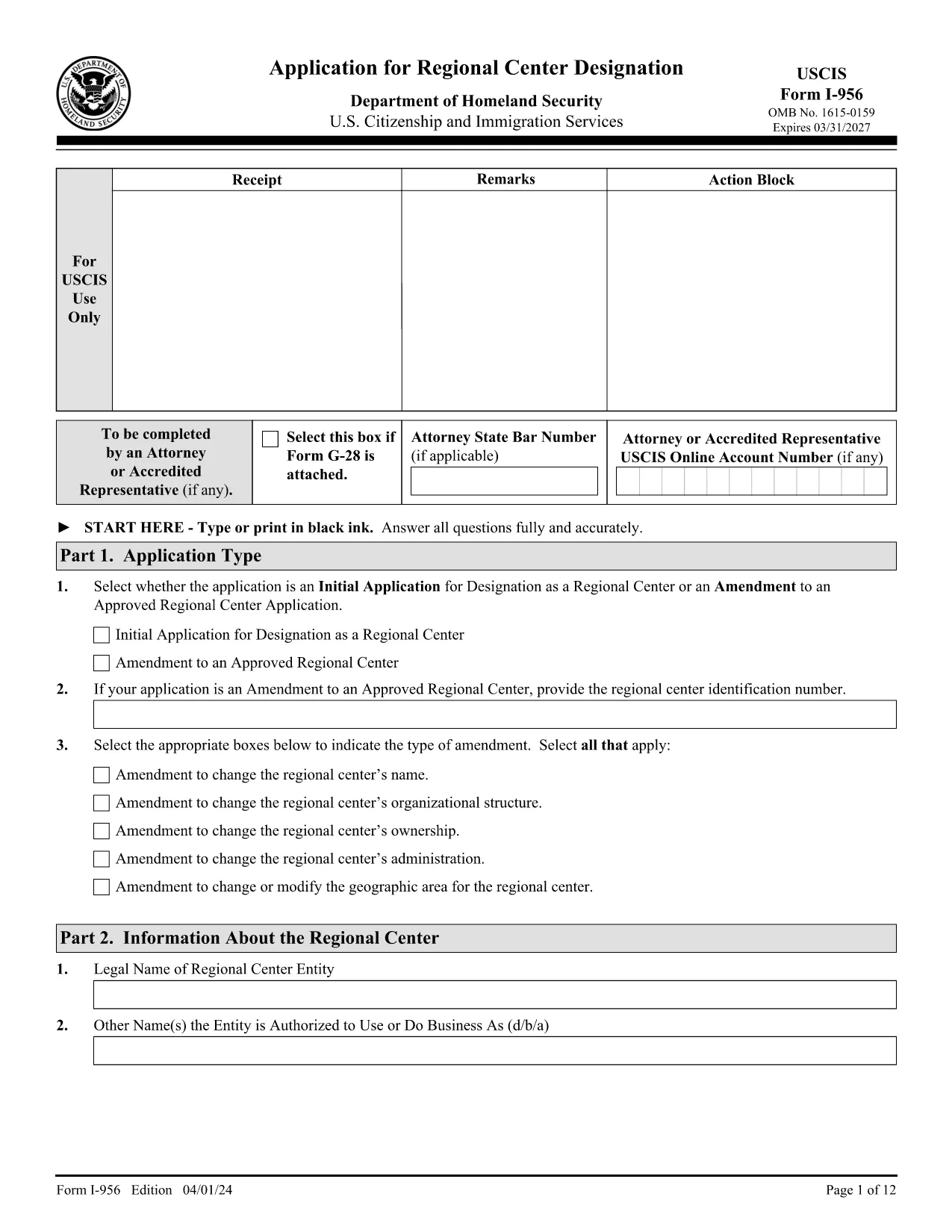
Form I-956 – Application for Regional Center Designation (Fillable PDF)

  1. Negara Amerika Serikat
  2. Bahasa Bahasa inggris
  3. Departemen Layanan Kewarganegaraan dan Imigrasi AS
Form I-956 – Application for Regional Center Designation (Fillable PDF)

The USCIS Form I-956 is the official application used to request designation as a Regional Center under the EB‑5 Immigrant Investor Program, or to amend an existing designation. This form must be completed in English, signed, and submitted with the appropriate filing fee.

Formize provides a secure, fillable PDF version of Form I-956 that works directly in your browser—no extra software needed. Simply click the "Fill out this form" button, let the Formize PDF Filler load, and start entering your information.

What Is Form I-956?

Form I-956 collects detailed information about the proposed or existing regional center, including business structure, proposed projects, investment amounts, and the qualifications of key personnel. The form is a core requirement for EB‑5 investors and project sponsors.

How to Complete Form I-956 Online

Using the Formize fillable version, you can:

  • Navigate between sections with a click.
  • Save your progress and return later.
  • Validate required fields in real time.
  • Print a clean, signed PDF for mailing to the USCIS Lockbox.

Common Filing Mistakes to Avoid

  • Wrong edition date: Ensure every page shows the edition date 04/01/24.
  • Missing signatures: Unsigned forms are rejected.
  • Incorrect fee payment method: Use Form G‑1450 for credit‑card payments or the approved ACH form.
  • Inconsistent page numbers: All pages must be from the same edition.

Submission Guidelines & Filing Fee

Mail the completed Form I-956 to the USCIS Regional Center Designation Lockbox (Dallas, TX) with the current filing fee. Payments must be made electronically unless you qualify for an exemption.

Download & Save the Official PDF

For a hard‑copy backup, you can download the official PDF directly from USCIS. The link below is the exact source used by the U.S. government.

Download Official Form I-956 (PDF)

FAQ
  • What is the purpose of Form I-956?

    Form I-956 is used to request USCIS designation of a Regional Center under the EB‑5 Immigrant Investor Program, or to amend an existing designation.

  • Can I submit Form I-956 electronically?

    No. Form I-956 must be printed, signed, and mailed to the USCIS Lockbox. The fillable PDF helps you prepare a correct paper submission.

  • Do I need a lawyer to complete Form I-956?

    While not required, many applicants work with an immigration attorney to ensure the business plan and supporting evidence meet USCIS standards.

  • What edition of Form I-956 should I use?

    Use the edition dated 04/01/24. All pages of the form and its instructions must show this date; mixing editions leads to rejection.

  • How much is the filing fee for Form I-956?

    The fee varies; check the USCIS Fee Schedule for the current amount. Payments must be made electronically unless you qualify for an exemption.

  • What common errors cause Form I-956 to be rejected?

    Missing signatures, wrong edition date, inconsistent page numbers, and incorrect fee payment method are the top reasons for rejection.

  • Can I save my progress while filling the form online?

    Yes. The Formize fillable PDF allows you to save the document locally and return later to finish it.

  • Where do I mail the completed Form I-956?

    Send the signed form and fee to the USCIS Regional Center Designation Lockbox: P.O. Box 660168, Dallas, TX 75266‑0168.

BAGAIMANA CARANYA

Cara mengisi Form I-956 gratis secara online dalam 5 langkah mudah:

  1. 1
    Open the Fillable Form
    Click the "Fill out this form" button on the page. The Formize PDF Filler app will open in a new tab.
  2. 2
    Wait for the Filler to Load
    The app loads the official I-956 PDF and automatically makes every field editable.
  3. 3
    Enter Your Information
    Complete each section, following the on‑screen prompts. Required fields are highlighted.
  4. 4
    Review and Sign
    Use the built‑in review tool to check for missing data, then add your electronic signature.
  5. 5
    Download or Print
    Save the completed PDF to your computer or print it for mailing to the USCIS Lockbox.
Bentuk aplikasi Pengisi PDF
TENTANG

kerangka Form I-956

Dengan serangkaian fitur tradisional untuk melihat dan mengisi dokumen PDF, dipadukan dengan manfaat aplikasi web dan tata letak responsif, Anda dapat menyelesaikan Form I-956 dalam hitungan menit.

FITUR

Pengisi PDF

Cara termudah untuk mengisi formulir PDF secara online

  • Isi Form I-956 dengan cepat
    Mencari cara mengisi Form I-956 dengan cepat secara online? Dengan pengisi formulir PDF online gratis kami, Anda akan tahu cara mengedit dan mengisi dokumen pdf ini dalam waktu kurang dari satu menit.
  • Editor PDF online yang mudah digunakan
    Muak dengan mencetak file PDF sehingga Anda dapat mengeditnya, sebelum memindai ulang dan mengirimnya kembali? Edit dokumen PDF secara online gratis. Gunakan editor pdf online kami untuk menghemat waktu dan kertas.
  • Alat hebat, semua platform
    Ingin tahu cara mengisi Form I-956 di Mac, atau mungkin cara menggunakan pengisi PDF gratis? Alat PDF online kami berfungsi di semua platform.
  • Penyimpanan file yang aman
    File "Form I-956" yang telah selesai disimpan dalam database aman yang dikelola oleh hosting Amazon Cloud. Anda dapat menghapus file Anda dari sistem kami kapan saja. Bagaimanapun, file-file ini secara otomatis dihapus setelah 24 jam.
  • Ngobrol dengan Form I-956
    Ngobrol dengan "Form I-956" di Chatize yang merupakan asisten pembaca PDF gratis. Ajukan pertanyaan dan dapatkan jawaban dari "Form I-956". Cukup klik tombol Chat Dengan Dokumen di atas.

Hapus sesi pengisian

Hapus sesi pengisian yang dipilih? Dalam hal ini, kemajuan Anda dalam menyelesaikan formulir akan hilang.

Hapus sesi pengeditan

Hapus sesi pengeditan yang dipilih? Dalam hal ini, kemajuan Anda dalam membuat dan mengedit formulir akan hilang.