Pilih bahasa

G-1041A – Genealogy Records Request (Fillable PDF)

  1. Negara Amerika Serikat
  2. Bahasa Bahasa inggris
  3. Aktivitas Immigration Records
  4. Departemen USCIS
G-1041A – Genealogy Records Request (Fillable PDF)

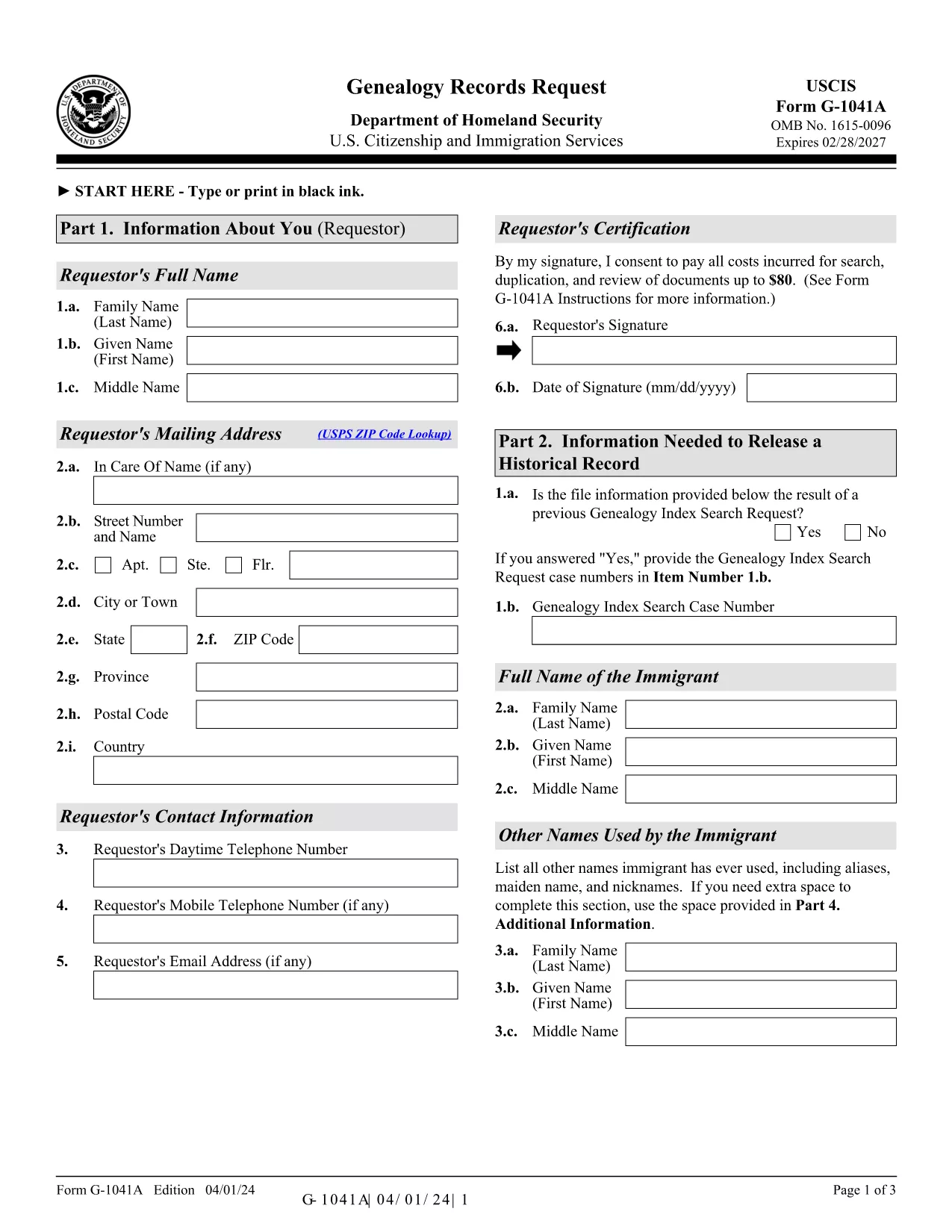
The G-1041A is the official USCIS Genealogy Records Request form. It lets you obtain copies of historical immigration records for yourself or a relative. Instead of printing, scanning, and mailing a static PDF, you can fill the form directly on our site using the Formize PDF Filler – a secure, browser‑based editor that saves you time and eliminates formatting errors.

What Is the G-1041A Form?

G-1041A is used when you need full copies of an immigrant’s USCIS file, such as birth certificates, naturalization records, or travel documents. It is different from Form G-1041, which only requests an index search.

How to Complete the G-1041A with Formize

Follow the simple steps below to fill out the form online and download a completed PDF ready for mailing.

Common Mistakes & Tips for a Successful Submission

  • Use the latest edition – the form edition date is 04/01/24. Our filler always loads the current version.
  • Sign the form – the signature field is required; you can type your name and add a digital signature.
  • Provide English translations for any foreign‑language documents.
  • Do not send original documents unless specifically requested.

Where to Send Your Completed Request

After you download the filled PDF, mail it with the required fee to the USCIS Chicago Lockbox:

USCIS Attn: Genealogy Program
P.O. Box 805925
Chicago, IL 60680‑4188

For faster processing, you can also submit the request online through the USCIS Genealogy Program portal, but the fillable PDF remains the most reliable method for complex cases.

Need help? Review the official USCIS instructions or contact the USCIS Customer Service Center.

FAQ
  • What is the difference between G-1041 and G-1041A?

    Form G-1041 requests an index search of USCIS records, while G-1041A requests full copies of the records once the index is located.

  • Can I submit the G-1041A online instead of by mail?

    Yes, USCIS offers an online portal for genealogy requests, but the fillable PDF is required for many detailed or complex cases.

  • How much does the genealogy request cost?

    USCIS charges a fee for each copy of a document requested (up to $80 per document). Check the current fee schedule on the USCIS website.

  • Do I need to provide proof of death for the person I’m requesting?

    If the record holder is deceased and under 100 years old, you must include a death certificate or other acceptable proof of death.

  • What should I do if I receive a rejection notice?

    Review the notice for missing signatures, incorrect edition dates, or incomplete supporting documents. Correct the issue and resend the form.

  • Is the Formize filler secure for personal data?

    Yes. Formize uses SSL encryption and does not store your data on our servers after the PDF is generated.

BAGAIMANA CARANYA

Cara mengisi G-1041A gratis secara online dalam 5 langkah mudah:

  1. 1
    Open the Fillable Form
    Click the “Fill out this form” button on the page. The Formize PDF Filler app loads directly in your browser.
  2. 2
    Enter Your Information
    Complete each field – name, date of birth, alien registration number, and the relationship to the record holder. Use the Tab key to move quickly.
  3. 3
    Add a Digital Signature
    Type your full name in the signature field or upload a scanned signature image. The app validates the signature format automatically.
  4. 4
    Review & Download
    Click “Review” to check for missing fields. When everything looks correct, press “Download Completed PDF” to save the file to your computer.
  5. 5
    Mail the Request
    Print the downloaded PDF, attach the required fee, and mail it to the USCIS Chicago Lockbox address provided above.
Bentuk aplikasi Pengisi PDF
TENTANG

kerangka G-1041A

Dengan serangkaian fitur tradisional untuk melihat dan mengisi dokumen PDF, dipadukan dengan manfaat aplikasi web dan tata letak responsif, Anda dapat menyelesaikan G-1041A dalam hitungan menit.

FITUR

Pengisi PDF

Cara termudah untuk mengisi formulir PDF secara online

  • Isi G-1041A dengan cepat
    Mencari cara mengisi G-1041A dengan cepat secara online? Dengan pengisi formulir PDF online gratis kami, Anda akan tahu cara mengedit dan mengisi dokumen pdf ini dalam waktu kurang dari satu menit.
  • Editor PDF online yang mudah digunakan
    Muak dengan mencetak file PDF sehingga Anda dapat mengeditnya, sebelum memindai ulang dan mengirimnya kembali? Edit dokumen PDF secara online gratis. Gunakan editor pdf online kami untuk menghemat waktu dan kertas.
  • Alat hebat, semua platform
    Ingin tahu cara mengisi G-1041A di Mac, atau mungkin cara menggunakan pengisi PDF gratis? Alat PDF online kami berfungsi di semua platform.
  • Penyimpanan file yang aman
    File "G-1041A" yang telah selesai disimpan dalam database aman yang dikelola oleh hosting Amazon Cloud. Anda dapat menghapus file Anda dari sistem kami kapan saja. Bagaimanapun, file-file ini secara otomatis dihapus setelah 24 jam.
  • Ngobrol dengan G-1041A
    Ngobrol dengan "G-1041A" di Chatize yang merupakan asisten pembaca PDF gratis. Ajukan pertanyaan dan dapatkan jawaban dari "G-1041A". Cukup klik tombol Chat Dengan Dokumen di atas.

Hapus sesi pengisian

Hapus sesi pengisian yang dipilih? Dalam hal ini, kemajuan Anda dalam menyelesaikan formulir akan hilang.

Hapus sesi pengeditan

Hapus sesi pengeditan yang dipilih? Dalam hal ini, kemajuan Anda dalam membuat dan mengedit formulir akan hilang.