
Pilih bahasa

Alabama Motor Vehicle Power of Attorney (Form MVT‑5‑13)

  1. Bahasa Bahasa inggris
  2. Negara Amerika Serikat
  3. Aktivitas Pendaftaran kendaraan
  4. Negara Alabama
Alabama Motor Vehicle Power of Attorney (Form MVT‑5‑13)

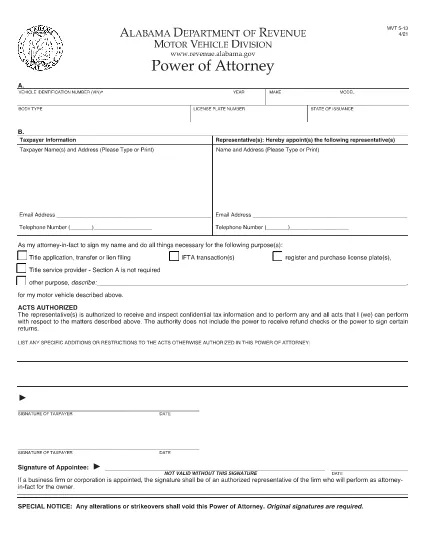
The Alabama Motor Vehicle Power of Attorney (Form MVT‑5‑13) lets a vehicle owner authorize another person—called the appointee or attorney‑in‑fact—to perform specific vehicle‑related tasks such as registration, title transfer, or sale. This form is required whenever the owner cannot be present at the Alabama Department of Revenue or a local licensing office.

What Is Form MVT‑5‑13?

Form MVT‑5‑13 is a short, state‑approved document that grants limited authority to a trusted representative. It is used for:

  • Transferring a vehicle title
  • Registering or renewing a vehicle
  • Submitting a bill of sale
  • Handling lien releases
The form must be signed by both the vehicle owner (taxpayer) and the appointed representative.

How to Fill the MVT‑5‑13 Online

Instead of downloading the PDF and editing it in a separate program, simply click the "Fill out this form" button on this page. The Formize PDF Filler app will load instantly, allowing you to complete every field directly in your browser.

Signing Requirements & Notarization

Alabama law requires:

  • Both the owner and the representative to sign and date the form.
  • A notary public is not mandatory, but a notarized signature adds credibility and is often requested by the licensing office.
If you choose notarization, bring a valid ID and the completed form to a notary.

Common Mistakes to Avoid

  • Leaving sections blank: Every field marked with an asterisk (*) is required.
  • Incorrect VIN: Double‑check the Vehicle Identification Number; a single digit error can delay processing.
  • Mismatched signatures: The signatures on the PDF must match the printed names exactly.
  • Using an expired form: Ensure you are using the latest version (the link below is the current 2021 revision).

Where to Submit the Completed Form

After filling and signing, you can:

  • Bring the printed form to any Alabama Department of Revenue office.
  • Mail it to the appropriate Vehicle Licensing Office.
  • Upload a scanned copy through the online portal if the agency permits electronic submissions.
Having a clean, correctly completed Form MVT‑5‑13 speeds up title transfers and registration renewals.

Download the official PDF version of Form MVT‑5‑13 for reference or offline use.

FAQ
  • Who can be appointed as an attorney‑in‑fact on Form MVT‑5‑13?

    Any adult individual you trust – a family member, friend, attorney, or title‑service representative – can be appointed, as long as they are willing to sign the form.

  • Is notarization required for the MVT‑5‑13?

    Alabama law does not require notarization, but many licensing offices prefer or require a notarized signature for added security.

  • Can I use the same Form MVT‑5‑13 for multiple vehicles?

    No. Each vehicle requires its own completed Form MVT‑5‑13 with the specific VIN, make, model, and year.

  • How long is the power of attorney valid?

    The form remains effective until the vehicle transaction is completed, or until you submit a written revocation to the Department of Revenue.

  • What should I do if I make a mistake after signing?

    Correct the error by crossing out the mistake, initialing the change, and having both the owner and representative sign again. For major errors, submit a new Form MVT‑5‑13.

  • Can I submit the form electronically?

    Some county offices accept scanned copies via their online portals. Check with your local licensing office for electronic submission policies.

  • Do I need to provide additional documents with the POA?

    Typically you’ll need the vehicle’s current title, a valid photo ID for both parties, and any applicable fees for the transaction you’re performing.

  • Is there a fee to download the PDF?

    No. The PDF is provided free of charge; you only pay any notary or filing fees required by the Department of Revenue.

BAGAIMANA CARANYA

Cara mengisi MVT-5-13 gratis secara online dalam 5 langkah mudah:

  1. 1
    Click the Fill Button
    Press the “Fill out this form” button on the page. The Formize PDF Filler app loads instantly in your browser.
  2. 2
    Enter All Required Information
    Complete each field – vehicle details, owner information, and representative details. Required fields are marked with an asterisk (*).
  3. 3
    Review and Sign
    Double‑check the entered data, then use the built‑in signature tool to sign as the owner and as the appointee.
  4. 4
    Download or Email the Completed Form
    When you’re satisfied, click “Save & Download” to get a copy, or choose “Email” to send the filled PDF directly to the licensing office.
  5. 5
    Print and Notarize (if needed)
    Print the saved PDF, bring it to a notary public for notarization if your local office requires it, then submit the final document.
Bentuk aplikasi Pengisi PDF
TENTANG

Formulir Pendaftaran Kendaraan

MVT-5-13 adalah salah satu formulir STNK yang merupakan dokumen yang digunakan untuk mendaftarkan kendaraan bermotor pada otoritas pemerintah terkait, biasanya Departemen Kendaraan Bermotor (DMV) atau lembaga setara. Formulir ini diperlukan ketika seseorang membeli kendaraan baru atau bekas, mengalihkan kepemilikan kendaraan, atau pindah ke yurisdiksi baru dengan membawa kendaraan.

Formulir registrasi kendaraan tertentu dapat berbeda-beda di setiap yurisdiksi, namun umumnya memerlukan informasi berikut:

Informasi Kendaraan: Ini mencakup detail tentang kendaraan, seperti merek, model, tahun, nomor identifikasi kendaraan (VIN), dan pembacaan odometer.

Informasi Pemilik: Formulir ini memerlukan informasi tentang pemilik kendaraan, termasuk nama, alamat, informasi kontak, dan nomor SIM.

Bukti Kepemilikan: Tergantung pada keadaan, bukti kepemilikan mungkin diperlukan, seperti sertifikat hak milik, tagihan penjualan, atau surat keterangan asal pabrikan (untuk kendaraan baru).

Informasi Asuransi: Bukti perlindungan asuransi kendaraan yang valid biasanya diperlukan. Ini mungkin termasuk memberikan nomor polis asuransi, tanggal pertanggungan, dan rincian perusahaan asuransi.

Pembayaran Biaya: Pendaftaran kendaraan melibatkan pembayaran berbagai biaya, seperti biaya pendaftaran, pajak, dan mungkin biaya lain yang spesifik untuk yurisdiksi.

Selain persyaratan dasar ini, beberapa yurisdiksi mungkin memiliki persyaratan formulir atau dokumentasi tambahan. Misalnya, hasil uji emisi, inspeksi keselamatan, atau bukti domisili mungkin diperlukan di wilayah tertentu.

Setelah formulir STNK dilengkapi dan diserahkan, otoritas pemerintah akan menerbitkan STNK, plat nomor, dan stiker STNK. Dokumen-dokumen ini menunjukkan bahwa kendaraan tersebut terdaftar secara sah dan diizinkan untuk dioperasikan di jalan umum.

Penting untuk dicatat bahwa persyaratan registrasi kendaraan dapat sangat bervariasi menurut yurisdiksi. Oleh karena itu, disarankan untuk berkonsultasi dengan DMV setempat atau lembaga setara mengenai formulir dan prosedur khusus yang berlaku di lokasi Anda.

FITUR

Pengisi PDF

Cara termudah untuk mengisi formulir PDF secara online

  • Isi MVT-5-13 dengan cepat
    Mencari cara mengisi MVT-5-13 dengan cepat secara online? Dengan pengisi formulir PDF online gratis kami, Anda akan tahu cara mengedit dan mengisi dokumen pdf ini dalam waktu kurang dari satu menit.
  • Editor PDF online yang mudah digunakan
    Muak dengan mencetak file PDF sehingga Anda dapat mengeditnya, sebelum memindai ulang dan mengirimnya kembali? Edit dokumen PDF secara online gratis. Gunakan editor pdf online kami untuk menghemat waktu dan kertas.
  • Alat hebat, semua platform
    Ingin tahu cara mengisi MVT-5-13 di Mac, atau mungkin cara menggunakan pengisi PDF gratis? Alat PDF online kami berfungsi di semua platform.
  • Penyimpanan file yang aman
    File "MVT-5-13" yang telah selesai disimpan dalam database aman yang dikelola oleh hosting Amazon Cloud. Anda dapat menghapus file Anda dari sistem kami kapan saja. Bagaimanapun, file-file ini secara otomatis dihapus setelah 24 jam.
  • Ngobrol dengan MVT-5-13
    Ngobrol dengan "MVT-5-13" di Chatize yang merupakan asisten pembaca PDF gratis. Ajukan pertanyaan dan dapatkan jawaban dari "MVT-5-13". Cukup klik tombol Chat Dengan Dokumen di atas.

Hapus sesi pengisian

Hapus sesi pengisian yang dipilih? Dalam hal ini, kemajuan Anda dalam menyelesaikan formulir akan hilang.

Hapus sesi pengeditan

Hapus sesi pengeditan yang dipilih? Dalam hal ini, kemajuan Anda dalam membuat dan mengedit formulir akan hilang.