
Pilih bahasa

Connecticut Cert-106 Vehicle Use Tax Refund Form (Fillable PDF)

  1. Bahasa Bahasa inggris
  2. Negara Amerika Serikat
  3. Aktivitas Pendaftaran kendaraan
  4. Negara Connecticut
Connecticut Cert-106 Vehicle Use Tax Refund Form (Fillable PDF)

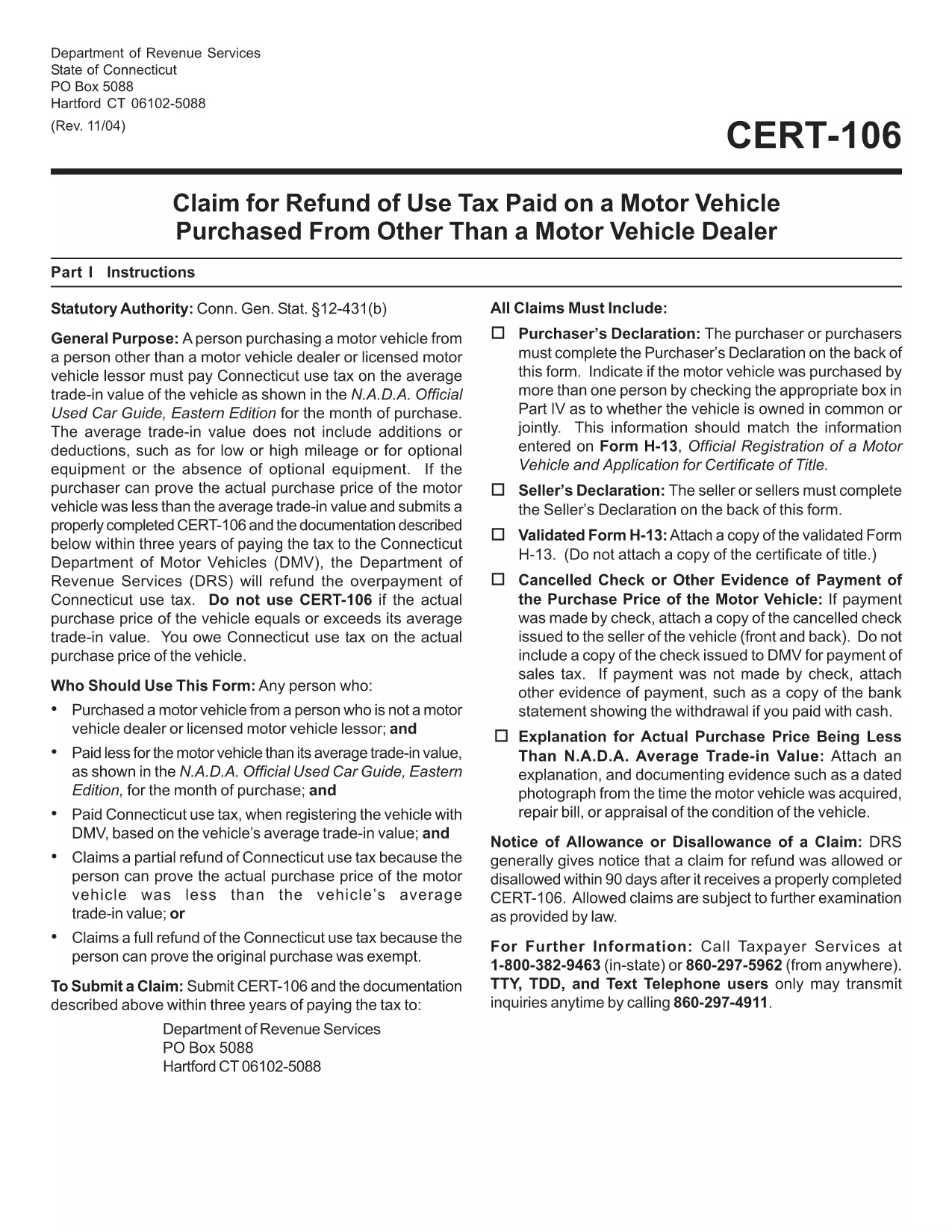
The Connecticut Cert-106 is the official claim form used to request a refund of use tax paid on a motor vehicle purchase. Whether you bought a car, truck, or motorcycle and believe you over‑paid tax, this fillable PDF lets you submit a proper request to the Connecticut Department of Revenue Services (DRS) quickly and accurately.

What is the Cert-106 Form?

Cert-106, officially titled “Claim for Refund of Use Tax Paid on Motor Vehicle Purchased,” collects essential details about the buyer, the vehicle, and the tax paid. The DRS reviews the information and, if eligible, issues a refund.

Who Needs to File Cert-106?

  • Individuals who purchased a vehicle and paid Connecticut use tax but qualify for a refund (e.g., out‑of‑state purchase, trade‑in adjustments).
  • Dealers or businesses that acted as the purchaser on behalf of a client.
  • Anyone who can provide proof of tax payment and supporting documentation within three years of the payment date.

How to Fill Out Cert-106 Online

Instead of printing, scanning, or manually typing, use Formize’s built‑in PDF filler:

  1. Click the "Fill out this form" button on this page.
  2. Wait a few seconds while the Formize PDF Filler app loads the Cert‑106 template.
  3. Enter your information directly into the fields (name, address, vehicle details, tax amount, etc.).
  4. Upload any required documents (receipt, proof of payment, vehicle title) using the attachment icons.
  5. Review the completed form, then click Save & Download or Submit according to your preferred filing method.

Common Mistakes to Avoid

  • Missing signatures: The purchaser’s declaration on the back of the form must be signed.
  • Incorrect dates: Use the exact date the tax was paid, not the purchase date.
  • Incomplete documentation: Attach the original receipt and any trade‑in paperwork; otherwise the claim will be rejected.
  • Submitting after three years: The DRS only accepts claims within three years of the tax payment.

Where to Submit Your Completed Form

After you’ve filled and saved the PDF, you can:

  • Mail it to Department of Revenue Services, PO Box 5088, Hartford, CT 06102‑5088.
  • Upload it through the Connecticut DRS online portal (if you have an account).
  • Deliver it in person to a local DRS office for immediate assistance.

Using Formize’s fillable PDF eliminates the hassle of printing, scanning, or re‑typing. Get your refund faster and keep a digital copy for your records.

FAQ
  • What is the purpose of Cert‑106?

    Cert‑106 is used to claim a refund of Connecticut use tax paid on a motor vehicle when the taxpayer qualifies for a refund.

  • Can I file Cert‑106 electronically?

    Yes. Fill the form online with Formize’s fillable PDF, save the completed document, and then upload or mail it to the Department of Revenue Services.

  • How long do I have to submit a Cert‑106 claim?

    Claims must be submitted within three years of the date the tax was paid.

  • What supporting documents are required?

    You need the original tax receipt, vehicle purchase agreement or title, and any trade‑in documentation that affects the tax amount.

  • Do I need a signature on the form?

    Yes. The purchaser’s declaration on the back of Cert‑106 must be signed for the claim to be valid.

  • Is there a filing fee for Cert‑106?

    No. There is no fee to submit a Cert‑106 claim, but you must provide accurate information to avoid processing delays.

  • Can a business use Cert‑106?

    Businesses that purchased a vehicle and paid use tax can also file Cert‑106 to request a refund.

  • What if my claim is denied?

    The DRS will send a written explanation. You can correct any errors and resubmit, or appeal the decision according to the DRS guidelines.

BAGAIMANA CARANYA

Cara mengisi cert-106 gratis secara online dalam 5 langkah mudah:

  1. 1
    Open the Fillable Form
    Click the "Fill out this form" button on the page. The Formize PDF Filler app will open automatically.
  2. 2
    Enter Your Information
    Type directly into each field – name, address, vehicle details, tax amount, and any other required data.
  3. 3
    Attach Supporting Documents
    Use the attachment icons to upload receipts, proof of tax payment, and the vehicle title.
  4. 4
    Review & Save
    Double‑check every entry, then click "Save & Download" to keep a copy or "Submit" to send it to the DRS.
  5. 5
    Send Your Claim
    Mail the saved PDF to the DRS address, upload it via the online portal, or deliver it in person.
Bentuk aplikasi Pengisi PDF
TENTANG

Formulir Pendaftaran Kendaraan

Jika Anda memiliki atau menyewa kendaraan bermotor, trailer, atau perahu, Anda harus memenuhi kewajiban tertentu untuk menjaga agar kendaraan Anda terdaftar secara sah dan aman.

cert-106 adalah salah satu formulir STNK yang merupakan dokumen yang digunakan untuk mendaftarkan kendaraan bermotor dengan otoritas negara bagian atau provinsi terkait. Formulir ini biasanya diperlukan saat seseorang membeli kendaraan baru atau bekas atau saat mereka pindah ke negara bagian atau provinsi baru dengan kendaraan.

Persyaratan dan formulir pasti yang diperlukan untuk pendaftaran kendaraan dapat berbeda-beda di setiap lokasi, tetapi umumnya, prosesnya mencakup pemberian informasi tentang kendaraan, pemilik, dan hak gadai apa pun pada kendaraan tersebut.

Setelah formulir pendaftaran dan biaya diserahkan, otoritas negara bagian atau provinsi akan menerbitkan sertifikat pendaftaran atau plat nomor kepada pemilik kendaraan. Pendaftaran ini memungkinkan kendaraan untuk dioperasikan secara legal di jalan umum dan jalan raya.

FITUR

Pengisi PDF

Cara termudah untuk mengisi formulir PDF secara online

  • Isi cert-106 dengan cepat
    Mencari cara mengisi cert-106 dengan cepat secara online? Dengan pengisi formulir PDF online gratis kami, Anda akan tahu cara mengedit dan mengisi dokumen pdf ini dalam waktu kurang dari satu menit.
  • Editor PDF online yang mudah digunakan
    Muak dengan mencetak file PDF sehingga Anda dapat mengeditnya, sebelum memindai ulang dan mengirimnya kembali? Edit dokumen PDF secara online gratis. Gunakan editor pdf online kami untuk menghemat waktu dan kertas.
  • Alat hebat, semua platform
    Ingin tahu cara mengisi cert-106 di Mac, atau mungkin cara menggunakan pengisi PDF gratis? Alat PDF online kami berfungsi di semua platform.
  • Penyimpanan file yang aman
    File "cert-106" yang telah selesai disimpan dalam database aman yang dikelola oleh hosting Amazon Cloud. Anda dapat menghapus file Anda dari sistem kami kapan saja. Bagaimanapun, file-file ini secara otomatis dihapus setelah 24 jam.
  • Ngobrol dengan cert-106
    Ngobrol dengan "cert-106" di Chatize yang merupakan asisten pembaca PDF gratis. Ajukan pertanyaan dan dapatkan jawaban dari "cert-106". Cukup klik tombol Chat Dengan Dokumen di atas.

Hapus sesi pengisian

Hapus sesi pengisian yang dipilih? Dalam hal ini, kemajuan Anda dalam menyelesaikan formulir akan hilang.

Hapus sesi pengeditan

Hapus sesi pengeditan yang dipilih? Dalam hal ini, kemajuan Anda dalam membuat dan mengedit formulir akan hilang.