
Pilih bahasa

Form 2305 – Affidavit to Establish Title to Exempt Property (Fillable PDF)

  1. Bahasa Bahasa inggris
  2. Negara Amerika Serikat
  3. Aktivitas Pendaftaran kendaraan
  4. Negara Missouri
Form 2305 – Affidavit to Establish Title to Exempt Property (Fillable PDF)

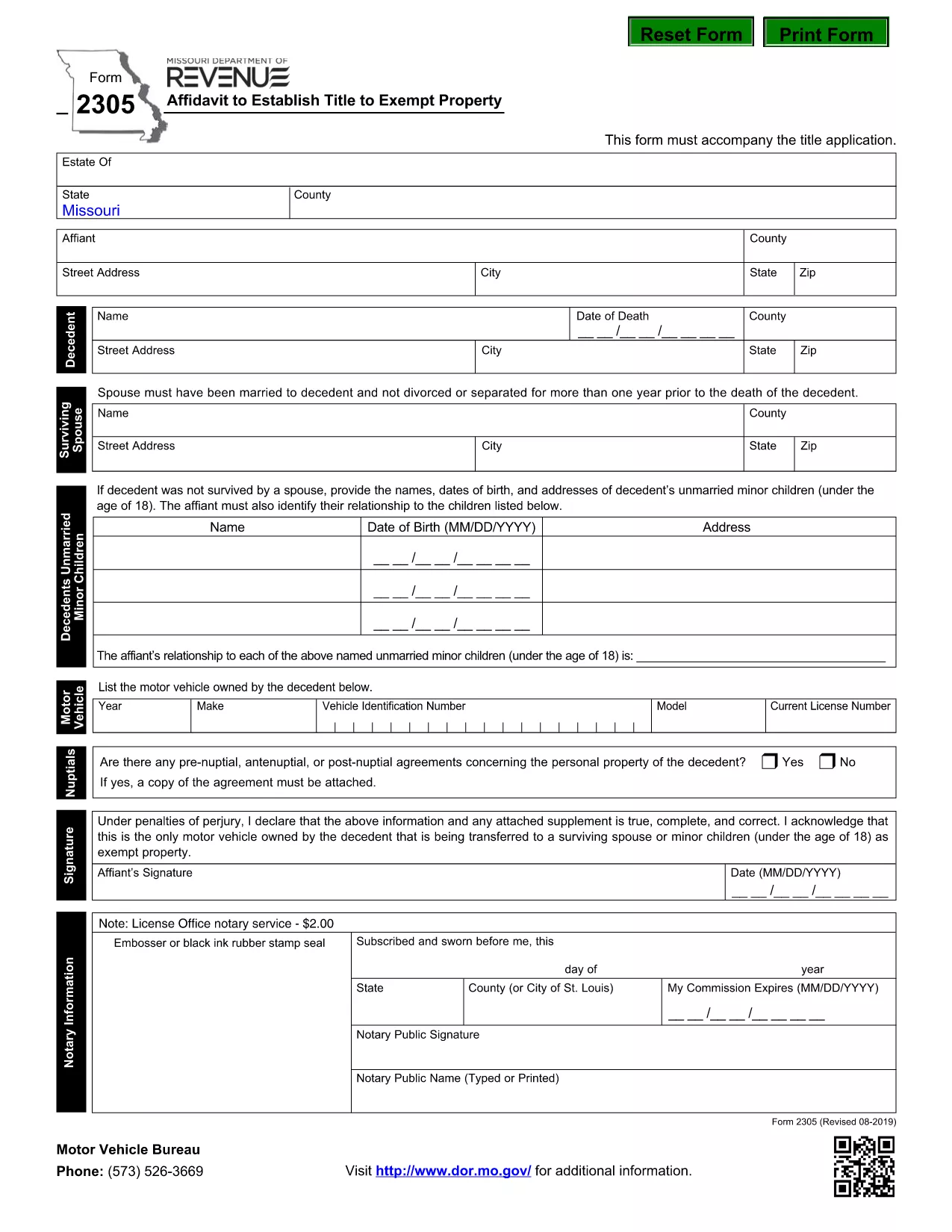
The Missouri Form 2305 – Affidavit to Establish Title to Exempt Property – is used when a deceased person’s estate needs to prove ownership of property that is exempt from certain taxes. This form must accompany the title application and include details such as the motor vehicle or other exempt items owned by the decedent.

What Is Form 2305 and When Is It Required?

Form 2305 is required by the Missouri Department of Revenue whenever you are applying for a title transfer of property that is exempt from the state's personal property tax. Typical scenarios include:

  • Vehicle owned by a deceased family member.
  • Equipment or machinery that qualifies for a tax exemption.
  • Any other personal property listed as exempt under Missouri law.

How to Complete Form 2305 Online with Formize

Instead of downloading the PDF and editing it manually, you can fill the form directly on our page:

  1. Click the "Fill out this form" button below.
  2. Wait a few seconds while the Formize PDF Filler app loads.
  3. Enter the required information in each fillable field.
  4. Review your entries, then click Save & Download to get a completed PDF.

All data stays secure, and you’ll have a printable, ready‑to‑submit document in minutes.

Common Mistakes to Avoid on Form 2305

  • Incorrect Decedent Information: Double‑check the name, Social Security number, and date of death.
  • Missing Vehicle Details: Provide the VIN, make, model, and year for every vehicle listed.
  • Signature Errors: The affidavit must be signed by the executor or personal representative; unsigned forms are rejected.
  • Leaving Blank Fields: If a field does not apply, write “N/A” rather than leaving it empty.

Download the Official Fillable PDF

For a hard‑copy version or offline use, you can download the official Missouri form directly from the Department of Revenue:

Download Form 2305 (PDF)

FAQ
  • What is the purpose of Form 2305?

    Form 2305 is an affidavit used to establish legal title to property that is exempt from Missouri personal property tax, typically required during a title transfer after a death.

  • Do I need a notary for Form 2305?

    The Missouri Department of Revenue does not require notarization, but the form must be signed by the executor or personal representative of the estate.

  • Can I submit the form electronically?

    Yes. After completing the fillable PDF with Formize, you can print the signed copy and mail it with your title application. Some counties also accept scanned PDFs.

  • What if I make a mistake after submitting?

    Contact the Missouri Department of Revenue to request a corrected affidavit. You will need to submit a new Form 2305 with the accurate information.

  • Is there a filing fee for Form 2305?

    No separate fee is charged for the affidavit itself, but standard title transfer fees may apply.

  • How long does it take to process the affidavit?

    Processing time varies by county, but once the completed Form 2305 is received with the title application, it is usually reviewed within 5‑10 business days.

  • Can I use the same form for multiple exempt items?

    Yes. List each exempt vehicle or property on a separate line within the form’s schedule section.

  • Where can I get help if I have questions?

    Visit the Missouri Department of Revenue website or call their customer service line for assistance with Form 2305.

BAGAIMANA CARANYA

Cara mengisi Form 2305 gratis secara online dalam 4 langkah mudah:

  1. 1
    Open the Fillable Form
    Click the "Fill out this form" button on the page. The Formize PDF Filler will open in your browser.
  2. 2
    Enter Required Information
    Complete each field with the decedent’s details, vehicle information, and any exempt property data. Use "N/A" for non‑applicable sections.
  3. 3
    Review and Sign
    Double‑check all entries for accuracy. Add the executor’s signature electronically if the form supports it, or print to sign later.
  4. 4
    Save and Download
    When finished, click "Save & Download" to obtain a completed PDF that you can print and submit to the Missouri Department of Revenue.
Bentuk aplikasi Pengisi PDF
TENTANG

Formulir Pendaftaran Kendaraan

Form 2305 adalah salah satu formulir DMV disebut juga formulir Departemen Kendaraan Bermotor yang merupakan dokumen yang digunakan dalam berbagai transaksi dan proses yang berkaitan dengan kendaraan bermotor. DMV adalah lembaga pemerintah yang bertanggung jawab atas perizinan pengemudi, STNK, dan penegakan hukum kendaraan bermotor. Formulir DMV spesifik yang tersedia dapat berbeda-beda di setiap yurisdiksi, namun berikut adalah beberapa contoh umum:

Formulir Surat Izin Mengemudi: Formulir ini digunakan untuk mengajukan permohonan Surat Izin Mengemudi atau untuk meminta perubahan atau perpanjangan. Mereka biasanya memerlukan informasi pribadi, bukti identitas, dan mungkin menyertakan bagian untuk informasi medis atau riwayat mengemudi.

Formulir Pendaftaran Kendaraan: Formulir ini digunakan untuk mendaftarkan kendaraan bermotor ke DMV. Mereka memerlukan informasi kendaraan, rincian kepemilikan, dan bukti asuransi.

Formulir Pengalihan Hak: Saat membeli atau menjual kendaraan, formulir ini digunakan untuk mengalihkan kepemilikan dari satu pihak ke pihak lain. Mereka memerlukan informasi tentang pembeli, penjual, rincian kendaraan, dan mungkin termasuk tagihan penjualan.

Formulir Pelepasan Kendaraan: Saat menjual atau mengalihkan kepemilikan kendaraan, formulir ini memberi tahu DMV bahwa penjual tidak lagi bertanggung jawab atas kendaraan tersebut. Ini membantu melindungi penjual dari tanggung jawab atas kecelakaan atau insiden yang melibatkan kendaraan setelah penjualan.

Formulir Perpanjangan Plat Nomor dan Registrasi: Formulir ini digunakan untuk memperbarui STNK atau meminta pelat nomor baru. Mereka biasanya memerlukan informasi tentang pemilik terdaftar, rincian pendaftaran saat ini, dan pembayaran biaya yang berlaku.

Formulir Permintaan Catatan Mengemudi: Formulir ini memungkinkan individu untuk meminta catatan mengemudi mereka dari DMV, yang memberikan informasi tentang pelanggaran mengemudi, status SIM, dan detail relevan lainnya.

Formulir Pelat Nomor Khusus atau Personalisasi: Formulir ini digunakan untuk mengajukan permohonan pelat nomor yang dipersonalisasi atau khusus, yang memungkinkan individu untuk menyesuaikan pelat nomornya dengan karakter atau desain tertentu.

Ini hanyalah beberapa contoh dari banyak formulir yang mungkin tersedia melalui DMV. Formulir dan persyaratan spesifik dapat berbeda-beda di setiap yurisdiksi, jadi penting untuk berkonsultasi dengan situs web DMV setempat atau mengunjungi kantor DMV untuk mendapatkan formulir yang tepat untuk kebutuhan khusus Anda.

FITUR

Pengisi PDF

Cara termudah untuk mengisi formulir PDF secara online

  • Isi Form 2305 dengan cepat
    Mencari cara mengisi Form 2305 dengan cepat secara online? Dengan pengisi formulir PDF online gratis kami, Anda akan tahu cara mengedit dan mengisi dokumen pdf ini dalam waktu kurang dari satu menit.
  • Editor PDF online yang mudah digunakan
    Muak dengan mencetak file PDF sehingga Anda dapat mengeditnya, sebelum memindai ulang dan mengirimnya kembali? Edit dokumen PDF secara online gratis. Gunakan editor pdf online kami untuk menghemat waktu dan kertas.
  • Alat hebat, semua platform
    Ingin tahu cara mengisi Form 2305 di Mac, atau mungkin cara menggunakan pengisi PDF gratis? Alat PDF online kami berfungsi di semua platform.
  • Penyimpanan file yang aman
    File "Form 2305" yang telah selesai disimpan dalam database aman yang dikelola oleh hosting Amazon Cloud. Anda dapat menghapus file Anda dari sistem kami kapan saja. Bagaimanapun, file-file ini secara otomatis dihapus setelah 24 jam.
  • Ngobrol dengan Form 2305
    Ngobrol dengan "Form 2305" di Chatize yang merupakan asisten pembaca PDF gratis. Ajukan pertanyaan dan dapatkan jawaban dari "Form 2305". Cukup klik tombol Chat Dengan Dokumen di atas.

Hapus sesi pengisian

Hapus sesi pengisian yang dipilih? Dalam hal ini, kemajuan Anda dalam menyelesaikan formulir akan hilang.

Hapus sesi pengeditan

Hapus sesi pengeditan yang dipilih? Dalam hal ini, kemajuan Anda dalam membuat dan mengedit formulir akan hilang.