
Pilih bahasa

MV70A Inspection Checklist – Fillable PDF

  1. Bahasa Bahasa inggris
  2. Negara Amerika Serikat
  3. Aktivitas Pendaftaran kendaraan
  4. Negara Montana
MV70A Inspection Checklist – Fillable PDF

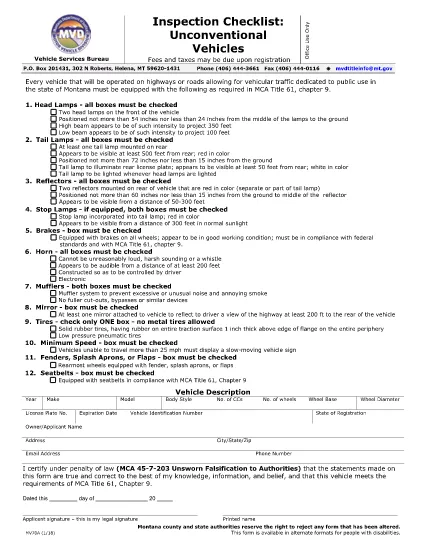
The MV70A Inspection Checklist is the official Montana Motor Vehicle Department (MVD) form used to certify that an unconventional vehicle—such as a custom‑built car, kit car, or modified motorcycle—meets safety standards before it can be titled and registered.

What Is the MV70A Form?

Form MV70A documents the visual and functional inspection of the vehicle. It includes sections for the inspector’s signature, the applicant’s printed name, and detailed check‑boxes covering brakes, lights, emissions, and chassis integrity. The form is required for any vehicle that does not fall under standard Montana registration categories.

How to Complete the MV70A Online

Instead of printing, signing, and scanning, you can fill out the MV70A directly in your browser using Formize’s secure PDF filler:

  1. Click the "Fill out this form" button on this page.
  2. Wait a few seconds while the Formize PDF Filler app loads.
  3. Enter the requested information in each fillable field. The interface guides you through required sections.
  4. When you finish, click Save to download a completed PDF or Print to submit a hard copy.

Common Mistakes to Avoid

  • Leaving required fields blank: The online filler highlights missing information before you can save.
  • Using altered or handwritten entries: The MVD rejects any form that appears altered; stick to typed text.
  • Skipping the inspector’s signature: Even if you are the owner, a certified inspector must sign the checklist.

Where to Submit the Completed Form

After saving the completed MV70A, you have two options:

  • In‑person: Bring the PDF (printed) to any Montana MVD office or authorized inspection station.
  • Mail: Send the printed form to the address listed on the MVD website along with any required fees.

Benefits of Using Formize PDF Filler

Formize provides a fast, secure, and accessible way to complete the MV70A. The fillable PDF is fully compatible with disability‑access tools, and your data is stored locally—no third‑party servers keep a copy of your personal information.

FAQ
  • Is the MV70A form available in a fillable format?

    Yes. Formize provides a fully fillable PDF version that works in any modern web browser without additional software.

  • Can I submit the MV70A electronically?

    The Montana MVD currently requires a printed, signed copy, but you can use the online filler to complete the form and then print it for submission.

  • What types of vehicles need the MV70A?

    Any non‑conforming or unconventional vehicle—such as kit cars, custom builds, and certain motorcycles—must be inspected with the MV70A before registration.

  • Do I need a certified inspector to sign the form?

    Yes. The inspector’s signature is mandatory. The form cannot be approved with only the owner’s signature.

  • How long is the MV70A valid after inspection?

    The checklist is valid for the specific inspection date listed on the form. If the vehicle fails, a new inspection and form are required.

  • Is there a fee to use Formize’s PDF filler?

    Formize offers a free basic filler for standard forms like MV70A. No payment is required to complete and download the document.

BAGAIMANA CARANYA

Cara mengisi MV70A gratis secara online dalam 4 langkah mudah:

  1. 1
    Open the Fillable Form
    Click the “Fill out this form” button on the page. The Formize PDF Filler will open in a new tab.
  2. 2
    Load the MV70A Document
    The MV70A PDF loads automatically. All fields become interactive text boxes.
  3. 3
    Enter Your Information
    Type the required details—owner name, vehicle VIN, inspection results—into each highlighted field.
  4. 4
    Save or Print
    When every required field is completed, click “Save” to download the finished PDF or “Print” to produce a hard copy for submission.
Bentuk aplikasi Pengisi PDF
TENTANG

Formulir Pendaftaran Kendaraan

MV70A adalah salah satu formulir STNK yang merupakan dokumen yang digunakan untuk mendaftarkan kendaraan bermotor pada otoritas pemerintah terkait, biasanya Departemen Kendaraan Bermotor (DMV) atau lembaga setara. Formulir ini diperlukan ketika seseorang membeli kendaraan baru atau bekas, mengalihkan kepemilikan kendaraan, atau pindah ke yurisdiksi baru dengan membawa kendaraan.

Formulir registrasi kendaraan tertentu dapat berbeda-beda di setiap yurisdiksi, namun umumnya memerlukan informasi berikut:

Informasi Kendaraan: Ini mencakup detail tentang kendaraan, seperti merek, model, tahun, nomor identifikasi kendaraan (VIN), dan pembacaan odometer.

Informasi Pemilik: Formulir ini memerlukan informasi tentang pemilik kendaraan, termasuk nama, alamat, informasi kontak, dan nomor SIM.

Bukti Kepemilikan: Tergantung pada keadaan, bukti kepemilikan mungkin diperlukan, seperti sertifikat hak milik, tagihan penjualan, atau surat keterangan asal pabrikan (untuk kendaraan baru).

Informasi Asuransi: Bukti perlindungan asuransi kendaraan yang valid biasanya diperlukan. Ini mungkin termasuk memberikan nomor polis asuransi, tanggal pertanggungan, dan rincian perusahaan asuransi.

Pembayaran Biaya: Pendaftaran kendaraan melibatkan pembayaran berbagai biaya, seperti biaya pendaftaran, pajak, dan mungkin biaya lain yang spesifik untuk yurisdiksi.

Selain persyaratan dasar ini, beberapa yurisdiksi mungkin memiliki persyaratan formulir atau dokumentasi tambahan. Misalnya, hasil uji emisi, inspeksi keselamatan, atau bukti domisili mungkin diperlukan di wilayah tertentu.

Setelah formulir STNK dilengkapi dan diserahkan, otoritas pemerintah akan menerbitkan STNK, plat nomor, dan stiker STNK. Dokumen-dokumen ini menunjukkan bahwa kendaraan tersebut terdaftar secara sah dan diizinkan untuk dioperasikan di jalan umum.

Penting untuk dicatat bahwa persyaratan registrasi kendaraan dapat sangat bervariasi menurut yurisdiksi. Oleh karena itu, disarankan untuk berkonsultasi dengan DMV setempat atau lembaga setara mengenai formulir dan prosedur khusus yang berlaku di lokasi Anda.

FITUR

Pengisi PDF

Cara termudah untuk mengisi formulir PDF secara online

  • Isi MV70A dengan cepat
    Mencari cara mengisi MV70A dengan cepat secara online? Dengan pengisi formulir PDF online gratis kami, Anda akan tahu cara mengedit dan mengisi dokumen pdf ini dalam waktu kurang dari satu menit.
  • Editor PDF online yang mudah digunakan
    Muak dengan mencetak file PDF sehingga Anda dapat mengeditnya, sebelum memindai ulang dan mengirimnya kembali? Edit dokumen PDF secara online gratis. Gunakan editor pdf online kami untuk menghemat waktu dan kertas.
  • Alat hebat, semua platform
    Ingin tahu cara mengisi MV70A di Mac, atau mungkin cara menggunakan pengisi PDF gratis? Alat PDF online kami berfungsi di semua platform.
  • Penyimpanan file yang aman
    File "MV70A" yang telah selesai disimpan dalam database aman yang dikelola oleh hosting Amazon Cloud. Anda dapat menghapus file Anda dari sistem kami kapan saja. Bagaimanapun, file-file ini secara otomatis dihapus setelah 24 jam.
  • Ngobrol dengan MV70A
    Ngobrol dengan "MV70A" di Chatize yang merupakan asisten pembaca PDF gratis. Ajukan pertanyaan dan dapatkan jawaban dari "MV70A". Cukup klik tombol Chat Dengan Dokumen di atas.

Hapus sesi pengisian

Hapus sesi pengisian yang dipilih? Dalam hal ini, kemajuan Anda dalam menyelesaikan formulir akan hilang.

Hapus sesi pengeditan

Hapus sesi pengeditan yang dipilih? Dalam hal ini, kemajuan Anda dalam membuat dan mengedit formulir akan hilang.