
Pilih bahasa

MVR-27ART Fillable PDF – North Carolina Specialty Plate Application

  1. Bahasa Bahasa inggris
  2. Negara Amerika Serikat
  3. Aktivitas Pendaftaran kendaraan
  4. Negara Karolina utara
MVR-27ART Fillable PDF – North Carolina Specialty Plate Application

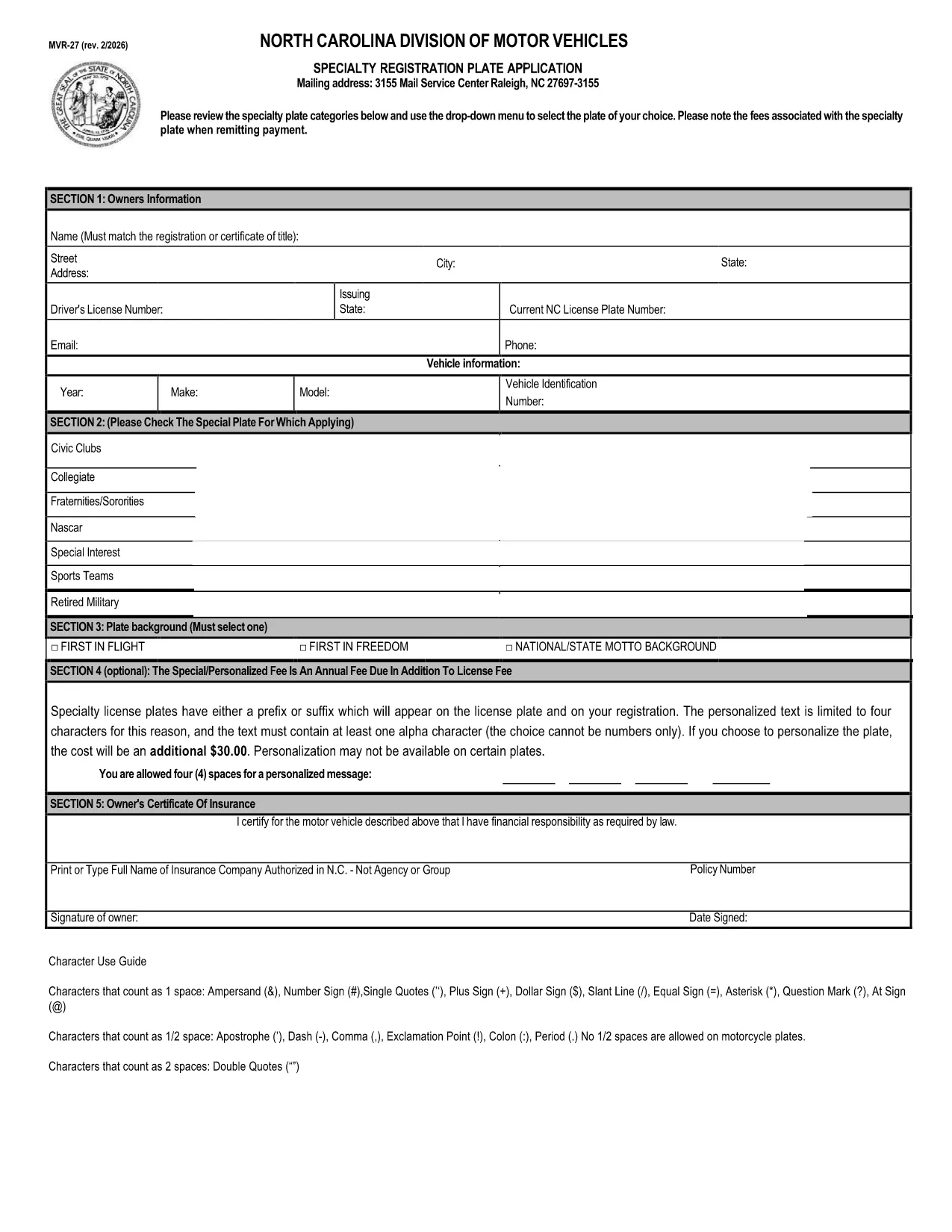
The MVR-27ART is the official North Carolina Division of Motor Vehicles (DMV) application for personalized and specialized license plates. Whether you want a custom design, a commemorative plate, or a plate supporting a cause, this form captures all the required information.

What Is the MVR-27ART Form?

The MVR-27ART (Revision 09/17) collects vehicle and owner details, plate design selection, and payment information. It is used by the NC DMV to process specialty plate requests and to ensure plates meet state regulations.

How to Fill Out the MVR-27ART Online

Instead of downloading, printing, and manually completing the PDF, simply click the **"Fill out this form"** button on this page. The Formize PDF Filler app will load directly in your browser, allowing you to type, select drop‑down options, and sign electronically.

  • Step 1: Click the green "Fill out this form" button.
  • Step 2: Wait a few seconds while the Formize PDF Filler loads.
  • Step 3: Complete each field – the form automatically validates entries.
  • Step 4: Review your information, then click "Submit" to download the completed PDF.
  • Step 5: Print the completed form (if required) and mail it with payment, or submit it electronically if your county accepts digital submissions.

Common Mistakes to Avoid

Even with a fillable PDF, a few errors can delay processing:

  • Leaving the Vehicle Identification Number (VIN) blank or entering it with spaces.
  • Choosing a plate design that is not available for your vehicle type.
  • Forgetting to sign the form – the digital signature field must be completed.
  • Submitting an outdated address; the DMV uses the address on the form for the registration sticker.

Submit Your Application & Pay Fees

After completing the form, follow your local DMV’s payment instructions. Most counties accept credit cards, checks, or money orders. Keep a copy of the completed PDF for your records.

Download the Official PDF

If you prefer the original static version, you can download it directly from the NC DMV:

Download MVR-27ART PDF

Using Formize’s online filler is faster, reduces errors, and eliminates the need for additional software.

FAQ
  • Is the MVR-27ART form free to download?

    Yes, the PDF is provided by the North Carolina DMV at no cost. Fees apply only to the specialty plate you request.

  • Can I submit the form online without printing?

    Many NC counties accept a printed copy, but some allow electronic submission. Check your local DMV’s guidelines after completing the form.

  • What vehicle information do I need?

    You’ll need the VIN, make, model, year, and current registration details of the vehicle you want the specialty plate for.

  • How long does it take to process the application?

    Processing usually takes 2‑4 weeks after the DMV receives the completed form and payment.

  • What if I make a mistake after submitting?

    Contact your local DMV office. In most cases you’ll need to submit a corrected form and may have to pay a small re‑processing fee.

  • Do I need a separate insurance card for the specialty plate?

    No additional insurance is required; the plate is tied to your existing vehicle registration.

  • Can I change the plate design after it’s approved?

    You must submit a new MVR-27ART application for a different design and pay the applicable fee again.

BAGAIMANA CARANYA

Cara mengisi MVR-27ART gratis secara online dalam 4 langkah mudah:

  1. 1
    Open the Fillable Form
    Click the green "Fill out this form" button on the page. The Formize PDF Filler loads directly in your browser.
  2. 2
    Enter Your Information
    Type in all required fields, select your specialty plate design, and sign using the digital signature field.
  3. 3
    Validate & Submit
    The filler checks for missing or incorrect data. Once everything looks correct, click "Submit" to download the completed PDF.
  4. 4
    Print or Send Electronically
    Print the completed form to mail with payment, or follow your county’s instructions for electronic submission.
Bentuk aplikasi Pengisi PDF
TENTANG

Formulir Pendaftaran Kendaraan

MVR-27ART adalah salah satu formulir DMV disebut juga formulir Departemen Kendaraan Bermotor yang merupakan dokumen yang digunakan dalam berbagai transaksi dan proses yang berkaitan dengan kendaraan bermotor. DMV adalah lembaga pemerintah yang bertanggung jawab atas perizinan pengemudi, STNK, dan penegakan hukum kendaraan bermotor. Formulir DMV spesifik yang tersedia dapat berbeda-beda di setiap yurisdiksi, namun berikut adalah beberapa contoh umum:

Formulir Surat Izin Mengemudi: Formulir ini digunakan untuk mengajukan permohonan Surat Izin Mengemudi atau untuk meminta perubahan atau perpanjangan. Mereka biasanya memerlukan informasi pribadi, bukti identitas, dan mungkin menyertakan bagian untuk informasi medis atau riwayat mengemudi.

Formulir Pendaftaran Kendaraan: Formulir ini digunakan untuk mendaftarkan kendaraan bermotor ke DMV. Mereka memerlukan informasi kendaraan, rincian kepemilikan, dan bukti asuransi.

Formulir Pengalihan Hak: Saat membeli atau menjual kendaraan, formulir ini digunakan untuk mengalihkan kepemilikan dari satu pihak ke pihak lain. Mereka memerlukan informasi tentang pembeli, penjual, rincian kendaraan, dan mungkin termasuk tagihan penjualan.

Formulir Pelepasan Kendaraan: Saat menjual atau mengalihkan kepemilikan kendaraan, formulir ini memberi tahu DMV bahwa penjual tidak lagi bertanggung jawab atas kendaraan tersebut. Ini membantu melindungi penjual dari tanggung jawab atas kecelakaan atau insiden yang melibatkan kendaraan setelah penjualan.

Formulir Perpanjangan Plat Nomor dan Registrasi: Formulir ini digunakan untuk memperbarui STNK atau meminta pelat nomor baru. Mereka biasanya memerlukan informasi tentang pemilik terdaftar, rincian pendaftaran saat ini, dan pembayaran biaya yang berlaku.

Formulir Permintaan Catatan Mengemudi: Formulir ini memungkinkan individu untuk meminta catatan mengemudi mereka dari DMV, yang memberikan informasi tentang pelanggaran mengemudi, status SIM, dan detail relevan lainnya.

Formulir Pelat Nomor Khusus atau Personalisasi: Formulir ini digunakan untuk mengajukan permohonan pelat nomor yang dipersonalisasi atau khusus, yang memungkinkan individu untuk menyesuaikan pelat nomornya dengan karakter atau desain tertentu.

Ini hanyalah beberapa contoh dari banyak formulir yang mungkin tersedia melalui DMV. Formulir dan persyaratan spesifik dapat berbeda-beda di setiap yurisdiksi, jadi penting untuk berkonsultasi dengan situs web DMV setempat atau mengunjungi kantor DMV untuk mendapatkan formulir yang tepat untuk kebutuhan khusus Anda.

FITUR

Pengisi PDF

Cara termudah untuk mengisi formulir PDF secara online

  • Isi MVR-27ART dengan cepat
    Mencari cara mengisi MVR-27ART dengan cepat secara online? Dengan pengisi formulir PDF online gratis kami, Anda akan tahu cara mengedit dan mengisi dokumen pdf ini dalam waktu kurang dari satu menit.
  • Editor PDF online yang mudah digunakan
    Muak dengan mencetak file PDF sehingga Anda dapat mengeditnya, sebelum memindai ulang dan mengirimnya kembali? Edit dokumen PDF secara online gratis. Gunakan editor pdf online kami untuk menghemat waktu dan kertas.
  • Alat hebat, semua platform
    Ingin tahu cara mengisi MVR-27ART di Mac, atau mungkin cara menggunakan pengisi PDF gratis? Alat PDF online kami berfungsi di semua platform.
  • Penyimpanan file yang aman
    File "MVR-27ART" yang telah selesai disimpan dalam database aman yang dikelola oleh hosting Amazon Cloud. Anda dapat menghapus file Anda dari sistem kami kapan saja. Bagaimanapun, file-file ini secara otomatis dihapus setelah 24 jam.
  • Ngobrol dengan MVR-27ART
    Ngobrol dengan "MVR-27ART" di Chatize yang merupakan asisten pembaca PDF gratis. Ajukan pertanyaan dan dapatkan jawaban dari "MVR-27ART". Cukup klik tombol Chat Dengan Dokumen di atas.

Hapus sesi pengisian

Hapus sesi pengisian yang dipilih? Dalam hal ini, kemajuan Anda dalam menyelesaikan formulir akan hilang.

Hapus sesi pengeditan

Hapus sesi pengeditan yang dipilih? Dalam hal ini, kemajuan Anda dalam membuat dan mengedit formulir akan hilang.