
Pilih bahasa

MVR‑37A Fillable PDF – North Carolina Disability Parking Placard Application

  1. Bahasa Bahasa inggris
  2. Negara Amerika Serikat
  3. Aktivitas Pendaftaran kendaraan
  4. Negara Karolina utara
MVR‑37A Fillable PDF – North Carolina Disability Parking Placard Application

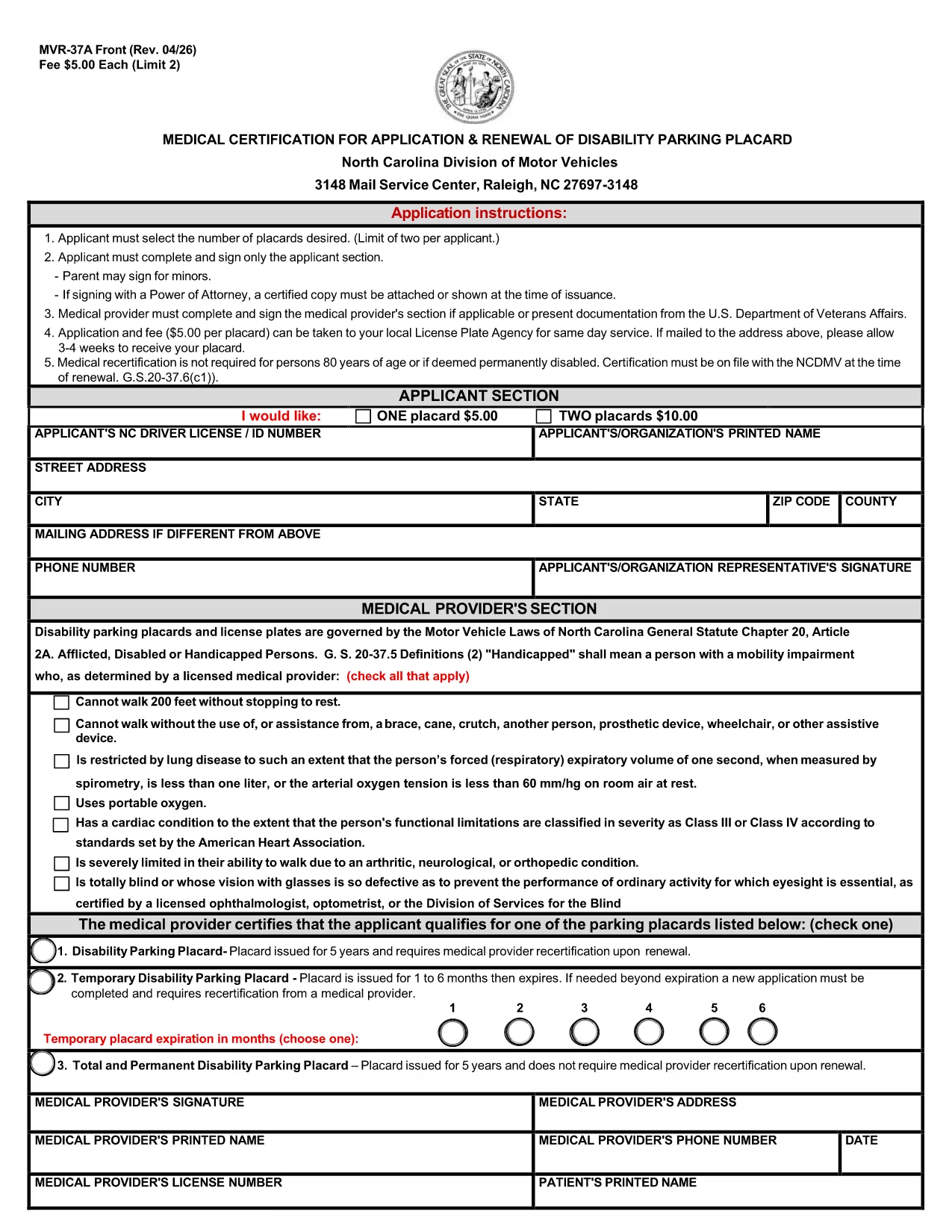
The MVR‑37A is the official medical certification required by the North Carolina Division of Motor Vehicles (DMV) to apply for or renew a disability parking placard. This fillable PDF lets you complete the entire application online, eliminating the need for printing, scanning, or hand‑writing.

What Is the MVR‑37A Form?

The form collects personal details, vehicle information, and a medical provider’s certification that you meet the state’s eligibility criteria. It is used for three types of placards:

  • Standard Disability Parking Placard
  • Temporary Disability Parking Placard
  • Total and Permanent Disability Placard

Who Needs a Disability Parking Placard in NC?

Anyone who has a qualifying medical condition that limits mobility may apply. Typical qualifying conditions include, but are not limited to, loss of limb function, severe arthritis, spinal cord injury, and certain cardiovascular or respiratory disorders.

Step‑by‑Step Guide to Fill the Form Online

Instead of downloading and opening the PDF in a separate editor, simply click the "Fill out this form" button on the page. The Formize PDF Filler app will load instantly, allowing you to:

  1. Select the number of placards you need (maximum two per applicant).
  2. Enter your personal and contact information.
  3. Provide your NC driver’s license or ID number.
  4. Have your medical provider complete the certification section.
  5. Electronically sign the applicant and provider sections.
  6. Save, download, or directly email the completed form to the DMV.

Common Mistakes to Avoid

  • Leaving the provider section blank: The DMV will reject any form without a completed medical certification.
  • Incorrect placard count: Only two placards are allowed per applicant; ordering more will cause delays.
  • Missing signature: Both the applicant and the medical provider must sign electronically.
  • Wrong address format: Use the exact mailing address as it appears on official documents.

Where to Submit Your Application

After completing the form, you can:

  • Mail the PDF to the NC DMV address listed on the form.
  • Submit it in person at your local DMV office.
  • Upload it through the NC DMV’s online portal if you have an account.

The processing time is typically 4‑6 weeks. Include the appropriate fee ($5 per placard) with a check or money order payable to the "North Carolina Division of Motor Vehicles."

FAQ
  • How many disability parking placards can I request?

    A maximum of two placards per applicant is allowed. Each placard costs $5.

  • Do I need a medical provider’s signature?

    Yes. The form is invalid without a completed and signed medical certification section.

  • Can I fill out the MVR‑37A online without printing?

    Absolutely. Use the Formize PDF Filler on this page to complete, sign, and save the form electronically.

  • What is the processing time after I submit the form?

    The North Carolina DMV typically processes applications within 4‑6 weeks.

  • What if I lose my placard after it’s issued?

    Report the loss to the NC DMV immediately and submit a new MVR‑37A form with a $5 replacement fee.

  • Is there a fee for a temporary disability placard?

    Yes, the same $5 fee applies for a temporary placard, which is valid for up to 90 days.

  • Can a parent sign the form for a minor?

    A parent or legal guardian may sign on behalf of a minor applicant and must indicate their relationship on the form.

BAGAIMANA CARANYA

Cara mengisi MVR-37A gratis secara online dalam 5 langkah mudah:

  1. 1
    Open the Fillable Form
    Click the "Fill out this form" button on the page. The Formize PDF Filler will open in a new tab.
  2. 2
    Wait for the Formize App to Load
    Allow a few seconds for the online editor to initialize. No download is required.
  3. 3
    Complete All Required Fields
    Enter your personal details, select the number of placards, and have your medical provider fill out the certification section.
  4. 4
    Add Electronic Signatures
    Use your mouse, trackpad, or touchscreen to sign the applicant and provider sections.
  5. 5
    Save and Submit
    Click "Save" to download the completed PDF, then mail or upload it to the NC DMV as instructed on the form.
Bentuk aplikasi Pengisi PDF
TENTANG

Formulir Pendaftaran Kendaraan

Jika Anda memiliki atau menyewa kendaraan bermotor, trailer, atau perahu, Anda harus memenuhi kewajiban tertentu untuk menjaga agar kendaraan Anda terdaftar secara sah dan aman.

MVR-37A adalah salah satu formulir STNK yang merupakan dokumen yang digunakan untuk mendaftarkan kendaraan bermotor dengan otoritas negara bagian atau provinsi terkait. Formulir ini biasanya diperlukan saat seseorang membeli kendaraan baru atau bekas atau saat mereka pindah ke negara bagian atau provinsi baru dengan kendaraan.

Persyaratan dan formulir pasti yang diperlukan untuk pendaftaran kendaraan dapat berbeda-beda di setiap lokasi, tetapi umumnya, prosesnya mencakup pemberian informasi tentang kendaraan, pemilik, dan hak gadai apa pun pada kendaraan tersebut.

Setelah formulir pendaftaran dan biaya diserahkan, otoritas negara bagian atau provinsi akan menerbitkan sertifikat pendaftaran atau plat nomor kepada pemilik kendaraan. Pendaftaran ini memungkinkan kendaraan untuk dioperasikan secara legal di jalan umum dan jalan raya.

FITUR

Pengisi PDF

Cara termudah untuk mengisi formulir PDF secara online

  • Isi MVR-37A dengan cepat
    Mencari cara mengisi MVR-37A dengan cepat secara online? Dengan pengisi formulir PDF online gratis kami, Anda akan tahu cara mengedit dan mengisi dokumen pdf ini dalam waktu kurang dari satu menit.
  • Editor PDF online yang mudah digunakan
    Muak dengan mencetak file PDF sehingga Anda dapat mengeditnya, sebelum memindai ulang dan mengirimnya kembali? Edit dokumen PDF secara online gratis. Gunakan editor pdf online kami untuk menghemat waktu dan kertas.
  • Alat hebat, semua platform
    Ingin tahu cara mengisi MVR-37A di Mac, atau mungkin cara menggunakan pengisi PDF gratis? Alat PDF online kami berfungsi di semua platform.
  • Penyimpanan file yang aman
    File "MVR-37A" yang telah selesai disimpan dalam database aman yang dikelola oleh hosting Amazon Cloud. Anda dapat menghapus file Anda dari sistem kami kapan saja. Bagaimanapun, file-file ini secara otomatis dihapus setelah 24 jam.
  • Ngobrol dengan MVR-37A
    Ngobrol dengan "MVR-37A" di Chatize yang merupakan asisten pembaca PDF gratis. Ajukan pertanyaan dan dapatkan jawaban dari "MVR-37A". Cukup klik tombol Chat Dengan Dokumen di atas.

Hapus sesi pengisian

Hapus sesi pengisian yang dipilih? Dalam hal ini, kemajuan Anda dalam menyelesaikan formulir akan hilang.

Hapus sesi pengeditan

Hapus sesi pengeditan yang dipilih? Dalam hal ini, kemajuan Anda dalam membuat dan mengedit formulir akan hilang.