
Pilih bahasa

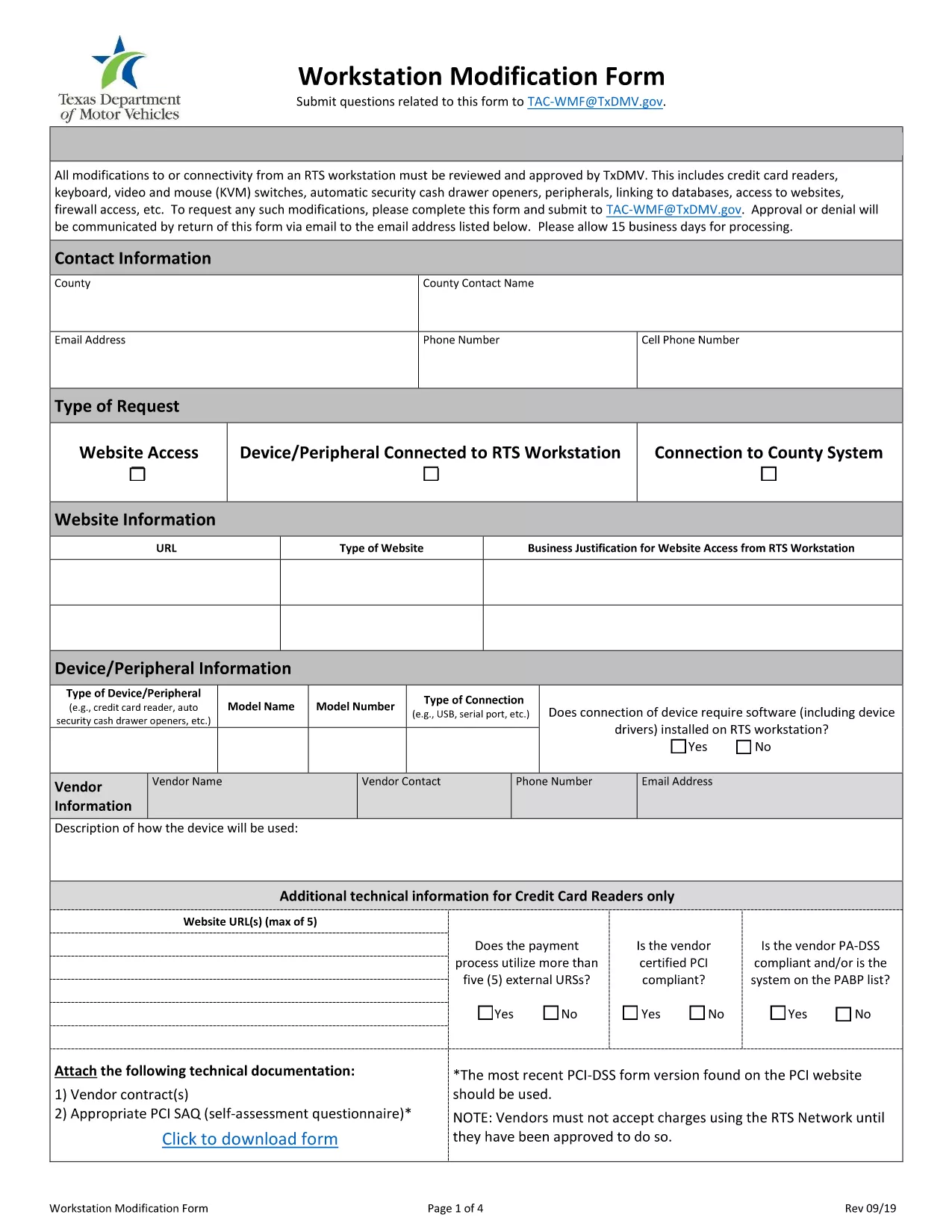
Workstation Modification Form (Fillable PDF)

  1. Bahasa Bahasa inggris
  2. Negara Amerika Serikat
  3. Aktivitas Pendaftaran kendaraan
  4. Negara Texas
Workstation Modification Form (Fillable PDF)

The Workstation Modification Form is required by the Texas Department of Motor Vehicles (TxDMV) when you need to request changes to a registered workstation setup. Our fillable PDF version lets you complete the form instantly in your browser—no printing, scanning, or faxing required.

Why Use the Workstation Modification Form?

This form ensures your workstation complies with Texas safety regulations and allows the DMV to process your request quickly. Submitting a correctly completed form reduces processing time and avoids costly re‑submission.

How to Fill Out the Form Online

Simply click the "Fill out this form" button below. The Formize PDF Filler app will load the fillable PDF, and you can start entering information right away.

  • Enter your personal and vehicle details exactly as they appear on your registration.
  • Provide a clear description of the workstation modification you are requesting.
  • Attach any supporting documents using the built‑in upload field.
  • Review all entries for accuracy before submitting.

Common Mistakes to Avoid

  • Leaving required fields blank – the form will not submit.
  • Using illegible handwriting in scanned PDFs – the fillable version eliminates this issue.
  • Submitting outdated vehicle information – verify your registration details first.
  • Forgetting to attach supporting documentation – the app prompts you if an attachment is missing.

Download & Print Options

If you prefer a hard copy, you can still download the PDF after filling it out. Click the Download PDF button in the Formize toolbar, print, and mail it to the TxDMV address shown on the form.

Need more help? Review our FAQ section below or contact the TxDMV directly.

FAQ
  • What is the Workstation Modification Form used for?

    It authorizes changes to a registered workstation, such as equipment upgrades or layout adjustments, ensuring compliance with Texas safety standards.

  • Do I need a PDF editor to complete this form?

    No. The Formize PDF Filler lets you fill the form directly in your browser—no extra software required.

  • Can I save my progress and finish later?

    Yes. Use the "Save" button in the filler to download a partially completed PDF, then reopen it later to continue.

  • Is there a filing fee for a workstation modification?

    The TxDMV may charge a nominal processing fee. Check the latest fee schedule on the TxDMV website or on the form itself.

  • What documents should I attach?

    Include any equipment specifications, photos of the current setup, and a written justification for the modification.

  • How long does the approval process take?

    Typically 7‑10 business days after the completed form and supporting documents are received.

BAGAIMANA CARANYA

Cara mengisi workstation modification form gratis secara online dalam 5 langkah mudah:

  1. 1
    Click the Fill‑out Button
    Press the "Fill out this form" button on the page. The Formize PDF Filler will open the fillable workstation modification PDF.
  2. 2
    Wait for the Filler to Load
    A few seconds pass while the app loads the form fields. You’ll see interactive boxes where you can type.
  3. 3
    Complete Each Section
    Enter your personal information, vehicle details, and a description of the requested modification. Use dropdowns and checkboxes where provided.
  4. 4
    Attach Supporting Documents
    If the form asks for additional paperwork, click the upload icon and select your files.
  5. 5
    Review and Submit
    Double‑check every field, then click the "Submit" button. You can also download a copy for your records.
Bentuk aplikasi Pengisi PDF
TENTANG

Formulir Pendaftaran Kendaraan

workstation modification form adalah salah satu formulir STNK yang merupakan dokumen yang digunakan untuk mendaftarkan kendaraan bermotor pada otoritas pemerintah terkait, biasanya Departemen Kendaraan Bermotor (DMV) atau lembaga setara. Formulir ini diperlukan ketika seseorang membeli kendaraan baru atau bekas, mengalihkan kepemilikan kendaraan, atau pindah ke yurisdiksi baru dengan membawa kendaraan.

Formulir registrasi kendaraan tertentu dapat berbeda-beda di setiap yurisdiksi, namun umumnya memerlukan informasi berikut:

Informasi Kendaraan: Ini mencakup detail tentang kendaraan, seperti merek, model, tahun, nomor identifikasi kendaraan (VIN), dan pembacaan odometer.

Informasi Pemilik: Formulir ini memerlukan informasi tentang pemilik kendaraan, termasuk nama, alamat, informasi kontak, dan nomor SIM.

Bukti Kepemilikan: Tergantung pada keadaan, bukti kepemilikan mungkin diperlukan, seperti sertifikat hak milik, tagihan penjualan, atau surat keterangan asal pabrikan (untuk kendaraan baru).

Informasi Asuransi: Bukti perlindungan asuransi kendaraan yang valid biasanya diperlukan. Ini mungkin termasuk memberikan nomor polis asuransi, tanggal pertanggungan, dan rincian perusahaan asuransi.

Pembayaran Biaya: Pendaftaran kendaraan melibatkan pembayaran berbagai biaya, seperti biaya pendaftaran, pajak, dan mungkin biaya lain yang spesifik untuk yurisdiksi.

Selain persyaratan dasar ini, beberapa yurisdiksi mungkin memiliki persyaratan formulir atau dokumentasi tambahan. Misalnya, hasil uji emisi, inspeksi keselamatan, atau bukti domisili mungkin diperlukan di wilayah tertentu.

Setelah formulir STNK dilengkapi dan diserahkan, otoritas pemerintah akan menerbitkan STNK, plat nomor, dan stiker STNK. Dokumen-dokumen ini menunjukkan bahwa kendaraan tersebut terdaftar secara sah dan diizinkan untuk dioperasikan di jalan umum.

Penting untuk dicatat bahwa persyaratan registrasi kendaraan dapat sangat bervariasi menurut yurisdiksi. Oleh karena itu, disarankan untuk berkonsultasi dengan DMV setempat atau lembaga setara mengenai formulir dan prosedur khusus yang berlaku di lokasi Anda.

FITUR

Pengisi PDF

Cara termudah untuk mengisi formulir PDF secara online

  • Isi workstation modification form dengan cepat
    Mencari cara mengisi workstation modification form dengan cepat secara online? Dengan pengisi formulir PDF online gratis kami, Anda akan tahu cara mengedit dan mengisi dokumen pdf ini dalam waktu kurang dari satu menit.
  • Editor PDF online yang mudah digunakan
    Muak dengan mencetak file PDF sehingga Anda dapat mengeditnya, sebelum memindai ulang dan mengirimnya kembali? Edit dokumen PDF secara online gratis. Gunakan editor pdf online kami untuk menghemat waktu dan kertas.
  • Alat hebat, semua platform
    Ingin tahu cara mengisi workstation modification form di Mac, atau mungkin cara menggunakan pengisi PDF gratis? Alat PDF online kami berfungsi di semua platform.
  • Penyimpanan file yang aman
    File "workstation modification form" yang telah selesai disimpan dalam database aman yang dikelola oleh hosting Amazon Cloud. Anda dapat menghapus file Anda dari sistem kami kapan saja. Bagaimanapun, file-file ini secara otomatis dihapus setelah 24 jam.
  • Ngobrol dengan workstation modification form
    Ngobrol dengan "workstation modification form" di Chatize yang merupakan asisten pembaca PDF gratis. Ajukan pertanyaan dan dapatkan jawaban dari "workstation modification form". Cukup klik tombol Chat Dengan Dokumen di atas.

Hapus sesi pengisian

Hapus sesi pengisian yang dipilih? Dalam hal ini, kemajuan Anda dalam menyelesaikan formulir akan hilang.

Hapus sesi pengeditan

Hapus sesi pengeditan yang dipilih? Dalam hal ini, kemajuan Anda dalam membuat dan mengedit formulir akan hilang.