
Pilih bahasa

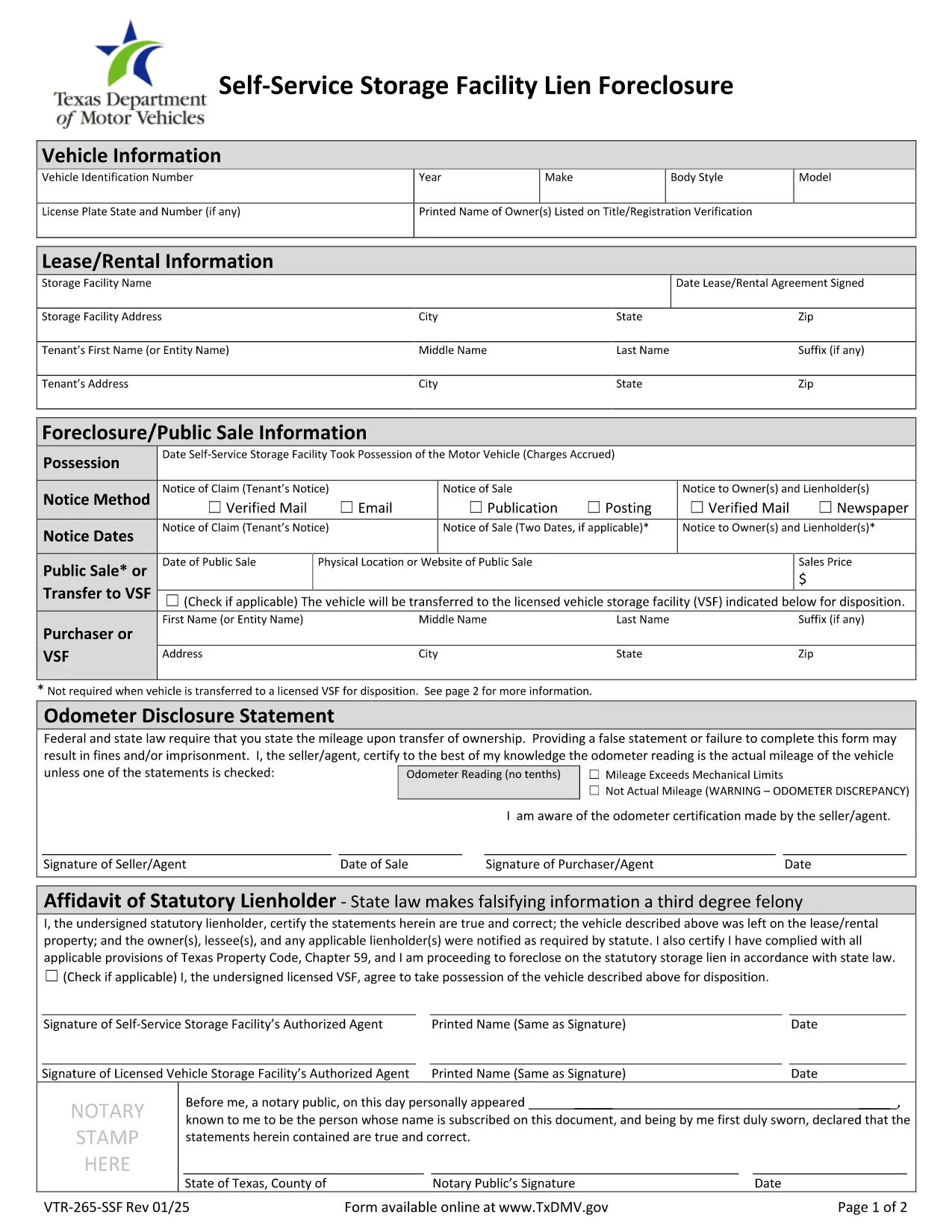
VTR-265-SSF Fillable PDF – Self‑Service Storage Facility Lien Foreclosure

  1. Bahasa Bahasa inggris
  2. Negara Amerika Serikat
  3. Aktivitas Pendaftaran kendaraan
  4. Negara Texas
VTR-265-SSF Fillable PDF – Self‑Service Storage Facility Lien Foreclosure

The VTR-265-SSF is the Texas Department of Motor Vehicles (TxDMV) form used to verify title and registration when a self‑service storage facility forecloses on a lien. Whether you’re a storage operator, a lien holder, or the vehicle owner, this form is required to transfer ownership after a lien foreclosure.

What Is Form VTR-265-SSF?

This form is officially titled Verification of Title and/or Registration – Self‑Service Storage Facility Lien Foreclosure. It collects:

  • Vehicle identification details (VIN, make, model, year)
  • Proof of lien foreclosure
  • Owner and lienholder signatures
  • Evidence that the title can be transferred

How to Complete the VTR-265-SSF Online

Instead of downloading, printing, and scanning, use Formize’s built‑in PDF filler:

  1. Click “Fill out this form” on the page.
  2. Wait a few seconds while the Formize PDF Filler app loads.
  3. Enter the required information in each fillable field. The app validates dates, VIN length, and required signatures.
  4. Review the completed form for accuracy.
  5. Save the filled PDF or submit it directly to the TxDMV portal if instructed.

Common Mistakes to Avoid

  • Incorrect VIN: Double‑check the 17‑character VIN; a single digit error will cause rejection.
  • Missing signatures: Both the lienholder and the vehicle owner must sign; electronic signatures are accepted in the Formize filler.
  • Wrong lien documentation: Attach the foreclosure notice and any court order before uploading.
  • Out‑of‑date form version: Use the PDF linked below – it is the current TxDMV version.

Where to Submit the Completed Form

After filling the form, you can:

  • Mail it to the Texas Department of Motor Vehicles, Vehicle Services Division.
  • Submit electronically through the TxDMV online portal if you have an account.
  • Deliver it in person to any TxDMV Regional Service Center.

Download the Official PDF

For reference or offline use, you can download the official VTR-265-SSF PDF directly from the Texas DMV website.

FAQ
  • Who needs to complete Form VTR-265-SSF?

    The form is required by storage facility owners, lienholders, and vehicle owners when a lien is foreclosed and title ownership must be transferred in Texas.

  • Can I submit the form electronically?

    Yes. After filling the form with Formize, you can upload the completed PDF to the TxDMV online portal or email it if the agency permits electronic submissions.

  • What documentation must accompany the form?

    Attach the foreclosure notice, any court order, and proof of notification (certified mail receipts). These documents verify the lien’s validity.

  • Is the PDF fillable on mobile devices?

    The Formize PDF Filler works on most modern smartphones and tablets, allowing you to complete the form on the go.

  • How long does the TxDMV take to process the form?

    Processing typically takes 7‑10 business days after receipt, provided all required fields and supporting documents are complete.

  • What if I make a mistake after submitting?

    Contact the TxDMV Vehicle Services Division to request a correction. You may need to submit a new VTR-265-SSF with the corrected information.

  • Is there a fee to file VTR-265-SSF?

    There is no filing fee for the VTR-265-SSF itself, but standard title transfer fees may apply when the new title is issued.

BAGAIMANA CARANYA

Cara mengisi VTR-265-SSF gratis secara online dalam 4 langkah mudah:

  1. 1
    Open the Fillable Form
    Click the “Fill out this form” button on the page. The Formize PDF Filler will open in your browser.
  2. 2
    Enter Required Information
    Fill in each field – VIN, owner details, lienholder information, and attach the foreclosure notice. The filler checks for correct formats.
  3. 3
    Review and Sign
    Double‑check all entries, then add electronic signatures for the owner and lienholder using the built‑in signature tool.
  4. 4
    Save or Submit
    Save the completed PDF to your computer or submit it directly to the TxDMV portal as instructed.
Bentuk aplikasi Pengisi PDF
TENTANG

Formulir Pendaftaran Kendaraan

VTR-265-SSF adalah salah satu formulir STNK yang merupakan dokumen yang digunakan untuk mendaftarkan kendaraan bermotor pada otoritas pemerintah terkait, biasanya Departemen Kendaraan Bermotor (DMV) atau lembaga setara. Formulir ini diperlukan ketika seseorang membeli kendaraan baru atau bekas, mengalihkan kepemilikan kendaraan, atau pindah ke yurisdiksi baru dengan membawa kendaraan.

Formulir registrasi kendaraan tertentu dapat berbeda-beda di setiap yurisdiksi, namun umumnya memerlukan informasi berikut:

Informasi Kendaraan: Ini mencakup detail tentang kendaraan, seperti merek, model, tahun, nomor identifikasi kendaraan (VIN), dan pembacaan odometer.

Informasi Pemilik: Formulir ini memerlukan informasi tentang pemilik kendaraan, termasuk nama, alamat, informasi kontak, dan nomor SIM.

Bukti Kepemilikan: Tergantung pada keadaan, bukti kepemilikan mungkin diperlukan, seperti sertifikat hak milik, tagihan penjualan, atau surat keterangan asal pabrikan (untuk kendaraan baru).

Informasi Asuransi: Bukti perlindungan asuransi kendaraan yang valid biasanya diperlukan. Ini mungkin termasuk memberikan nomor polis asuransi, tanggal pertanggungan, dan rincian perusahaan asuransi.

Pembayaran Biaya: Pendaftaran kendaraan melibatkan pembayaran berbagai biaya, seperti biaya pendaftaran, pajak, dan mungkin biaya lain yang spesifik untuk yurisdiksi.

Selain persyaratan dasar ini, beberapa yurisdiksi mungkin memiliki persyaratan formulir atau dokumentasi tambahan. Misalnya, hasil uji emisi, inspeksi keselamatan, atau bukti domisili mungkin diperlukan di wilayah tertentu.

Setelah formulir STNK dilengkapi dan diserahkan, otoritas pemerintah akan menerbitkan STNK, plat nomor, dan stiker STNK. Dokumen-dokumen ini menunjukkan bahwa kendaraan tersebut terdaftar secara sah dan diizinkan untuk dioperasikan di jalan umum.

Penting untuk dicatat bahwa persyaratan registrasi kendaraan dapat sangat bervariasi menurut yurisdiksi. Oleh karena itu, disarankan untuk berkonsultasi dengan DMV setempat atau lembaga setara mengenai formulir dan prosedur khusus yang berlaku di lokasi Anda.

FITUR

Pengisi PDF

Cara termudah untuk mengisi formulir PDF secara online

  • Isi VTR-265-SSF dengan cepat
    Mencari cara mengisi VTR-265-SSF dengan cepat secara online? Dengan pengisi formulir PDF online gratis kami, Anda akan tahu cara mengedit dan mengisi dokumen pdf ini dalam waktu kurang dari satu menit.
  • Editor PDF online yang mudah digunakan
    Muak dengan mencetak file PDF sehingga Anda dapat mengeditnya, sebelum memindai ulang dan mengirimnya kembali? Edit dokumen PDF secara online gratis. Gunakan editor pdf online kami untuk menghemat waktu dan kertas.
  • Alat hebat, semua platform
    Ingin tahu cara mengisi VTR-265-SSF di Mac, atau mungkin cara menggunakan pengisi PDF gratis? Alat PDF online kami berfungsi di semua platform.
  • Penyimpanan file yang aman
    File "VTR-265-SSF" yang telah selesai disimpan dalam database aman yang dikelola oleh hosting Amazon Cloud. Anda dapat menghapus file Anda dari sistem kami kapan saja. Bagaimanapun, file-file ini secara otomatis dihapus setelah 24 jam.
  • Ngobrol dengan VTR-265-SSF
    Ngobrol dengan "VTR-265-SSF" di Chatize yang merupakan asisten pembaca PDF gratis. Ajukan pertanyaan dan dapatkan jawaban dari "VTR-265-SSF". Cukup klik tombol Chat Dengan Dokumen di atas.

Hapus sesi pengisian

Hapus sesi pengisian yang dipilih? Dalam hal ini, kemajuan Anda dalam menyelesaikan formulir akan hilang.

Hapus sesi pengeditan

Hapus sesi pengeditan yang dipilih? Dalam hal ini, kemajuan Anda dalam membuat dan mengedit formulir akan hilang.