
Pilih bahasa

VTR-62-EMS Fillable PDF – Texas EMS Exempt License Plate Application

  1. Bahasa Bahasa inggris
  2. Negara Amerika Serikat
  3. Aktivitas Pendaftaran kendaraan
  4. Negara Texas
VTR-62-EMS Fillable PDF – Texas EMS Exempt License Plate Application

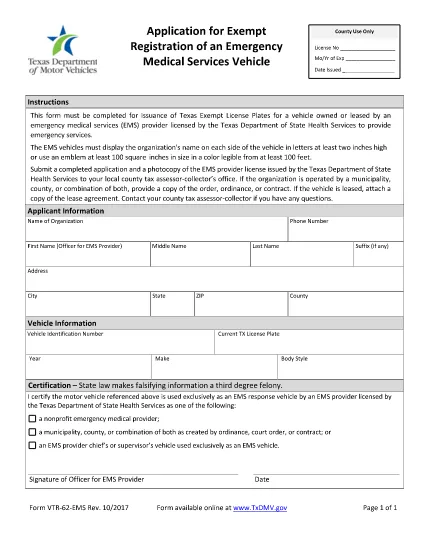
The VTR-62-EMS is the Texas Department of Motor Vehicles (TxDMV) application used by emergency medical services (EMS) providers to obtain exempt license plates for their emergency vehicles. This form must be completed, signed, and submitted to the TxDMV before the plates can be issued.

What Is the VTR-62-EMS Form?

The VTR-62-EMS form authorizes the issuance of special, exempt license plates that are reserved for EMS vehicles. The plates display the organization’s name or an approved emblem and are exempt from standard registration fees.

How to Complete the Form Online

Instead of downloading the PDF, simply click the "Fill out this form" button on this page. The Formize PDF Filler app will load the fillable version of the VTR-62-EMS, allowing you to:

  • Enter organization details, vehicle information, and contact data.
  • Upload a digital copy of the EMS emblem (optional).
  • Sign electronically with a mouse or touchscreen.
  • Save your progress and return later if needed.

Common Mistakes to Avoid

  • Incorrect vehicle identification number (VIN): Double‑check the VIN on the vehicle registration.
  • Missing signature: The form requires an authorized signature; an unsigned form will be rejected.
  • Improper emblem size: The emblem must be at least two inches high if used.
  • Wrong organization name spelling: The name appears on both sides of the plate and must be exact.

Where to Submit the Completed Form

After filling out and signing the form online, you can:

  • Download the completed PDF and mail it to the TxDMV address listed on the form.
  • Print the form and deliver it in person to any Texas Department of Motor Vehicles office.

Be sure to include any required supporting documents, such as proof of EMS licensing.

Download the Official PDF

If you prefer the original PDF, you can download it directly from the Texas DMV website:

Download VTR-62-EMS PDF

FAQ
  • Who can use the VTR-62-EMS form?

    Any EMS provider licensed by the Texas Department of State Health Services that operates emergency vehicles may apply for exempt plates using this form.

  • Is there a fee for the exempt license plates?

    The plates are exempt from the standard registration fee, but you may still need to pay for the physical plate production, depending on the TxDMV policy.

  • Can I submit the form electronically?

    Yes. After completing the fillable PDF with Formize, you can download the signed document and email it to the TxDMV, or mail a printed copy.

  • What size must the EMS emblem be?

    The emblem must be at least two inches high and clearly visible on the plate.

  • How long does it take to receive the plates after submission?

    Processing typically takes 7‑10 business days once the TxDMV receives a complete and correctly signed application.

  • Do I need to renew the exempt plates?

    Exempt plates are valid for the same period as standard plates. Renewal notices will be sent by the TxDMV.

  • What if I make a mistake on the form?

    Correct any errors before signing. If you submit a form with mistakes, the TxDMV will return it, causing delays.

  • Can I use a different PDF editor to fill the form?

    You can, but the Formize fillable version is optimized for ease of use and ensures all required fields are completed.

BAGAIMANA CARANYA

Cara mengisi VTR-62-EMS gratis secara online dalam 5 langkah mudah:

  1. 1
    Click the Fill Out Button
    Press the "Fill out this form" button on the page to launch the Formize PDF Filler.
  2. 2
    Wait for the Filler to Load
    The fillable version of VTR-62-EMS will appear in a secure window. This only takes a few seconds.
  3. 3
    Enter All Required Information
    Complete each field—organization name, vehicle VIN, driver details, etc.—exactly as shown on your registration documents.
  4. 4
    Add Your Signature
    Use your mouse, trackpad, or touchscreen to sign electronically. The signature is legally binding.
  5. 5
    Save, Download, or Print
    When finished, click "Save" to store a copy in your browser, "Download" to get a PDF file, or "Print" to submit a hard copy to the TxDMV.
Bentuk aplikasi Pengisi PDF
TENTANG

Formulir Pendaftaran Kendaraan

VTR-62-EMS adalah salah satu formulir DMV disebut juga formulir Departemen Kendaraan Bermotor yang merupakan dokumen yang digunakan dalam berbagai transaksi dan proses yang berkaitan dengan kendaraan bermotor. DMV adalah lembaga pemerintah yang bertanggung jawab atas perizinan pengemudi, STNK, dan penegakan hukum kendaraan bermotor. Formulir DMV spesifik yang tersedia dapat berbeda-beda di setiap yurisdiksi, namun berikut adalah beberapa contoh umum:

Formulir Surat Izin Mengemudi: Formulir ini digunakan untuk mengajukan permohonan Surat Izin Mengemudi atau untuk meminta perubahan atau perpanjangan. Mereka biasanya memerlukan informasi pribadi, bukti identitas, dan mungkin menyertakan bagian untuk informasi medis atau riwayat mengemudi.

Formulir Pendaftaran Kendaraan: Formulir ini digunakan untuk mendaftarkan kendaraan bermotor ke DMV. Mereka memerlukan informasi kendaraan, rincian kepemilikan, dan bukti asuransi.

Formulir Pengalihan Hak: Saat membeli atau menjual kendaraan, formulir ini digunakan untuk mengalihkan kepemilikan dari satu pihak ke pihak lain. Mereka memerlukan informasi tentang pembeli, penjual, rincian kendaraan, dan mungkin termasuk tagihan penjualan.

Formulir Pelepasan Kendaraan: Saat menjual atau mengalihkan kepemilikan kendaraan, formulir ini memberi tahu DMV bahwa penjual tidak lagi bertanggung jawab atas kendaraan tersebut. Ini membantu melindungi penjual dari tanggung jawab atas kecelakaan atau insiden yang melibatkan kendaraan setelah penjualan.

Formulir Perpanjangan Plat Nomor dan Registrasi: Formulir ini digunakan untuk memperbarui STNK atau meminta pelat nomor baru. Mereka biasanya memerlukan informasi tentang pemilik terdaftar, rincian pendaftaran saat ini, dan pembayaran biaya yang berlaku.

Formulir Permintaan Catatan Mengemudi: Formulir ini memungkinkan individu untuk meminta catatan mengemudi mereka dari DMV, yang memberikan informasi tentang pelanggaran mengemudi, status SIM, dan detail relevan lainnya.

Formulir Pelat Nomor Khusus atau Personalisasi: Formulir ini digunakan untuk mengajukan permohonan pelat nomor yang dipersonalisasi atau khusus, yang memungkinkan individu untuk menyesuaikan pelat nomornya dengan karakter atau desain tertentu.

Ini hanyalah beberapa contoh dari banyak formulir yang mungkin tersedia melalui DMV. Formulir dan persyaratan spesifik dapat berbeda-beda di setiap yurisdiksi, jadi penting untuk berkonsultasi dengan situs web DMV setempat atau mengunjungi kantor DMV untuk mendapatkan formulir yang tepat untuk kebutuhan khusus Anda.

FITUR

Pengisi PDF

Cara termudah untuk mengisi formulir PDF secara online

  • Isi VTR-62-EMS dengan cepat
    Mencari cara mengisi VTR-62-EMS dengan cepat secara online? Dengan pengisi formulir PDF online gratis kami, Anda akan tahu cara mengedit dan mengisi dokumen pdf ini dalam waktu kurang dari satu menit.
  • Editor PDF online yang mudah digunakan
    Muak dengan mencetak file PDF sehingga Anda dapat mengeditnya, sebelum memindai ulang dan mengirimnya kembali? Edit dokumen PDF secara online gratis. Gunakan editor pdf online kami untuk menghemat waktu dan kertas.
  • Alat hebat, semua platform
    Ingin tahu cara mengisi VTR-62-EMS di Mac, atau mungkin cara menggunakan pengisi PDF gratis? Alat PDF online kami berfungsi di semua platform.
  • Penyimpanan file yang aman
    File "VTR-62-EMS" yang telah selesai disimpan dalam database aman yang dikelola oleh hosting Amazon Cloud. Anda dapat menghapus file Anda dari sistem kami kapan saja. Bagaimanapun, file-file ini secara otomatis dihapus setelah 24 jam.
  • Ngobrol dengan VTR-62-EMS
    Ngobrol dengan "VTR-62-EMS" di Chatize yang merupakan asisten pembaca PDF gratis. Ajukan pertanyaan dan dapatkan jawaban dari "VTR-62-EMS". Cukup klik tombol Chat Dengan Dokumen di atas.

Hapus sesi pengisian

Hapus sesi pengisian yang dipilih? Dalam hal ini, kemajuan Anda dalam menyelesaikan formulir akan hilang.

Hapus sesi pengeditan

Hapus sesi pengeditan yang dipilih? Dalam hal ini, kemajuan Anda dalam membuat dan mengedit formulir akan hilang.