
Pilih bahasa

MV2652 Fillable PDF – Wisconsin Vehicle Plate Information & Application

  1. Negara Amerika Serikat
  2. Bahasa Bahasa inggris
  3. Departemen Wisconsin Department of Transportation
  4. Aktivitas Pendaftaran kendaraan
MV2652 Fillable PDF – Wisconsin Vehicle Plate Information & Application

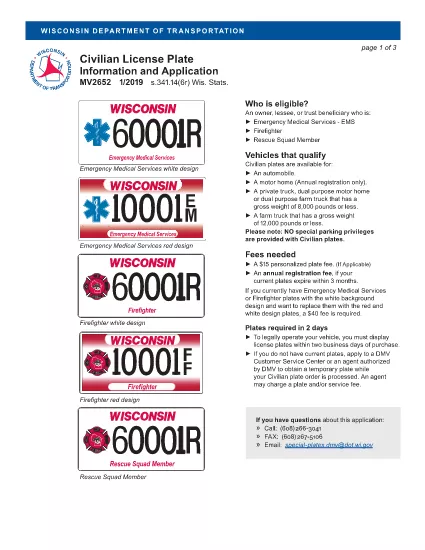
The MV2652 is the official Wisconsin Department of Transportation (WisDOT) form used to request, change, or verify vehicle plate information. Whether you need a new plate, a replacement, or an update to your registration details, this fillable PDF lets you complete the entire process quickly and accurately.

What Is the MV2652 Form?

Form MV2652 collects essential data about your vehicle, owner, and the specific plate request. It is required for:

  • Applying for a new Wisconsin license plate
  • Transferring plates between vehicles
  • Updating plate information after a name change or address move
  • Requesting specialty or personalized plates

How to Complete the MV2652 Online with Formize

Instead of downloading, printing, and scanning, you can fill the form directly in your browser using the Formize PDF Filler app. Follow these simple steps:

  1. Click the Fill out this form button below.
  2. The Formize PDF Filler loads the MV2652 document instantly.
  3. Enter your information in the highlighted fields – the interface saves your entries automatically.
  4. When you’re done, click Save & Download to get a completed PDF ready for submission.

Common Errors to Avoid

  • Incorrect VIN or License Plate Number: Double‑check the numbers before saving.
  • Missing Signature: The form requires a handwritten or electronic signature; the filler provides a signature box.
  • Out‑of‑Date Information: Ensure your address and ownership details match current records.
  • Skipping Required Attachments: Some plate requests need proof of insurance or a vehicle title – attach them as separate PDFs when you submit.

Where to Submit Your Completed Form

After you download the completed MV2652, you can:

  • Mail it to your local WisDOT office (address listed on the form).
  • Bring a printed copy to any WisDOT service center.
  • If your county offers electronic filing, upload the PDF through their portal.

Need help? Contact your nearest WisDOT office or visit the WisDOT online services page for additional resources.

Fill out this form

FAQ
  • What is the MV2652 form used for?

    The MV2652 is the Wisconsin Department of Transportation’s form for requesting new, replacement, or updated vehicle license plates.

  • Can I fill out MV2652 online without printing?

    Yes. Using Formize’s PDF Filler, you can complete the entire form in your browser and then download the finished PDF.

  • Do I need a signature on the MV2652?

    A signature is required. Formize provides an electronic signature field, or you can upload a scanned image of your handwritten signature.

  • How long does it take for WisDOT to process the form?

    Processing time varies by request type, but most standard plate applications are processed within 7‑10 business days after receipt.

  • What attachments should I include with the MV2652?

    Depending on the request, you may need to attach proof of insurance, a copy of the vehicle title, or a specialty plate fee receipt. Check the form instructions for exact requirements.

  • Is there a fee for submitting MV2652?

    Yes. Fees depend on the plate type and any special requests. The form lists the current fee schedule.

BAGAIMANA CARANYA

Cara mengisi MV2652 gratis secara online dalam 5 langkah mudah:

  1. 1
    Open the Fillable Form
    Click the “Fill out this form” button on the page. The Formize PDF Filler app loads the MV2652 document directly in your browser.
  2. 2
    Enter Your Information
    Type into each highlighted field. The filler auto‑saves your entries, so you won’t lose any data.
  3. 3
    Add a Signature
    Use the built‑in signature box to create an electronic signature or upload a scanned image of your handwritten signature.
  4. 4
    Save and Download
    When all fields are complete, click “Save & Download”. A finished PDF will be saved to your computer, ready for mailing or uploading.
  5. 5
    Submit to WisDOT
    Print and mail the PDF, bring a hard copy to a WisDOT office, or upload it through your county’s electronic filing portal.
Bentuk aplikasi Pengisi PDF
TENTANG

Formulir Pendaftaran Kendaraan

MV2652 adalah salah satu formulir STNK yang merupakan dokumen yang digunakan untuk mendaftarkan kendaraan bermotor pada otoritas pemerintah terkait, biasanya Departemen Kendaraan Bermotor (DMV) atau lembaga setara. Formulir ini diperlukan ketika seseorang membeli kendaraan baru atau bekas, mengalihkan kepemilikan kendaraan, atau pindah ke yurisdiksi baru dengan membawa kendaraan.

Formulir registrasi kendaraan tertentu dapat berbeda-beda di setiap yurisdiksi, namun umumnya memerlukan informasi berikut:

Informasi Kendaraan: Ini mencakup detail tentang kendaraan, seperti merek, model, tahun, nomor identifikasi kendaraan (VIN), dan pembacaan odometer.

Informasi Pemilik: Formulir ini memerlukan informasi tentang pemilik kendaraan, termasuk nama, alamat, informasi kontak, dan nomor SIM.

Bukti Kepemilikan: Tergantung pada keadaan, bukti kepemilikan mungkin diperlukan, seperti sertifikat hak milik, tagihan penjualan, atau surat keterangan asal pabrikan (untuk kendaraan baru).

Informasi Asuransi: Bukti perlindungan asuransi kendaraan yang valid biasanya diperlukan. Ini mungkin termasuk memberikan nomor polis asuransi, tanggal pertanggungan, dan rincian perusahaan asuransi.

Pembayaran Biaya: Pendaftaran kendaraan melibatkan pembayaran berbagai biaya, seperti biaya pendaftaran, pajak, dan mungkin biaya lain yang spesifik untuk yurisdiksi.

Selain persyaratan dasar ini, beberapa yurisdiksi mungkin memiliki persyaratan formulir atau dokumentasi tambahan. Misalnya, hasil uji emisi, inspeksi keselamatan, atau bukti domisili mungkin diperlukan di wilayah tertentu.

Setelah formulir STNK dilengkapi dan diserahkan, otoritas pemerintah akan menerbitkan STNK, plat nomor, dan stiker STNK. Dokumen-dokumen ini menunjukkan bahwa kendaraan tersebut terdaftar secara sah dan diizinkan untuk dioperasikan di jalan umum.

Penting untuk dicatat bahwa persyaratan registrasi kendaraan dapat sangat bervariasi menurut yurisdiksi. Oleh karena itu, disarankan untuk berkonsultasi dengan DMV setempat atau lembaga setara mengenai formulir dan prosedur khusus yang berlaku di lokasi Anda.

FITUR

Pengisi PDF

Cara termudah untuk mengisi formulir PDF secara online

  • Isi MV2652 dengan cepat
    Mencari cara mengisi MV2652 dengan cepat secara online? Dengan pengisi formulir PDF online gratis kami, Anda akan tahu cara mengedit dan mengisi dokumen pdf ini dalam waktu kurang dari satu menit.
  • Editor PDF online yang mudah digunakan
    Muak dengan mencetak file PDF sehingga Anda dapat mengeditnya, sebelum memindai ulang dan mengirimnya kembali? Edit dokumen PDF secara online gratis. Gunakan editor pdf online kami untuk menghemat waktu dan kertas.
  • Alat hebat, semua platform
    Ingin tahu cara mengisi MV2652 di Mac, atau mungkin cara menggunakan pengisi PDF gratis? Alat PDF online kami berfungsi di semua platform.
  • Penyimpanan file yang aman
    File "MV2652" yang telah selesai disimpan dalam database aman yang dikelola oleh hosting Amazon Cloud. Anda dapat menghapus file Anda dari sistem kami kapan saja. Bagaimanapun, file-file ini secara otomatis dihapus setelah 24 jam.
  • Ngobrol dengan MV2652
    Ngobrol dengan "MV2652" di Chatize yang merupakan asisten pembaca PDF gratis. Ajukan pertanyaan dan dapatkan jawaban dari "MV2652". Cukup klik tombol Chat Dengan Dokumen di atas.

Hapus sesi pengisian

Hapus sesi pengisian yang dipilih? Dalam hal ini, kemajuan Anda dalam menyelesaikan formulir akan hilang.

Hapus sesi pengeditan

Hapus sesi pengeditan yang dipilih? Dalam hal ini, kemajuan Anda dalam membuat dan mengedit formulir akan hilang.