
Seleziona la lingua

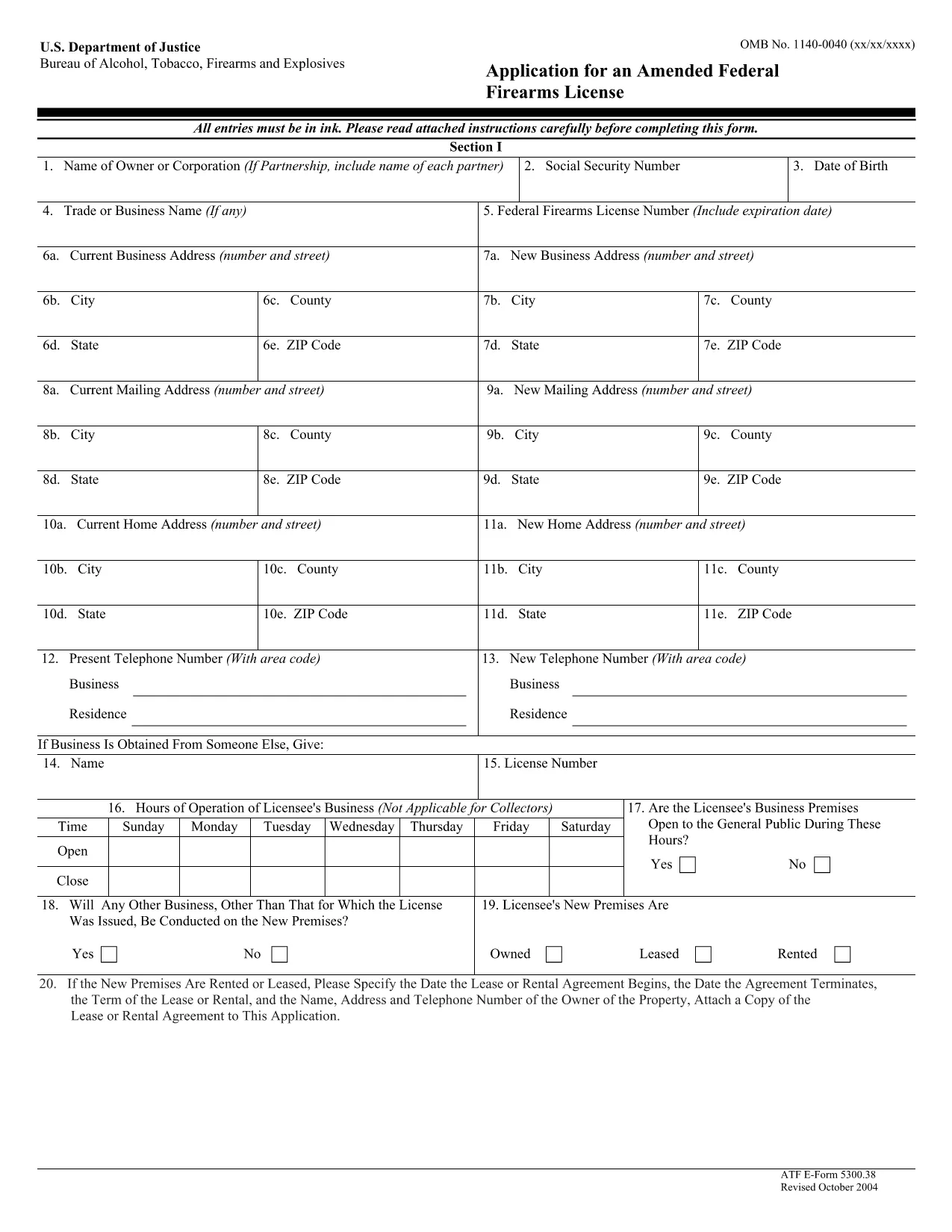
ATF Form 5300.38 – Amended Federal Firearms License Application

  1. Lingua Inglese
  2. Paese Stati Uniti d'America
  3. Dipartimento Bereau di alcool, tabacco, armi da fuoco ed esplosivi
  4. Settore Armi da fuoco
Compila questo modulo
ATF Form 5300.38 – Amended Federal Firearms License Application

The ATF Form 5300.38 is the official application used to request an amendment to an existing Federal Firearms License (FFL). Whether you need to add a new class of firearms, change your business address, or update other license details, this form is required by the Bureau of Alcohol, Tobacco, Firearms and Explosives (ATF).

Formize.com offers a 100% fillable, searchable PDF version of the ATF Form 5300.38. You can either download the PDF to complete it offline or use our integrated online PDF filler to fill it out instantly in your browser—no extra software needed.

What is ATF Form 5300.38?

This form is titled “Application for an Amended Federal Firearms License” and is governed by 18 U.S.C. Chapter 44. It is used by existing FFL holders to request any change to their license that does not require a completely new application.

How to Fill Out the Form Online

Follow the simple steps below to complete the form securely with Formize’s PDF Filler:

  • Click the “Fill out this form” button on this page.
  • Wait a few seconds while the Formize PDF Filler loads the fillable ATF Form 5300.38.
  • Enter your information directly into each field. The filler validates dates, phone numbers, and required fields in real time.
  • Review the completed form, sign electronically if required, and click “Download” or “Print”.
  • Mail the signed form to the ATF Federal Firearms Licensing Center as instructed.

Common Mistakes to Avoid

Even a small error can delay processing. Keep these tips in mind:

  • Incorrect ATF Number: Double‑check your current FFL number.
  • Missing Signatures: All required signatures must be original or an accepted electronic signature.
  • Out‑of‑Date Addresses: Use the exact mailing address listed on your current license.
  • Incomplete Attachments: If you’re adding a new class, include the appropriate supplemental pages.

Where to Submit Your Application

After completing the form, mail it to:

Chief, Federal Firearms Licensing Center
2600 Century Parkway NE
Atlanta, GA 30345
United States

Use certified mail or a reputable courier to ensure delivery tracking.

Download the Official PDF

If you prefer to fill out the form offline, click the download button below to get the official ATF Form 5300.38 PDF directly from the government source.

Download ATF Form 5300.38 PDF

FAQ
  • Is the ATF Form 5300.38 available as a fillable PDF?

    Yes. Formize provides a fully fillable PDF version that you can complete online or download for offline use.

  • Do I need a digital signature for this form?

    The ATF accepts electronic signatures for most sections, but the final signature line often requires a wet ink signature. Check the instructions on the form.

  • How long does it take for the ATF to process an amendment?

    Processing times vary, but most amended license requests are reviewed within 4‑6 weeks after receipt.

  • Can I submit the form electronically?

    The ATF still requires a hard‑copy submission by mail. You can, however, fill out the form electronically and print it for mailing.

  • What should I do if I make a mistake after printing?

    Cross out the error with a single line, initial the change, and complete the rest of the form. For major errors, it’s best to start a new copy.

  • Is there a fee for filing an amendment?

    Generally, there is no additional fee for amending an existing FFL unless the amendment adds a new class of firearms, which may incur a fee.

  • Where can I find the official ATF instructions for Form 5300.38?

    The official instruction sheet is included as the first page of the PDF linked above or can be accessed on the ATF website.

  • Do I need to attach any supporting documents?

    Depending on the amendment, you may need to attach a copy of your current license, a new business location map, or other relevant documentation.

COME

Come compilare ATF Form 5300.38 gratuitamente, online in 5 semplici passaggi:

  1. 1
    Click the Fill‑out Button
    Press the “Fill out this form” button on this page to launch the Formize PDF Filler.
  2. 2
    Wait for the Filler to Load
    The fillable ATF Form 5300.38 will appear in your browser within a few seconds.
  3. 3
    Enter Your Information
    Complete each field. The tool validates entries and highlights required sections.
  4. 4
    Review and Sign
    Check the completed form for accuracy, add an electronic signature if allowed, and save.
  5. 5
    Download or Print
    Download the finished PDF or print it to mail to the ATF Federal Firearms Licensing Center.
App Formize PDF Filler
DI

Moduli Bereau di alcol, tabacco, armi da fuoco ed esplosivi (ATF).

ATF Form 5300.38 è uno dei moduli ufficiali utilizzati dall'ATF, un'agenzia di polizia federale all'interno del Dipartimento di Giustizia degli Stati Uniti. L'ATF è responsabile dell'applicazione delle leggi e dei regolamenti federali relativi ad alcol, tabacco, armi da fuoco ed esplosivi. Questi moduli vengono utilizzati per vari scopi, tra cui la registrazione, la concessione di licenze e la regolamentazione di aziende e individui coinvolti in questi settori. Ecco alcuni esempi di moduli ATF:

Modulo ATF 4473: questo modulo viene utilizzato per la procedura di controllo dei precedenti quando una persona acquista un'arma da fuoco da un rivenditore di armi con licenza federale. Raccoglie informazioni sull'identità, sul background e sull'idoneità dell'acquirente a detenere armi da fuoco.

Modulo ATF 1: questo modulo viene utilizzato per richiedere la fabbricazione e la registrazione di un'arma da fuoco. Viene generalmente utilizzato per le persone che desiderano produrre un'arma da fuoco per uso personale o convertire un'arma da fuoco esistente in una configurazione diversa.

Modulo ATF 4: questo modulo viene utilizzato per il trasferimento e la registrazione di un'arma da fuoco da un individuo o entità a un altro. È comunemente utilizzato nel processo di acquisto di un'arma da fuoco da un privato o nel trasferimento di un'arma da fuoco a un trust o a una società.

Modulo ATF 6: questo modulo viene utilizzato per l'importazione di armi da fuoco, munizioni e alcuni altri articoli regolamentati dall'ATF. È richiesto per individui o aziende che desiderano importare tali articoli negli Stati Uniti.

Modulo ATF 7: questo modulo viene utilizzato per la richiesta e il rinnovo di una licenza federale di armi da fuoco (FFL). È richiesto per individui o aziende impegnati nell'attività di produzione, commercio o importazione di armi da fuoco.

Modulo ATF 5320.20: questo modulo viene utilizzato per la notifica e l'approvazione del trasporto di armi da fuoco o dispositivi distruttivi oltre i confini di stato.

Modulo ATF 5400.13: questo modulo viene utilizzato per la registrazione e la segnalazione di materiali e dispositivi esplosivi.

Questi sono solo alcuni esempi dei moduli ATF utilizzati per vari scopi legati alla regolamentazione e all'applicazione delle leggi federali che disciplinano l'alcol, il tabacco, le armi da fuoco e gli esplosivi. I moduli specifici richiesti dipendono dalla particolare attività o transazione condotta e dalle normative applicabili. È importante consultare il sito web ufficiale dell'Ufficio per l'alcol, il tabacco, le armi da fuoco e gli esplosivi (www.atf.gov) o cercare una guida professionale per informazioni accurate e aggiornate per quanto riguarda i moduli ATF specifici rilevanti per la tua situazione.

CARATTERISTICHE

Compilatore PDF

Il modo più semplice per compilare moduli PDF online

  • Compila rapidamente ATF Form 5300.38
    Cerchi un modo per compilare rapidamente ATF Form 5300.38 online? Con il nostro compilatore di moduli PDF gratuito online, saprai come modificare e compilare questo documento PDF in meno di un minuto.
  • Editor PDF online facile da usare
    Stufo di stampare file PDF in modo da poterli modificare, prima di riscansionarli e rispedirli? Modifica documenti PDF gratuitamente online. Utilizza il nostro editor PDF online per risparmiare tempo e carta.
  • Grandi strumenti, tutte le piattaforme
    Ti stai chiedendo come inserire ATF Form 5300.38 su un Mac o forse come utilizzare un riempitivo PDF gratuito? I nostri strumenti PDF online funzionano su tutte le piattaforme.
  • Archiviazione sicura dei file
    I file "ATF Form 5300.38" completati vengono archiviati in un database protetto gestito dall'hosting Amazon Cloud. Puoi eliminare i tuoi file dal nostro sistema in qualsiasi momento. In ogni caso, questi file vengono automaticamente cancellati dopo 24 ore.
  • Chatta con {parola chiave}
    Chatta con "ATF Form 5300.38" su Chatize che è un assistente di lettura PDF gratuito. Fai domande e ottieni risposte da "ATF Form 5300.38". Basta fare clic sul pulsante Chatta con il documento in alto.

Elimina sessione di riempimento

Eliminare la sessione di riempimento selezionata? In questo caso, i progressi nella compilazione del modulo andranno persi.

Elimina la sessione di modifica

Eliminare la sessione di editing selezionata? In questo caso, i tuoi progressi nella creazione e modifica del modulo andranno persi.