
Seleziona la lingua

ATF Form 5310.12 & 5310.16 Fillable PDF – Download & Complete Online

  1. Lingua Inglese
  2. Paese Stati Uniti d'America
  3. Dipartimento Bereau di alcool, tabacco, armi da fuoco ed esplosivi
  4. Settore Armi da fuoco
Compila questo modulo
ATF Form 5310.12 & 5310.16 Fillable PDF – Download & Complete Online

Whether you are applying for a new Federal Firearms License (FFL) or need to add a responsible person to an existing license, the ATF’s Form 5310.12 and Form 5310.16 are essential. Formize provides a secure, fillable PDF that lets you complete both forms directly in your browser – no extra software required.

What Is ATF Form 5310.12?

Form 5310.12 is the official application used to request any type of FFL (Dealer, Manufacturer, Importer, etc.). It collects business information, background details, and the specific license class you are seeking.

Understanding Form 5310.16 – Responsible Person Questionnaire

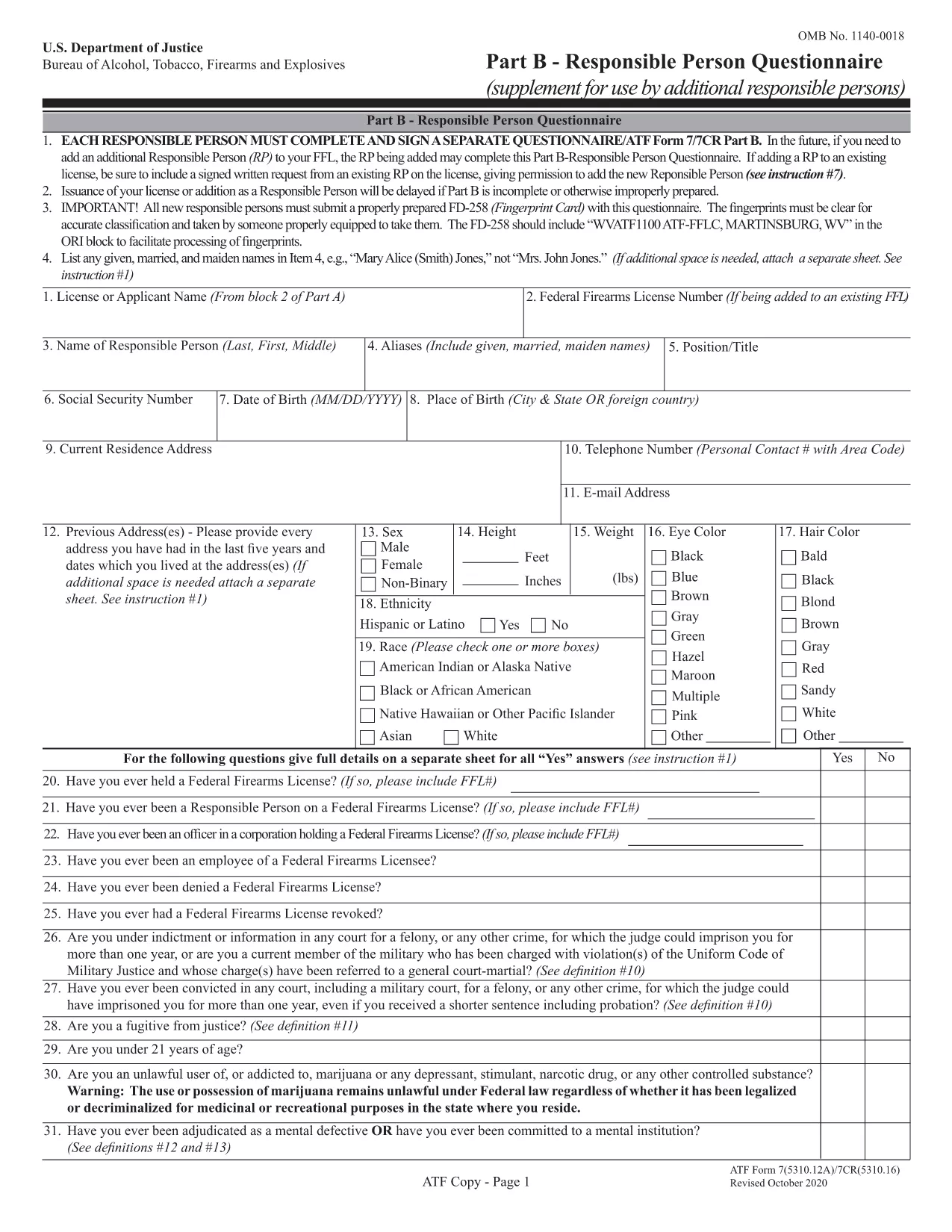
Form 5310.16 (also known as Part B) is a questionnaire that must be completed by every responsible person added to an FFL. It includes personal background questions, fingerprint instructions, and a photo requirement.

How to Fill Out the Forms Online with Formize

Follow the simple steps below to fill the PDF without leaving the page.

  • Click the "Fill out this form" button on the page.
  • Wait a few seconds while the Formize PDF Filler app loads.
  • Enter your information directly into the fillable fields.
  • Use the Save button to download a completed copy or Print it for mailing.
  • Mail the printed form to the ATF address shown on the form instructions.

Common Mistakes to Avoid

  • Leaving required fields blank – the filler highlights empty mandatory sections.
  • Using an outdated form version – our PDF is the latest revision (effective 2022).
  • Submitting the wrong mailing address – double‑check the address on the form’s last page.
  • Forgetting the fingerprint card for Form 5310.16 – attach it before mailing.

Where to Submit Your Completed Forms

After completing the forms, mail them to the ATF’s Federal Firearms Licensing Center (FFLC) at the address printed on the last page of each form. For expedited processing, consider using certified mail with tracking.

Need more help? Review the ATF’s official instructions linked on each form or consult a qualified firearms attorney.

FAQ
  • Do I need to fill out both Form 5310.12 and 5310.16?

    Form 5310.12 is required for a new FFL. Form 5310.16 is only needed when adding or updating a responsible person on an existing FFL.

  • Can I submit the forms electronically?

    The ATF currently requires a hard‑copy submission for these forms. Use the online filler to complete them, then print and mail.

  • Is the PDF fillable on mobile devices?

    Yes. The Formize filler works on most modern smartphones and tablets, though a larger screen makes data entry easier.

  • What address should I use for mailing?

    The correct mailing address is printed on the last page of each form. For Form 5310.12, use the Federal Firearms Licensing Center address; for Form 5310.16, use the ATF address shown in the questionnaire instructions.

  • How long does it take the ATF to process my application?

    Processing times vary, but most FFL applications are reviewed within 60‑90 days after receipt.

  • Do I need a fingerprint card for Form 5310.16?

    Yes. Every responsible person must submit a fingerprint card (FD‑258) along with the completed questionnaire.

  • What if I make a mistake after mailing?

    Contact the ATF’s Federal Firearms Licensing Center immediately. They may allow a corrected form to be resubmitted before final approval.

COME

Come compilare ATF Form 5310.12 gratuitamente, online in 5 semplici passaggi:

  1. 1
    Click the Fill Out Button
    Press the "Fill out this form" button on the page to launch the Formize PDF Filler.
  2. 2
    Wait for the Filler to Load
    A short loading screen appears while the secure fillable PDF is prepared.
  3. 3
    Enter Your Information
    Type directly into each highlighted field. Use the navigation tabs to jump between sections.
  4. 4
    Save or Print Your Completed Form
    When finished, click "Save" to download a copy or "Print" to produce a hard‑copy for mailing.
  5. 5
    Mail to the ATF
    Attach any required fingerprint cards or photos and mail the form to the address shown on the last page.
App Formize PDF Filler
DI

Moduli Bereau di alcol, tabacco, armi da fuoco ed esplosivi (ATF).

ATF Form 5310.12 è uno dei moduli ufficiali utilizzati dall'ATF, un'agenzia di polizia federale all'interno del Dipartimento di Giustizia degli Stati Uniti. L'ATF è responsabile dell'applicazione delle leggi e dei regolamenti federali relativi ad alcol, tabacco, armi da fuoco ed esplosivi. Questi moduli vengono utilizzati per vari scopi, tra cui la registrazione, la concessione di licenze e la regolamentazione di aziende e individui coinvolti in questi settori. Ecco alcuni esempi di moduli ATF:

Modulo ATF 4473: questo modulo viene utilizzato per la procedura di controllo dei precedenti quando una persona acquista un'arma da fuoco da un rivenditore di armi con licenza federale. Raccoglie informazioni sull'identità, sul background e sull'idoneità dell'acquirente a detenere armi da fuoco.

Modulo ATF 1: questo modulo viene utilizzato per richiedere la fabbricazione e la registrazione di un'arma da fuoco. Viene generalmente utilizzato per le persone che desiderano produrre un'arma da fuoco per uso personale o convertire un'arma da fuoco esistente in una configurazione diversa.

Modulo ATF 4: questo modulo viene utilizzato per il trasferimento e la registrazione di un'arma da fuoco da un individuo o entità a un altro. È comunemente utilizzato nel processo di acquisto di un'arma da fuoco da un privato o nel trasferimento di un'arma da fuoco a un trust o a una società.

Modulo ATF 6: questo modulo viene utilizzato per l'importazione di armi da fuoco, munizioni e alcuni altri articoli regolamentati dall'ATF. È richiesto per individui o aziende che desiderano importare tali articoli negli Stati Uniti.

Modulo ATF 7: questo modulo viene utilizzato per la richiesta e il rinnovo di una licenza federale di armi da fuoco (FFL). È richiesto per individui o aziende impegnati nell'attività di produzione, commercio o importazione di armi da fuoco.

Modulo ATF 5320.20: questo modulo viene utilizzato per la notifica e l'approvazione del trasporto di armi da fuoco o dispositivi distruttivi oltre i confini di stato.

Modulo ATF 5400.13: questo modulo viene utilizzato per la registrazione e la segnalazione di materiali e dispositivi esplosivi.

Questi sono solo alcuni esempi dei moduli ATF utilizzati per vari scopi legati alla regolamentazione e all'applicazione delle leggi federali che disciplinano l'alcol, il tabacco, le armi da fuoco e gli esplosivi. I moduli specifici richiesti dipendono dalla particolare attività o transazione condotta e dalle normative applicabili. È importante consultare il sito web ufficiale dell'Ufficio per l'alcol, il tabacco, le armi da fuoco e gli esplosivi (www.atf.gov) o cercare una guida professionale per informazioni accurate e aggiornate per quanto riguarda i moduli ATF specifici rilevanti per la tua situazione.

CARATTERISTICHE

Compilatore PDF

Il modo più semplice per compilare moduli PDF online

  • Compila rapidamente ATF Form 5310.12
    Cerchi un modo per compilare rapidamente ATF Form 5310.12 online? Con il nostro compilatore di moduli PDF gratuito online, saprai come modificare e compilare questo documento PDF in meno di un minuto.
  • Editor PDF online facile da usare
    Stufo di stampare file PDF in modo da poterli modificare, prima di riscansionarli e rispedirli? Modifica documenti PDF gratuitamente online. Utilizza il nostro editor PDF online per risparmiare tempo e carta.
  • Grandi strumenti, tutte le piattaforme
    Ti stai chiedendo come inserire ATF Form 5310.12 su un Mac o forse come utilizzare un riempitivo PDF gratuito? I nostri strumenti PDF online funzionano su tutte le piattaforme.
  • Archiviazione sicura dei file
    I file "ATF Form 5310.12" completati vengono archiviati in un database protetto gestito dall'hosting Amazon Cloud. Puoi eliminare i tuoi file dal nostro sistema in qualsiasi momento. In ogni caso, questi file vengono automaticamente cancellati dopo 24 ore.
  • Chatta con {parola chiave}
    Chatta con "ATF Form 5310.12" su Chatize che è un assistente di lettura PDF gratuito. Fai domande e ottieni risposte da "ATF Form 5310.12". Basta fare clic sul pulsante Chatta con il documento in alto.

Elimina sessione di riempimento

Eliminare la sessione di riempimento selezionata? In questo caso, i progressi nella compilazione del modulo andranno persi.

Elimina la sessione di modifica

Eliminare la sessione di editing selezionata? In questo caso, i tuoi progressi nella creazione e modifica del modulo andranno persi.