
Seleziona la lingua

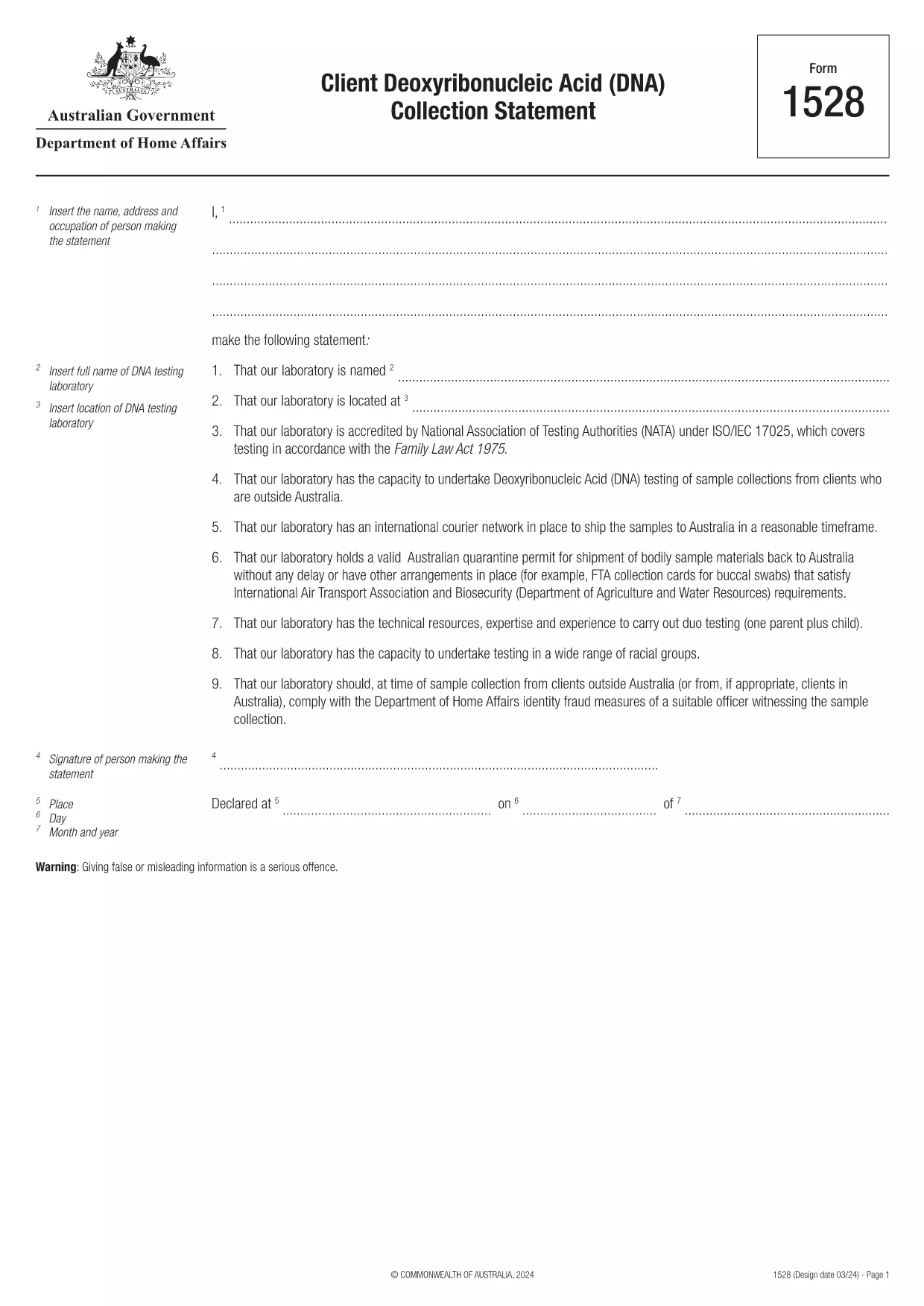
Form 1528 – Client DNA Collection Statement (Fillable PDF)

  1. Paese Australia
  2. Lingua Inglese
  3. Attività Carattere o identità
Compila questo modulo
Form 1528 – Client DNA Collection Statement (Fillable PDF)

Form 1528 is the official Client Deoxyribonucleic Acid (DNA) Collection Statement required by the Australian Department of Home Affairs. The form captures the name, address and occupation of the person making the statement, as well as details of the DNA testing laboratory.

What Is Form 1528?

This form is used when an individual must provide a DNA sample for immigration, visa, or forensic purposes. It must be completed by the person providing the sample and signed by an authorised DNA testing laboratory.

How to Fill Out Form 1528 with Formize

Instead of printing, scanning, or editing the PDF manually, simply click the “Fill out this form” button on this page. The Formize PDF Filler app will load the fillable version, letting you enter data, add signatures, and save the completed document in seconds.

Common Mistakes & Tips

  • Leave no blank fields – the Department rejects forms with empty required sections.
  • Use the exact laboratory name and address as it appears on the lab’s official letterhead.
  • Check date formats – use DD/MM/YYYY throughout.
  • Sign electronically only after all information is verified; a digital signature is accepted.

Where to Submit the Completed Form

After you download the completed PDF, you can upload it through your online visa portal, email it to the requesting officer, or deliver a printed copy to the nearest Australian Visa Application Centre.

Need More Help?

For detailed guidance, review the instructions on the Department of Home Affairs website or contact your DNA testing laboratory for clarification on laboratory‑specific fields.

FAQ
  • Is an electronic signature accepted on Form 1528?

    Yes. The Department of Home Affairs accepts a clear electronic signature created with the Formize PDF Filler.

  • Can I print the form after filling it online?

    Absolutely. After completing the form, you can download the PDF and print a hard copy if you prefer a physical submission.

  • What if I make a mistake after saving the form?

    Open the saved PDF again in Formize, edit the incorrect fields, and re‑save. The fillable PDF allows unlimited edits before final submission.

  • Do I need to attach any supporting documents?

    Typically, the DNA laboratory will provide a separate certification letter. Attach that letter alongside the completed Form 1528 when you submit your application.

  • How long does it take to process Form 1528?

    Processing time varies by case, but the Department generally reviews the statement within 5‑10 business days after receipt.

  • Is there a fee for using Formize’s PDF filler?

    Formize offers a free basic fillable version for Form 1528. Advanced features such as bulk signing require a paid plan, but are not needed for a single submission.

  • Can I fill out Form 1528 on a mobile device?

    Yes. The Formize PDF Filler works on smartphones and tablets, allowing you to complete the form anywhere.

  • What format should I use when uploading the completed form?

    Upload the final document as a PDF file. Ensure the file size does not exceed the portal’s limit (usually 5 MB).

COME

Come compilare Form 1528 gratuitamente, online in 5 semplici passaggi:

  1. 1
    Open the Fillable Form
    Click the “Fill out this form” button on the page. The Formize PDF Filler app will launch in a new tab with the fillable version of Form 1528.
  2. 2
    Enter Your Information
    Type the required details – personal data, laboratory name, and address – directly into the highlighted fields.
  3. 3
    Add Electronic Signatures
    Use the signature tool to sign the statement and, if required, the laboratory representative’s signature.
  4. 4
    Review & Validate
    Double‑check every field for accuracy, especially dates and laboratory information.
  5. 5
    Download or Submit
    When you’re satisfied, click “Save & Download” to get the completed PDF, or use the built‑in “Submit” button to send it directly to the Home Affairs portal.
App Formize PDF Filler
DI

Forme di carattere o identità

Form 1528 è uno dei documenti utilizzati per raccogliere informazioni sul carattere o sulle qualità personali di un individuo. Questi moduli possono essere utilizzati in varie situazioni, come lavoro, alloggio o procedimenti legali, per valutare l'idoneità o la credibilità di un individuo. Ecco alcuni esempi di forme che potrebbero essere considerate "forme di carattere" in diversi contesti:

Moduli di riferimento del personaggio: questi moduli vengono utilizzati per raccogliere informazioni da individui che possono garantire il carattere, le abilità e le qualifiche di un individuo. Sono spesso richiesti nell'ambito di domande di lavoro, domande di affitto o procedimenti legali. I moduli in genere richiedono dettagli sulla relazione con il richiedente, la loro opinione sul carattere del richiedente ed eventuali esperienze o osservazioni rilevanti.

Moduli per dichiarazioni personali: in determinate situazioni, agli individui può essere chiesto di fornire una dichiarazione personale o un saggio per trasmettere il proprio carattere, i propri valori e le proprie motivazioni. Ciò potrebbe essere richiesto per l'ammissione al college, le richieste di borse di studio o i processi di licenza professionale.

Moduli di testimonianza di carattere: nei procedimenti legali, un testimone di carattere può essere chiamato a fornire testimonianza riguardante il carattere, la reputazione o il comportamento di un individuo. Anche se generalmente non sotto forma di un documento predefinito, potrebbero esserci moduli o modelli forniti per guidare il testimone nella strutturazione della propria testimonianza.

Moduli di divulgazione e autorizzazione per il controllo dei precedenti: in alcuni contesti, come le domande di lavoro, alle persone potrebbe essere chiesto di compilare moduli che autorizzano un controllo dei precedenti. Questi moduli possono includere domande su riferimenti di carattere, precedenti penali o altre informazioni personali rilevanti.

È importante notare che i moduli specifici utilizzati per valutare il carattere di un individuo possono variare a seconda del contesto e dei requisiti dell'organizzazione o istituzione coinvolta. Si consiglia pertanto di fare riferimento agli specifici moduli forniti dal soggetto interessato per comprendere le informazioni richieste e come compilare correttamente i moduli.

CARATTERISTICHE

Compilatore PDF

Il modo più semplice per compilare moduli PDF online

  • Compila rapidamente Form 1528
    Cerchi un modo per compilare rapidamente Form 1528 online? Con il nostro compilatore di moduli PDF gratuito online, saprai come modificare e compilare questo documento PDF in meno di un minuto.
  • Editor PDF online facile da usare
    Stufo di stampare file PDF in modo da poterli modificare, prima di riscansionarli e rispedirli? Modifica documenti PDF gratuitamente online. Utilizza il nostro editor PDF online per risparmiare tempo e carta.
  • Grandi strumenti, tutte le piattaforme
    Ti stai chiedendo come inserire Form 1528 su un Mac o forse come utilizzare un riempitivo PDF gratuito? I nostri strumenti PDF online funzionano su tutte le piattaforme.
  • Archiviazione sicura dei file
    I file "Form 1528" completati vengono archiviati in un database protetto gestito dall'hosting Amazon Cloud. Puoi eliminare i tuoi file dal nostro sistema in qualsiasi momento. In ogni caso, questi file vengono automaticamente cancellati dopo 24 ore.
  • Chatta con {parola chiave}
    Chatta con "Form 1528" su Chatize che è un assistente di lettura PDF gratuito. Fai domande e ottieni risposte da "Form 1528". Basta fare clic sul pulsante Chatta con il documento in alto.

Elimina sessione di riempimento

Eliminare la sessione di riempimento selezionata? In questo caso, i progressi nella compilazione del modulo andranno persi.

Elimina la sessione di modifica

Eliminare la sessione di editing selezionata? In questo caso, i tuoi progressi nella creazione e modifica del modulo andranno persi.