Seleziona la lingua

Form 43 – Request to Load Goods onto Ship (Fillable PDF)

  1. Paese Australia
  2. Lingua Inglese
  3. Attività Import/Export
  4. Dipartimento Customs
Compila questo modulo
Form 43 – Request to Load Goods onto Ship (Fillable PDF)

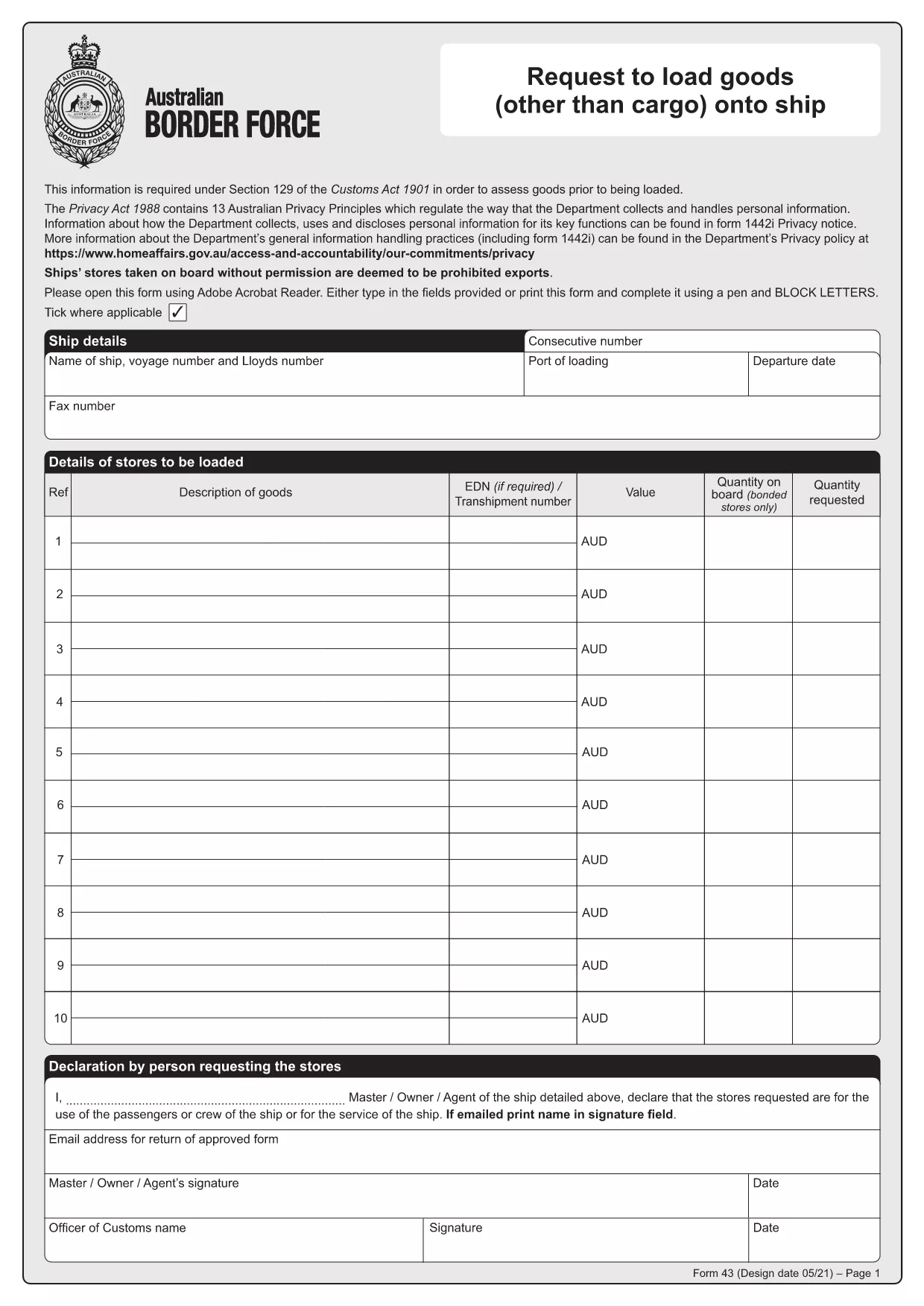
Form 43 is the Australian Border Force (ABF) customs form used when ship stores or other goods are taken on board a vessel without prior permission. It records essential details about the ship, the supplier, the goods, and the customs officer’s approval.

Whether you are a ship captain, a logistics officer, or a supplier, having a quick, fillable version of Form 43 saves time and reduces errors. With Formize’s online PDF filler, you can complete the form directly in your browser – no extra software required.

  • Instant download: Get the official PDF in seconds.
  • Online filling: Click “Fill out this form” and the Formize PDF Filler loads automatically.
  • Secure storage: Save a copy to your device or cloud storage after you submit.

Below you’ll find step‑by‑step instructions, common pitfalls, and answers to the most frequently asked questions about Form 43.

FAQ
  • What is the purpose of Form 43?

    Form 43 records the request to load ship stores or other goods onto a vessel without prior customs permission, ensuring the goods are documented and approved.

  • Can I edit the PDF on my phone?

    Yes. The Formize PDF Filler works on all modern browsers, including mobile Safari and Chrome, so you can complete the form on a smartphone or tablet.

  • Do I need a PDF editor to fill Form 43?

    No. The online filler lets you fill, sign, and save the form without installing any PDF editor.

  • Is the downloaded PDF an official version?

    Absolutely. The file is the official Form 43 PDF provided by the Australian Border Force, unchanged and ready for submission.

  • What common mistakes should I avoid?

    Make sure all dates are in DD/MM/YYYY format, double‑check the ship’s registration number, and ensure the customs officer’s signature field is left blank for them to sign later.

  • How long is Form 43 valid after submission?

    The form remains valid for the duration of the voyage it covers. Keep a saved copy for your records in case customs request it later.

  • Can I submit Form 43 electronically to customs?

    Customs usually requires a printed copy with the officer’s signature, but you can email a PDF copy for preliminary review if your port authority allows it.

COME

Come compilare Form 43 PDF gratuitamente, online in 4 semplici passaggi:

  1. 1
    Step 1 – Click the Fill Button
    On this page, click the bright “Fill out this form” button. The Formize PDF Filler app will open in a new tab.
  2. 2
    Step 2 – Wait for the Filler to Load
    The online filler loads the official Form 43 PDF automatically. This usually takes only a few seconds.
  3. 3
    Step 3 – Enter the Required Information
    Type directly into each field: ship details, supplier name, description of goods, dates, and customs officer approval. All fields are searchable and auto‑save.
  4. 4
    Step 4 – Save or Print Your Completed Form
    When you finish, click “Save” to download a filled PDF to your device, or click “Print” to produce a hard copy for submission to customs.
App Formize PDF Filler
DI

modello Form 43 PDF

Con il tradizionale set di funzionalità per la visualizzazione e la compilazione di un documento PDF, combinato con i vantaggi di un'applicazione Web e un layout reattivo, puoi completare Form 43 PDF in pochi minuti.

CARATTERISTICHE

Compilatore PDF

Il modo più semplice per compilare moduli PDF online

  • Compila rapidamente Form 43 PDF
    Cerchi un modo per compilare rapidamente Form 43 PDF online? Con il nostro compilatore di moduli PDF gratuito online, saprai come modificare e compilare questo documento PDF in meno di un minuto.
  • Editor PDF online facile da usare
    Stufo di stampare file PDF in modo da poterli modificare, prima di riscansionarli e rispedirli? Modifica documenti PDF gratuitamente online. Utilizza il nostro editor PDF online per risparmiare tempo e carta.
  • Grandi strumenti, tutte le piattaforme
    Ti stai chiedendo come inserire Form 43 PDF su un Mac o forse come utilizzare un riempitivo PDF gratuito? I nostri strumenti PDF online funzionano su tutte le piattaforme.
  • Archiviazione sicura dei file
    I file "Form 43 PDF" completati vengono archiviati in un database protetto gestito dall'hosting Amazon Cloud. Puoi eliminare i tuoi file dal nostro sistema in qualsiasi momento. In ogni caso, questi file vengono automaticamente cancellati dopo 24 ore.
  • Chatta con {parola chiave}
    Chatta con "Form 43 PDF" su Chatize che è un assistente di lettura PDF gratuito. Fai domande e ottieni risposte da "Form 43 PDF". Basta fare clic sul pulsante Chatta con il documento in alto.

Elimina sessione di riempimento

Eliminare la sessione di riempimento selezionata? In questo caso, i progressi nella compilazione del modulo andranno persi.

Elimina la sessione di modifica

Eliminare la sessione di editing selezionata? In questo caso, i tuoi progressi nella creazione e modifica del modulo andranno persi.