
Seleziona la lingua

Air Force Application Form – Fillable PDF

  1. Lingua Inglese
  2. Paese Australia
  3. Dipartimento Defence
  4. Attività Military Recruitment
Compila questo modulo
Air Force Application Form – Fillable PDF

What Is This Form For?

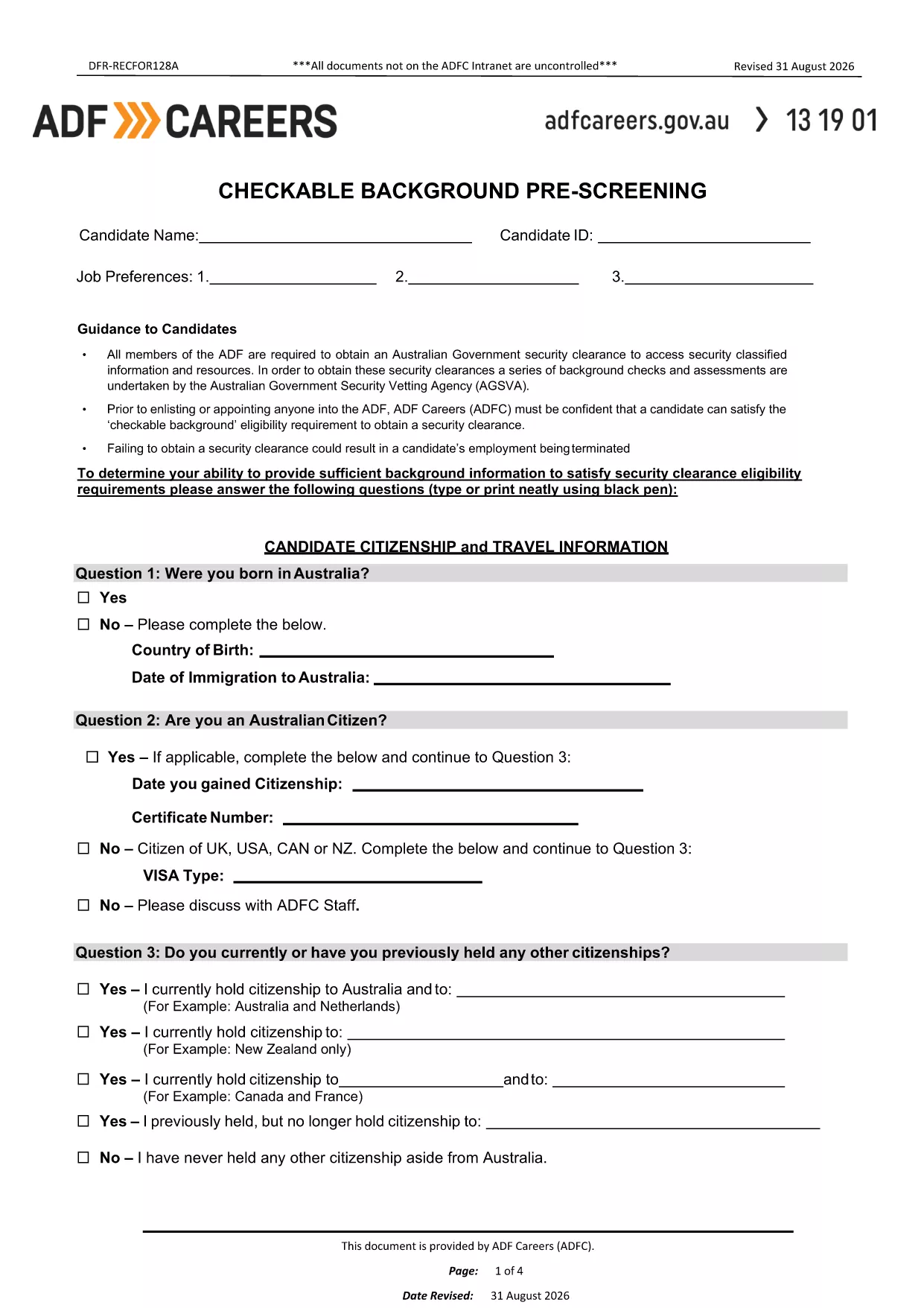
The Air Force Application Form is the first step in the enlistment or officer selection process. It captures personal details, education, employment history, and a background pre‑screening questionnaire that the Australian Defence Force (ADF) uses to assess eligibility for Air Force roles.

How to Fill Out the Air Force Application Form Online

Instead of downloading the PDF and editing it with a separate editor, simply click the "Fill out this form" button on this page. The Formize PDF Filler will load the fillable document directly in your browser, allowing you to:

  • Enter data into interactive fields.
  • Save progress at any time.
  • Validate required fields before submission.
  • Export the completed form as a PDF or send it directly to the recruiting office.

Common Mistakes to Avoid

  • Leaving required fields blank: The form will not let you submit until all mandatory sections are completed.
  • Using unofficial abbreviations: Write full names for schools, employers, and qualifications.
  • Skipping the background questions: Incomplete answers can delay security clearance.
  • Not signing the form: Use the built‑in e‑signature tool before saving.

Download & Save the PDF

If you prefer a local copy, you can still download the original PDF from the link below. Keep this file handy for reference or for printing a hard copy after you have completed the online version.

Download the Air Force Application Form (PDF)

Frequently Asked Questions

Answers to the most common queries are listed below. Click each question to expand the answer.

FAQ
  • Do I need to print the form after filling it online?

    No. The Formize filler lets you save a PDF copy digitally, which is accepted by all ADF recruiting offices.

  • Can I edit the form after I have saved it?

    Yes. Open the saved PDF again with Formize, make any changes, and re‑save.

  • What if I make a mistake while typing?

    Use the backspace or delete key to correct any field before moving to the next section. The filler highlights incomplete or invalid entries.

  • Is my personal data secure?

    Formize uses SSL encryption and does not store your information on our servers unless you choose to save it to the cloud.

  • Do I need a PDF reader to complete the form?

    No special software is required. All modern browsers support the Formize filler, which works on desktop and mobile devices.

  • How long does the pre‑screening process take?

    After submission, the ADF typically reviews the background questionnaire within 5‑10 business days.

COME

Come compilare air force application form gratuitamente, online in 4 semplici passaggi:

  1. 1
    Open the Fillable Form
    Click the "Fill out this form" button on the page. The Formize PDF Filler loads the Air Force Application Form directly in your browser.
  2. 2
    Enter Your Information
    Complete each section – personal details, education, employment, and background questions – using the interactive fields.
  3. 3
    Validate & Sign
    The filler checks required fields automatically. When all sections are complete, use the built‑in e‑signature tool to sign the form.
  4. 4
    Save or Submit
    Save a copy to your device or click "Submit" to email the completed PDF to your recruiting officer.
App Formize PDF Filler
DI

modello air force application form

Con il tradizionale set di funzionalità per la visualizzazione e la compilazione di un documento PDF, combinato con i vantaggi di un'applicazione Web e un layout reattivo, puoi completare air force application form in pochi minuti.

CARATTERISTICHE

Compilatore PDF

Il modo più semplice per compilare moduli PDF online

  • Compila rapidamente air force application form
    Cerchi un modo per compilare rapidamente air force application form online? Con il nostro compilatore di moduli PDF gratuito online, saprai come modificare e compilare questo documento PDF in meno di un minuto.
  • Editor PDF online facile da usare
    Stufo di stampare file PDF in modo da poterli modificare, prima di riscansionarli e rispedirli? Modifica documenti PDF gratuitamente online. Utilizza il nostro editor PDF online per risparmiare tempo e carta.
  • Grandi strumenti, tutte le piattaforme
    Ti stai chiedendo come inserire air force application form su un Mac o forse come utilizzare un riempitivo PDF gratuito? I nostri strumenti PDF online funzionano su tutte le piattaforme.
  • Archiviazione sicura dei file
    I file "air force application form" completati vengono archiviati in un database protetto gestito dall'hosting Amazon Cloud. Puoi eliminare i tuoi file dal nostro sistema in qualsiasi momento. In ogni caso, questi file vengono automaticamente cancellati dopo 24 ore.
  • Chatta con {parola chiave}
    Chatta con "air force application form" su Chatize che è un assistente di lettura PDF gratuito. Fai domande e ottieni risposte da "air force application form". Basta fare clic sul pulsante Chatta con il documento in alto.

Elimina sessione di riempimento

Eliminare la sessione di riempimento selezionata? In questo caso, i progressi nella compilazione del modulo andranno persi.

Elimina la sessione di modifica

Eliminare la sessione di editing selezionata? In questo caso, i tuoi progressi nella creazione e modifica del modulo andranno persi.