
Seleziona la lingua

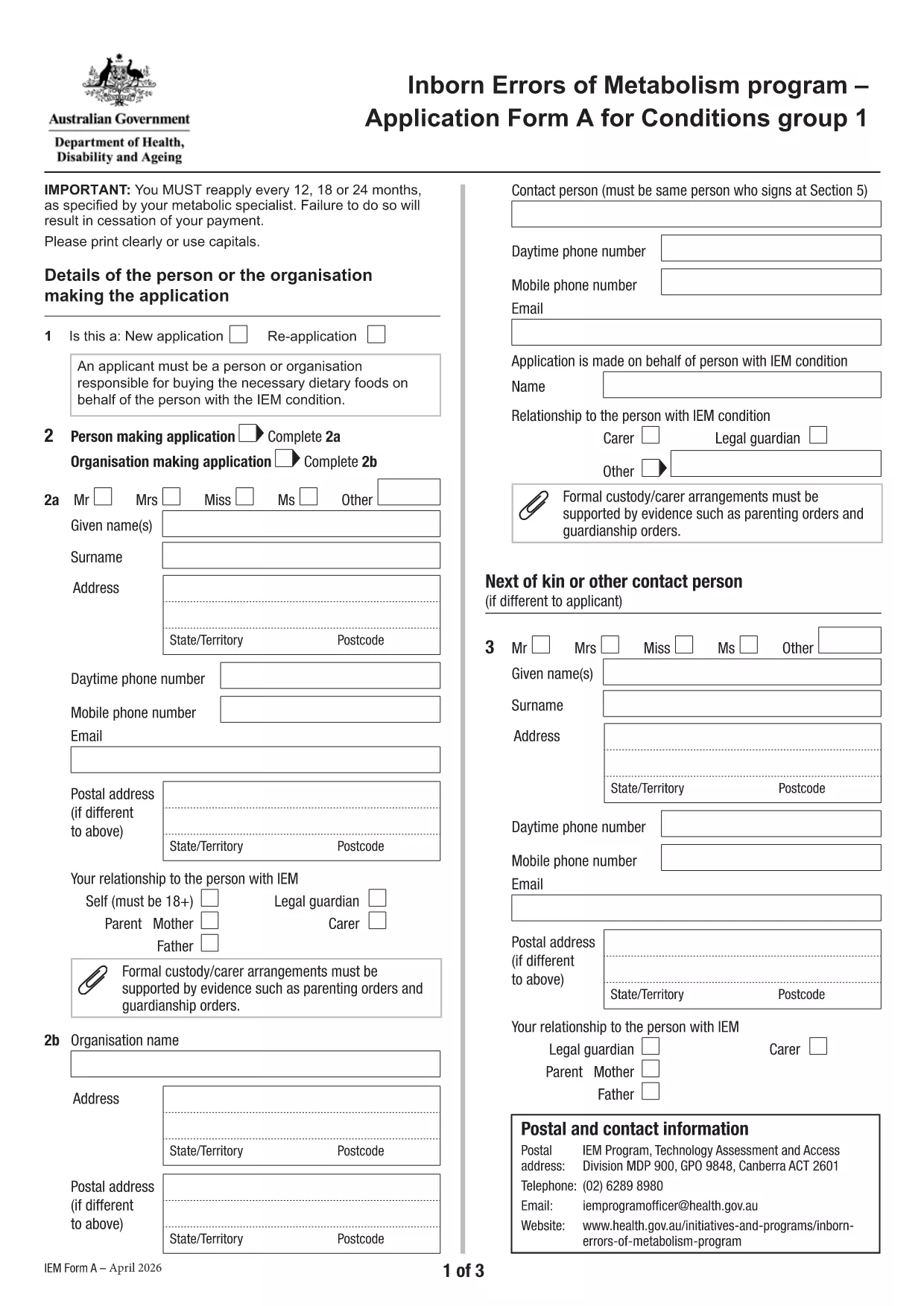
Application Form A – Inborn Errors of Metabolism

  1. Lingua Inglese
  2. Paese Australia
  3. Attività Health Assistance
  4. Dipartimento Dipartimento della salute e del benessere familiare
Compila questo modulo
Application Form A – Inborn Errors of Metabolism

Application Form A is the official Australian Government form used to apply for financial assistance for individuals diagnosed with certain Inborn Errors of Metabolism, specifically dihydropteridine reductase (DHPR) deficiency, hyperphenylalaninemia, and phenylketonuria (PKU). The form must be completed and resubmitted every 12 months to maintain eligibility.

What is Application Form A?

This PDF form collects personal details, medical diagnosis, treatment information, and financial data required by the Department of Health’s Inborn Errors of Metabolism program. It is a fillable PDF, meaning you can type directly into the fields without printing.

Who needs to complete this form?

  • Individuals diagnosed with DHPR deficiency, hyperphenylalaninemia, or PKU.
  • Parents or legal guardians applying on behalf of a minor.
  • Anyone who has previously received assistance under the program and needs to renew their claim.

How to fill out Application Form A online

Instead of downloading the PDF and opening it in a separate editor, simply click the "Fill out this form" button on this page. The Formize PDF Filler app will load automatically, allowing you to complete the form directly in your browser.

Common mistakes to avoid

  • Leaving required fields blank – the form will not submit.
  • Providing outdated medical reports – attach the most recent diagnosis documents.
  • Using an unsupported browser – Chrome is recommended for best performance.
  • Submitting the form before the 12‑month renewal period – ensure you are within the eligibility window.

Where to submit the completed form

After you finish filling out the form, click the Submit button within the Formize interface. Your application will be securely transmitted to the Department of Health’s processing team. You will receive a confirmation email with a reference number for future inquiries.

Need more help? Review the FAQs below or contact your local health service for assistance.

FAQ
  • What conditions are covered by Application Form A?

    The form is only for DHPR deficiency, hyperphenylalaninemia, and phenylketonuria (PKU). Other metabolic conditions must use Application Form B.

  • How often must I re‑apply?

    You must reassess and submit a new Application Form A every 12 months to continue receiving assistance.

  • Can I fill out the form on a mobile device?

    Yes, the Formize PDF Filler works on most smartphones and tablets, though a larger screen (tablet or desktop) is recommended for easier navigation.

  • What if I make a mistake after submitting?

    Contact the Department of Health’s Inborn Errors of Metabolism program using the reference number from your confirmation email. They can guide you on how to correct the error.

  • Do I need to print the form after filling it online?

    No. The form is submitted electronically via Formize. Printing is only necessary if you want a hard copy for your records.

  • Which browsers are supported?

    Chrome is the recommended browser for optimal performance. Firefox, Edge, and Safari also work but may have limited functionality.

  • Is my personal and medical information secure?

    Yes. Formize uses SSL encryption, and the Department of Health follows strict privacy guidelines to protect your data.

  • Can I save my progress and finish later?

    The Formize platform allows you to save a draft. Click the "Save Draft" button before exiting and return using the same link.

COME

Come compilare Application Form A gratuitamente, online in 5 semplici passaggi:

  1. 1
    Open the fillable form
    Click the "Fill out this form" button on the page. The Formize PDF Filler will open in a new tab.
  2. 2
    Enter your information
    Type directly into each field. Use the tab key to move quickly between sections.
  3. 3
    Attach supporting documents
    Upload recent medical reports and proof of identity using the attachment icons beside each required field.
  4. 4
    Review and submit
    Check all entries for accuracy, then click the "Submit" button. You will receive a confirmation email with a reference number.
  5. 5
    Save a copy
    After submission, download a PDF copy of the completed form for your records.
App Formize PDF Filler
DI

modello Application Form A

Con il tradizionale set di funzionalità per la visualizzazione e la compilazione di un documento PDF, combinato con i vantaggi di un'applicazione Web e un layout reattivo, puoi completare Application Form A in pochi minuti.

CARATTERISTICHE

Compilatore PDF

Il modo più semplice per compilare moduli PDF online

  • Compila rapidamente Application Form A
    Cerchi un modo per compilare rapidamente Application Form A online? Con il nostro compilatore di moduli PDF gratuito online, saprai come modificare e compilare questo documento PDF in meno di un minuto.
  • Editor PDF online facile da usare
    Stufo di stampare file PDF in modo da poterli modificare, prima di riscansionarli e rispedirli? Modifica documenti PDF gratuitamente online. Utilizza il nostro editor PDF online per risparmiare tempo e carta.
  • Grandi strumenti, tutte le piattaforme
    Ti stai chiedendo come inserire Application Form A su un Mac o forse come utilizzare un riempitivo PDF gratuito? I nostri strumenti PDF online funzionano su tutte le piattaforme.
  • Archiviazione sicura dei file
    I file "Application Form A" completati vengono archiviati in un database protetto gestito dall'hosting Amazon Cloud. Puoi eliminare i tuoi file dal nostro sistema in qualsiasi momento. In ogni caso, questi file vengono automaticamente cancellati dopo 24 ore.
  • Chatta con {parola chiave}
    Chatta con "Application Form A" su Chatize che è un assistente di lettura PDF gratuito. Fai domande e ottieni risposte da "Application Form A". Basta fare clic sul pulsante Chatta con il documento in alto.

Elimina sessione di riempimento

Eliminare la sessione di riempimento selezionata? In questo caso, i progressi nella compilazione del modulo andranno persi.

Elimina la sessione di modifica

Eliminare la sessione di editing selezionata? In questo caso, i tuoi progressi nella creazione e modifica del modulo andranno persi.