
Seleziona la lingua

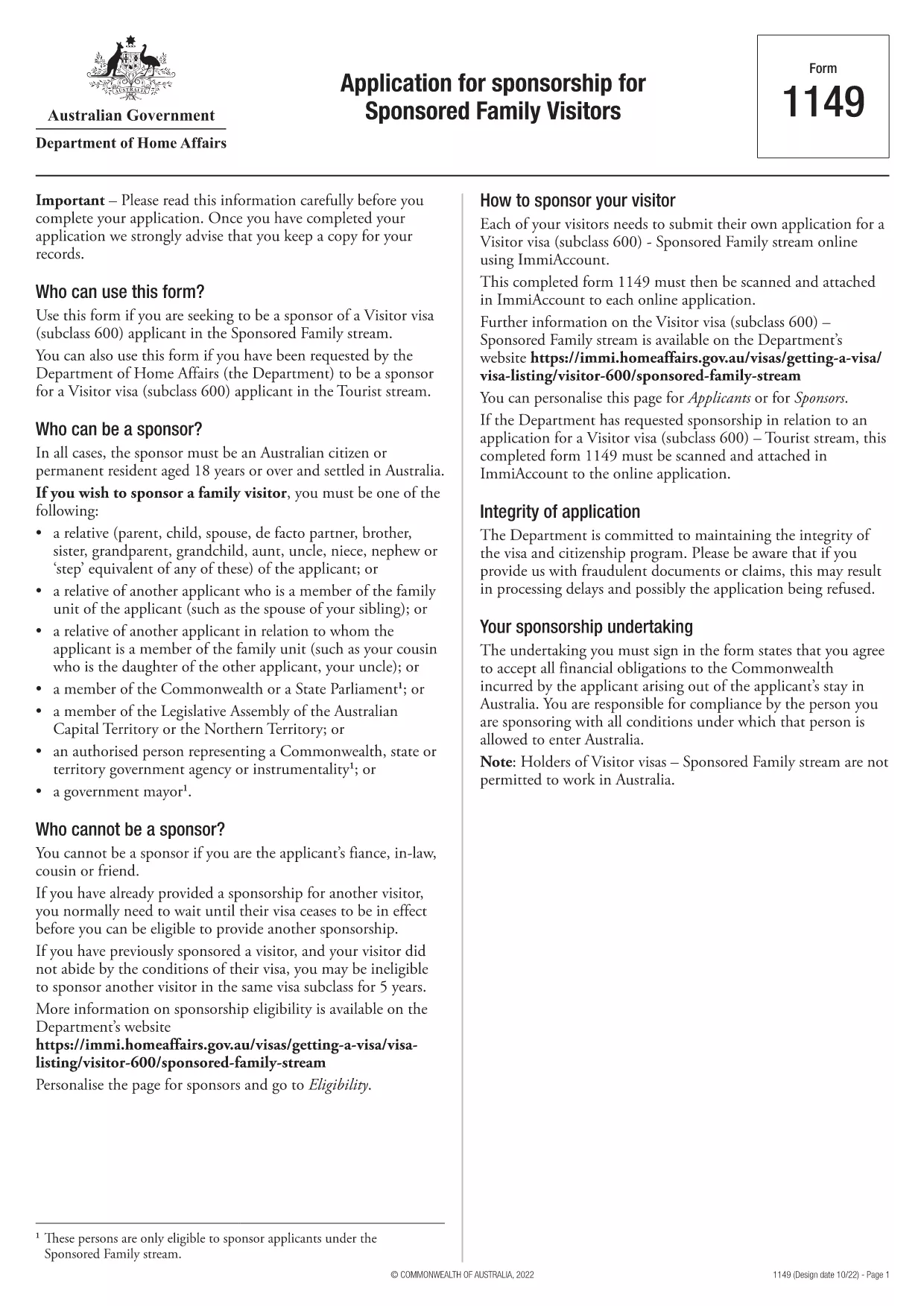
Form 1149 – Application for Sponsorship of a Family Visitor (Visitor Visa 600)

  1. Paese Australia
  2. Lingua Inglese
  3. Attività Unisciti o porta la famiglia
Compila questo modulo
Form 1149 – Application for Sponsorship of a Family Visitor (Visitor Visa 600)

Form 1149 is the official Application for Sponsorship for Sponsored Family Visitors used by Australian citizens or permanent residents who wish to sponsor a relative, a member of the Commonwealth, or a state parliamentarian for a Visitor visa (subclass 600). The form outlines the sponsor’s obligations, eligibility criteria, and any security bond requirements.

Traditionally the form is a static PDF that must be printed, handwritten, and mailed. With Formize you can complete the same form entirely online – just click Fill out this form and let our secure PDF filler do the work.

What Is Form 1149?

Form 1149 collects detailed information about the sponsor (name, address, citizenship status), the invited visitor (relationship, passport details, travel dates), and the financial support the sponsor will provide. It also asks about any previous sponsorships and the sponsor’s ability to meet the visa conditions.

Who Needs to Complete This Form?

  • Australian citizens or permanent residents sponsoring a family member for a Visitor visa (subclass 600).
  • Members of the Commonwealth or state parliament who are inviting a guest for official duties.
  • Anyone required to provide a security bond for the visitor’s stay.

How to Fill Form 1149 Online with Formize

Follow these simple steps to complete the form without printing:

  1. Click the Fill out this form button on this page.
  2. Wait a few seconds while the Formize PDF Filler loads the fillable version of Form 1149.
  3. Enter all required details in the highlighted fields. The filler validates dates, passport numbers, and numeric entries in real‑time.
  4. Review the summary page, correct any highlighted errors, and click Submit to download the completed PDF.
  5. Print the signed PDF (if a physical signature is required) and attach it to your visa application package.

Common Mistakes to Avoid

  • Incorrect passport numbers: Double‑check each digit; a single typo can delay processing.
  • Missing sponsor’s financial details: Provide clear evidence of income or savings to satisfy the bond requirement.
  • Leaving optional fields blank: If a field asks for “previous sponsorships”, answer “None” rather than leaving it empty.
  • Using an outdated version: Always use the latest PDF – the link on this page points to the current 2024 version.

Where to Submit the Completed Form

After filling and printing the form, include it with the Visitor visa (subclass 600) application packet and submit to the Department of Home Affairs either online via ImmiAccount or by post to the address indicated in the visa instructions.

Using Formize’s online filler saves time, reduces errors, and ensures you are working with the most up‑to‑date version of Form 1149.

FAQ
  • Who can act as a sponsor on Form 1149?

    Only Australian citizens or permanent residents may sponsor a family visitor for a subclass 600 visa. Commonwealth or state parliament members may also sponsor for official visits.

  • Do I need to provide a security bond?

    A bond is required if the sponsor cannot demonstrate sufficient financial capacity. The amount is determined by the Department of Home Affairs based on the visitor’s length of stay and circumstances.

  • Can I submit the form electronically?

    Yes. Fill the form online with Formize, download the completed PDF, and attach it to your ImmiAccount submission. Some cases may still require a printed, signed copy.

  • How long is Form 1149 valid?

    The form does not have an expiry date, but you should use the latest version available on the Department of Home Affairs website.

  • What common errors cause delays?

    Incorrect passport numbers, missing financial information, and leaving optional fields blank are the most frequent reasons for processing delays.

  • Is there a fee to use Formize’s PDF filler?

    Formize offers a free basic filler for most government forms, including Form 1149. Premium features are optional and not required for this form.

  • Do I need to sign the PDF digitally?

    A digital signature is accepted for most online submissions. If you submit a paper application, print the PDF and sign it with a pen.

COME

Come compilare Form 1149 gratuitamente, online in 5 semplici passaggi:

  1. 1
    Open the Fillable Form
    Click the "Fill out this form" button on this page. The Formize PDF Filler will open in a new tab.
  2. 2
    Enter Your Details
    Fill each highlighted field with accurate information. The tool validates entries in real time.
  3. 3
    Review and Correct Errors
    Check the summary page for any highlighted errors, correct them, and confirm the data.
  4. 4
    Download the Completed PDF
    Click "Submit" to download the fully completed PDF. Print and sign if a physical signature is required.
  5. 5
    Attach to Your Visa Application
    Include the signed PDF with your Visitor visa (subclass 600) application and submit to the Department of Home Affairs.
App Formize PDF Filler
DI

Unisciti o porta moduli familiari

Form 1149 è uno dei moduli di domanda che gli individui utilizzano per sponsorizzare e facilitare l'immigrazione o il ricongiungimento dei propri familiari in un paese diverso. Queste forme sono spesso associate a programmi o politiche di immigrazione basati sulla famiglia che consentono alle persone che già risiedono in un particolare paese di portare con sé i propri familiari più stretti. Le forme specifiche possono variare a seconda del paese e del suo sistema di immigrazione, ma ecco alcuni esempi comuni:

Modulo di richiesta di sponsorizzazione familiare: questo è il modulo principale utilizzato dalle persone che desiderano sponsorizzare i propri familiari per l'immigrazione. Raccoglie informazioni sullo sponsor (la persona già residente nel Paese) e sui familiari sponsorizzati, inclusa la loro relazione, i dettagli personali e la documentazione di supporto.

Modulo di richiesta di visto per dipendenti: in alcuni sistemi di immigrazione, le persone che già risiedono in un paese possono richiedere visti per dipendenti per portare con sé i loro parenti stretti, come coniugi, figli o genitori. Il modulo di richiesta del visto per dipendenti raccoglie informazioni sullo sponsor, sui familiari a carico, sulla loro relazione e sulla documentazione di supporto.

Dichiarazione giurata di sostegno: in alcuni paesi, agli sponsor potrebbe essere richiesto di presentare una dichiarazione giurata di sostegno, ovvero un documento legale che afferma la loro responsabilità finanziaria nei confronti dei familiari sponsorizzati. Questo documento spesso include dettagli sul reddito, sui beni e sulla capacità dello sponsor di sostenere finanziariamente i membri della famiglia.

Moduli per visita medica: ai familiari sponsorizzati per l'immigrazione potrebbe essere richiesto di sottoporsi a una visita medica per garantire che soddisfino i requisiti sanitari del paese di destinazione. I moduli per la visita medica raccolgono le informazioni sanitarie necessarie e i risultati dei test.

Moduli di documentazione del rapporto di parentela: per dimostrare il legame di parentela tra il soggiornante e i familiari sponsorizzati possono essere richiesti diversi documenti. Questi possono includere certificati di nascita, certificati di matrimonio, documenti di adozione o altre prove a sostegno del rapporto familiare.

È importante notare che i moduli e i requisiti specifici possono variare in modo significativo a seconda del paese e delle sue leggi e politiche sull'immigrazione. Si consiglia di consultare il sito web ufficiale dell'autorità per l'immigrazione o chiedere consulenza legale per ottenere informazioni precise e aggiornate sui moduli e sui processi necessari per sponsorizzare o portare familiari in un determinato paese.

CARATTERISTICHE

Compilatore PDF

Il modo più semplice per compilare moduli PDF online

  • Compila rapidamente Form 1149
    Cerchi un modo per compilare rapidamente Form 1149 online? Con il nostro compilatore di moduli PDF gratuito online, saprai come modificare e compilare questo documento PDF in meno di un minuto.
  • Editor PDF online facile da usare
    Stufo di stampare file PDF in modo da poterli modificare, prima di riscansionarli e rispedirli? Modifica documenti PDF gratuitamente online. Utilizza il nostro editor PDF online per risparmiare tempo e carta.
  • Grandi strumenti, tutte le piattaforme
    Ti stai chiedendo come inserire Form 1149 su un Mac o forse come utilizzare un riempitivo PDF gratuito? I nostri strumenti PDF online funzionano su tutte le piattaforme.
  • Archiviazione sicura dei file
    I file "Form 1149" completati vengono archiviati in un database protetto gestito dall'hosting Amazon Cloud. Puoi eliminare i tuoi file dal nostro sistema in qualsiasi momento. In ogni caso, questi file vengono automaticamente cancellati dopo 24 ore.
  • Chatta con {parola chiave}
    Chatta con "Form 1149" su Chatize che è un assistente di lettura PDF gratuito. Fai domande e ottieni risposte da "Form 1149". Basta fare clic sul pulsante Chatta con il documento in alto.

Elimina sessione di riempimento

Eliminare la sessione di riempimento selezionata? In questo caso, i progressi nella compilazione del modulo andranno persi.

Elimina la sessione di modifica

Eliminare la sessione di editing selezionata? In questo caso, i tuoi progressi nella creazione e modifica del modulo andranno persi.