
Seleziona la lingua

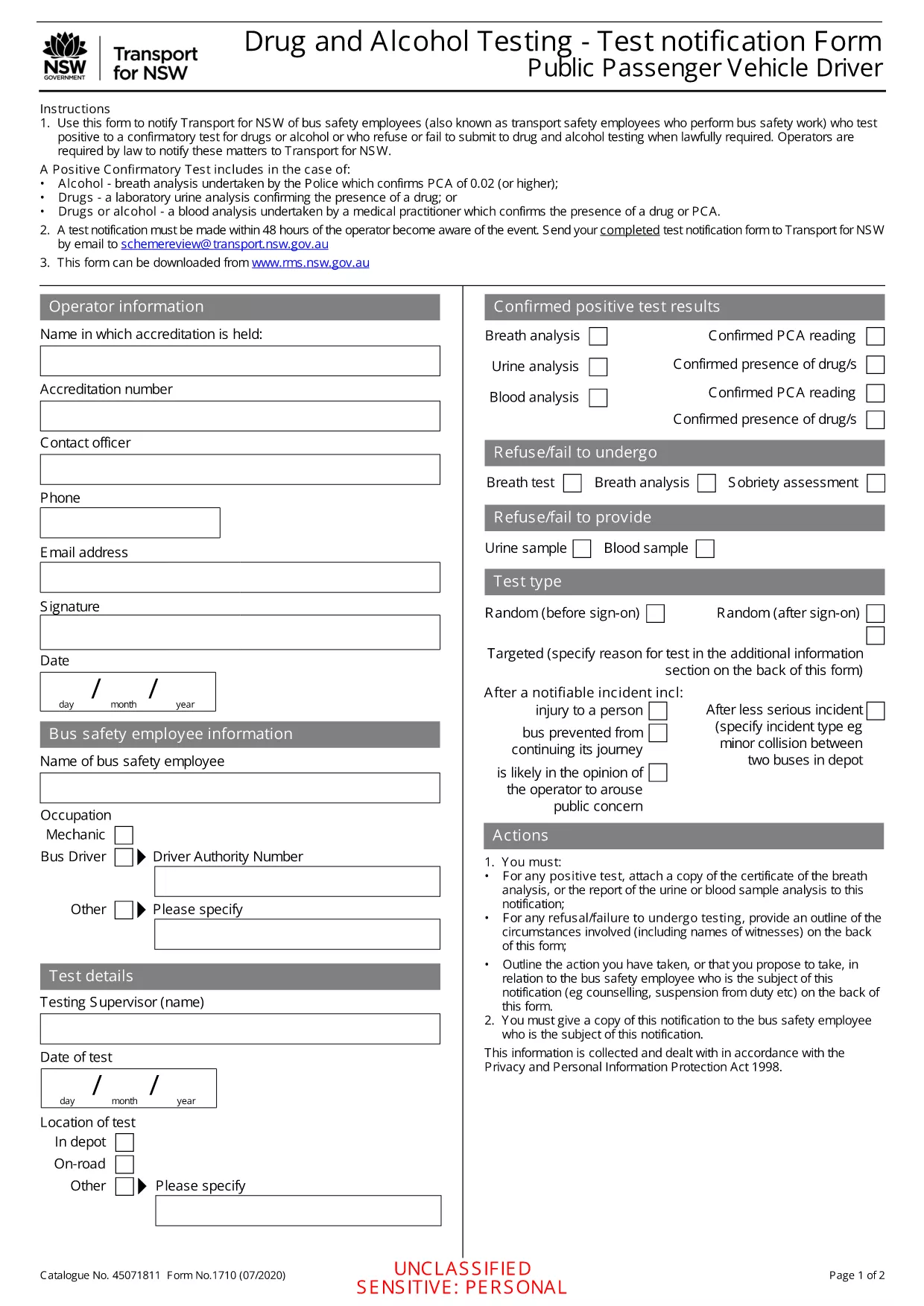
Positive/Refused Drug and Alcohol Test Report (Fillable PDF)

  1. Lingua Inglese
  2. Paese Australia
  3. Dipartimento Transport
  4. Attività Safety Compliance
Compila questo modulo
Positive/Refused Drug and Alcohol Test Report (Fillable PDF)

Employers, transport agencies, and safety managers often need to document a worker’s positive, refused, or failed drug/alcohol test. The Positive/Refused Drug and Alcohol Test Report is a mandatory notification form used across Australian jurisdictions, especially for public passenger vehicle operators.

When to Use This Test Report

This form is required whenever a driver or safety‑critical employee:

  • Tests positive for drugs or alcohol after a confirmatory analysis.
  • Refuses to submit a sample when lawfully required.
  • Fails to appear for a scheduled test without a valid excuse.

Submitting the report promptly helps maintain compliance with the National Heavy Vehicle Regulator (NHVR) and state transport regulations.

Key Sections of the Form

The fillable PDF is divided into clear sections:

  1. Employer & Employee Details – names, licence numbers, and contact information.
  2. Test Information – date, time, type of test, and laboratory results.
  3. Outcome – Positive, Refused, or Failed to Test.
  4. Follow‑up Actions – suspension dates, medical review, and notification dates.
  5. Signature & Declaration – authorised signatory acknowledgment.

How to Fill Out the Form Online

Instead of downloading and editing the PDF in a separate editor, simply click the "Fill out this form" button on this page. The Formize PDF Filler app will load instantly, allowing you to complete every field directly in your browser.

Common Mistakes & Tips

  • Missing licence numbers – double‑check the driver’s licence and vehicle registration numbers.
  • Incorrect test type – specify whether the test was urine, breath, or blood.
  • Skipping the signature – the form is invalid without an authorised signature.
  • Delays in submission – submit within 24 hours of the test result to stay compliant.

Follow these tips to ensure a smooth, error‑free submission.

FAQ
  • What qualifies as a "refused" test?

    A refusal occurs when the employee declines to provide a sample after being lawfully directed to do so, or when they intentionally obstruct the collection process.

  • Do I need a laboratory report to submit this form?

    Yes. For a positive result, attach the confirmatory laboratory report. For a refusal, include a written statement of the employee’s refusal.

  • Can I edit the PDF after I download it?

    The form is fully fillable online via Formize. After downloading, you can still edit it with any standard PDF editor, but online completion is recommended for accuracy.

  • How long must I keep the completed report?

    Regulations require retention for at least 3 years, or longer if stipulated by your state’s transport authority.

  • Is the online filler secure?

    Formize uses SSL encryption and stores data only in your browser session. No information is transmitted to third parties unless you choose to email or upload the file.

  • What if I make an error after submitting?

    Contact your compliance officer immediately. You can submit a corrected form with a clear note indicating it supersedes the previous submission.

  • Do I need a digital signature?

    A typed name in the signature field is acceptable when the form is submitted electronically. For hard‑copy submissions, print and sign the document.

COME

Come compilare drug test report PDF gratuitamente, online in 5 semplici passaggi:

  1. 1
    Click the Fill‑out Button
    On this page, click the "Fill out this form" button. The Formize PDF Filler will open in a new tab.
  2. 2
    Wait for the Filler to Load
    The app loads the fillable PDF automatically. No download or extra software is required.
  3. 3
    Enter All Required Information
    Complete each highlighted field with accurate employer, employee, and test details.
  4. 4
    Save and Download
    When finished, click "Save" to store a copy in your browser, then download the completed PDF for your records.
  5. 5
    Submit to the Authority
    Email or upload the saved PDF to the relevant transport authority as instructed in your organisation’s policy.
App Formize PDF Filler
DI

modello drug test report PDF

Con il tradizionale set di funzionalità per la visualizzazione e la compilazione di un documento PDF, combinato con i vantaggi di un'applicazione Web e un layout reattivo, puoi completare drug test report PDF in pochi minuti.

CARATTERISTICHE

Compilatore PDF

Il modo più semplice per compilare moduli PDF online

  • Compila rapidamente drug test report PDF
    Cerchi un modo per compilare rapidamente drug test report PDF online? Con il nostro compilatore di moduli PDF gratuito online, saprai come modificare e compilare questo documento PDF in meno di un minuto.
  • Editor PDF online facile da usare
    Stufo di stampare file PDF in modo da poterli modificare, prima di riscansionarli e rispedirli? Modifica documenti PDF gratuitamente online. Utilizza il nostro editor PDF online per risparmiare tempo e carta.
  • Grandi strumenti, tutte le piattaforme
    Ti stai chiedendo come inserire drug test report PDF su un Mac o forse come utilizzare un riempitivo PDF gratuito? I nostri strumenti PDF online funzionano su tutte le piattaforme.
  • Archiviazione sicura dei file
    I file "drug test report PDF" completati vengono archiviati in un database protetto gestito dall'hosting Amazon Cloud. Puoi eliminare i tuoi file dal nostro sistema in qualsiasi momento. In ogni caso, questi file vengono automaticamente cancellati dopo 24 ore.
  • Chatta con {parola chiave}
    Chatta con "drug test report PDF" su Chatize che è un assistente di lettura PDF gratuito. Fai domande e ottieni risposte da "drug test report PDF". Basta fare clic sul pulsante Chatta con il documento in alto.

Elimina sessione di riempimento

Eliminare la sessione di riempimento selezionata? In questo caso, i progressi nella compilazione del modulo andranno persi.

Elimina la sessione di modifica

Eliminare la sessione di editing selezionata? In questo caso, i tuoi progressi nella creazione e modifica del modulo andranno persi.