
Seleziona la lingua

Old Age Pension Application Form (Fillable PDF)

  1. Paese Canada
  2. Lingua Inglese
  3. Attività Pensions
  4. Dipartimento Service Canada
Compila questo modulo
Old Age Pension Application Form (Fillable PDF)

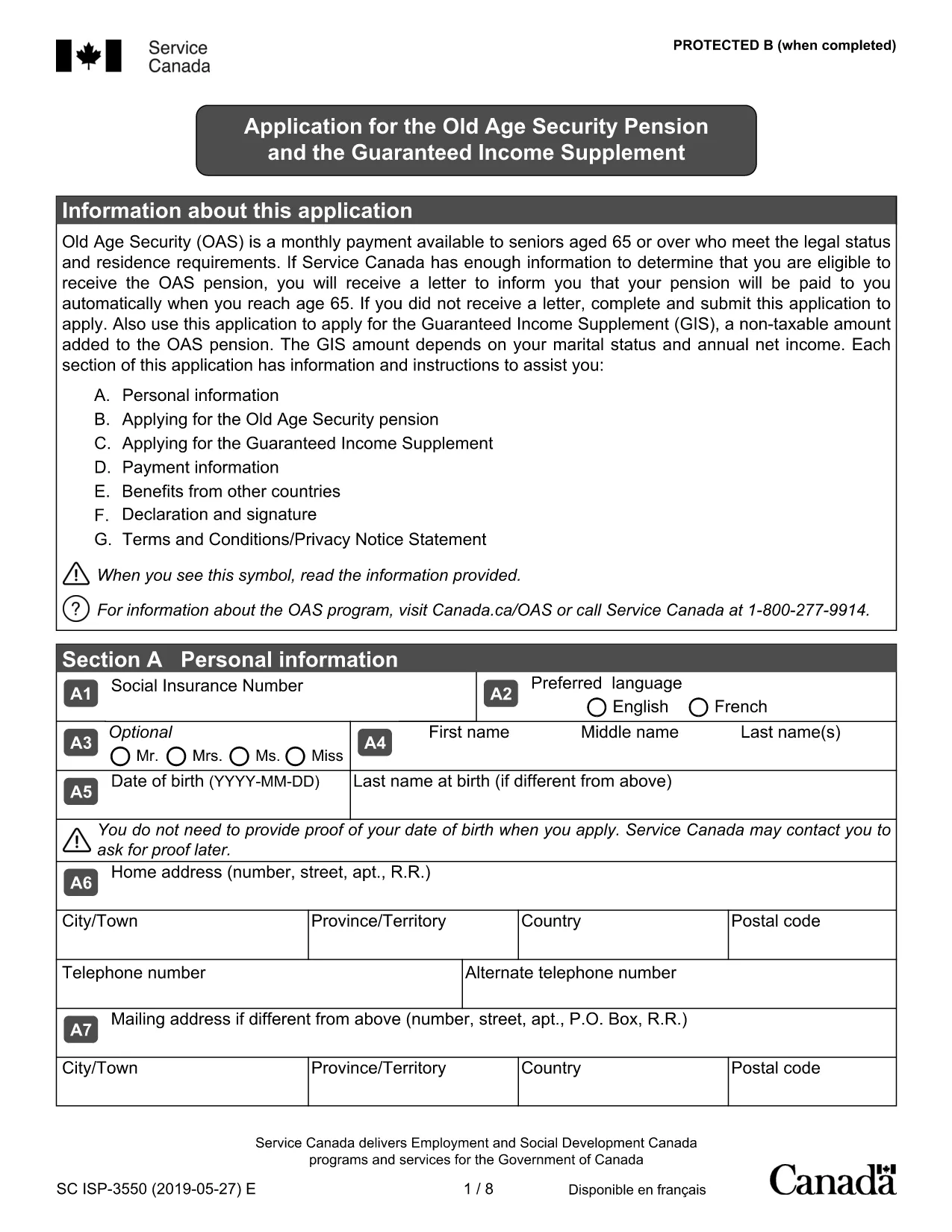
Applying for the Old Age Pension (Old Age Security) can feel overwhelming, but with our fillable PDF you can complete the entire application online, save time, and reduce errors. The form is fully compatible with the Formize PDF Filler – just click the button, fill the fields, and submit.

Why Choose a Fillable PDF for Your Old Age Pension

  • Instant editing: No need to print, write, scan, or fax.
  • Auto‑save: Your progress is saved automatically, so you can return later.
  • Guided validation: The filler highlights required fields and alerts you to missing information.
  • Secure submission: Export a clean PDF that meets Service Canada’s requirements.

How to Complete the Old Age Pension Application

Follow the simple steps below to fill out the application correctly. Each step corresponds to a section of the PDF.

  1. Open the form: Click the Fill out this form button on this page. The Formize PDF Filler will load the document.
  2. Enter personal details: Provide your full name, date of birth, Social Insurance Number (SIN), and current address.
  3. Residency information: Indicate your citizenship status and the number of years you have lived in Canada.
  4. Financial information: List any income, savings, or property you own. This helps Service Canada assess eligibility.
  5. Partner details (if applicable): Even if your partner is not applying, their information is required for the means test.
  6. Review & submit: Use the built‑in review tool, then download the completed PDF and send it to Service Canada.

Common Mistakes to Avoid

  • Leaving required fields blank – the filler will flag them before you can submit.
  • Using an outdated address – ensure the mailing address matches your myGov profile.
  • Incorrect SIN format – double‑check the nine‑digit number.
  • Omitting partner information – this can delay processing.
  • Submitting an unsigned form – the PDF filler adds an electronic signature option.

Eligibility Checklist

Before you start, make sure you meet the basic criteria:

  • Age 65 or older
  • Canadian citizen or legal resident
  • Minimum 10 years of residence in Canada after age 18
  • Income and assets within the program’s limits

Download & Fill the Form

Ready to begin? Click the button below, let Formize load the PDF, and complete your Old Age Pension application in minutes.

Fill out this form

FAQ
  • Do I need to print the Old Age Pension form?

    No. The fillable PDF can be completed entirely online using the Formize PDF Filler, then saved as a digital file for submission.

  • What documents do I need to have handy?

    You’ll need your Social Insurance Number (SIN), proof of residency (e.g., driver’s licence), recent bank statements, and details of any assets or income.

  • Can I save my progress and finish later?

    Yes. The Formize filler automatically saves your entries in the browser, so you can close the window and return at any time.

  • Is an electronic signature accepted?

    Service Canada accepts a digitally signed PDF. The Formize filler includes an e‑signature field that meets their requirements.

  • How long does the application process take?

    After submission, Service Canada typically processes an OAS application within 4‑6 weeks, provided all information is complete.

  • What if I make a mistake after I submit?

    Contact Service Canada immediately. You can submit a corrected PDF or provide additional information through your myGov account.

  • Is there a fee to use the fillable PDF?

    No. The PDF and the Formize filler are completely free to use.

COME

Come compilare old age pension application gratuitamente, online in 5 semplici passaggi:

  1. 1
    Open the Fillable Form
    Click the “Fill out this form” button on the page. The Formize PDF Filler loads the Old Age Pension application automatically.
  2. 2
    Enter Your Information
    Type your personal, residency, and financial details into the highlighted fields. Required fields are marked with an asterisk.
  3. 3
    Validate & Review
    The filler checks for missing or incorrectly formatted data. Fix any alerts, then use the built‑in preview to ensure everything looks correct.
  4. 4
    Save or Export
    When you’re satisfied, click “Save” to store a copy in your browser or “Export” to download a clean PDF ready for submission.
  5. 5
    Submit to Service Canada
    Mail or upload the completed PDF to Service Canada according to their instructions. Keep a copy for your records.
App Formize PDF Filler
DI

modello old age pension application

Con il tradizionale set di funzionalità per la visualizzazione e la compilazione di un documento PDF, combinato con i vantaggi di un'applicazione Web e un layout reattivo, puoi completare old age pension application in pochi minuti.

CARATTERISTICHE

Compilatore PDF

Il modo più semplice per compilare moduli PDF online

  • Compila rapidamente old age pension application
    Cerchi un modo per compilare rapidamente old age pension application online? Con il nostro compilatore di moduli PDF gratuito online, saprai come modificare e compilare questo documento PDF in meno di un minuto.
  • Editor PDF online facile da usare
    Stufo di stampare file PDF in modo da poterli modificare, prima di riscansionarli e rispedirli? Modifica documenti PDF gratuitamente online. Utilizza il nostro editor PDF online per risparmiare tempo e carta.
  • Grandi strumenti, tutte le piattaforme
    Ti stai chiedendo come inserire old age pension application su un Mac o forse come utilizzare un riempitivo PDF gratuito? I nostri strumenti PDF online funzionano su tutte le piattaforme.
  • Archiviazione sicura dei file
    I file "old age pension application" completati vengono archiviati in un database protetto gestito dall'hosting Amazon Cloud. Puoi eliminare i tuoi file dal nostro sistema in qualsiasi momento. In ogni caso, questi file vengono automaticamente cancellati dopo 24 ore.
  • Chatta con {parola chiave}
    Chatta con "old age pension application" su Chatize che è un assistente di lettura PDF gratuito. Fai domande e ottieni risposte da "old age pension application". Basta fare clic sul pulsante Chatta con il documento in alto.

Elimina sessione di riempimento

Eliminare la sessione di riempimento selezionata? In questo caso, i progressi nella compilazione del modulo andranno persi.

Elimina la sessione di modifica

Eliminare la sessione di editing selezionata? In questo caso, i tuoi progressi nella creazione e modifica del modulo andranno persi.