
Seleziona la lingua

IMM 5476 – Use of a Representative (Canada)

  1. Paese Canada
  2. Lingua Inglese francese
  3. Attività Visti
Compila questo modulo
IMM 5476 – Use of a Representative (Canada)

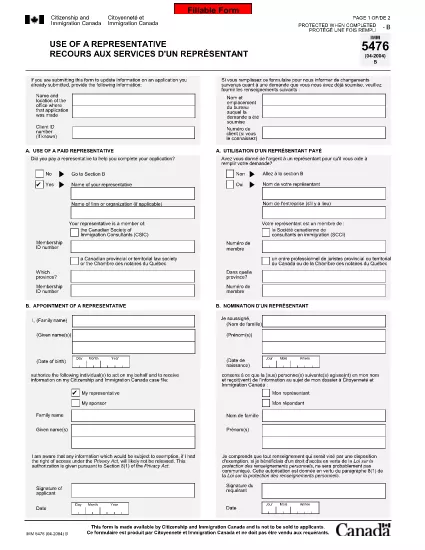
The IMM 5476 – Use of a Representative form allows you to officially appoint an immigration consultant, lawyer, or another authorized person to act on your behalf with Immigration, Refugees and Citizenship Canada (IRCC) and the Canada Border Services Agency (CBSA). This form is required for most permanent‑resident, temporary‑resident, and citizenship applications.

What Is the IMM 5476 Form?

IMM 5476 is a government‑issued PDF that records the details of your chosen representative, their contact information, and the scope of authority you are granting. It is available in both English and French and must be signed by both you (the applicant) and your representative.

How to Fill Out IMM 5476 Online

Instead of downloading the PDF and editing it manually, simply click the "Fill out this form" button on the page. Our Formize PDF Filler app will load the fillable version instantly, letting you complete the form directly in your browser.

Common Mistakes to Avoid

  • Incorrect Representative Details: Double‑check the name, address, and CRA‑issued client number of your representative.
  • Missing Signatures: Both the applicant and the representative must sign; unsigned forms are rejected.
  • Wrong Language Version: Use the official English or French version that matches the rest of your application package.
  • Out‑of‑Date Form: Always use the latest version – the link below always points to the current PDF.

When to Submit the Form

Attach IMM 5476 to the same package as your main application (e.g., Express Entry, Study Permit, Visitor Visa). If you change representatives later, submit a new, signed IMM 5476 with your updated request.

Need More Help?

While Formize does not provide live support, you can find detailed guidance on the IRCC website or consult a licensed immigration professional.

FAQ
  • Do I need a lawyer to fill out IMM 5476?

    No. You can appoint any authorized representative, such as a licensed immigration consultant, lawyer, or family member, as long as they have a valid client number.

  • Can I change my representative after submitting the form?

    Yes. Submit a new, signed IMM 5476 with the updated representative’s details and include a brief letter explaining the change.

  • Is a digital signature accepted?

    IRCC accepts electronic signatures generated within a fillable PDF application like Formize, provided the signature field is clearly marked.

  • What happens if I forget to sign the form?

    An unsigned IMM 5476 will be considered incomplete and may delay processing of your entire application.

  • Do I need to submit both English and French versions?

    Submit only the language version that matches the rest of your application package. IRCC does not require both versions.

  • Is there a fee to use the Formize PDF Filler?

    No. Formize provides free access to fillable PDFs for government forms like IMM 5476.

  • Can I print the form after filling it online?

    Yes. Once you finish, click "Download PDF" and print a hard copy if your submission requires a physical signature.

  • Where can I find the latest version of IMM 5476?

    The link on this page always points to the most recent version published by Immigration, Refugees and Citizenship Canada.

COME

Come compilare IMM 5476 gratuitamente, online in 5 semplici passaggi:

  1. 1
    Open the Fillable Form
    Click the "Fill out this form" button on the page. The Formize PDF Filler app will load the IMM 5476 form directly in your browser.
  2. 2
    Enter Applicant Information
    Fill in your full name, client ID, and contact details in the Applicant section. All fields are required.
  3. 3
    Enter Representative Details
    Provide the representative’s name, firm, address, phone, and email. Make sure the CRA client number matches the one on record.
  4. 4
    Add Signatures
    Use the built‑in signature fields to sign electronically. Both you and your representative must sign before saving.
  5. 5
    Download or Submit
    After completing the form, click "Download PDF" to save a copy for your records, then attach it to your immigration application package.
App Formize PDF Filler
DI

Moduli di visto

IMM 5476 è uno dei moduli di visto che sono documenti utilizzati per richiedere un visto per entrare in un paese straniero. Un visto è un documento che consente a un cittadino straniero di entrare, soggiornare e talvolta lavorare in un paese straniero per un determinato periodo di tempo. I moduli e i requisiti esatti per ottenere un visto variano a seconda del paese e del tipo di visto.

I moduli di visto in genere richiedono informazioni personali come nome, data di nascita e informazioni sul passaporto, nonché informazioni sullo scopo e la durata del viaggio, la destinazione prevista e se al richiedente è stato precedentemente rifiutato un visto o espulso da un paese. I moduli possono anche richiedere documenti giustificativi come passaporto, fotografie e prova del sostegno finanziario.

Negli Stati Uniti, i moduli di visto più comuni sono i moduli DS-160 e DS-260. Il modulo DS-160 viene utilizzato per richiedere un visto per non immigrati, mentre il modulo DS-260 viene utilizzato per richiedere un visto per immigrati. Questi moduli richiedono informazioni dettagliate sulla storia personale e di viaggio del richiedente, nonché documentazione di supporto come passaporto, itinerario di viaggio e documenti finanziari.

Altri paesi possono avere moduli e requisiti di visto diversi, ma il processo di base in genere prevede il completamento di una domanda di visto, la fornitura di documentazione di supporto e la partecipazione a un colloquio con un funzionario consolare presso un'ambasciata o un consolato degli Stati Uniti. È importante notare che il processo di richiesta del visto può essere complesso e richiedere molto tempo e si raccomanda alle persone che richiedono un visto di consultare un avvocato specializzato in immigrazione o altro professionista qualificato per garantire che tutti i moduli e i requisiti necessari siano soddisfatti.

CARATTERISTICHE

Compilatore PDF

Il modo più semplice per compilare moduli PDF online

  • Compila rapidamente IMM 5476
    Cerchi un modo per compilare rapidamente IMM 5476 online? Con il nostro compilatore di moduli PDF gratuito online, saprai come modificare e compilare questo documento PDF in meno di un minuto.
  • Editor PDF online facile da usare
    Stufo di stampare file PDF in modo da poterli modificare, prima di riscansionarli e rispedirli? Modifica documenti PDF gratuitamente online. Utilizza il nostro editor PDF online per risparmiare tempo e carta.
  • Grandi strumenti, tutte le piattaforme
    Ti stai chiedendo come inserire IMM 5476 su un Mac o forse come utilizzare un riempitivo PDF gratuito? I nostri strumenti PDF online funzionano su tutte le piattaforme.
  • Archiviazione sicura dei file
    I file "IMM 5476" completati vengono archiviati in un database protetto gestito dall'hosting Amazon Cloud. Puoi eliminare i tuoi file dal nostro sistema in qualsiasi momento. In ogni caso, questi file vengono automaticamente cancellati dopo 24 ore.
  • Chatta con {parola chiave}
    Chatta con "IMM 5476" su Chatize che è un assistente di lettura PDF gratuito. Fai domande e ottieni risposte da "IMM 5476". Basta fare clic sul pulsante Chatta con il documento in alto.

Elimina sessione di riempimento

Eliminare la sessione di riempimento selezionata? In questo caso, i progressi nella compilazione del modulo andranno persi.

Elimina la sessione di modifica

Eliminare la sessione di editing selezionata? In questo caso, i tuoi progressi nella creazione e modifica del modulo andranno persi.