
Seleziona la lingua

Punjab Solemnization of Marriage Form (Fillable PDF)

  1. Lingua Inglese hindi
  2. Paese India
  3. Stato Punjab
  4. Dipartimento Dipartimento degli affari interni e della giustizia
Compila questo modulo
Punjab Solemnization of Marriage Form (Fillable PDF)

Punjab Solemnization of Marriage Form (Fillable PDF)

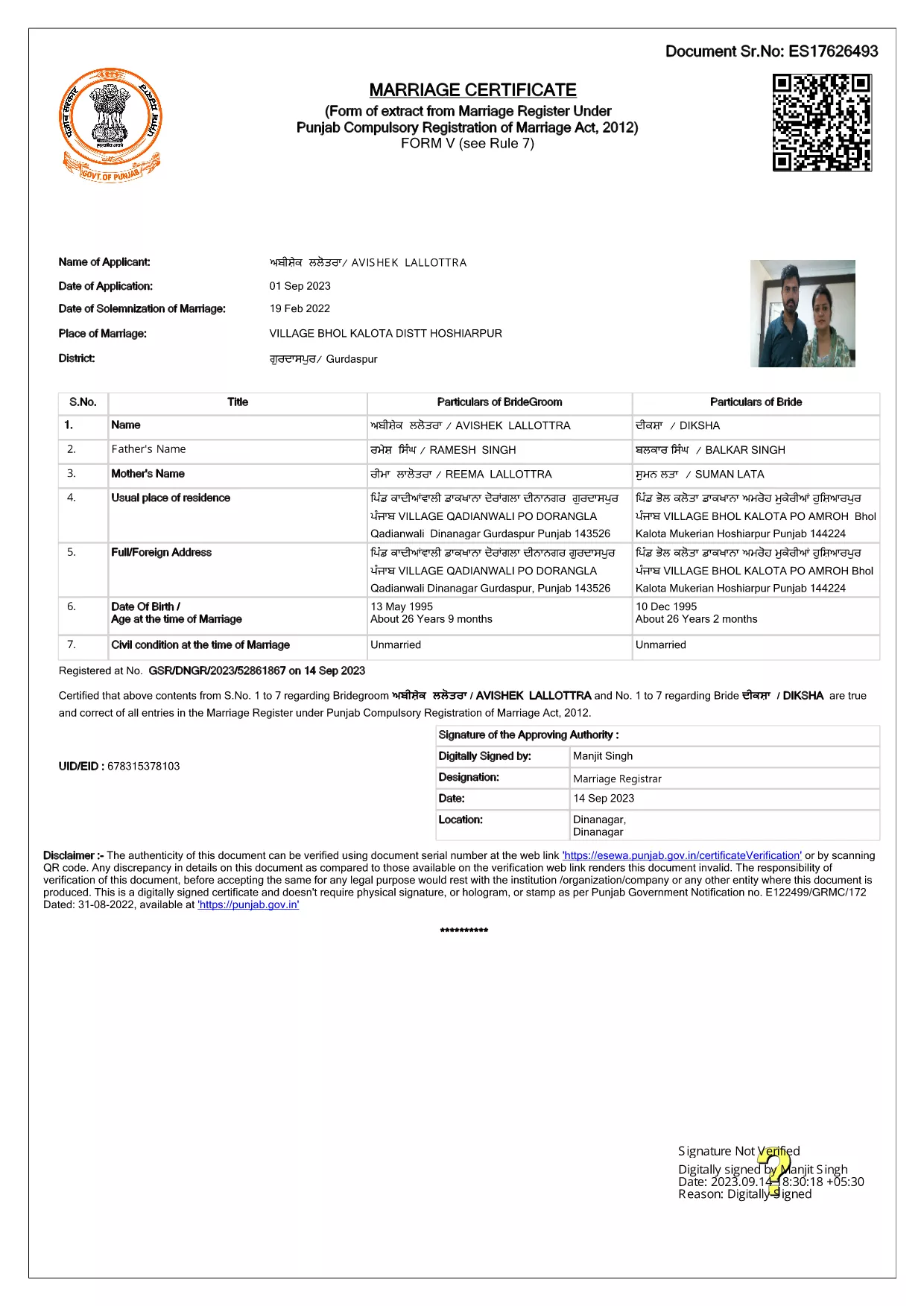
Getting married in Punjab requires you to submit the official Punjab Solemnization of Marriage form. This form records essential details of the bride, groom, and witnesses, and it is mandatory under the Punjab Compulsory Registration of Marriage Act, 2012.

What Is the Punjab Solemnization of Marriage Form?

The form is a government‑issued marriage certificate that captures personal information, parental details, and the date and place of the marriage ceremony. It is the legal proof needed for future documentation such as passport applications, property registration, and visa requests.

How to Fill Out the Form Online with Formize

Instead of printing, printing‑and‑scanning, or using a third‑party PDF editor, you can complete the form directly in your browser:

  1. Click the **"Fill out this form"** button on this page.
  2. Wait a few seconds while the Formize PDF Filler app loads.
  3. Enter the required information in each fillable field. The interface guides you through mandatory sections.
  4. Review your entries, then click **"Save & Download"** to get a completed PDF copy.

Common Mistakes to Avoid When Completing the Form

  • Incorrect spelling of names: Verify the spelling exactly as it appears on official ID documents.
  • Missing witness details: All three witnesses must be fully listed; incomplete entries will cause rejection.
  • Wrong date format: Use DD‑MM‑YYYY as required by the Punjab Registration Department.
  • Leaving optional fields blank: Even optional fields should be filled with "N/A" if not applicable.

Where to Submit the Completed Form

After you have saved the filled PDF, submit it to the nearest Punjab Registration Office or the designated online portal of the Punjab Registration Department. Bring original identity proofs for both parties and witnesses.

Download the Official PDF

Click the button below to download the original, government‑approved PDF. The file is hosted securely and matches the exact layout required by the registration authority.

FAQ
  • Is the Punjab marriage form available in Punjabi?

    The official PDF is printed in English, but you may fill it out in any language. For official submissions, the English version is accepted.

  • Do I need a digital signature?

    A digital signature is not required for the fillable PDF. You must sign the printed copy in the presence of a registrar.

  • Can I edit the form after I download it?

    Yes. The saved PDF remains fully editable with any standard PDF editor, but the Formize filler already lets you complete the form without extra software.

  • How many witnesses are required?

    Three adult witnesses are mandatory. Their full names, addresses, and signatures must be entered in the designated sections.

  • What documents do I need to submit with the form?

    Both parties must provide a valid ID (Aadhar, PAN, or passport), proof of residence, and the original signed marriage certificate.

  • Is there a fee for downloading the PDF?

    No. The PDF is provided free of charge. Any registration fees are paid directly to the Punjab Registration Office.

COME

Come compilare Punjab marriage form gratuitamente, online in 4 semplici passaggi:

  1. 1
    Click the Fill‑Out Button
    Press the **"Fill out this form"** button on the page to launch the Formize PDF Filler.
  2. 2
    Wait for the Filler to Load
    The app loads in a few seconds; you’ll see a clean, searchable interface with all form fields highlighted.
  3. 3
    Enter Your Information
    Type the required details for the bride, groom, and witnesses. The filler validates dates and mandatory fields automatically.
  4. 4
    Save and Download
    After reviewing, click **"Save & Download"** to get a completed PDF you can print or submit electronically.
App Formize PDF Filler
DI

Moduli di domanda del Ministero degli Affari Esteri

Punjab marriage form è uno dei moduli di domanda del Ministero degli Affari Esteri. Il Ministero indiano degli Affari Esteri offre vari moduli di domanda per diversi servizi legati agli affari esterni e alle relazioni internazionali. Alcuni moduli di domanda comuni includono:

Richiesta di passaporto: questo modulo viene utilizzato per richiedere un passaporto indiano. Raccoglie dati personali come nome, indirizzo, data di nascita e nazionalità.

Richiesta di cittadinanza d'oltremare dell'India (OCI): questo modulo viene utilizzato per richiedere lo status OCI, che consente alle persone di origine indiana di vivere e lavorare in India a tempo indeterminato. Raccoglie dati personali, inclusa la prova dell'origine indiana.

Richiesta di visto: questo modulo viene utilizzato per richiedere un visto per viaggiare in un paese straniero. Raccoglie dati personali, informazioni di viaggio e lo scopo del viaggio.

Domanda di nulla osta all'emigrazione: questo modulo viene utilizzato da persone che cercano l'autorizzazione all'emigrazione per motivi di lavoro in determinati paesi. Raccoglie informazioni personali e dettagli sull'occupazione.

Richiesta di attestazione: questo modulo viene utilizzato per richiedere l'attestazione di vari documenti, come certificati di studio, certificati di matrimonio e documenti commerciali. Raccoglie i dettagli del documento da attestare e lo scopo dell'attestazione.

Domanda per servizi consolari: questo modulo viene utilizzato per vari servizi consolari, tra cui il rilascio di certificati di emergenza, l'assistenza ai cittadini indiani all'estero e la registrazione dei cittadini indiani. I dettagli specifici richiesti dipendono dalla natura del servizio richiesto.

CARATTERISTICHE

Compilatore PDF

Il modo più semplice per compilare moduli PDF online

  • Compila rapidamente Punjab marriage form
    Cerchi un modo per compilare rapidamente Punjab marriage form online? Con il nostro compilatore di moduli PDF gratuito online, saprai come modificare e compilare questo documento PDF in meno di un minuto.
  • Editor PDF online facile da usare
    Stufo di stampare file PDF in modo da poterli modificare, prima di riscansionarli e rispedirli? Modifica documenti PDF gratuitamente online. Utilizza il nostro editor PDF online per risparmiare tempo e carta.
  • Grandi strumenti, tutte le piattaforme
    Ti stai chiedendo come inserire Punjab marriage form su un Mac o forse come utilizzare un riempitivo PDF gratuito? I nostri strumenti PDF online funzionano su tutte le piattaforme.
  • Archiviazione sicura dei file
    I file "Punjab marriage form" completati vengono archiviati in un database protetto gestito dall'hosting Amazon Cloud. Puoi eliminare i tuoi file dal nostro sistema in qualsiasi momento. In ogni caso, questi file vengono automaticamente cancellati dopo 24 ore.
  • Chatta con {parola chiave}
    Chatta con "Punjab marriage form" su Chatize che è un assistente di lettura PDF gratuito. Fai domande e ottieni risposte da "Punjab marriage form". Basta fare clic sul pulsante Chatta con il documento in alto.

Elimina sessione di riempimento

Eliminare la sessione di riempimento selezionata? In questo caso, i progressi nella compilazione del modulo andranno persi.

Elimina la sessione di modifica

Eliminare la sessione di editing selezionata? In questo caso, i tuoi progressi nella creazione e modifica del modulo andranno persi.