Seleziona la lingua

Fillable Schedule I (Form 1041) – Estate & Trust AMT Form

  1. Paese Stati Uniti d'America
  2. Lingua Inglese
  3. Attività Le tasse
  4. Dipartimento Agenzia delle Entrate
Compila questo modulo
Fillable Schedule I (Form 1041) – Estate & Trust AMT Form

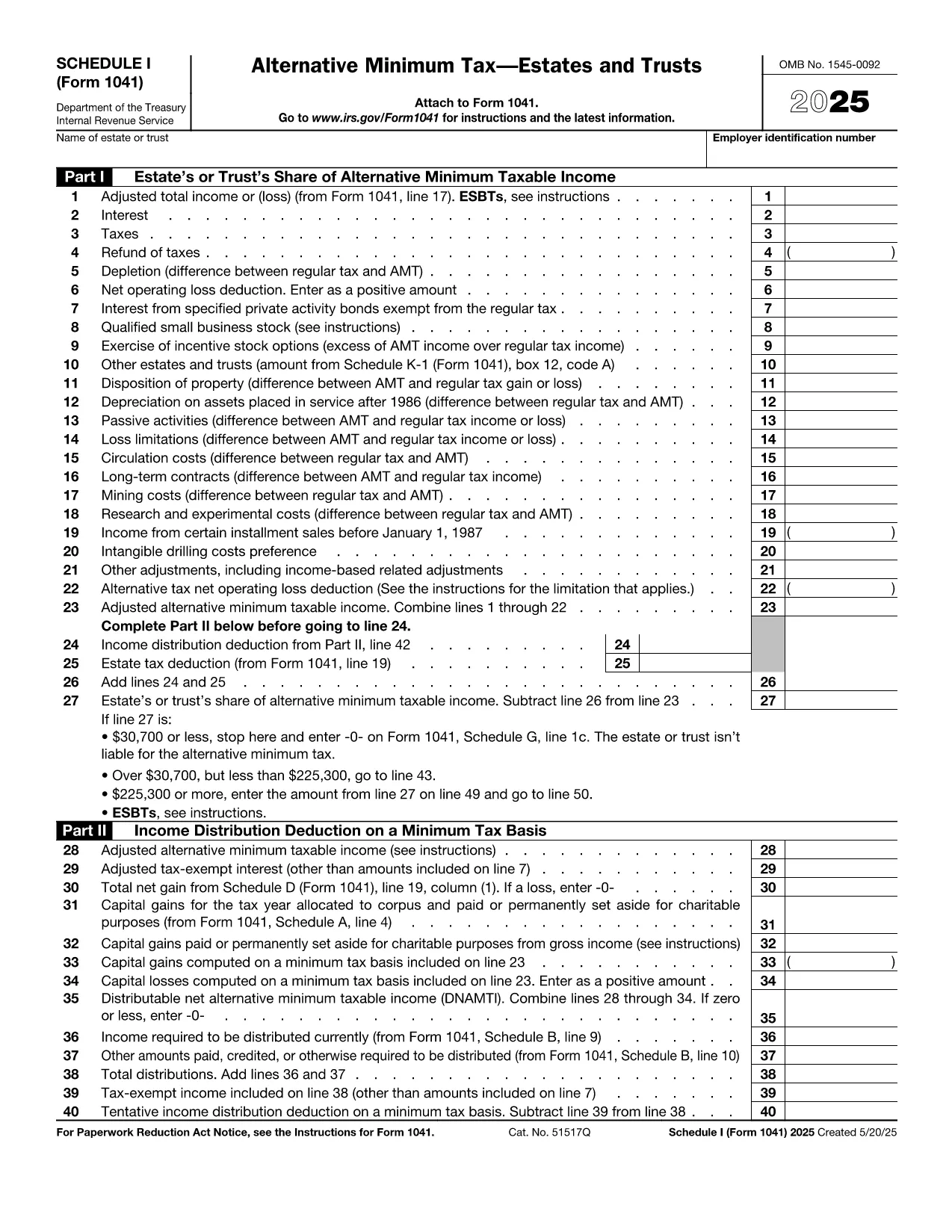
Schedule I (Form 1041) is the IRS worksheet used by estates and trusts to calculate Alternative Minimum Tax (AMT) adjustments. Whether you are an executor, trustee, or tax professional, you need a reliable, fillable version that eliminates manual calculations and reduces errors.

What Is Schedule I (Form 1041)?

Schedule I attaches to the Form 1041 – U.S. Income Tax Return for Estates and Trusts. It captures preference items, tax‑exempt interest, and other adjustments that affect the estate’s or trust’s AMT liability. The form is mandatory when the alternative minimum taxable income (AMTI) exceeds the threshold set by the IRS.

How to Complete Schedule I Online

Formize provides a secure, browser‑based PDF filler so you can complete Schedule I without downloading any software. Just click the "Fill out this form" button, wait for the editor to load, and start entering your numbers. All calculations are performed automatically, and you can save, print, or e‑sign the completed worksheet.

Common Mistakes & Tips

  • Missing Preference Items: Review all income sources, especially tax‑exempt interest, to ensure they are reported on line 1.
  • Incorrect AMTI Threshold: The threshold changes yearly; verify the correct amount for the tax year you are filing.
  • Calculation Errors: Use the built‑in auto‑sum feature in the Formize editor to avoid manual addition mistakes.
  • Signature Oversight: The form must be signed by the fiduciary. Add an e‑signature directly in the filler before saving.

Download the Official PDF

For reference or offline use, the official IRS version of Schedule I is available as a PDF. Our online filler is built from the same source, guaranteeing compliance.

Download IRS Schedule I (Form 1041) PDF

Istruzioni

FAQ
  • Who must file Schedule I (Form 1041)?

    Estates and trusts that have AMTI above the IRS threshold for the filing year must attach Schedule I to Form 1041.

  • Can I use the fillable PDF for multiple tax years?

    Each tax year has its own version of Schedule I. Use the PDF that matches the year you are filing; the link above is for the most recent version.

  • Do I need special software to fill the form?

    No. Formize’s online PDF filler works in any modern browser—no download or installation required.

  • Is my data secure when I use Formize?

    Yes. All data is encrypted in transit (TLS 1.2) and processed in a secure, GDPR‑compliant environment.

  • What if I make a mistake after submitting?

    Amend the return by filing Form 1041‑X and attach a corrected Schedule I. Keep a copy of the original for your records.

  • Do I need a separate signature for Schedule I?

    The fiduciary who signs Form 1041 also signs Schedule I. Use the e‑signature feature in the filler to add it.

COME

Come compilare Schedule I Form 1041 gratuitamente, online in 5 semplici passaggi:

  1. 1
    Click the Fill‑out Button
    On this page, click the blue "Fill out this form" button. The Formize PDF Filler app will open in a new tab.
  2. 2
    Wait for the Editor to Load
    The secure editor loads the fillable Schedule I template. This only takes a few seconds.
  3. 3
    Enter Your Information
    Fill each field with the required numbers – the editor automatically totals rows and validates entries.
  4. 4
    Review & Add Signature
    Double‑check all amounts, then use the e‑signature tool to sign as the fiduciary.
  5. 5
    Save, Print, or Submit
    When finished, click "Save" to download a completed PDF, or print directly for mailing to the IRS.
App Formize PDF Filler
DI

Moduli fiscali

Schedule I Form 1041 è uno dei moduli fiscali che sono documenti utilizzati per segnalare redditi, detrazioni e passività fiscali all'autorità fiscale competente. Questi moduli costituiscono una parte essenziale del processo di dichiarazione dei redditi e vengono utilizzati per garantire che gli individui e le imprese rispettino le leggi fiscali e calcolino accuratamente i loro obblighi fiscali.

I moduli fiscali specifici richiesti possono variare a seconda di fattori quali lo stato di dichiarazione di un individuo, le fonti di reddito e le leggi fiscali del paese. Tuttavia, ecco alcuni tipi comuni di moduli fiscali:

Moduli per l'imposta sul reddito individuale: questi moduli, come la serie 1040 negli Stati Uniti, vengono utilizzati da parte degli individui per dichiarare il proprio reddito, richiedere detrazioni e crediti e calcolare la propria responsabilità fiscale.

Moduli fiscali aziendali: le aziende, comprese le imprese individuali, le società di persone, le società e i lavoratori autonomi, potrebbero dover compilare vari moduli per segnalare entrate, spese e imposte dovute. Gli esempi includono l'Allegato C (Profitti o perdite aziendali) e il Modulo 1120 (Dichiarazione dei redditi delle società statunitensi).

Moduli fiscali sul lavoro: i datori di lavoro sono tenuti a dichiarare le retribuzioni dei dipendenti e a trattenere e versare le imposte sui salari. A questo scopo vengono utilizzati moduli come W-2 (Dichiarazione salariale e fiscale) e 941 (Dichiarazione dei redditi federale trimestrale del datore di lavoro).

Moduli per conti pensionistici e di investimento: questi moduli vengono utilizzati per segnalare redditi da investimenti, plusvalenze e perdite, nonché contributi e distribuzioni dai conti pensionistici. Gli esempi includono il modulo 1099-DIV (Dividendi e distribuzioni) e Modulo 5498 (Informazioni sui contributi dell'IRA).

Moduli per imposte sulle successioni e sulle donazioni: quando una persona muore o fa donazioni significative, moduli specifici come il Modulo 706 (Dichiarazione dei redditi degli Stati Uniti sulle proprietà immobiliari (e trasferimento di generazione)) e Modulo 709 (Regali degli Stati Uniti (e generazione-trasferimento) Salto trasferimento) Dichiarazione dei redditi) vengono utilizzati per segnalare e calcolare eventuali imposte sulle successioni o sulle donazioni applicabili.

È importante notare che le leggi e i moduli fiscali possono cambiare nel tempo, pertanto i privati ​​e le imprese dovrebbero consultare l’autorità fiscale competente o richiedere una consulenza fiscale professionale per garantire la conformità ai requisiti attuali.

CARATTERISTICHE

Compilatore PDF

Il modo più semplice per compilare moduli PDF online

  • Compila rapidamente Schedule I Form 1041
    Cerchi un modo per compilare rapidamente Schedule I Form 1041 online? Con il nostro compilatore di moduli PDF gratuito online, saprai come modificare e compilare questo documento PDF in meno di un minuto.
  • Editor PDF online facile da usare
    Stufo di stampare file PDF in modo da poterli modificare, prima di riscansionarli e rispedirli? Modifica documenti PDF gratuitamente online. Utilizza il nostro editor PDF online per risparmiare tempo e carta.
  • Grandi strumenti, tutte le piattaforme
    Ti stai chiedendo come inserire Schedule I Form 1041 su un Mac o forse come utilizzare un riempitivo PDF gratuito? I nostri strumenti PDF online funzionano su tutte le piattaforme.
  • Archiviazione sicura dei file
    I file "Schedule I Form 1041" completati vengono archiviati in un database protetto gestito dall'hosting Amazon Cloud. Puoi eliminare i tuoi file dal nostro sistema in qualsiasi momento. In ogni caso, questi file vengono automaticamente cancellati dopo 24 ore.
  • Chatta con {parola chiave}
    Chatta con "Schedule I Form 1041" su Chatize che è un assistente di lettura PDF gratuito. Fai domande e ottieni risposte da "Schedule I Form 1041". Basta fare clic sul pulsante Chatta con il documento in alto.

Elimina sessione di riempimento

Eliminare la sessione di riempimento selezionata? In questo caso, i progressi nella compilazione del modulo andranno persi.

Elimina la sessione di modifica

Eliminare la sessione di editing selezionata? In questo caso, i tuoi progressi nella creazione e modifica del modulo andranno persi.