
Seleziona la lingua

IRS Form 13909 – Tax‑Exempt Organization Complaint (Fillable PDF)

  1. Paese Stati Uniti d'America
  2. Lingua Inglese
  3. Attività Le tasse
  4. Dipartimento Agenzia delle Entrate
Compila questo modulo
IRS Form 13909 – Tax‑Exempt Organization Complaint (Fillable PDF)

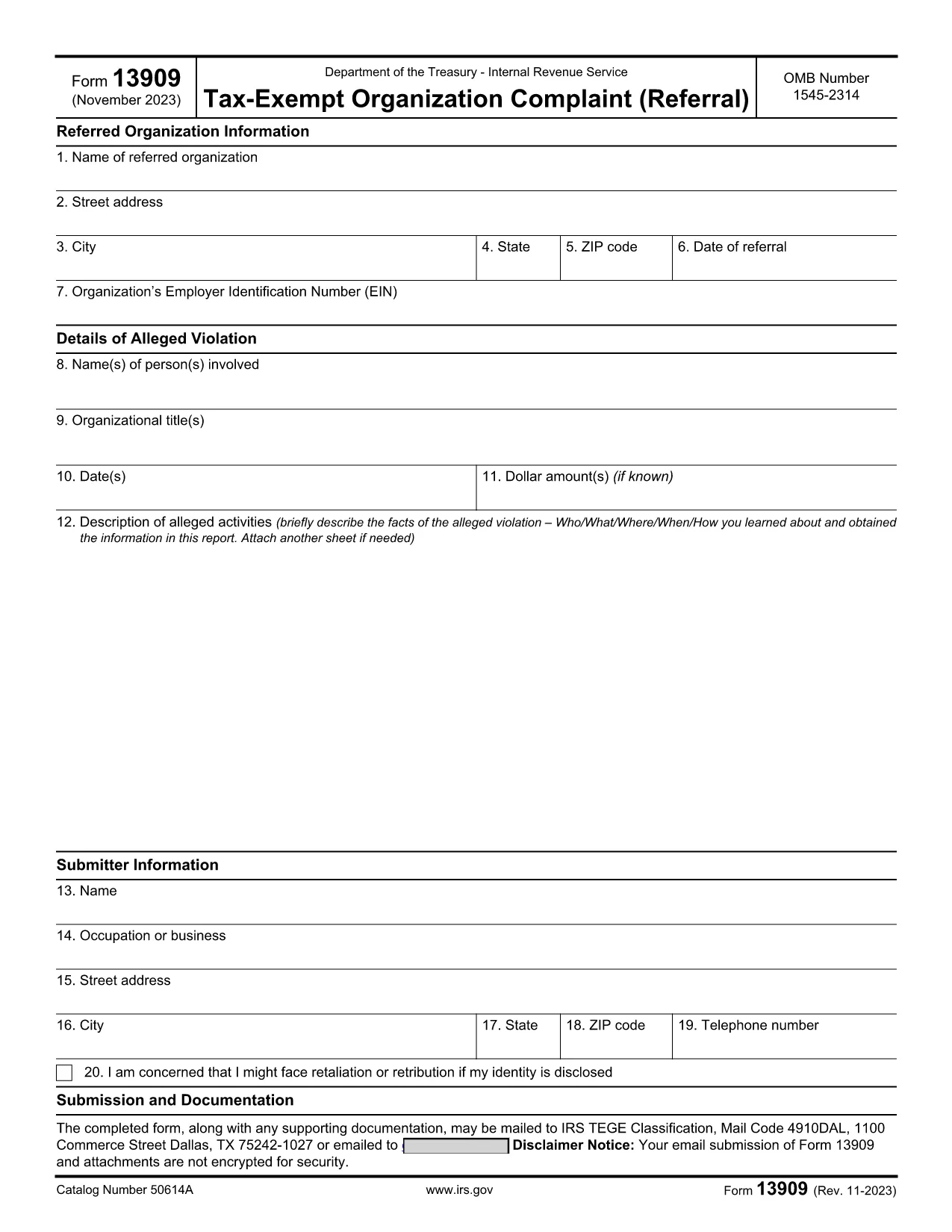
IRS Form 13909 is the official Tax‑Exempt Organization Complaint (Referral) used to report alleged violations of federal tax law by nonprofit charities, churches, or other tax‑exempt entities. The form is completely fillable PDF, allowing you to provide detailed information about the organization, the alleged misconduct, and your own contact details (or remain anonymous).

What Is IRS Form 13909?

This voluntary form collects three main sections:

  • Referred Organization Information – name, address, EIN, and date of referral.
  • Details of Alleged Violation – persons involved, dates, dollar amounts, and a narrative description.
  • Submitter Information – your name, address, and optional whistleblower details.

Submitting accurate information helps the Internal Revenue Service investigate potential abuse of tax‑exempt status.

How to Fill Out the Form Online with Formize

Instead of downloading the PDF and opening it in a separate editor, simply click the "Fill out this form" button on this page. The Formize PDF Filler app will load in your browser, providing a smooth, mobile‑friendly experience.

  1. Click the Fill Out Button – the Formize app opens instantly.
  2. Enter the required data in each field. The app validates dates and EIN formats for you.
  3. Attach supporting documents (PDF, JPG, PNG) if you have evidence.
  4. Review the completed form using the preview feature.
  5. Submit or download – you can email the filled form directly to the IRS or download a copy for your records.

Common Mistakes to Avoid

  • Leaving required fields blank – the IRS may reject the complaint.
  • Providing an incorrect EIN – double‑check the nine‑digit number.
  • Submitting vague descriptions – be as specific as possible about dates, amounts, and actions.
  • Forgetting to sign the form – electronic signatures are accepted in the Formize app.

Where to Submit the Completed Form

After you finish, you can:

  • Email the PDF to exempt@irs.gov.
  • Mail a printed copy to the address listed in the form instructions.
  • Use the online submission link provided by the Formize app (if available).

Keep a copy of the completed form and any supporting documentation for your records.

FAQ
  • Can I submit IRS Form 13909 anonymously?

    Yes. If you are concerned about retaliation, you may write “Anonymous” in the submitter name field. However, providing contact information can help the IRS follow up if needed.

  • Do I need to attach evidence when filing Form 13909?

    Attaching supporting documents (receipts, emails, contracts) strengthens your complaint but is not mandatory. Include anything that clearly illustrates the alleged violation.

  • Is there a filing fee for Form 13909?

    No. Filing a Tax‑Exempt Organization Complaint is completely free.

  • How long does the IRS take to respond?

    The IRS will send an acknowledgment within 30 days. An investigation timeline varies depending on the complexity of the case.

  • Can I claim a whistleblower reward for this form?

    Potential rewards are handled on a separate form (IRS Form 211). If you believe you qualify, you can file Form 211 after submitting Form 13909.

  • What if I make a mistake on the form?

    You can correct errors by reopening the fillable PDF in Formize, fixing the fields, and resubmitting. Do not send multiple versions unless instructed.

  • Is the Formize filler compatible with mobile devices?

    Yes. The Formize PDF Filler is responsive and works on smartphones, tablets, and desktop browsers.

  • Where can I find the official PDF version of Form 13909?

    The official IRS version is available at https://www.irs.gov/pub/irs-pdf/f13909.pdf.

COME

Come compilare IRS Form 13909 gratuitamente, online in 5 semplici passaggi:

  1. 1
    Open the Formize PDF Filler
    Click the “Fill out this form” button on the page. The Formize app loads directly in your browser, no download needed.
  2. 2
    Enter Organization Details
    Fill in the name, address, EIN, and date of referral for the tax‑exempt organization you are reporting.
  3. 3
    Describe the Alleged Violation
    Provide names, dates, dollar amounts, and a clear narrative of the misconduct. Attach any supporting documents.
  4. 4
    Add Your Information (Optional)
    Enter your contact details or write “Anonymous” if you prefer not to be identified.
  5. 5
    Review, Sign, and Submit
    Use the preview feature, add an electronic signature, then either email the completed PDF to the IRS or download it for mailing.
App Formize PDF Filler
DI

Moduli fiscali

IRS Form 13909 è uno dei moduli fiscali che sono documenti utilizzati per segnalare informazioni relative alle imposte all'autorità fiscale competente. Esistono vari tipi di moduli fiscali, inclusi moduli fiscali federali, statali e locali, che possono variare a seconda delle circostanze e dell'ubicazione del contribuente.

CARATTERISTICHE

Compilatore PDF

Il modo più semplice per compilare moduli PDF online

  • Compila rapidamente IRS Form 13909
    Cerchi un modo per compilare rapidamente IRS Form 13909 online? Con il nostro compilatore di moduli PDF gratuito online, saprai come modificare e compilare questo documento PDF in meno di un minuto.
  • Editor PDF online facile da usare
    Stufo di stampare file PDF in modo da poterli modificare, prima di riscansionarli e rispedirli? Modifica documenti PDF gratuitamente online. Utilizza il nostro editor PDF online per risparmiare tempo e carta.
  • Grandi strumenti, tutte le piattaforme
    Ti stai chiedendo come inserire IRS Form 13909 su un Mac o forse come utilizzare un riempitivo PDF gratuito? I nostri strumenti PDF online funzionano su tutte le piattaforme.
  • Archiviazione sicura dei file
    I file "IRS Form 13909" completati vengono archiviati in un database protetto gestito dall'hosting Amazon Cloud. Puoi eliminare i tuoi file dal nostro sistema in qualsiasi momento. In ogni caso, questi file vengono automaticamente cancellati dopo 24 ore.
  • Chatta con {parola chiave}
    Chatta con "IRS Form 13909" su Chatize che è un assistente di lettura PDF gratuito. Fai domande e ottieni risposte da "IRS Form 13909". Basta fare clic sul pulsante Chatta con il documento in alto.

Elimina sessione di riempimento

Eliminare la sessione di riempimento selezionata? In questo caso, i progressi nella compilazione del modulo andranno persi.

Elimina la sessione di modifica

Eliminare la sessione di editing selezionata? In questo caso, i tuoi progressi nella creazione e modifica del modulo andranno persi.