
Seleziona la lingua

IRS Form 14453 – Penalty Computation Worksheet (Fillable Online)

  1. Paese Stati Uniti d'America
  2. Lingua Inglese
  3. Attività Le tasse
  4. Dipartimento Agenzia delle Entrate
Compila questo modulo
IRS Form 14453 – Penalty Computation Worksheet (Fillable Online)

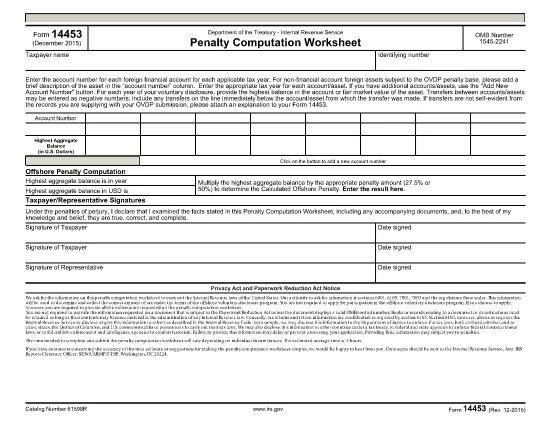
Form 14453 is the Penalty Computation Worksheet used by taxpayers who are participating in the IRS Offshore Voluntary Disclosure Program (OVDP) or similar offshore tax compliance initiatives. The worksheet helps calculate the aggregate balance of foreign accounts and the resulting penalty amount.

What Is Form 14453 and Who Needs It?

This form is required when you need to report the highest balance for each foreign financial account and let the IRS compute the offshore penalty. It is typically filed by U.S. persons with undisclosed foreign accounts, foreign trusts, or foreign corporations.

Key Sections of the Worksheet Explained

  • Account Information – List each foreign account, its highest balance, and the country of the account.
  • Aggregate Balance – The worksheet automatically adds the highest balances to give you a total aggregate balance.
  • Penalty Calculation – Based on the aggregate balance, the IRS applies the statutory penalty rate (usually 40%).
  • Signature & Date – Required to certify the accuracy of the information.

How to Complete Form 14453 with Formize

Instead of downloading the PDF and opening it in a PDF editor, simply click the "Fill out this form" button on this page. The Formize PDF Filler app will load in your browser, allowing you to complete the worksheet instantly.

Common Mistakes to Avoid

  • Entering the same balance for multiple accounts – each account must list its own highest balance.
  • Leaving negative numbers or blanks in the aggregate section – the form auto‑calculates, so leave those fields untouched.
  • Forgetting to sign the form – an unsigned worksheet will be rejected by the IRS.

Where to Find Additional IRS Guidance

Visit the IRS website for detailed instructions on the Offshore Voluntary Disclosure Program, penalty rates, and filing deadlines. You can also review related forms such as Form 14457 (OVDP Letter).

Ready to start? Click the button below and let Formize handle the rest.

FAQ
  • Do I need to download Form 14453 before filling it out?

    No. With Formize you can fill the form directly in your browser. Just click the "Fill out this form" button and the app loads the PDF for you.

  • Can I edit the aggregate balance field?

    The aggregate balance is calculated automatically. Do not edit it manually; the worksheet will recalculate if you change any account balances.

  • Is Form 14453 required for every offshore account?

    Only if you are reporting undisclosed foreign accounts to the IRS under the Offshore Voluntary Disclosure Program or a similar compliance program.

  • What penalty rate is applied on the worksheet?

    The worksheet uses the statutory offshore penalty rate of 40% of the aggregate balance, unless the IRS provides a reduced rate based on reasonable cause.

  • Can I submit the filled form electronically?

    Yes. After completing the form in Formize, you can download the PDF and attach it to your electronic OVDP filing or mail it as part of a paper submission.

  • What if I make a mistake after submitting?

    You can download a new copy of the form, correct the error, and resubmit. Keep both versions for your records.

  • Is there a fee to use Formize for this form?

    Formize offers free filling for IRS forms like 14453. No hidden fees or subscriptions are required.

  • Do I need a PDF reader to view the completed form?

    No. The Formize app lets you view and edit the PDF in the browser. You can also open the final PDF with any standard PDF reader if you wish.

COME

Come compilare Form 14453 gratuitamente, online in 5 semplici passaggi:

  1. 1
    Open the Fillable Form
    Click the "Fill out this form" button on the page. The Formize PDF Filler will launch directly in your browser.
  2. 2
    Enter Your Account Details
    Add each foreign account, its highest balance, and the country. The worksheet will automatically calculate the aggregate balance.
  3. 3
    Review the Penalty Calculation
    Check the auto‑generated penalty amount. Make sure all numbers are correct before proceeding.
  4. 4
    Sign and Submit
    Enter your signature and the date, then click "Submit". You can download a completed copy for your records.
  5. 5
    Save or Print
    After submission, save the PDF to your computer or print it to attach to your OVDP filing package.
App Formize PDF Filler
DI

Moduli fiscali

Form 14453 è uno dei moduli fiscali che sono documenti utilizzati per segnalare informazioni relative alle imposte all'autorità fiscale competente. Esistono vari tipi di moduli fiscali, inclusi moduli fiscali federali, statali e locali, che possono variare a seconda delle circostanze e dell'ubicazione del contribuente.

CARATTERISTICHE

Compilatore PDF

Il modo più semplice per compilare moduli PDF online

  • Compila rapidamente Form 14453
    Cerchi un modo per compilare rapidamente Form 14453 online? Con il nostro compilatore di moduli PDF gratuito online, saprai come modificare e compilare questo documento PDF in meno di un minuto.
  • Editor PDF online facile da usare
    Stufo di stampare file PDF in modo da poterli modificare, prima di riscansionarli e rispedirli? Modifica documenti PDF gratuitamente online. Utilizza il nostro editor PDF online per risparmiare tempo e carta.
  • Grandi strumenti, tutte le piattaforme
    Ti stai chiedendo come inserire Form 14453 su un Mac o forse come utilizzare un riempitivo PDF gratuito? I nostri strumenti PDF online funzionano su tutte le piattaforme.
  • Archiviazione sicura dei file
    I file "Form 14453" completati vengono archiviati in un database protetto gestito dall'hosting Amazon Cloud. Puoi eliminare i tuoi file dal nostro sistema in qualsiasi momento. In ogni caso, questi file vengono automaticamente cancellati dopo 24 ore.
  • Chatta con {parola chiave}
    Chatta con "Form 14453" su Chatize che è un assistente di lettura PDF gratuito. Fai domande e ottieni risposte da "Form 14453". Basta fare clic sul pulsante Chatta con il documento in alto.

Elimina sessione di riempimento

Eliminare la sessione di riempimento selezionata? In questo caso, i progressi nella compilazione del modulo andranno persi.

Elimina la sessione di modifica

Eliminare la sessione di editing selezionata? In questo caso, i tuoi progressi nella creazione e modifica del modulo andranno persi.