
Seleziona la lingua

IRS Form 433‑B – Fillable PDF Collection Statement for Businesses

  1. Paese Stati Uniti d'America
  2. Lingua Inglese
  3. Attività Le tasse
  4. Dipartimento Agenzia delle Entrate
Compila questo modulo
IRS Form 433‑B – Fillable PDF Collection Statement for Businesses

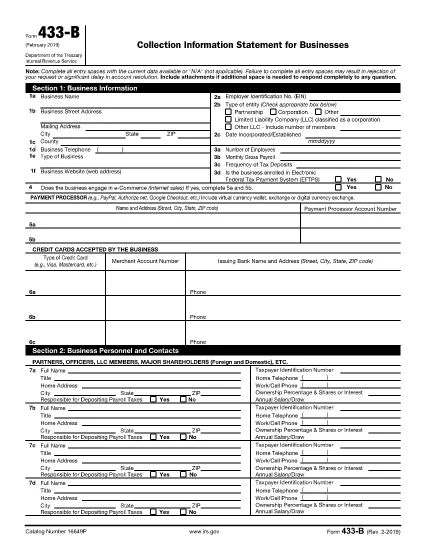
Form 433‑B, Collection Information Statement for Businesses, is the IRS’s standard form for gathering detailed financial data from corporations, partnerships, LLCs, and other business entities that owe tax. Completing this form accurately is essential when you are pursuing an Offer in Compromise, requesting a payment plan, or negotiating any other tax‑relief option.

What Is Form 433‑B and Who Needs It?

The form captures business information, assets, income, expenses, and the minimum offer amount the IRS will accept. It is required for:

  • Corporations (C‑corp, S‑corp)
  • Partnerships
  • LLCs taxed as corporations or partnerships
  • Any other entity with unpaid federal tax liabilities

Step‑by‑Step Guide to Fill Out Form 433‑B

Follow these simple steps using Formize’s built‑in PDF filler:

  1. Open the Fillable Form – Click the “Fill out this form” button on this page. The Formize PDF Filler loads automatically.
  2. Enter Business Information – Provide the legal name, EIN, address, phone, and a brief description of your business.
  3. Provide Officer/Owner Details – List each partner, officer, or member with name, title, ownership percentage, and salary.
  4. Report Assets – Include cash, bank accounts, real‑estate, equipment, vehicles, and any other valuable assets.
  5. Report Income & Expenses – Fill in monthly gross receipts, cost of goods sold, payroll, rent, utilities, and other operating costs.
  6. Calculate Minimum Offer – The form automatically totals the data; use the built‑in calculator to see the IRS‑required minimum offer amount.
  7. Review & Sign – Double‑check every field, then add the authorized signature and date.

Common Mistakes to Avoid

  • Leaving required fields blank – the IRS will reject the form.
  • Using outdated asset valuations – provide current market values.
  • Misclassifying the business entity – select the correct box for corporation, partnership, or LLC.
  • Forgetting to attach supporting documents – statements, depreciation schedules, and loan agreements are often required.

How to Submit the Completed Form

Once you finish, you have three options:

  • Download PDF and mail it to the IRS address indicated in the instructions.
  • Print & fax a hard copy to the appropriate IRS office.
  • Save securely and upload it through your IRS online account if you are working with a tax professional.

Using Formize ensures the PDF stays fillable and printable without losing formatting.

FAQ
  • What types of businesses must use Form 433‑B?

    Corporations, partnerships, and LLCs (taxed as corporations or partnerships) with unpaid federal tax liabilities are required to complete Form 433‑B.

  • Can I use Form 433‑B for a sole proprietorship?

    No. Sole proprietors should use Form 433‑A, the collection statement for wage earners and self‑employed individuals.

  • Is the PDF on Formize really fillable?

    Yes. The PDF retains all fillable fields, and the Formize online filler lets you type, save, and print without altering the original layout.

  • Do I need to attach supporting documents?

    Attach recent bank statements, asset appraisals, loan balances, and depreciation schedules as referenced in the form’s instructions.

  • How long does the IRS take to process a completed Form 433‑B?

    Processing time varies, but expect 30‑60 days for the IRS to review the information and respond to your request.

  • Can I submit the form electronically?

    The IRS does not accept an electronic upload for Form 433‑B directly. You must mail or fax the printed form, or provide it to your tax professional for electronic submission through the IRS portal.

  • What happens if I make a mistake on the form?

    Correct any errors before signing. If you discover a mistake after submission, send a revised form with “Amended” noted at the top of the first page.

COME

Come compilare IRS Form 433-B gratuitamente, online in 5 semplici passaggi:

  1. 1
    Open the Fillable Form
    Click the “Fill out this form” button on this page. The Formize PDF Filler loads in your browser, no download required.
  2. 2
    Enter Business Information
    Type the legal name, EIN, address, phone number, and a short description of your business into the highlighted fields.
  3. 3
    Add Asset and Income Details
    Provide current values for cash, bank accounts, real‑estate, equipment, and vehicles. Then enter monthly income and expense figures.
  4. 4
    Review Calculations
    Use the built‑in calculator to verify the minimum offer amount and ensure all totals are correct.
  5. 5
    Submit or Print
    When you’re satisfied, click “Save PDF” to download a completed copy, or print directly from the filler to mail to the IRS.
App Formize PDF Filler
DI

Moduli fiscali

IRS Form 433-B è uno dei moduli fiscali che sono documenti utilizzati per segnalare informazioni sul reddito, sulle detrazioni e sugli obblighi fiscali di un individuo o di un'azienda all'autorità fiscale competente. Questi moduli sono necessari per rispettare le leggi fiscali e adempiere agli obblighi fiscali. I moduli fiscali variano a seconda del Paese e dei requisiti fiscali specifici in vigore. Ecco alcuni tipi comuni di moduli fiscali:

Moduli fiscali individuali: questi moduli vengono utilizzati dai singoli contribuenti per dichiarare il proprio reddito personale e richiedere detrazioni, crediti ed esenzioni. Gli esempi includono il modulo 1040 negli Stati Uniti o il modulo di dichiarazione dei redditi di autovalutazione nel Regno Unito.

Moduli fiscali aziendali: i moduli fiscali aziendali vengono utilizzati da società, società di persone o lavoratori autonomi per segnalare redditi, spese e altre informazioni di natura fiscale. Gli esempi includono il modulo Schedule C (profitti o perdite aziendali) negli Stati Uniti o il modulo CT600 (dichiarazione dei redditi della società) nel Regno Unito.

Moduli relativi alle imposte sui salari: questi moduli vengono utilizzati dai datori di lavoro per segnalare salari, stipendi e imposte trattenute sulle buste paga dei propri dipendenti. Gli esempi includono il modulo W-2 negli Stati Uniti o il modulo P60 nel Regno Unito.

Moduli IVA: i moduli IVA vengono utilizzati dalle aziende per dichiarare e versare l'imposta sulle vendite riscossa su beni o servizi imponibili. I moduli specifici per l'imposta sulle vendite variano in base alla giurisdizione.

Moduli IVA (IVA): i moduli IVA vengono utilizzati nei paesi che impongono un'imposta sul valore aggiunto per dichiarare e versare l'IVA riscossa sulle vendite e richiedere crediti IVA per gli acquisti. Gli esempi includono i moduli di dichiarazione IVA utilizzati in molti paesi.

Moduli stima imposte: i moduli stima imposte vengono utilizzati per segnalare e pagare le imposte stimate sul reddito non soggetto a ritenuta, ad esempio reddito da lavoro autonomo o reddito da investimenti.

Questi sono solo alcuni esempi delle numerose forme fiscali che possono esistere. I moduli specifici richiesti dipendono dalle leggi e dai regolamenti fiscali del tuo Paese o giurisdizione. È importante consultare le linee guida dell'autorità fiscale o chiedere una consulenza professionale per determinare quali moduli sono applicabili alla tua situazione.

CARATTERISTICHE

Compilatore PDF

Il modo più semplice per compilare moduli PDF online

  • Compila rapidamente IRS Form 433-B
    Cerchi un modo per compilare rapidamente IRS Form 433-B online? Con il nostro compilatore di moduli PDF gratuito online, saprai come modificare e compilare questo documento PDF in meno di un minuto.
  • Editor PDF online facile da usare
    Stufo di stampare file PDF in modo da poterli modificare, prima di riscansionarli e rispedirli? Modifica documenti PDF gratuitamente online. Utilizza il nostro editor PDF online per risparmiare tempo e carta.
  • Grandi strumenti, tutte le piattaforme
    Ti stai chiedendo come inserire IRS Form 433-B su un Mac o forse come utilizzare un riempitivo PDF gratuito? I nostri strumenti PDF online funzionano su tutte le piattaforme.
  • Archiviazione sicura dei file
    I file "IRS Form 433-B" completati vengono archiviati in un database protetto gestito dall'hosting Amazon Cloud. Puoi eliminare i tuoi file dal nostro sistema in qualsiasi momento. In ogni caso, questi file vengono automaticamente cancellati dopo 24 ore.
  • Chatta con {parola chiave}
    Chatta con "IRS Form 433-B" su Chatize che è un assistente di lettura PDF gratuito. Fai domande e ottieni risposte da "IRS Form 433-B". Basta fare clic sul pulsante Chatta con il documento in alto.

Elimina sessione di riempimento

Eliminare la sessione di riempimento selezionata? In questo caso, i progressi nella compilazione del modulo andranno persi.

Elimina la sessione di modifica

Eliminare la sessione di editing selezionata? In questo caso, i tuoi progressi nella creazione e modifica del modulo andranno persi.