
Seleziona la lingua

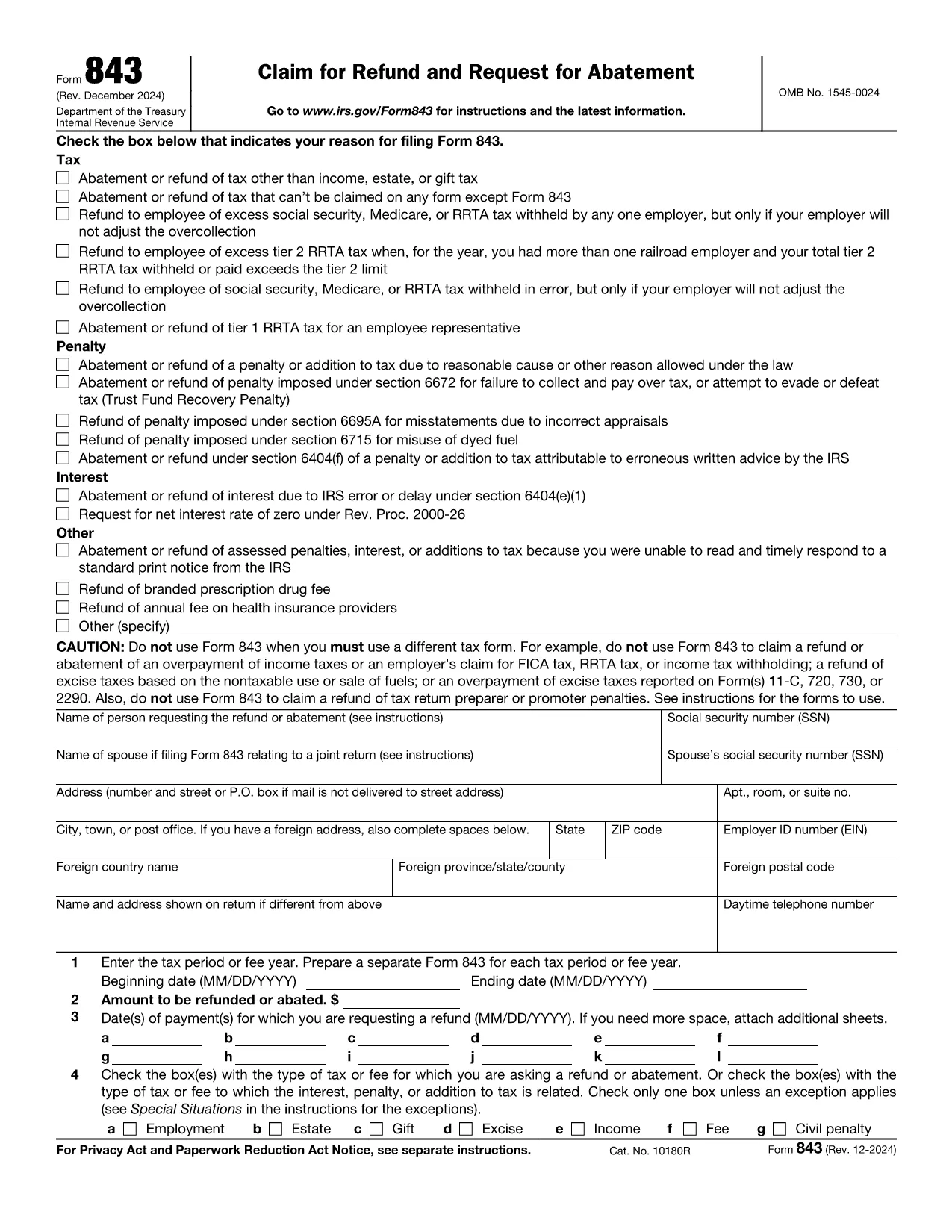
Fillable IRS Form 843 – Claim Refund or Request Abatement

  1. Paese Stati Uniti d'America
  2. Lingua Inglese
  3. Attività Le tasse
  4. Dipartimento Agenzia delle Entrate
Compila questo modulo
Fillable IRS Form 843 – Claim Refund or Request Abatement

Form 843 (Claim for Refund and Request for Abatement) lets taxpayers ask the Internal Revenue Service for a refund of taxes, penalties, interest, or fees that were paid in error. Whether you’re seeking a refund on an employment tax, an excise tax, or a penalty, this two‑page form is the official way to make the request.

What Is IRS Form 843?

Form 843 is a multipurpose tax document used for:

  • Refunding overpaid taxes (e.g., employment, estate, gift, excise).
  • Requesting abatement of penalties or interest.
  • Claiming refunds for specific fees such as the branded prescription drug fee.

When Should You Use Form 843?

You should file Form 843 when you have a legitimate reason to believe the IRS collected more than it was entitled to, or when an error caused an improper penalty or interest assessment. Typical scenarios include:

  • Incorrect calculation of employment taxes.
  • Excess Tier 2 RRTA tax.
  • Interest charged due to IRS processing delays.
  • Fee refunds for prescription drug fees.

How to Complete Form 843 Online with Formize

Formize makes the process painless. Follow these simple steps:

  1. Click the "Fill out this form" button on this page.
  2. The Formize PDF Filler app loads in your browser – no download needed.
  3. Enter your taxpayer information, tax period, amount, and reason for the claim.
  4. Attach any supporting documents (e.g., W‑2s, Form 8947) using the attachment field.
  5. Review, sign electronically, and submit directly to the IRS or download the completed PDF for mailing.

Common Mistakes to Avoid

  • Leaving lines blank: Every applicable line must be completed, even if the answer is “0”.
  • Incorrect tax type selection: Choose the exact tax or fee from the list on Line 4.
  • Missing signatures: Both the taxpayer and, if applicable, the authorized representative must sign.
  • Insufficient documentation: Attach copies of the original tax return or related forms to support your claim.

Where to Submit Your Completed Form

After filling out Form 843, you have two options:

  • Mail: Send the signed PDF to the address listed in the form’s instructions for your tax type.
  • Electronic submission: Use the IRS’s secure e‑file portal if you have a valid e‑file account.

Using Formize’s online filler ensures the PDF is correctly formatted for both mailing and electronic submission.

Istruzioni

  • Forma 843 Istruzioni - Istruzioni per il modulo 843, Ricorso per il rimborso e richiesta di abbattimento
FAQ
  • What tax types can I claim on Form 843?

    Form 843 covers employment tax, estate tax, gift tax, excise tax, fee refunds, and certain interest or penalty abatements. It does not apply to regular income tax refunds.

  • Do I need a certified tax professional to fill out Form 843?

    No. The form is straightforward, and with Formize’s fillable PDF you can complete it yourself. However, consult a tax professional if your situation is complex.

  • How long does the IRS take to process a Form 843 request?

    Processing time varies, but most refunds or abatements are issued within 60–90 days after the IRS receives a complete and accurate submission.

  • Can I file Form 843 electronically?

    Yes. After completing the form with Formize, you can upload the PDF to the IRS e‑file portal if you have an active e‑file account.

  • What supporting documents should I include?

    Attach copies of the original tax return, payment receipts, related forms (e.g., W‑2, Form 8947), and any IRS notices that explain the penalty or interest.

  • Is there a filing fee for Form 843?

    No. There is no fee to file Form 843; however, you may incur postage costs if mailing a paper copy.

  • Can I request a refund for a penalty that was assessed in error?

    Yes. If you can demonstrate that the penalty was incorrectly assessed, you can use Form 843 to request an abatement.

COME

Come compilare Form 843 gratuitamente, online in 5 semplici passaggi:

  1. 1
    Open the Fillable Form
    Click the "Fill out this form" button on this page. The Formize PDF Filler app will load directly in your browser.
  2. 2
    Enter Your Information
    Complete each section of Form 843 – taxpayer details, tax period, amount, and reason for the claim – using the on‑screen fields.
  3. 3
    Attach Supporting Documents
    Use the attachment option to upload copies of W‑2s, prior tax returns, or any other documents that support your refund or abatement request.
  4. 4
    Review and Sign
    Double‑check all entries, then apply your electronic signature in the signature field.
  5. 5
    Submit or Download
    Choose to submit the completed form directly to the IRS through the portal, or download the PDF to mail it yourself.
App Formize PDF Filler
DI

Moduli fiscali

Form 843 è uno dei moduli fiscali che sono documenti utilizzati per segnalare informazioni relative alle imposte all'autorità fiscale competente. Esistono vari tipi di moduli fiscali, inclusi moduli fiscali federali, statali e locali, che possono variare a seconda delle circostanze e dell'ubicazione del contribuente.

CARATTERISTICHE

Compilatore PDF

Il modo più semplice per compilare moduli PDF online

  • Compila rapidamente Form 843
    Cerchi un modo per compilare rapidamente Form 843 online? Con il nostro compilatore di moduli PDF gratuito online, saprai come modificare e compilare questo documento PDF in meno di un minuto.
  • Editor PDF online facile da usare
    Stufo di stampare file PDF in modo da poterli modificare, prima di riscansionarli e rispedirli? Modifica documenti PDF gratuitamente online. Utilizza il nostro editor PDF online per risparmiare tempo e carta.
  • Grandi strumenti, tutte le piattaforme
    Ti stai chiedendo come inserire Form 843 su un Mac o forse come utilizzare un riempitivo PDF gratuito? I nostri strumenti PDF online funzionano su tutte le piattaforme.
  • Archiviazione sicura dei file
    I file "Form 843" completati vengono archiviati in un database protetto gestito dall'hosting Amazon Cloud. Puoi eliminare i tuoi file dal nostro sistema in qualsiasi momento. In ogni caso, questi file vengono automaticamente cancellati dopo 24 ore.
  • Chatta con {parola chiave}
    Chatta con "Form 843" su Chatize che è un assistente di lettura PDF gratuito. Fai domande e ottieni risposte da "Form 843". Basta fare clic sul pulsante Chatta con il documento in alto.

Elimina sessione di riempimento

Eliminare la sessione di riempimento selezionata? In questo caso, i progressi nella compilazione del modulo andranno persi.

Elimina la sessione di modifica

Eliminare la sessione di editing selezionata? In questo caso, i tuoi progressi nella creazione e modifica del modulo andranno persi.