Seleziona la lingua

IRS Form 8586 – Low‑Income Housing Credit Fillable PDF

  1. Paese Stati Uniti d'America
  2. Lingua Inglese
  3. Attività Le tasse
  4. Dipartimento Agenzia delle Entrate
Compila questo modulo
IRS Form 8586 – Low‑Income Housing Credit Fillable PDF

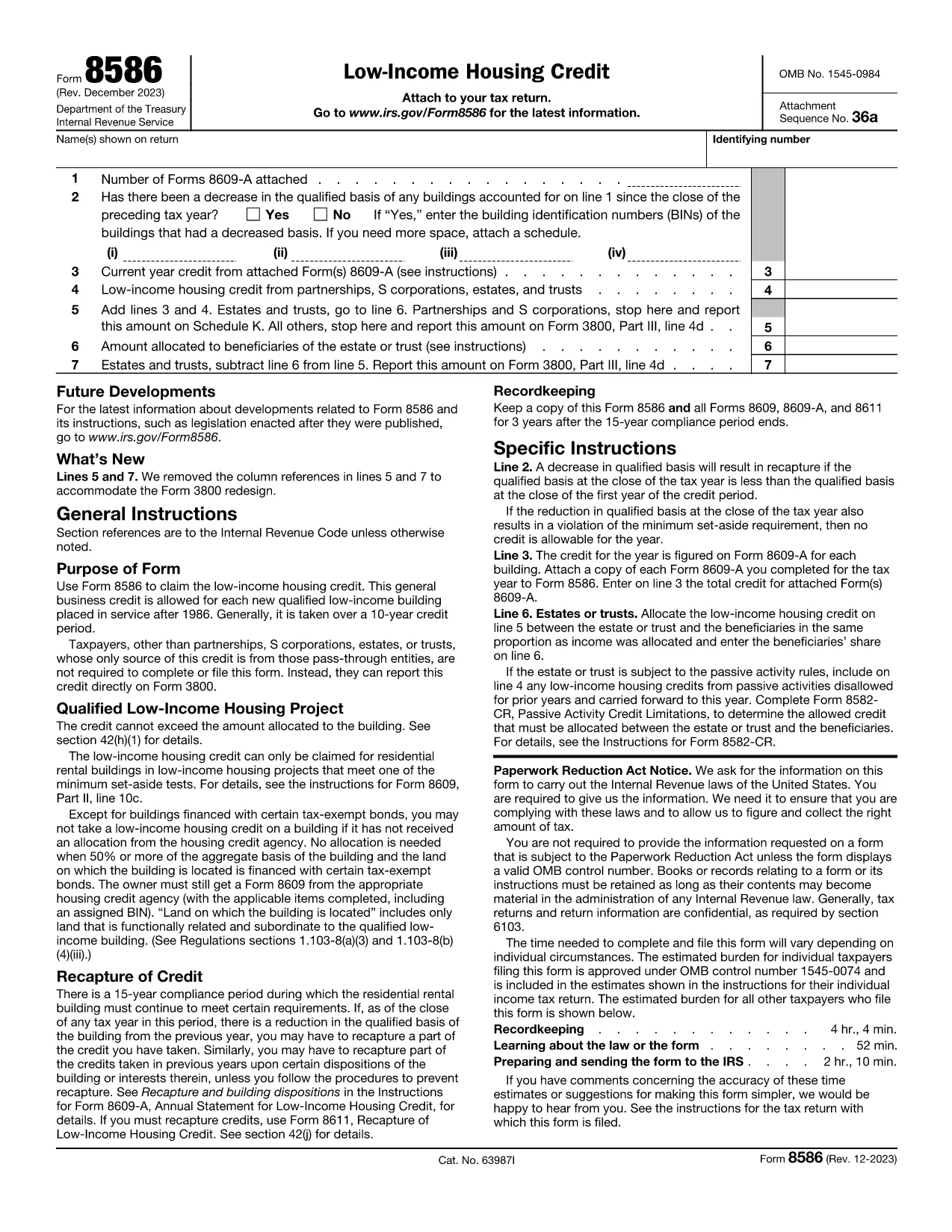
Form 8586 is the official IRS worksheet used to claim the Low‑Income Housing Credit. Whether you are an individual, partnership, S‑corporation, trust, or estate, this one‑page form aggregates the credit amounts calculated on Form 8609‑A and reports them on your tax return.

On Formize you can open the fillable PDF instantly, fill each field directly in the browser, and download a completed version ready for submission. No extra PDF editor is required.

What Is IRS Form 8586?

Form 8586 summarizes the low‑income housing credit for the tax year. It collects:

  • The number of attached Forms 8609‑A.
  • Any decrease in qualified basis that may trigger recapture.
  • The credit calculated for each building.
  • Credits passed through from partnerships, S‑corporations, estates, and trusts.
  • Allocation of the credit to beneficiaries, if applicable.

The total from Form 8586 is then entered on Form 3800, Line 4d as part of the general business credit.

How to Fill Out Form 8586 Online with Formize

Follow the simple steps below to complete the form without downloading any software.

Common Mistakes to Avoid on Form 8586

Even a small error can delay your credit. Watch out for:

  • Entering the wrong number of attached Forms 8609‑A.
  • Missing a decrease in qualified basis, which can cause recapture.
  • Incorrectly allocating the credit between the entity and its beneficiaries.
  • Failing to transfer the final amount to Form 3800.

Double‑check each line against your supporting schedules before saving.

Where to Download the Fillable PDF

The official, fillable version of Form 8586 is available from trusted sources. Click the button below to launch the Formize PDF Filler with the correct document pre‑loaded.

Frequently Asked Questions About Form 8586

Below are answers to the most common queries from taxpayers and tax professionals.

FAQ
  • Who needs to file IRS Form 8586?

    Any taxpayer who claims the Low‑Income Housing Credit—individuals, partnerships, S‑corporations, estates, and trusts—must file Form 8586 to report the credit amount.

  • Do I have to attach Form 8609‑A with Form 8586?

    Yes. For each qualified building you must attach a completed Form 8609‑A. The number of attached forms is reported on Line 1 of Form 8586.

  • Can I file Form 8586 electronically?

    Form 8586 itself is not filed electronically, but you can complete the fillable PDF online, save it, and then attach the scanned copy to your electronic tax return (e‑file) as part of the supporting documents.

  • What happens if my qualified basis decreases?

    A decrease in qualified basis may trigger a recapture of the credit. You must answer “Yes” on Line 2 and list the affected building identification numbers.

  • Where should the final credit amount be reported?

    The total credit from Form 8586 is entered on Form 3800, Line 4d, as part of the general business credit.

  • Is there a cost to use the Formize PDF Filler?

    Formize offers a free basic filler for most IRS forms, including Form 8586. Advanced features may require a paid plan, but the core filling and download functions are free.

COME

Come compilare Form 8586 gratuitamente, online in 4 semplici passaggi:

  1. 1
    Click the Fillable Form Button
    On this page, click the “Fill out this form” button. Formize will open the IRS Form 8586 PDF directly in your browser.
  2. 2
    Wait for the Formize PDF Filler to Load
    The PDF Filler app loads in a few seconds. All form fields become interactive, allowing you to type, select dates, and upload supporting numbers.
  3. 3
    Complete Each Section
    Enter the required information for taxpayer details, attached Form 8609‑A count, credit calculations, and any beneficiary allocations. Use the on‑screen help icons for quick guidance.
  4. 4
    Save and Download
    When every field is filled, click “Save & Download”. The completed PDF is saved to your device and ready to be attached to your tax return.
App Formize PDF Filler
DI

Moduli fiscali

Form 8586 è uno dei moduli fiscali che sono documenti utilizzati per segnalare informazioni relative alle imposte all'autorità fiscale competente. Esistono vari tipi di moduli fiscali, inclusi moduli fiscali federali, statali e locali, che possono variare a seconda delle circostanze e dell'ubicazione del contribuente.

CARATTERISTICHE

Compilatore PDF

Il modo più semplice per compilare moduli PDF online

  • Compila rapidamente Form 8586
    Cerchi un modo per compilare rapidamente Form 8586 online? Con il nostro compilatore di moduli PDF gratuito online, saprai come modificare e compilare questo documento PDF in meno di un minuto.
  • Editor PDF online facile da usare
    Stufo di stampare file PDF in modo da poterli modificare, prima di riscansionarli e rispedirli? Modifica documenti PDF gratuitamente online. Utilizza il nostro editor PDF online per risparmiare tempo e carta.
  • Grandi strumenti, tutte le piattaforme
    Ti stai chiedendo come inserire Form 8586 su un Mac o forse come utilizzare un riempitivo PDF gratuito? I nostri strumenti PDF online funzionano su tutte le piattaforme.
  • Archiviazione sicura dei file
    I file "Form 8586" completati vengono archiviati in un database protetto gestito dall'hosting Amazon Cloud. Puoi eliminare i tuoi file dal nostro sistema in qualsiasi momento. In ogni caso, questi file vengono automaticamente cancellati dopo 24 ore.
  • Chatta con {parola chiave}
    Chatta con "Form 8586" su Chatize che è un assistente di lettura PDF gratuito. Fai domande e ottieni risposte da "Form 8586". Basta fare clic sul pulsante Chatta con il documento in alto.

Elimina sessione di riempimento

Eliminare la sessione di riempimento selezionata? In questo caso, i progressi nella compilazione del modulo andranno persi.

Elimina la sessione di modifica

Eliminare la sessione di editing selezionata? In questo caso, i tuoi progressi nella creazione e modifica del modulo andranno persi.