Seleziona la lingua

IRS Form 8949 – Fillable PDF for Capital Gains Reporting

  1. Paese Stati Uniti d'America
  2. Lingua Inglese
  3. Attività Le tasse
  4. Dipartimento Agenzia delle Entrate
Compila questo modulo
IRS Form 8949 – Fillable PDF for Capital Gains Reporting

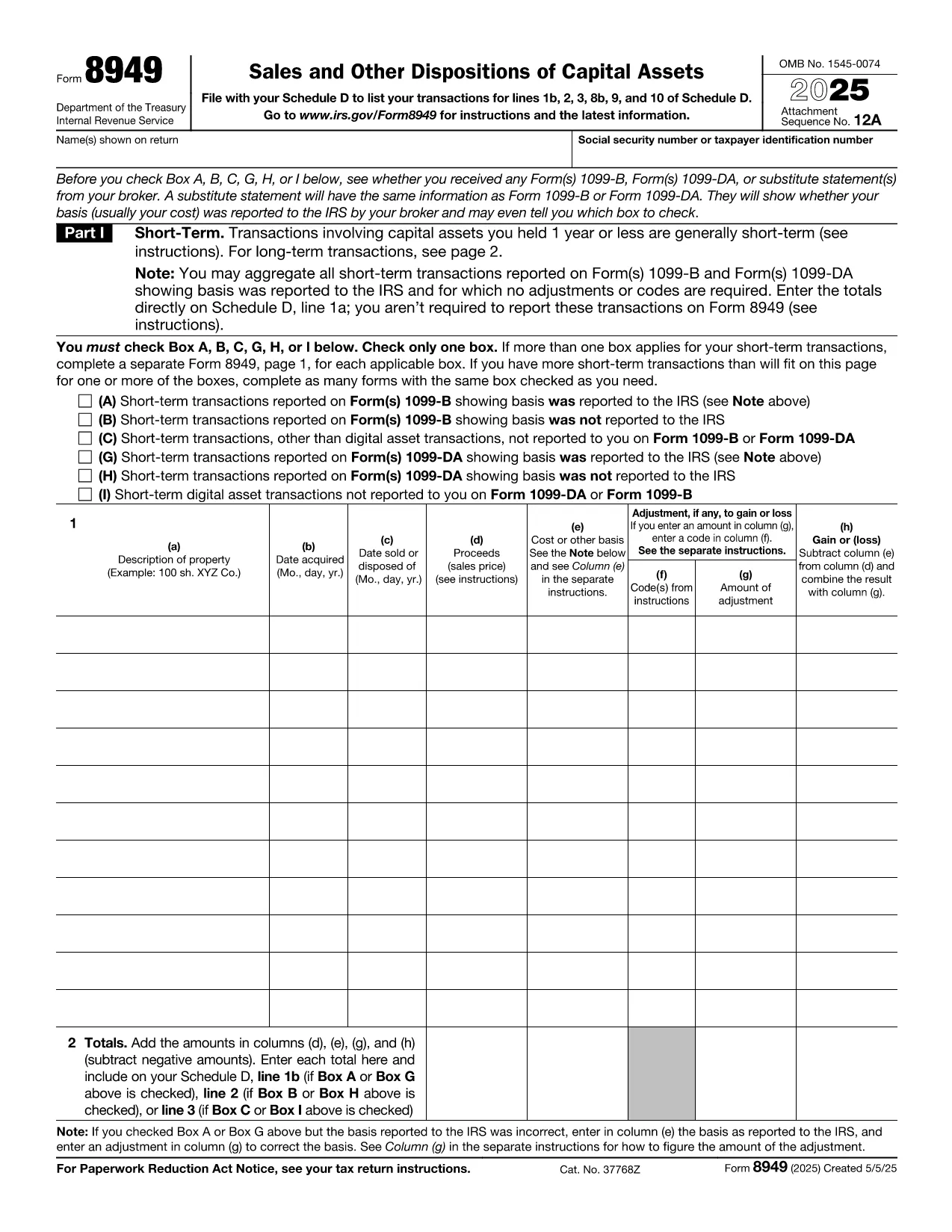
Form 8949, titled Sales and Other Dispositions of Capital Assets, is the IRS form you use to report the sale of stocks, bonds, real estate, and other investment assets. Whether you have a short‑term trade (held ≤ 1 year) or a long‑term investment, each transaction must be listed on Form 8949 before the totals are transferred to Schedule D of your 1040.

What Is Form 8949?

The form captures essential details for every capital‑asset transaction: description of the property, acquisition and sale dates, proceeds, cost basis, adjustments (such as wash‑sale losses), and the resulting gain or loss. The IRS provides three separate boxes (A, B, C) for short‑term sales and three for long‑term sales, letting you indicate whether the basis was reported to the IRS.

How to Fill Out Form 8949 Online with Formize

Formize lets you complete the official PDF without installing any software. Just click the “Fill out this form” button, wait a moment for the Formize PDF Filler to load, and you’ll see an interactive, fillable version of Form 8949 ready for data entry.

Common Mistakes to Avoid

  • Leaving Box A, B, or C unchecked – the IRS will reject the submission.
  • Mismatching dates – acquisition and sale dates must be accurate to determine short‑ vs long‑term status.
  • Incorrect basis adjustments – ensure wash‑sale codes and other adjustments are entered in column (g).
  • Summing totals incorrectly – double‑check the sums before copying them to Schedule D.

When Do You Need to Use Form 8949?

You must file Form 8949 for any capital‑asset transaction that is not already reported on a 1099‑B with a “basis reported to the IRS” checkbox checked, or when you need to report adjustments, codes, or a basis that was not reported.

Download, Print, or Save Your Completed Form

After you finish entering data, you can:

  • Download a completed PDF to attach to your e‑file.
  • Print a hard copy for a mailed return.
  • Save to your cloud storage for future reference.

All actions are performed directly within the browser, keeping your information secure and private.

Istruzioni

FAQ
  • Do I need to fill out Form 8949 if my broker already reported the basis?

    If the broker reported the basis to the IRS and no adjustments or codes are required, you can aggregate the totals on Schedule D. Otherwise, you must list each transaction on Form 8949.

  • What is the difference between Box A, B, and C?

    Box A: Basis reported to the IRS, no adjustments. Box B: Basis reported, but you have adjustments or codes. Box C: Basis not reported to the IRS.

  • Can I use the same Form 8949 for both short‑term and long‑term sales?

    Form 8949 has separate sections: Part I for short‑term (held ≤ 1 year) and Part II for long‑term (held > 1 year). Fill each transaction in the appropriate part.

  • Is the PDF on Formize editable on mobile devices?

    Yes. The Formize PDF Filler works on modern smartphones and tablets, allowing you to complete the form on the go.

  • How do I report a wash‑sale loss on Form 8949?

    Enter the loss in column (g) with code “W” and adjust the basis accordingly. The adjusted amount flows to Schedule D.

  • Do I need a separate Form 8949 for each tax year?

    Yes. Each tax year requires its own Form 8949 reflecting that year’s transactions.

  • Can I e‑file Form 8949 directly from Formize?

    Formize provides a completed PDF that you can upload to your tax‑software’s e‑file portal or attach to your electronic return.

COME

Come compilare IRS Form 8949 gratuitamente, online in 5 semplici passaggi:

  1. 1
    Click the Fill‑out Button
    On the page, click the bright “Fill out this form” button to launch the Formize PDF Filler.
  2. 2
    Wait for the Filler to Load
    The browser will load a secure, interactive version of Form 8949 – this usually takes just a few seconds.
  3. 3
    Enter Transaction Details
    Fill in each row with the description, dates, proceeds, cost basis, and any adjustments. Choose the correct box (A, B, or C) for short‑term or long‑term sales.
  4. 4
    Review and Validate
    Double‑check totals, ensure all required boxes are checked, and use the built‑in calculator to verify gains or losses.
  5. 5
    Save, Download, or Print
    When finished, click “Save” to store the PDF in the cloud, “Download” to get a copy for e‑filing, or “Print” to send a hard copy with your mailed return.
App Formize PDF Filler
DI

Moduli fiscali

IRS Form 8949 è uno dei moduli fiscali che sono documenti utilizzati per segnalare informazioni relative alle imposte all'autorità fiscale competente. Esistono vari tipi di moduli fiscali, inclusi moduli fiscali federali, statali e locali, che possono variare a seconda delle circostanze e dell'ubicazione del contribuente.

CARATTERISTICHE

Compilatore PDF

Il modo più semplice per compilare moduli PDF online

  • Compila rapidamente IRS Form 8949
    Cerchi un modo per compilare rapidamente IRS Form 8949 online? Con il nostro compilatore di moduli PDF gratuito online, saprai come modificare e compilare questo documento PDF in meno di un minuto.
  • Editor PDF online facile da usare
    Stufo di stampare file PDF in modo da poterli modificare, prima di riscansionarli e rispedirli? Modifica documenti PDF gratuitamente online. Utilizza il nostro editor PDF online per risparmiare tempo e carta.
  • Grandi strumenti, tutte le piattaforme
    Ti stai chiedendo come inserire IRS Form 8949 su un Mac o forse come utilizzare un riempitivo PDF gratuito? I nostri strumenti PDF online funzionano su tutte le piattaforme.
  • Archiviazione sicura dei file
    I file "IRS Form 8949" completati vengono archiviati in un database protetto gestito dall'hosting Amazon Cloud. Puoi eliminare i tuoi file dal nostro sistema in qualsiasi momento. In ogni caso, questi file vengono automaticamente cancellati dopo 24 ore.
  • Chatta con {parola chiave}
    Chatta con "IRS Form 8949" su Chatize che è un assistente di lettura PDF gratuito. Fai domande e ottieni risposte da "IRS Form 8949". Basta fare clic sul pulsante Chatta con il documento in alto.

Elimina sessione di riempimento

Eliminare la sessione di riempimento selezionata? In questo caso, i progressi nella compilazione del modulo andranno persi.

Elimina la sessione di modifica

Eliminare la sessione di editing selezionata? In questo caso, i tuoi progressi nella creazione e modifica del modulo andranno persi.