
Seleziona la lingua

Fillable Form W‑9S – Request Student or Borrower TIN

  1. Paese Stati Uniti d'America
  2. Lingua Inglese
  3. Attività Le tasse
  4. Dipartimento Agenzia delle Entrate
Compila questo modulo
Fillable Form W‑9S – Request Student or Borrower TIN

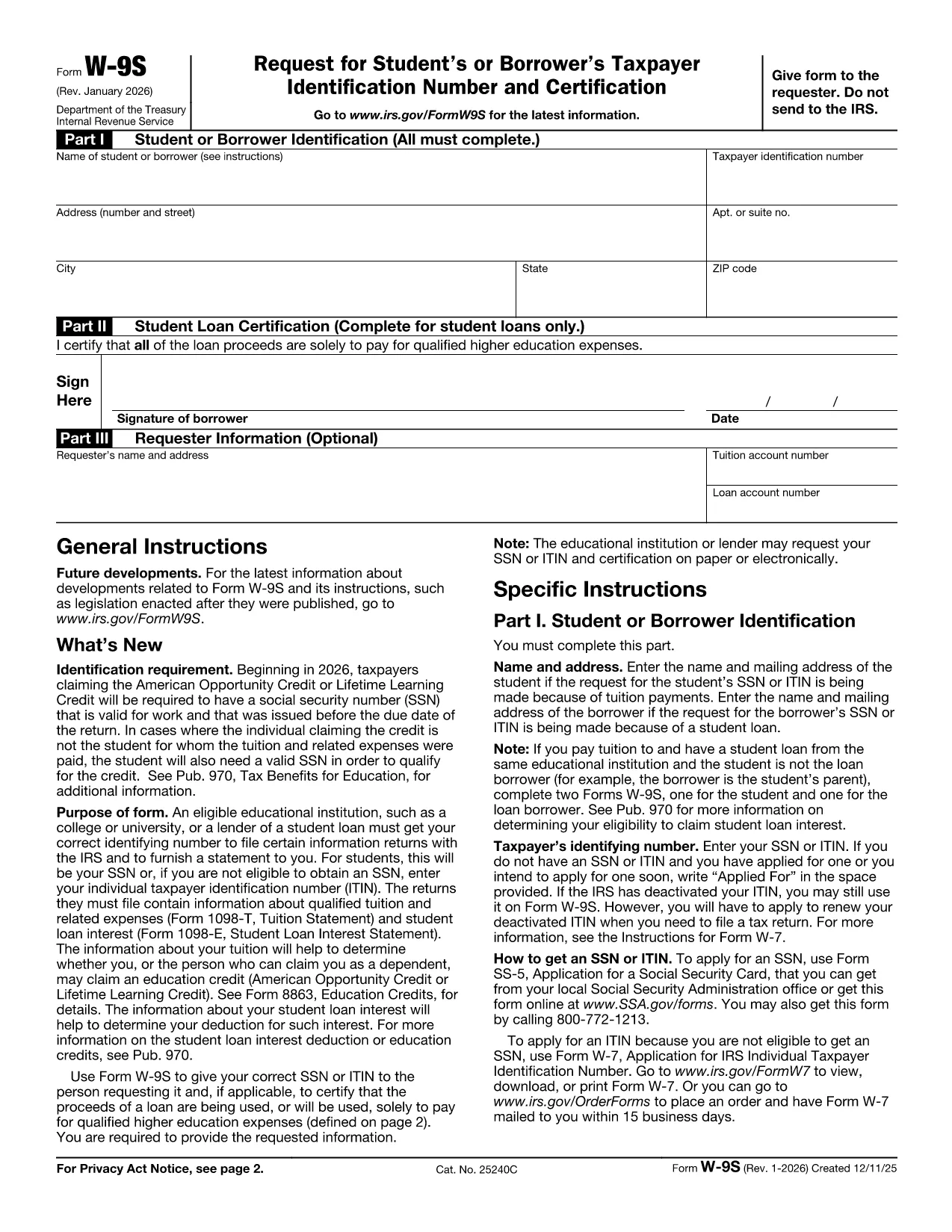
The IRS Form W‑9S, Request for Student's or Borrower's Taxpayer Identification Number and Certification, is used by qualifying educational institutions to collect the TIN of students or borrowers who receive scholarships, grants, or loan interest that must be reported on Forms 1098‑T or 1098‑E.

Our fillable Form W‑9S lets you complete the entire request directly in your browser—no printing, scanning, or PDF editor required. Simply click the “Fill out this form” button, let the Formize PDF Filler load, and start entering the required information.

What Is Form W‑9S and Who Needs It?

Form W‑9S captures the name, address, and Taxpayer Identification Number (TIN) of a student or borrower. It is required when the institution must issue a 1098‑T (tuition statement) or 1098‑E (student loan interest) to the IRS. Both federal and private loan recipients may be asked to submit this form.

How to Complete Form W‑9S Online

Follow these simple steps:

  1. Click the “Fill out this form” button on this page.
  2. Wait for the Formize PDF Filler app to load (usually a few seconds).
  3. Enter the student or borrower’s legal name, TIN (SSN or EIN), and full address.
  4. If you are reporting a loan, complete Part II with the loan certification.
  5. Sign electronically and submit the form according to your school’s instructions.

Common Mistakes to Avoid on Form W‑9S

  • Incorrect TIN: Double‑check the Social Security Number or EIN; a typo will delay processing.
  • Missing Signature: The form is not valid without a signed certification.
  • Out‑of‑date Address: Use the current mailing address to ensure the 1098‑E or 1098‑T reaches the taxpayer.
  • Leaving Part II Blank: Only leave it blank if the request is not for a loan.

Download the Official PDF

If you prefer the original IRS version, you can download it here: Form W‑9S (PDF). Our fillable version mirrors this official layout while adding a seamless online experience.

FAQ
  • What is the difference between Form W‑9 and Form W‑9S?

    Form W‑9 is used for general payee information, while Form W‑9S is specifically for students or borrowers who need to report tuition or loan interest to the IRS.

  • Can I use the same TIN for multiple schools?

    Yes. Your Social Security Number or EIN remains the same; each institution will request a separate Form W‑9S for its records.

  • Do I need to file Form W‑9S with the IRS myself?

    No. The educational institution collects the form and uses the information to issue the appropriate 1098‑T or 1098‑E to the IRS.

  • Is an electronic signature accepted on Form W‑9S?

    Yes. The IRS accepts electronic signatures on fillable PDFs as long as the signer certifies the information is correct.

  • What should I do if I make a mistake after submitting?

    Contact your school’s financial aid office immediately. They can provide a corrected Form W‑9S or advise you on the next steps.

  • Is there a fee to use the Formize PDF Filler?

    No. Formize offers free online filling for government forms like Form W‑9S.

COME

Come compilare Form W‑9S gratuitamente, online in 3 semplici passaggi:

  1. 1
    Open the Fillable Form
    Click the “Fill out this form” button on the page. The Formize PDF Filler will open in a new window.
  2. 2
    Enter Required Information
    Complete Part I with the student or borrower’s name, TIN, and address. If you have a loan, fill in Part II.
  3. 3
    Sign and Submit
    Add your electronic signature, review the data for accuracy, and follow your institution’s submission instructions.
App Formize PDF Filler
DI

Moduli fiscali

Form W‑9S è uno dei moduli fiscali che sono documenti utilizzati per segnalare informazioni relative alle imposte all'autorità fiscale competente. Esistono vari tipi di moduli fiscali, inclusi moduli fiscali federali, statali e locali, che possono variare a seconda delle circostanze e dell'ubicazione del contribuente.

CARATTERISTICHE

Compilatore PDF

Il modo più semplice per compilare moduli PDF online

  • Compila rapidamente Form W‑9S
    Cerchi un modo per compilare rapidamente Form W‑9S online? Con il nostro compilatore di moduli PDF gratuito online, saprai come modificare e compilare questo documento PDF in meno di un minuto.
  • Editor PDF online facile da usare
    Stufo di stampare file PDF in modo da poterli modificare, prima di riscansionarli e rispedirli? Modifica documenti PDF gratuitamente online. Utilizza il nostro editor PDF online per risparmiare tempo e carta.
  • Grandi strumenti, tutte le piattaforme
    Ti stai chiedendo come inserire Form W‑9S su un Mac o forse come utilizzare un riempitivo PDF gratuito? I nostri strumenti PDF online funzionano su tutte le piattaforme.
  • Archiviazione sicura dei file
    I file "Form W‑9S" completati vengono archiviati in un database protetto gestito dall'hosting Amazon Cloud. Puoi eliminare i tuoi file dal nostro sistema in qualsiasi momento. In ogni caso, questi file vengono automaticamente cancellati dopo 24 ore.
  • Chatta con {parola chiave}
    Chatta con "Form W‑9S" su Chatize che è un assistente di lettura PDF gratuito. Fai domande e ottieni risposte da "Form W‑9S". Basta fare clic sul pulsante Chatta con il documento in alto.

Elimina sessione di riempimento

Eliminare la sessione di riempimento selezionata? In questo caso, i progressi nella compilazione del modulo andranno persi.

Elimina la sessione di modifica

Eliminare la sessione di editing selezionata? In questo caso, i tuoi progressi nella creazione e modifica del modulo andranno persi.