
Seleziona la lingua

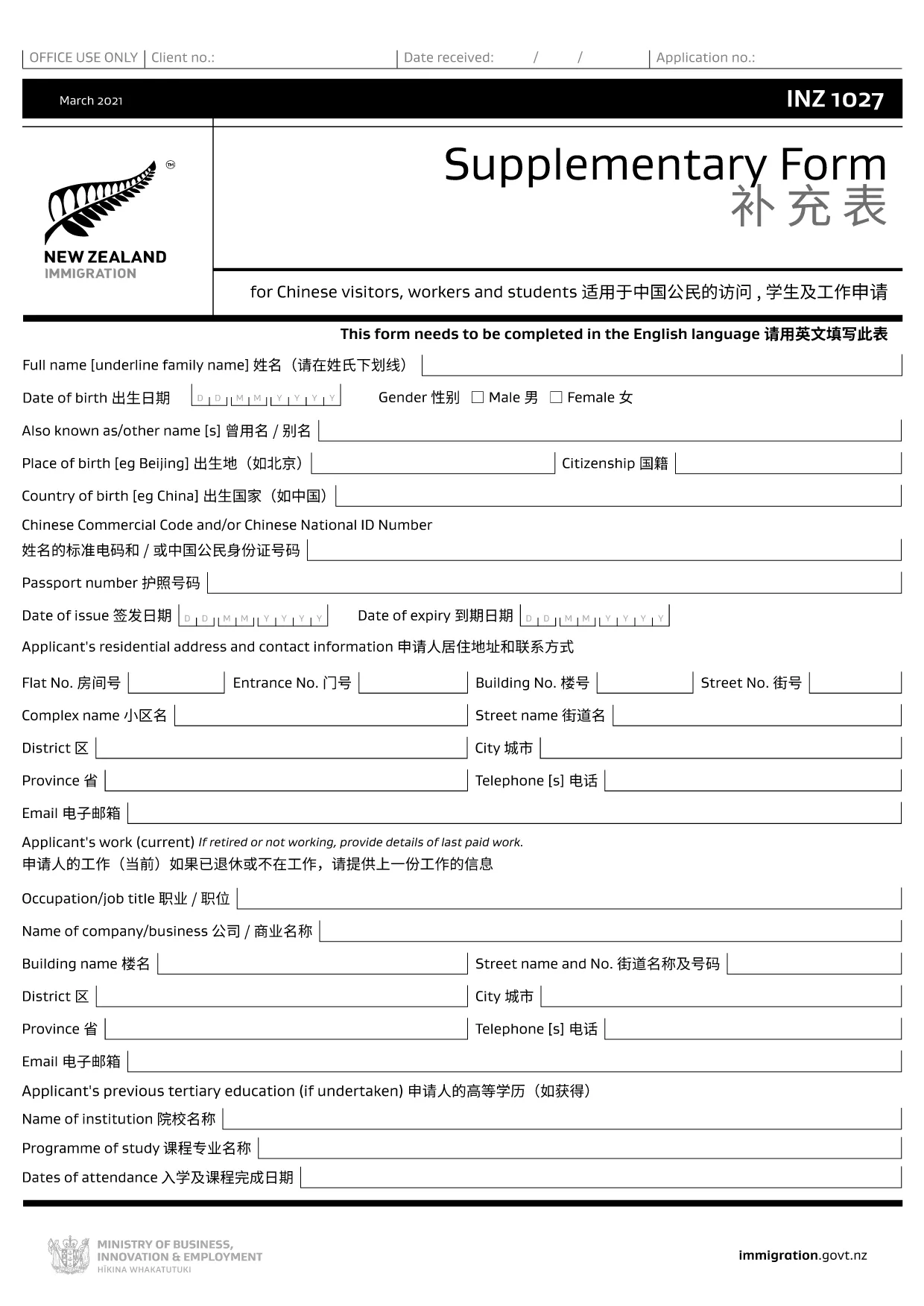
INZ 1027 – Immigration New Zealand Supplementary Form

  1. Lingua Inglese
  2. Paese Nuova Zelanda
  3. Dipartimento Immigration New Zealand
  4. Attività Visti
Compila questo modulo
INZ 1027 – Immigration New Zealand Supplementary Form

The INZ 1027 is the official supplementary form required by Immigration New Zealand for many visa applications. It collects additional personal details that help immigration officers assess your eligibility.

What Is the INZ 1027 Form?

This form must be completed in English and includes sections for full name, passport information, travel history, and any previous New Zealand visa details. The PDF is fully fillable, making it easy to type directly into the fields.

How to Fill Out INZ 1027 Online with Formize

Instead of downloading the PDF and using a separate editor, you can complete the form instantly on our site. Follow the simple steps below.

Common Mistakes to Avoid

  • Leaving any mandatory field blank – the form will not submit.
  • Using non‑English characters – the form must be in English.
  • Providing mismatched passport numbers or dates.

Where to Submit the Completed Form

After you finish, download the completed PDF and attach it to your visa application through the Immigration New Zealand online portal, or email it as instructed in your application guide.

FAQ
  • Do I need to print the INZ 1027 form?

    No. The form is fully fillable online. Print only if you prefer a hard copy for your records.

  • Can I edit the form after I download it?

    Yes, but you’ll need a PDF editor. Using Formize avoids this extra step because you can edit directly in your browser before downloading.

  • Is the INZ 1027 form required for all visa types?

    It is required for most visitor, student, and work visa applications that request additional personal details. Check your specific visa guide.

  • What language must I use?

    The form must be completed in English. Non‑English characters will be rejected.

  • How long does it take to fill out the form?

    Most applicants complete it in 5‑10 minutes if they have all required information handy.

  • Where can I get help if I have questions?

    Consult the Immigration New Zealand website or contact the visa office handling your application.

COME

Come compilare INZ 1027 gratuitamente, online in 5 semplici passaggi:

  1. 1
    Click the Fill‑out Button
    Press the “Fill out this form” button on the page. This opens the Formize PDF Filler in your browser.
  2. 2
    Wait for the Filler to Load
    The Formize app loads the INZ 1027 PDF automatically. A loading bar shows progress; it usually takes a few seconds.
  3. 3
    Enter Your Information
    Type directly into each field. Use the tab key or click to move between sections. All mandatory fields are highlighted.
  4. 4
    Save Your Progress
    Click “Save” at any time to download a copy of your partially‑filled form. You can return later to complete it.
  5. 5
    Download or Submit
    When finished, click “Download Completed PDF”. Attach the file to your visa application or follow the submission instructions provided by Immigration New Zealand.
App Formize PDF Filler
DI

Moduli di visto

INZ 1027 è uno dei moduli di visto che sono documenti utilizzati per richiedere un visto per entrare in un paese straniero. Un visto è un documento che consente a un cittadino straniero di entrare, soggiornare e talvolta lavorare in un paese straniero per un determinato periodo di tempo. I moduli e i requisiti esatti per ottenere un visto variano a seconda del paese e del tipo di visto.

I moduli di visto in genere richiedono informazioni personali come nome, data di nascita e informazioni sul passaporto, nonché informazioni sullo scopo e la durata del viaggio, la destinazione prevista e se al richiedente è stato precedentemente rifiutato un visto o espulso da un paese. I moduli possono anche richiedere documenti giustificativi come passaporto, fotografie e prova del sostegno finanziario.

Negli Stati Uniti, i moduli di visto più comuni sono i moduli DS-160 e DS-260. Il modulo DS-160 viene utilizzato per richiedere un visto per non immigrati, mentre il modulo DS-260 viene utilizzato per richiedere un visto per immigrati. Questi moduli richiedono informazioni dettagliate sulla storia personale e di viaggio del richiedente, nonché documentazione di supporto come passaporto, itinerario di viaggio e documenti finanziari.

Altri paesi possono avere moduli e requisiti di visto diversi, ma il processo di base in genere prevede il completamento di una domanda di visto, la fornitura di documentazione di supporto e la partecipazione a un colloquio con un funzionario consolare presso un'ambasciata o un consolato degli Stati Uniti. È importante notare che il processo di richiesta del visto può essere complesso e richiedere molto tempo e si raccomanda alle persone che richiedono un visto di consultare un avvocato specializzato in immigrazione o altro professionista qualificato per garantire che tutti i moduli e i requisiti necessari siano soddisfatti.

CARATTERISTICHE

Compilatore PDF

Il modo più semplice per compilare moduli PDF online

  • Compila rapidamente INZ 1027
    Cerchi un modo per compilare rapidamente INZ 1027 online? Con il nostro compilatore di moduli PDF gratuito online, saprai come modificare e compilare questo documento PDF in meno di un minuto.
  • Editor PDF online facile da usare
    Stufo di stampare file PDF in modo da poterli modificare, prima di riscansionarli e rispedirli? Modifica documenti PDF gratuitamente online. Utilizza il nostro editor PDF online per risparmiare tempo e carta.
  • Grandi strumenti, tutte le piattaforme
    Ti stai chiedendo come inserire INZ 1027 su un Mac o forse come utilizzare un riempitivo PDF gratuito? I nostri strumenti PDF online funzionano su tutte le piattaforme.
  • Archiviazione sicura dei file
    I file "INZ 1027" completati vengono archiviati in un database protetto gestito dall'hosting Amazon Cloud. Puoi eliminare i tuoi file dal nostro sistema in qualsiasi momento. In ogni caso, questi file vengono automaticamente cancellati dopo 24 ore.
  • Chatta con {parola chiave}
    Chatta con "INZ 1027" su Chatize che è un assistente di lettura PDF gratuito. Fai domande e ottieni risposte da "INZ 1027". Basta fare clic sul pulsante Chatta con il documento in alto.

Elimina sessione di riempimento

Eliminare la sessione di riempimento selezionata? In questo caso, i progressi nella compilazione del modulo andranno persi.

Elimina la sessione di modifica

Eliminare la sessione di editing selezionata? In questo caso, i tuoi progressi nella creazione e modifica del modulo andranno persi.