Seleziona la lingua

EN-AD.02 – Notice of Location or Change of Location Form (Fillable PDF)

  1. Lingua Inglese
  2. Paese United Kingdom
  3. Attività Legal filings
  4. Dipartimento Companies House
Compila questo modulo
EN-AD.02 – Notice of Location or Change of Location Form (Fillable PDF)

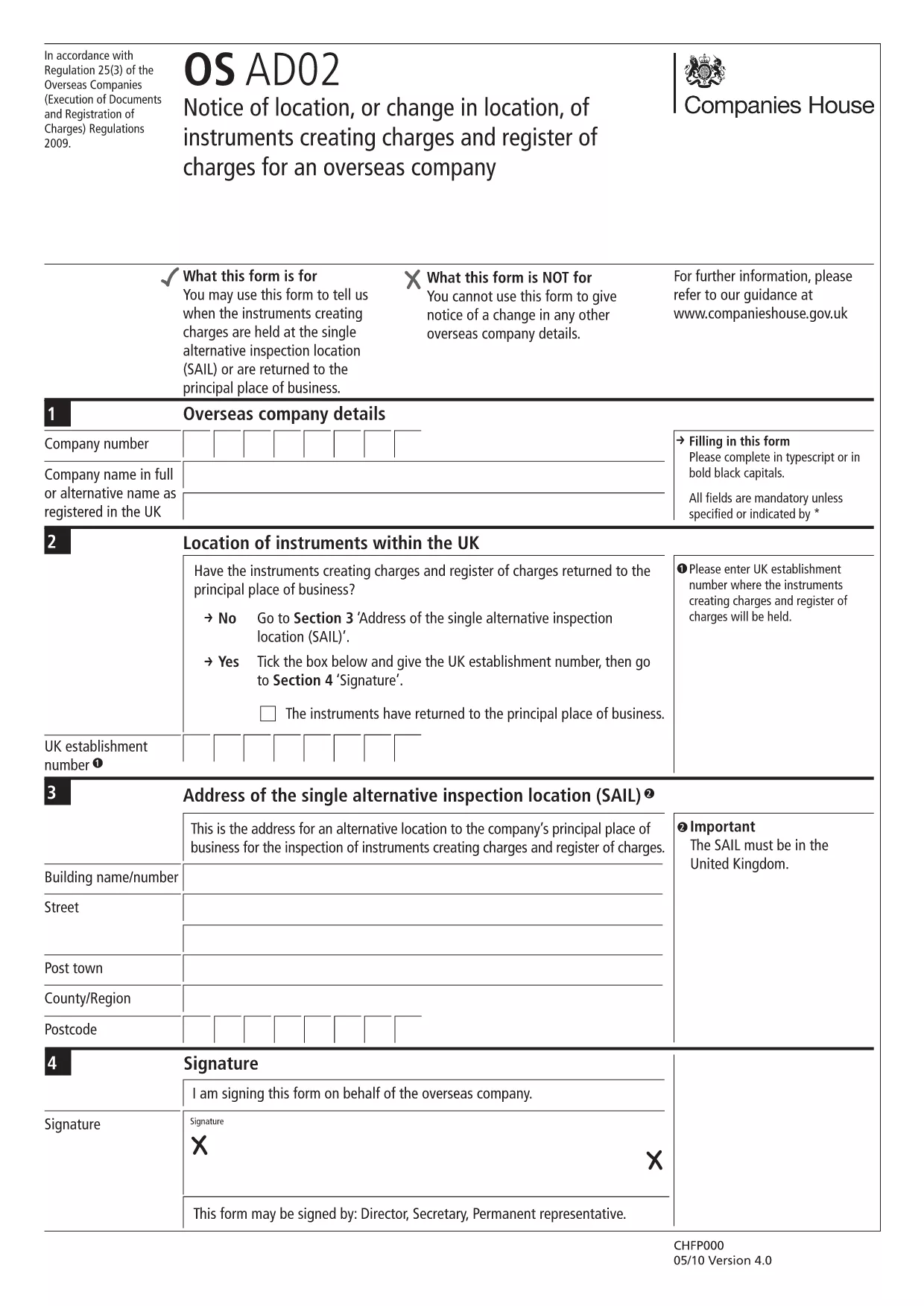
The EN-AD.02 (also referenced as OS AD02) is the official notice used to record the location, or any change in location, of instruments that create charges on the UK Register of Charges for overseas companies. Completing this form correctly ensures your charge is properly registered and publicly searchable.

Formize makes the EN-AD.02 form 100 % fillable online – no PDF editor required. Simply click the button below, let the Formize PDF Filler load, and start typing. All data is saved automatically, and you can download a completed copy or submit it directly to Companies House.

What Is EN-AD.02?

EN-AD.02 is a statutory document required by Companies House when an overseas company creates a charge over assets in the United Kingdom. The form captures details such as:

  • Company name and registration number
  • Type of instrument creating the charge
  • Exact location of the charge (or any change to that location)
  • Date of registration

How to Complete the EN-AD.02 Form Online

Follow the simple steps in the How‑To section below. The Formize PDF Filler loads the official PDF, turns every field into an interactive input, and validates dates and numeric entries for you.

Common Mistakes to Avoid

  • Leaving required fields blank: The form will not submit if mandatory sections are empty.
  • Mismatching dates: Ensure the “Date of Change” is later than the original registration date.
  • Incorrect charge description: Use the exact wording from the instrument to avoid rejection.

Where to Submit the Completed Form

After you finish, you can either:

  1. Download the signed PDF and upload it through the Companies House WebFiling service.
  2. Send the PDF by post to the Companies House office handling overseas charges.

Both methods require the form to be signed by an authorized representative of the overseas company.

FAQ
  • What is the purpose of the EN-AD.02 form?

    It notifies Companies House of the location, or any change in location, of instruments that create charges on the UK Register of Charges for overseas companies.

  • Can I edit the EN-AD.02 PDF without Formize?

    Technically you could use a PDF editor, but Formize provides a secure, fillable version that validates data and prevents common errors.

  • Is an electronic signature accepted on EN-AD.02?

    Yes, Companies House accepts qualified electronic signatures. Upload the signed PDF through WebFiling or attach a scanned handwritten signature.

  • How long does it take for the completed form to be processed?

    Once submitted, Companies House usually updates the Register of Charges within 5‑7 business days.

  • Do I need to submit supporting documents with EN-AD.02?

    Only if the charge instrument references additional agreements. Include any annexes mentioned in the instrument to avoid delays.

  • What if I make a mistake after submitting?

    You can file a corrected EN-AD.02 using the same process, clearly marking it as an amendment and referencing the original filing reference number.

COME

Come compilare EN-AD.02 gratuitamente, online in 5 semplici passaggi:

  1. 1
    Click the “Fill out this form” button
    Locate the bright button on this page and click it. The Formize PDF Filler will open in a new tab.
  2. 2
    Wait for the Formize PDF Filler to load
    The app loads the official EN-AD.02 PDF and automatically converts every field into an editable box.
  3. 3
    Enter the required information
    Type directly into each field. The filler validates dates, numbers, and required entries in real time.
  4. 4
    Review and sign
    Double‑check all entries, add an electronic signature if your organization uses one, and click “Save”.
  5. 5
    Download or submit
    Choose to download the completed PDF for your records or follow the on‑screen instructions to submit it to Companies House.
App Formize PDF Filler
DI

modello EN-AD.02

Con il tradizionale set di funzionalità per la visualizzazione e la compilazione di un documento PDF, combinato con i vantaggi di un'applicazione Web e un layout reattivo, puoi completare EN-AD.02 in pochi minuti.

CARATTERISTICHE

Compilatore PDF

Il modo più semplice per compilare moduli PDF online

  • Compila rapidamente EN-AD.02
    Cerchi un modo per compilare rapidamente EN-AD.02 online? Con il nostro compilatore di moduli PDF gratuito online, saprai come modificare e compilare questo documento PDF in meno di un minuto.
  • Editor PDF online facile da usare
    Stufo di stampare file PDF in modo da poterli modificare, prima di riscansionarli e rispedirli? Modifica documenti PDF gratuitamente online. Utilizza il nostro editor PDF online per risparmiare tempo e carta.
  • Grandi strumenti, tutte le piattaforme
    Ti stai chiedendo come inserire EN-AD.02 su un Mac o forse come utilizzare un riempitivo PDF gratuito? I nostri strumenti PDF online funzionano su tutte le piattaforme.
  • Archiviazione sicura dei file
    I file "EN-AD.02" completati vengono archiviati in un database protetto gestito dall'hosting Amazon Cloud. Puoi eliminare i tuoi file dal nostro sistema in qualsiasi momento. In ogni caso, questi file vengono automaticamente cancellati dopo 24 ore.
  • Chatta con {parola chiave}
    Chatta con "EN-AD.02" su Chatize che è un assistente di lettura PDF gratuito. Fai domande e ottieni risposte da "EN-AD.02". Basta fare clic sul pulsante Chatta con il documento in alto.

Elimina sessione di riempimento

Eliminare la sessione di riempimento selezionata? In questo caso, i progressi nella compilazione del modulo andranno persi.

Elimina la sessione di modifica

Eliminare la sessione di editing selezionata? In questo caso, i tuoi progressi nella creazione e modifica del modulo andranno persi.