
Seleziona la lingua

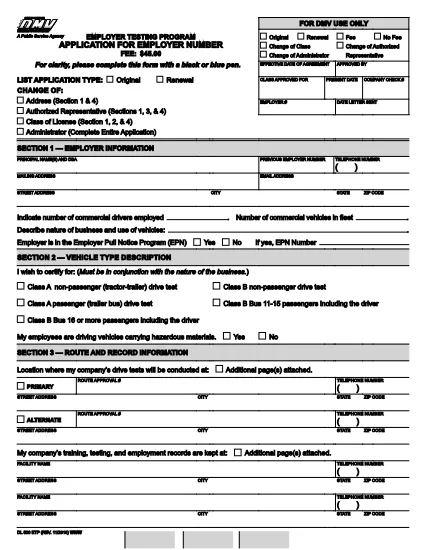
DL 520 – Employer Testing Program Application (California DMV)

  1. Lingua Inglese
  2. Paese Stati Uniti d'America
  3. Attività Registrazione del veicolo
  4. Dipartimento California DMV
Compila questo modulo
DL 520 – Employer Testing Program Application (California DMV)

The DL 520 is the California Department of Motor Vehicles (DMV) application used by employers to obtain an employer number for the Employer Testing Program (ETP). This program allows qualified organizations to issue Certificates of Driving Skill (DL 170 ETP) to employees who operate motor vehicles in safety‑sensitive positions.

What is the DL 520 Form?

The DL 520 form collects essential information about your business, the types of testing you will conduct, and your compliance with California Vehicle Code sections related to employer‑run testing programs. Once approved, you receive an employer number that authorizes you to manage driver‑skill testing under the ETP.

Who Must Complete the DL 520?

  • Employers in California who need to test employees for driving‑skill certification (e.g., transportation, construction, utilities).
  • Companies that wish to issue DL 170 ETP certificates to qualified drivers.
  • Any organization that conducts mandatory drug, alcohol, or skills testing required by state law.

How to Fill Out the DL 520 Online with Formize

Instead of downloading, printing, and scanning, you can complete the form directly on our site:

  1. Click the “Fill out this form” button on the page.
  2. Wait a few seconds while the Formize PDF Filler app loads the fillable DL 520 PDF.
  3. Enter your employer information, testing procedures, and contact details in the highlighted fields.
  4. Review each section for accuracy; required fields are marked with an asterisk (*).
  5. When finished, click Save & Download to get a completed PDF you can email or print for submission.

The fillable PDF retains the official DMV layout, so the California DMV will accept it without any modifications.

Common Mistakes to Avoid

  • Leaving required fields blank – the DMV will reject the application.
  • Using an outdated version of the form – always use the latest PDF (linked above).
  • Incorrect employer number format – double‑check the 8‑digit number if you already have one.
  • Missing signatures – both the employer representative and the DMV inspector must sign.
  • Submitting a scanned image of a handwritten form – the fillable PDF ensures legibility.

Where to Submit the Completed Form

After saving your completed DL 520 PDF, mail or fax it to the address listed on the form’s last page. You may also deliver a printed copy to your local DMV office. Keep a copy for your records.

Need help? Review the FAQs below or contact your nearest California DMV office.

FAQ
  • Do I need to print the DL 520 after filling it online?

    The California DMV accepts a printable PDF. You can either submit the electronic file by fax or print a hard copy for mailing.

  • How long does it take to get an employer number after submitting DL 520?

    Processing typically takes 7‑10 business days once the DMV receives a complete and correctly signed application.

  • Can I use the DL 520 for multiple locations?

    Yes. The employer number applies to all locations under the same legal entity, but each site must follow the same testing procedures.

  • What if I make a mistake after downloading the completed PDF?

    You must correct the error on a new copy of the form. The DMV does not accept handwritten alterations on a submitted PDF.

  • Is there a filing fee for the DL 520 application?

    There is no fee to submit the DL 520 itself, but the DMV may charge fees for issuing the employer number and subsequent certificates.

  • Do I need a separate DL 520 for each type of test (drug, alcohol, skill)?

    A single DL 520 authorizes all testing types covered under the Employer Testing Program, provided they are described in the application.

COME

Come compilare DL 520 gratuitamente, online in 4 semplici passaggi:

  1. 1
    Open the Fillable Form
    Click the “Fill out this form” button on the page. The Formize PDF Filler will load the DL 520 PDF automatically.
  2. 2
    Enter Your Information
    Type your employer name, address, testing procedures, and other required details into the highlighted fields.
  3. 3
    Review and Save
    Check every section for completeness, then click “Save & Download” to obtain a completed PDF ready for submission.
  4. 4
    Submit to the DMV
    Print the saved PDF (if required) and mail, fax, or deliver it to your local California DMV office as instructed on the form.
App Formize PDF Filler
DI

Moduli di registrazione del veicolo

DL 520 è uno dei moduli di immatricolazione dei veicoli che sono documenti utilizzati per immatricolare un veicolo a motore presso l'autorità governativa pertinente, in genere il Dipartimento dei veicoli a motore (DMV) o un'agenzia equivalente. Questi moduli sono richiesti quando una persona acquista un veicolo nuovo o usato, trasferisce la proprietà di un veicolo o si trasferisce in una nuova giurisdizione con un veicolo.

I moduli di immatricolazione specifici del veicolo possono variare in base alla giurisdizione, ma generalmente richiedono le seguenti informazioni:

Informazioni sul veicolo: includono dettagli sul veicolo, come marca, modello, anno, numero di identificazione del veicolo (VIN) e lettura del contachilometri.

Informazioni sul proprietario: il modulo richiederà informazioni sul proprietario del veicolo, inclusi nome, indirizzo, informazioni di contatto e numero di patente di guida.

Prova di proprietà: a seconda delle circostanze, potrebbe essere richiesta una prova di proprietà, come un certificato di proprietà, un atto di vendita o un certificato di origine del produttore (per i veicoli nuovi).

Informazioni sull'assicurazione: in genere è richiesta la prova della copertura assicurativa del veicolo valida. Ciò può includere la fornitura del numero di polizza assicurativa, delle date di copertura e dei dettagli della compagnia assicurativa.

Pagamento delle tariffe: la registrazione del veicolo comporta il pagamento di varie tariffe, come tasse di registrazione, tasse ed eventualmente altri oneri specifici della giurisdizione.

Oltre a questi requisiti di base, alcune giurisdizioni potrebbero avere moduli aggiuntivi o requisiti di documentazione. Ad esempio, in alcune aree potrebbero essere necessari i risultati dei test sulle emissioni, le ispezioni di sicurezza o la prova di residenza.

Una volta completati e inviati i moduli di immatricolazione del veicolo, l'autorità governativa rilascerà un certificato di immatricolazione, targhe e adesivi di immatricolazione. Questi documenti indicano che il veicolo è legalmente immatricolato e autorizzato a circolare su strade pubbliche.

È importante notare che i requisiti di immatricolazione dei veicoli possono variare in modo significativo a seconda della giurisdizione. Pertanto, si consiglia di consultare il DMV locale o un'agenzia equivalente per i moduli e le procedure specifiche applicabili alla propria località.

CARATTERISTICHE

Compilatore PDF

Il modo più semplice per compilare moduli PDF online

  • Compila rapidamente DL 520
    Cerchi un modo per compilare rapidamente DL 520 online? Con il nostro compilatore di moduli PDF gratuito online, saprai come modificare e compilare questo documento PDF in meno di un minuto.
  • Editor PDF online facile da usare
    Stufo di stampare file PDF in modo da poterli modificare, prima di riscansionarli e rispedirli? Modifica documenti PDF gratuitamente online. Utilizza il nostro editor PDF online per risparmiare tempo e carta.
  • Grandi strumenti, tutte le piattaforme
    Ti stai chiedendo come inserire DL 520 su un Mac o forse come utilizzare un riempitivo PDF gratuito? I nostri strumenti PDF online funzionano su tutte le piattaforme.
  • Archiviazione sicura dei file
    I file "DL 520" completati vengono archiviati in un database protetto gestito dall'hosting Amazon Cloud. Puoi eliminare i tuoi file dal nostro sistema in qualsiasi momento. In ogni caso, questi file vengono automaticamente cancellati dopo 24 ore.
  • Chatta con {parola chiave}
    Chatta con "DL 520" su Chatize che è un assistente di lettura PDF gratuito. Fai domande e ottieni risposte da "DL 520". Basta fare clic sul pulsante Chatta con il documento in alto.

Elimina sessione di riempimento

Eliminare la sessione di riempimento selezionata? In questo caso, i progressi nella compilazione del modulo andranno persi.

Elimina la sessione di modifica

Eliminare la sessione di editing selezionata? In questo caso, i tuoi progressi nella creazione e modifica del modulo andranno persi.