
Seleziona la lingua

Secure Test Declaration – Fillable PDF Form

  1. Lingua Inglese
  2. Paese Stati Uniti d'America
  3. Dipartimento Ufficio del diritto d'autore
Compila questo modulo
Secure Test Declaration – Fillable PDF Form

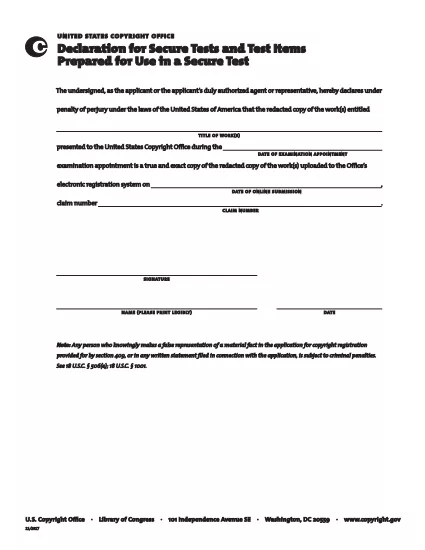
The Secure Test Declaration is a legally‑required statement used by the United States Copyright Office to certify that a test item is protected and will be handled securely. Our fillable PDF version lets you complete the form quickly, accurately, and without installing any extra software.

With Formize’s integrated PDF Filler, you can open the document directly in your browser, enter the required information, and save or print a certified copy. This eliminates the hassle of downloading, editing, and re‑uploading static PDFs.

Below you’ll find a brief overview of the form’s sections, tips for avoiding common errors, and step‑by‑step instructions for completing the declaration online.

What Is a Secure Test Declaration?

A Secure Test Declaration confirms that the test material you are submitting is confidential, that you have the authority to submit it, and that you understand the penalties for false statements. It is commonly required for copyrighted works that involve proprietary testing methods or confidential data.

Key Sections of the Form

  • Applicant Information – Name, address, and contact details.
  • Test Description – Title, purpose, and nature of the test.
  • Security Measures – How the test will be protected.
  • Declaration Statement – Signature line confirming truthfulness.

How to Fill Out the Secure Test Declaration Online

Instead of downloading the PDF and opening it in a separate editor, simply click the "Fill out this form" button on this page. The Formize PDF Filler app will load automatically, allowing you to complete every field directly in your browser.

Common Mistakes to Avoid

  • Leaving required fields blank – the filler will highlight missing information.
  • Using an unofficial signature image – type your name in the signature field for a legally accepted electronic signature.
  • Submitting outdated contact details – double‑check phone numbers and email addresses before saving.

Where to Submit the Completed Form

After saving the completed declaration, you can either:

  1. Upload the PDF through the Copyright Office’s online portal.
  2. Print, sign physically (if required), and mail it to the address listed on the form.

For most users, the electronic submission option is faster and provides immediate confirmation of receipt.

FAQ
  • Do I need Adobe Acrobat to fill out the Secure Test Declaration?

    No. Formize’s online PDF Filler works in any modern browser, so you don’t need Acrobat or any other software.

  • Can I edit the form after I’ve saved it?

    Yes. Open the saved PDF with Formize again, make any necessary changes, and re‑save.

  • Is an electronic signature accepted by the Copyright Office?

    For the Secure Test Declaration, an electronic signature entered through the Formize filler is considered valid, provided the form is submitted electronically.

  • What happens if I submit incomplete information?

    The filler will highlight missing required fields before you can save. Submitting an incomplete form may delay processing.

  • Is there a fee to download or use the Secure Test Declaration form?

    The PDF download and online filling are free. Any filing fees are set by the Copyright Office and are paid separately during submission.

COME

Come compilare secure test declaration gratuitamente, online in 4 semplici passaggi:

  1. 1
    Open the Fillable Form
    Click the "Fill out this form" button on the page. The Formize PDF Filler loads in a new tab.
  2. 2
    Enter Your Information
    Complete each highlighted field – the filler will guide you through Applicant Information, Test Description, and Security Measures.
  3. 3
    Sign Electronically
    Type your name in the signature field. The system records a timestamp for legal validity.
  4. 4
    Save and Submit
    Click "Save PDF" to download a copy, then upload it to the Copyright Office portal or print and mail as instructed.
App Formize PDF Filler
DI

Moduli dell'ufficio copyright

secure test declaration è uno dei moduli ufficiali utilizzati dal Copyright Office degli Stati Uniti, un dipartimento della Biblioteca del Congresso, per registrare e proteggere i diritti d'autore. Il Copyright Office è responsabile dell'amministrazione delle leggi sul copyright negli Stati Uniti, inclusa la registrazione dei copyright, la registrazione dei trasferimenti e delle licenze dei copyright e la fornitura di informazioni e servizi relativi al copyright.

Ecco alcuni esempi di moduli del Copyright Office:

Domanda di registrazione del copyright: questo è il modulo principale utilizzato per registrare un copyright presso il Copyright Office degli Stati Uniti. Sono disponibili diversi moduli di domanda per vari tipi di opere, come opere letterarie, arti visive, composizioni musicali, registrazioni sonore, film e altro ancora. L'applicazione raccoglie informazioni sull'opera registrata, sull'autore, sul richiedente e altri dettagli rilevanti.

Moduli di registrazione dei documenti: questi moduli vengono utilizzati per registrare i trasferimenti di copyright, come cessioni o licenze, con il Copyright Office. Forniscono un modo per stabilire un registro pubblico del trasferimento della proprietà del copyright.

Modulo per la directory degli agenti designati DMCA: questo modulo viene utilizzato per designare un agente presso il Copyright Office ai sensi del Digital Millennium Copyright Act (DMCA). L'agente designato è responsabile della ricezione e della gestione degli avvisi di rimozione relativi alla violazione del copyright online.

Tabella delle tariffe del Copyright Office: pur non essendo un modulo specifico, la tabella delle tariffe fornisce informazioni sulle tariffe associate a vari servizi di copyright, tra cui registrazione, registrazione e altri servizi correlati.

È importante notare che i moduli e i requisiti specifici possono cambiare nel tempo e potrebbero essere richiesti moduli diversi per tipi diversi di registrazioni o servizi di copyright. Si consiglia di visitare il sito web ufficiale del Copyright Office degli Stati Uniti (www.copyright.gov) o consultare professionisti legali specializzati in diritto d'autore per ottenere informazioni accurate e aggiornate per quanto riguarda i moduli specifici del Copyright Office pertinenti alle vostre esigenze relative al diritto d'autore.

CARATTERISTICHE

Compilatore PDF

Il modo più semplice per compilare moduli PDF online

  • Compila rapidamente secure test declaration
    Cerchi un modo per compilare rapidamente secure test declaration online? Con il nostro compilatore di moduli PDF gratuito online, saprai come modificare e compilare questo documento PDF in meno di un minuto.
  • Editor PDF online facile da usare
    Stufo di stampare file PDF in modo da poterli modificare, prima di riscansionarli e rispedirli? Modifica documenti PDF gratuitamente online. Utilizza il nostro editor PDF online per risparmiare tempo e carta.
  • Grandi strumenti, tutte le piattaforme
    Ti stai chiedendo come inserire secure test declaration su un Mac o forse come utilizzare un riempitivo PDF gratuito? I nostri strumenti PDF online funzionano su tutte le piattaforme.
  • Archiviazione sicura dei file
    I file "secure test declaration" completati vengono archiviati in un database protetto gestito dall'hosting Amazon Cloud. Puoi eliminare i tuoi file dal nostro sistema in qualsiasi momento. In ogni caso, questi file vengono automaticamente cancellati dopo 24 ore.
  • Chatta con {parola chiave}
    Chatta con "secure test declaration" su Chatize che è un assistente di lettura PDF gratuito. Fai domande e ottieni risposte da "secure test declaration". Basta fare clic sul pulsante Chatta con il documento in alto.

Elimina sessione di riempimento

Eliminare la sessione di riempimento selezionata? In questo caso, i progressi nella compilazione del modulo andranno persi.

Elimina la sessione di modifica

Eliminare la sessione di editing selezionata? In questo caso, i tuoi progressi nella creazione e modifica del modulo andranno persi.