
Seleziona la lingua

Lifetime History Request Form – Fillable PDF

  1. Lingua Inglese
  2. Paese Stati Uniti d'America
  3. Attività Vehicle Records
  4. Dipartimento Department of Motor Vehicles
Compila questo modulo
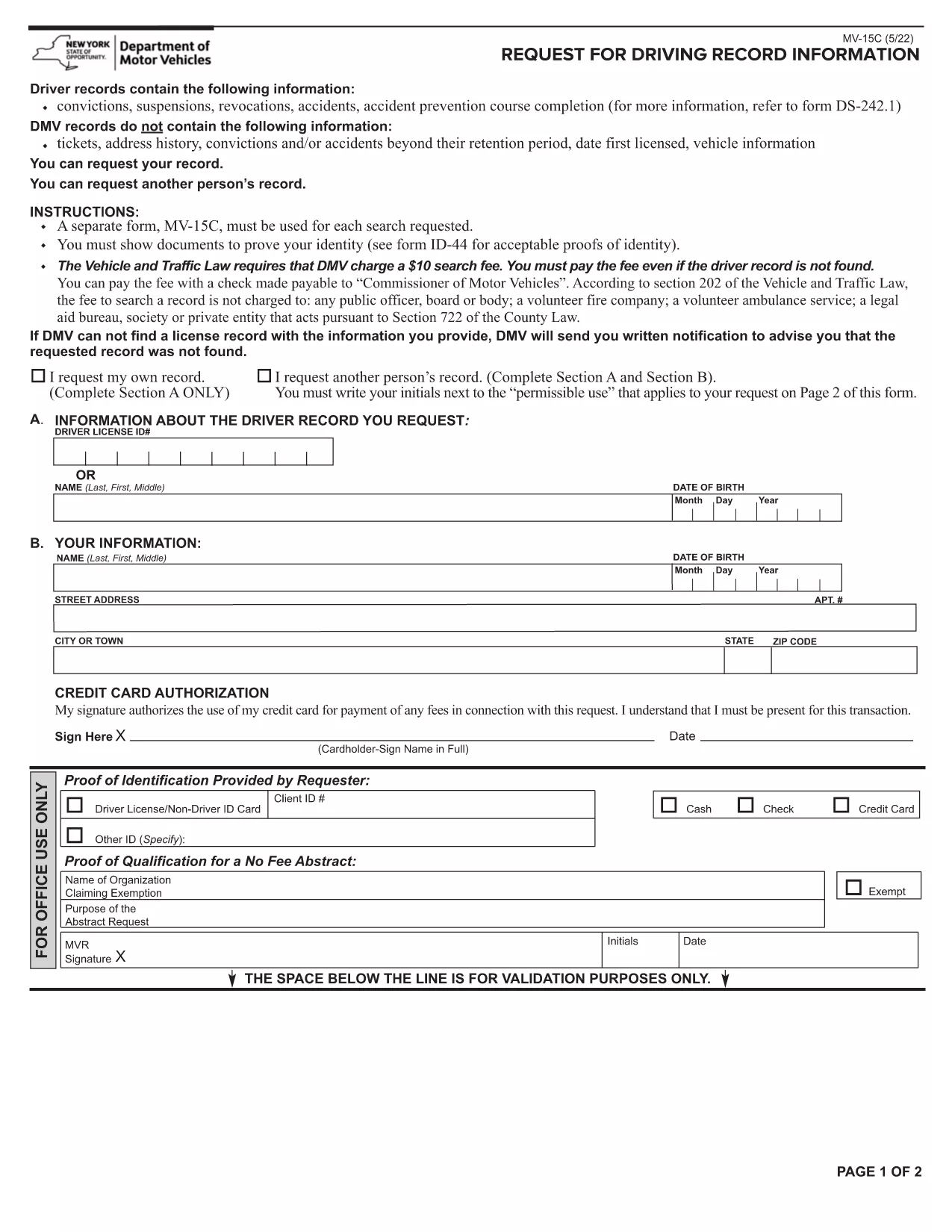
Lifetime History Request Form – Fillable PDF

Need a complete record of every ticket, suspension, or accident ever listed on your driving file? The Lifetime History Request Form lets you request a full, permanent abstract of your motor vehicle history from the New York State Department of Motor Vehicles (DMV).

What Is a Lifetime History Request Form?

This form (PDF MV‑15C) is the official DMV request used to obtain a Lifetime Driving Record. Unlike a standard abstract that only shows recent activity, a lifetime record includes every conviction, accident, and point ever recorded.

Who Needs a Lifetime Driving Record?

  • Employers conducting background checks for commercial driver positions.
  • Insurance companies assessing risk for high‑value policies.
  • Legal professionals needing a complete history for court cases.
  • Drivers who suspect errors in their current record and need proof of correction.

How to Fill Out the Form Online with Formize

Instead of printing, signing, and scanning, you can complete the form directly in your browser:

  1. Click the "Fill out this form" button on this page.
  2. Wait a few seconds while the Formize PDF Filler app loads.
  3. Enter your personal information exactly as it appears on your driver's license.
  4. Choose the Lifetime Record option, review the fee, and submit.
  5. When the DMV processes your request, you’ll receive a downloadable PDF via email.

Common Mistakes to Avoid

  • Incorrect ID numbers: Double‑check your Client ID and license number.
  • Missing signature: The Formize filler adds a digital signature field—make sure to sign before submitting.
  • Wrong record type: Select "Lifetime" rather than "Standard" if you need the full history.

Download, Save, and Submit Your Completed Form

After you finish filling the form, click Download PDF to keep a copy for your records. You can then mail the signed form with payment, or follow the DMV’s online payment instructions directly from the filler.

Need a quick start? The fillable PDF is ready below.

FAQ
  • What is the difference between a standard and a lifetime driving record?

    A standard record shows recent activity (typically the last 3‑5 years). A lifetime record includes every violation, accident, and suspension ever recorded on your file.

  • How long does it take to receive the lifetime record?

    Processing usually takes 5‑7 business days after the DMV receives your completed form and payment.

  • Can I request a lifetime record for someone else?

    Only the record holder or a legally authorized representative may request a lifetime record, and proper consent documentation is required.

  • Is there a fee for the lifetime history request?

    Yes, the DMV charges a fee (currently $10) for a lifetime abstract. The exact amount is displayed in the form before you submit.

  • Do I need to print the PDF after filling it online?

    No. The Formize filler lets you sign digitally and submit electronically. You can download a copy for your records if you wish.

  • What identification is required with the request?

    You must provide your driver’s license number, date of birth, and a valid photo ID (driver’s license or passport) when the DMV verifies your identity.

  • Can I correct errors on my lifetime record?

    Yes. After receiving your record, you can file a correction request with the DMV if you find inaccurate information.

  • Is the form available for other states?

    This specific MV‑15C form is for New York State. Other states have their own versions; check the local DMV website for details.

COME

Come compilare lifetime history request form gratuitamente, online in 5 semplici passaggi:

  1. 1
    Open the Fillable Form
    Click the "Fill out this form" button on the page. The Formize PDF Filler will open in a new tab.
  2. 2
    Enter Your Information
    Complete each field – name, address, driver’s license number, and date of birth – exactly as shown on your ID.
  3. 3
    Select Lifetime Record
    Choose the "Lifetime" option from the record‑type dropdown and verify the applicable fee.
  4. 4
    Sign and Submit
    Use the digital signature field, then click "Submit". The form will be securely sent to the DMV.
  5. 5
    Download Confirmation
    When the DMV processes your request, you’ll receive a confirmation email with a downloadable copy of your lifetime record.
App Formize PDF Filler
DI

modello lifetime history request form

Con il tradizionale set di funzionalità per la visualizzazione e la compilazione di un documento PDF, combinato con i vantaggi di un'applicazione Web e un layout reattivo, puoi completare lifetime history request form in pochi minuti.

CARATTERISTICHE

Compilatore PDF

Il modo più semplice per compilare moduli PDF online

  • Compila rapidamente lifetime history request form
    Cerchi un modo per compilare rapidamente lifetime history request form online? Con il nostro compilatore di moduli PDF gratuito online, saprai come modificare e compilare questo documento PDF in meno di un minuto.
  • Editor PDF online facile da usare
    Stufo di stampare file PDF in modo da poterli modificare, prima di riscansionarli e rispedirli? Modifica documenti PDF gratuitamente online. Utilizza il nostro editor PDF online per risparmiare tempo e carta.
  • Grandi strumenti, tutte le piattaforme
    Ti stai chiedendo come inserire lifetime history request form su un Mac o forse come utilizzare un riempitivo PDF gratuito? I nostri strumenti PDF online funzionano su tutte le piattaforme.
  • Archiviazione sicura dei file
    I file "lifetime history request form" completati vengono archiviati in un database protetto gestito dall'hosting Amazon Cloud. Puoi eliminare i tuoi file dal nostro sistema in qualsiasi momento. In ogni caso, questi file vengono automaticamente cancellati dopo 24 ore.
  • Chatta con {parola chiave}
    Chatta con "lifetime history request form" su Chatize che è un assistente di lettura PDF gratuito. Fai domande e ottieni risposte da "lifetime history request form". Basta fare clic sul pulsante Chatta con il documento in alto.

Elimina sessione di riempimento

Eliminare la sessione di riempimento selezionata? In questo caso, i progressi nella compilazione del modulo andranno persi.

Elimina la sessione di modifica

Eliminare la sessione di editing selezionata? In questo caso, i tuoi progressi nella creazione e modifica del modulo andranno persi.