
Seleziona la lingua

Form 4319 – Missouri Driver Condition Report

  1. Lingua Inglese
  2. Paese Stati Uniti d'America
  3. Attività Patente di guida
  4. Stato Missouri
Compila questo modulo
Form 4319 – Missouri Driver Condition Report

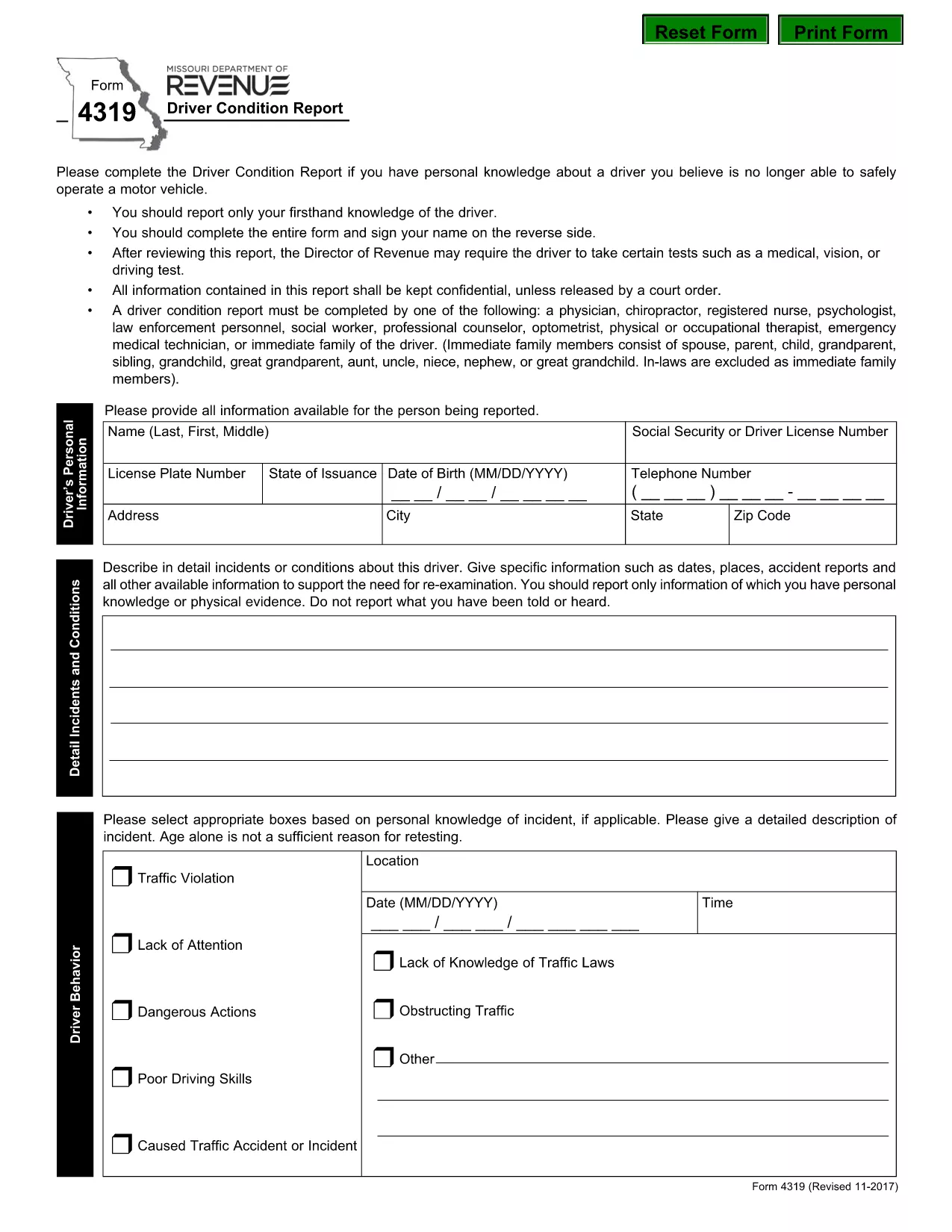
The Missouri Form 4319, also known as the Driver Condition Report, is required when a driver’s medical, vision, or overall condition may affect safe operation of a vehicle. This form is used by the Missouri Department of Revenue to evaluate whether additional testing or restrictions are needed.

What is Form 4319?

Form 4319 collects detailed information about a driver’s health, recent accidents, and any conditions that could impair driving ability. The report is confidential and is only shared with authorized officials or a court order.

How to Fill Out the Driver Condition Report Online

Instead of downloading and editing the PDF manually, simply click the “Fill out this form” button on this page. The Formize PDF Filler app will load in your browser, allowing you to complete the form directly, save your progress, and submit it electronically.

Common Mistakes to Avoid

  • Leaving any required field blank – the filler will highlight missing information before you can submit.
  • Signing on the reverse side of the PDF – use the built‑in signature field in the online filler.
  • Providing outdated medical information – ensure all health details are current.
  • Forgetting to attach supporting documents (e.g., physician’s statement) when required.

Where to Submit the Completed Form

After completing the form, you can:

  • Submit electronically through the Formize platform (recommended).
  • Print and mail the signed form to the Missouri Department of Revenue, Driver Licensing Division.

Keep a copy of the completed PDF for your records.

Download the Fillable PDF

If you prefer to work offline, you can download the official fillable PDF directly from the Missouri Department of Revenue:

Download Form 4319 (PDF)

FAQ
  • What is the purpose of Form 4319?

    Form 4319 is used by the Missouri Department of Revenue to assess a driver’s medical, vision, or other conditions that could affect safe driving.

  • Can I fill out Form 4319 on a mobile device?

    Yes. The Formize PDF Filler works on most smartphones and tablets with a modern browser.

  • Do I need a doctor’s signature on this form?

    If a physician’s statement is required, you must attach a signed statement from your doctor as a separate PDF attachment.

  • How long does it take for the Department of Revenue to process the report?

    Processing times vary, but most reviews are completed within 10‑14 business days after receipt.

  • Is the information on Form 4319 confidential?

    Yes. All information is kept confidential and is only disclosed under a court order or as required by law.

  • What should I do if I make a mistake after submitting?

    Contact the Missouri Department of Revenue’s Driver Licensing Division immediately to request a correction or to submit a revised form.

  • Can I submit the form by email?

    The online Formize submission is the preferred method. If you mail a printed copy, you can also email a scanned version to the department’s designated address.

  • Is there a fee to submit Form 4319?

    No, there is no fee to complete or submit Form 4319.

COME

Come compilare form 4319 gratuitamente, online in 5 semplici passaggi:

  1. 1
    Open the Fillable Form
    Click the “Fill out this form” button on the page. The Formize PDF Filler will open in a new tab.
  2. 2
    Enter Your Information
    Complete each field. Required fields are highlighted. Use the drop‑down menus and date pickers for easy entry.
  3. 3
    Add Your Signature
    Click the signature box, type your name, and the filler will create a digital signature.
  4. 4
    Save and Review
    Press the “Save” button to store a copy on your device. Review all entries for accuracy.
  5. 5
    Submit or Download
    Choose “Submit” to send the form directly to the Missouri Department of Revenue, or click “Download” to get a PDF copy for mailing.
App Formize PDF Filler
DI

Moduli per la richiesta della patente di guida

Nella maggior parte dei paesi, è obbligatorio avere una patente di guida prima di mettersi in viaggio. Ottenere una patente di guida è un traguardo importante per chiunque voglia guidare un'auto.

form 4319 è uno dei moduli di domanda di patente di guida che sono documenti utilizzati per raccogliere informazioni da persone che vogliono richiedere una patente di guida. Di solito contiene campi per il nome del richiedente, la data di nascita, il numero ID, le informazioni di contatto, nonché la cronologia e l'esperienza della patente di guida.

CARATTERISTICHE

Compilatore PDF

Il modo più semplice per compilare moduli PDF online

  • Compila rapidamente form 4319
    Cerchi un modo per compilare rapidamente form 4319 online? Con il nostro compilatore di moduli PDF gratuito online, saprai come modificare e compilare questo documento PDF in meno di un minuto.
  • Editor PDF online facile da usare
    Stufo di stampare file PDF in modo da poterli modificare, prima di riscansionarli e rispedirli? Modifica documenti PDF gratuitamente online. Utilizza il nostro editor PDF online per risparmiare tempo e carta.
  • Grandi strumenti, tutte le piattaforme
    Ti stai chiedendo come inserire form 4319 su un Mac o forse come utilizzare un riempitivo PDF gratuito? I nostri strumenti PDF online funzionano su tutte le piattaforme.
  • Archiviazione sicura dei file
    I file "form 4319" completati vengono archiviati in un database protetto gestito dall'hosting Amazon Cloud. Puoi eliminare i tuoi file dal nostro sistema in qualsiasi momento. In ogni caso, questi file vengono automaticamente cancellati dopo 24 ore.
  • Chatta con {parola chiave}
    Chatta con "form 4319" su Chatize che è un assistente di lettura PDF gratuito. Fai domande e ottieni risposte da "form 4319". Basta fare clic sul pulsante Chatta con il documento in alto.

Elimina sessione di riempimento

Eliminare la sessione di riempimento selezionata? In questo caso, i progressi nella compilazione del modulo andranno persi.

Elimina la sessione di modifica

Eliminare la sessione di editing selezionata? In questo caso, i tuoi progressi nella creazione e modifica del modulo andranno persi.